Gemini 4 Neon a few days in: SimpleBench, high vs xhigh, and real coding
By Flavio
Tagged: AI
Why Gemini 4 Neon sits at #2 on SimpleBench, why xhigh rarely pays for itself over high, and what Theo found running it on real repos in T3 Code.
A few days ago I ran Gemini 4 Neon against Opus 5.5 and Carbon on two small coding tasks, a commit message rewrite and a 100k-token search. It got every answer right, saved 42% on the long prompt, and spent a lot of thinking tokens on short tasks.
Since then, better data has landed from people who pushed Neon much harder. SimpleBench published its scores and cost per run, Adam Holter charted all four thinking levels against cost, and Theo posted a 32-minute review after using it nonstop inside T3 Code on real projects.
Put those three together and a clear picture shows up. Neon is much stronger than a “medium” model has any right to be, its token price hides how much it thinks, and leaving it on high is almost always better than turning on xhigh.
Where Neon lands on SimpleBench
SimpleBench tests everyday reasoning, spatial logic and trick questions that catch models relying on memorized patterns. The human baseline is 83.7%, and the highest human score is 95.4%.
Gemini 4 Neon landed at 94.4%, good for 2nd place overall, half a point behind Claude Fable 5.2 (94.9%) and six full points ahead of Claude Opus 5.5 (88.4%).
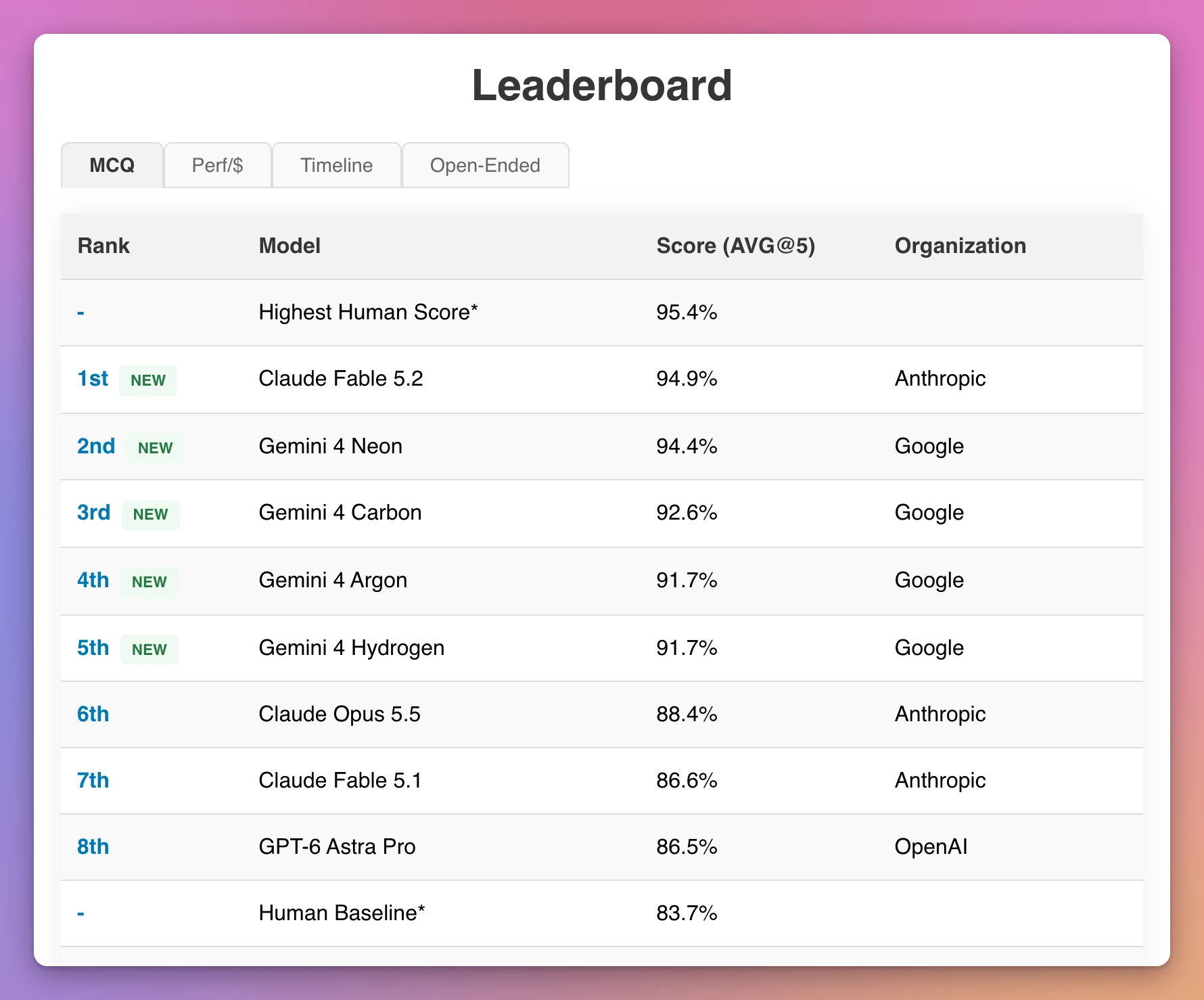
Google holds four of the top five spots (Neon, Carbon, Argon, Hydrogen), and the “medium” model beat Carbon (94.4% vs 92.6%). If the periodic-table names still feel backwards, I mapped the whole lineup in AI model names explained. Meanwhile OpenAI’s newer GPT-6.2 releases sit well below the top ten: GPT-6.2 Astra Pro is 16th at 79.2%, GPT-6.2 Astra is 17th at 77.3%, and GPT-6.2 Sol is 30th at 69.9%.
The more interesting tab on SimpleBench is Perf/$. A model’s list price per million tokens is only half the bill, because reasoning models spend very different numbers of output tokens before they answer.
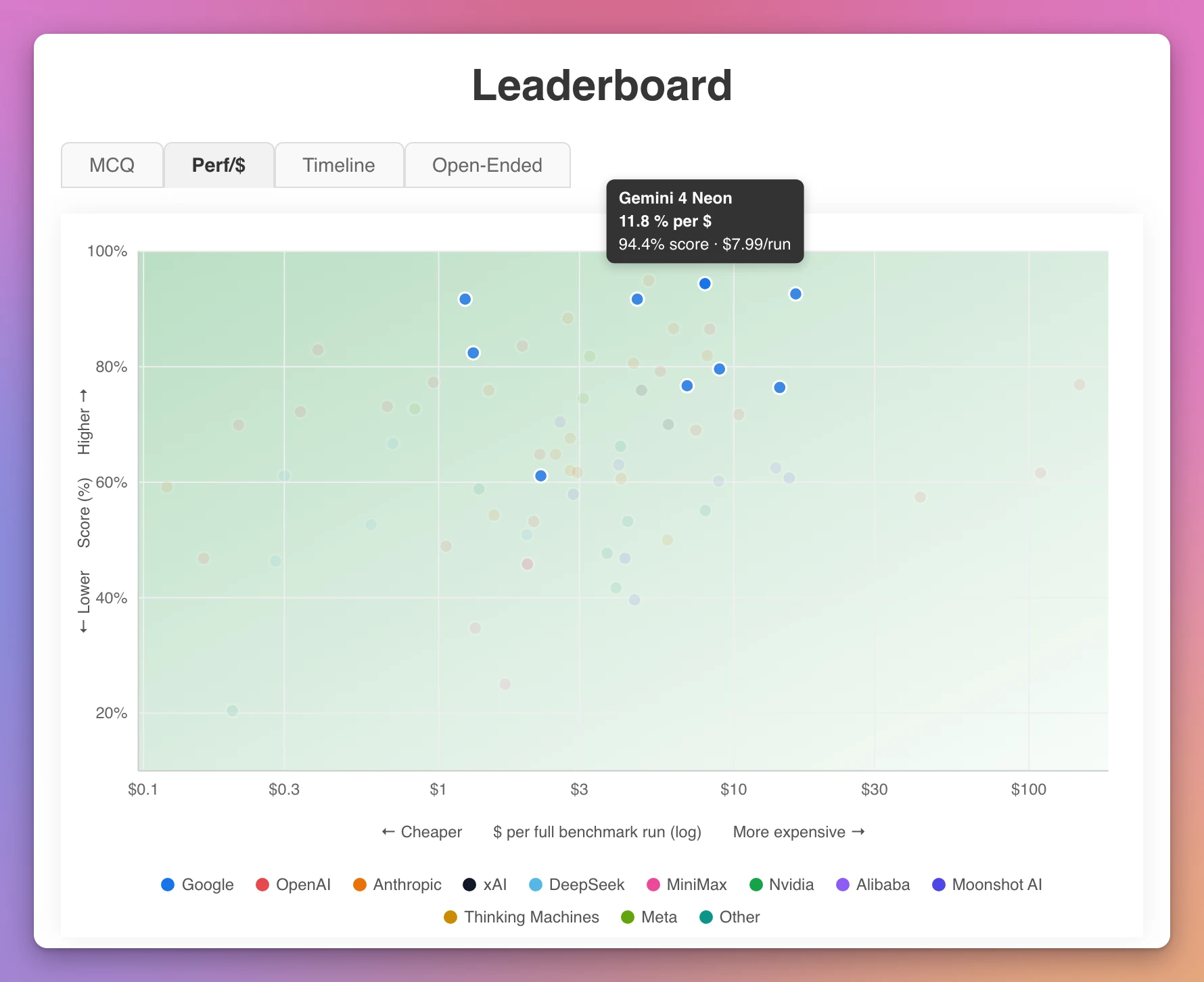
You can pull those exact numbers from SimpleBench’s public dataset with a few lines of Node:
const res = await fetch('https://simple-bench.com/static/js/leaderboard-data.js')
const src = await res.text()
const { leaderboardData, modelMeta } = new Function(
  src + '\nreturn { leaderboardData, modelMeta }'
)()

const picks = [
  'Claude Fable 5.2',
  'Gemini 4 Neon',
  'Gemini 4 Carbon',
  'Gemini 4 Argon',
  'Gemini 4 Hydrogen',
  'Claude Opus 5.5',
  'GPT-6.2 Astra'
]

console.table(
  picks.map((name) => {
    const row = leaderboardData.find((item) => item.model === name)
    const meta = modelMeta[name]
    return {
      model: name,
      rank: row.rank,
      score: row.score,
      listOut: '$' + meta.output,
      avgOutTok: meta.tout,
      costPerRun: '$' + meta.cpr.toFixed(2)
    }
  })
)
Running that prints the live SimpleBench figures:
┌─────────┬─────────────────────┬────────┬─────────┬─────────┬───────────┬────────────┐
│ (index) │ model               │ rank   │ score   │ listOut │ avgOutTok │ costPerRun │
├─────────┼─────────────────────┼────────┼─────────┼─────────┼───────────┼────────────┤
│ 0       │ 'Claude Fable 5.2'  │ '1st'  │ '94.9%' │ '$40'   │ 537       │ '$5.15'    │
│ 1       │ 'Gemini 4 Neon'     │ '2nd'  │ '94.4%' │ '$15'   │ 2385      │ '$7.99'    │
│ 2       │ 'Gemini 4 Carbon'   │ '3rd'  │ '92.6%' │ '$10'   │ 7456      │ '$16.21'   │
│ 3       │ 'Gemini 4 Argon'    │ '4th'  │ '91.7%' │ '$10'   │ 520       │ '$1.23'    │
│ 4       │ 'Gemini 4 Hydrogen' │ '5th'  │ '91.7%' │ '$7.5'  │ 2861      │ '$4.71'    │
│ 5       │ 'Claude Opus 5.5'   │ '6th'  │ '88.4%' │ '$20'   │ 575       │ '$2.74'    │
│ 6       │ 'GPT-6.2 Astra'     │ '17th' │ '77.3%' │ '$40'   │ 69        │ '$0.96'    │
└─────────┴─────────────────────┴────────┴─────────┴─────────┴───────────┴────────────┘
Here is the full comparison with input prices and percentage points per dollar included:
| Rank | Model | Score | List price (in / out) | Avg output tokens | Cost per run | % per $ |
|---|---|---|---|---|---|---|
| 1st | Claude Fable 5.2 | 94.9% | $8 / $40 | 537 | $5.15 | 18.4 |
| 2nd | Gemini 4 Neon | 94.4% | $3 / $15 | 2,385 | $7.99 | 11.8 |
| 3rd | Gemini 4 Carbon | 92.6% | $2 / $10 | 7,456 | $16.21 | 5.7 |
| 4th | Gemini 4 Argon | 91.7% | $2 / $10 | 520 | $1.23 | 74.6 |
| 5th | Gemini 4 Hydrogen | 91.7% | $1.50 / $7.50 | 2,861 | $4.71 | 19.5 |
| 6th | Claude Opus 5.5 | 88.4% | $4 / $20 | 575 | $2.74 | 32.3 |
| 16th | GPT-6.2 Astra Pro | 79.2% | $8 / $40 | 181 | $5.64 | 14.0 |
| 17th | GPT-6.2 Astra | 77.3% | $8 / $40 | 69 | $0.96 | 80.5 |
| 30th | GPT-6.2 Sol | 69.9% | $2 / $10 | 54 | $0.21 | 332.9 |
Look at the first two rows. On paper, Claude Fable 5.2 costs $40 per million output tokens and Gemini 4 Neon costs $15, less than half. On an actual benchmark run, Neon costs $7.99 while Fable 5.2 costs $5.15, because Neon writes 2,385 output tokens per question compared to Fable’s 537.
That is the exact same pattern I hit on my small CSV parser in my first Neon test: Neon was cheaper per token than Opus 5.5, spent almost 8x as many reasoning tokens, and ended up costing 3x more for that prompt. Carbon is even more extreme on SimpleBench at 7,456 output tokens and $16.21 per run, even with its $2 / $10 promotional token price.
Notice that when you pay for a flat plan like Google AI Pro ($19.99/month) or Google AI Ultra instead of per-token API calls, Google absorbs those extra thinking tokens. That’s one reason subscription math looks very different from API math (best value AI subscription).
Stay on high, skip xhigh
Google’s launch post puts Neon at #3 overall on the Artificial Analysis Intelligence Index with a score of 61. That headline score was measured at xhigh, the top thinking level, while Google’s default is high.
Adam Holter broke down all four thinking levels across eight benchmarks using Artificial Analysis and Priors data. Using cost per task relative to low:
low: 1xmedium: 2.5xhigh: 5xxhigh: 8.6x (72% more expensive per task thanhigh)
Moving from low to medium to high lifts scores noticeably across coding and reasoning boards. Moving from high to xhigh adds 72% to your bill and buys almost nothing on most tasks:
| Benchmark | Gain from high to xhigh |
|---|---|
| Terminal-Bench Science | +4.3 |
| HLE-Diamond | +2.9 |
| Terminal-Bench 4 (AA) | +2.0 |
| AA Intelligence Index | +1.8 |
| FrontierCode 2.0 (AA) | +1.1 |
| CritPt | +0.9 |
| AutomationBench (AA) | +0.1 |
| GDP.pdf | -5.4 |
AutomationBench moves by 0.1 points and FrontierCode 2.0 by 1.1. On GDP.pdf the score drops by 5.4 points when Neon thinks longer. The only benchmarks where xhigh earns its keep are heavy science and research evaluations (Terminal-Bench Science and HLE-Diamond).
For everyday API and agent work, Holter’s advice matches my own numbers: stay on high for complex tasks, drop to low for small, well-specified functions, and leave xhigh off unless you are stuck on a hard science or math problem.
What Theo found running it on real repos
Benchmarks only go so far, so I watched and transcribed Theo’s 32-minute review after he spent two days pushing Neon through Antigravity inside T3 Code.
Context matters here: Theo hated Gemini 4 Argon and Carbon, called them two of the worst large models he had ever used, and was frustrated with GPT-6.2 Astra. He went into Neon expecting to dismiss it. Instead, he ended the video calling it his favorite model right now, the first real competitor to Claude Opus 5.5, and said Google should have called it Gemini 5.
His main argument is about coherency versus capability. Every top model is smart enough on paper now. What makes an agent pleasant or painful to work with is whether it stays on task over hours, understands what you meant without heavy prompt files, and writes clear explanations of what it changed. On his capability-versus-coherency chart, he placed Neon at the top right alongside Claude Fable 5.2 and Opus 5.5, further right on coherency than either of them, with GPT-6.2 Astra high on capability but far left on coherency and Gemini 4 Carbon near the bottom left.
Here are the runs he walked through.
Debugging a slow VPS
He gave Neon a thread where GPT-6.2 Astra had spun in circles trying to explain a 6.3-second gap in git worktree creation on a VPS. Neon found a misconfiguration Theo had missed for three weeks while using that exact thread as a test: /work on the VM was formatted for a spinning hard drive, accounting for 3.8 seconds of the 6.3-second delay.
Setting up another machine and handing off
He opened a thread in T3 Code and asked Neon to set up Antigravity with his auth on his Windows gaming PC (Woodrig), verify it appeared in T3 Code, and notify another active thread once Neon was ready there. Eight minutes later it had configured the machine, verified the connection, found the other thread, and sent the handoff message on its own.
Diagnosing a bug in T3 Code itself
When he asked Neon to chart PR and issue throughput on the T3 Code repository, it seemed to stop twice without showing anything. When he pushed it, Neon inspected the recorded tool output, saw that the Antigravity adapter in T3 Code was dropping html_render frames from the chat UI, explained the exact bug, worked around it by rendering the HTML itself and sending screenshots, and then opened a PR to fix the adapter.
Shrinking and speeding up TS-Rust
This was the wildest result in the video. Theo has a Rust TypeScript type checker called ts-rust. He ran GPT-6.2 Astra on it for more than seven days with a simple goal: make the binary half the size and make it faster than tsrs and bun. Astra made the binary 46% smaller and 56% slower, then spent four more days unable to make it faster without breaking type checking. Opus 5.5 and Fable took several days to get it about 20% faster than before.
He forked from the same original v0.8.0 commit and gave Neon the same goal, allowing it to use Antigravity’s /swarm mode. In under 10 hours:
- The raw binary dropped from 47.44 MB to 7.97 MB (5.95x smaller, and 32.5% the size of Go’s
tsc 7.1-betaat 24.52 MB). - The packed npm
.tgzdropped from 19.19 MB to 5.03 MB (3.81x smaller). - Warm incremental runs hit 46.2 ms (21x faster than
v0.8.0). - Across his benchmark repositories, overall speed improved 1.5x (2.3x on Sentry) and total suite runtime dropped 48.6%.
Following a negative instruction
He asked Neon to write an Amazon-style launch blog post describing a source-control plan for his side project Lakebed and publish it through his Postplan skill, while explicitly telling it to ignore the style guidelines inside that skill. Most models still copy the skill’s black-and-white minimal layout anyway. Neon followed the override and wrote copy natural enough that his co-founder thought a human wrote it.
Where Neon still fell short
He also showed where Neon tripped up:
- Passive codebase Q&A still hallucinates. On his
ts-rustarchitecture analysis test, 10 of Neon’s 72 claims were wrong. That’s half as many hallucinations as Carbon (which had half as many as Argon), and roughly in the Fable 5.1 / 5.2 range, though still noticeable. On his code review benchmark Neon got 21 valid findings, 5 minor plausible ones, and zero wrong claims, and when editing code it verified its assumptions instead of guessing. - 3D generation is weak. On his 3D test (“fishslop”), Neon broke fonts and visuals. Switching from
hightoxhighhelped a little, though it still looked like an older generation compared to Opus 5.5. - Custom skill triggering. One casual shorthand prompt failed to trigger two of his custom skills, though he wasn’t sure if that was the model or the Antigravity harness.
- Cache hits and the standalone app. Google doubled the prompt-cache discount to 95% ($0.15/1M) and cut time-to-first-token by over 50%, yet Theo noted Google’s cache hit rates still trail Anthropic and OpenAI, and he avoids the standalone Antigravity app in favor of running Antigravity through T3 Code.
One detail from the end of his video explains why Neon feels so different from Argon and Carbon: according to his contacts at DeepMind, Neon was not supposed to ship this quickly after Carbon and Hydrogen. DeepMind’s own engineers liked using it internally so much that they pushed to release it early, and Google deliberately underplayed it in the announcement.
How I would use Gemini 4 Neon now
In my first test I had only run Neon through OpenRouter on single prompts. I already pay for Google AI Ultra (20x) and run my coding agents inside T3 Code, so adding Neon as a real coding driver doesn’t cost me anything extra.
Here is how I would split the work based on what these tests show:
- Everyday agent sessions in T3 Code: run Neon on
highas a real alternative to Opus 5.5, especially on long multi-file tasks and big repos where the 1M context window and Google’s cheaper tokenizer help. - Quick, well-specified API calls: drop to
low. On my CSV parser it got 27/27 right at less than half the cost and half the wait ofhigh. - When to touch
xhigh: almost never. Paying 72% more per task for +1.1 onFrontierCodeor -5.4 onGDP.pdfis a bad trade unless you are specifically fighting a hard math or science bug. - Where I would still switch away: for API workloads with short prompts where every cent matters, Neon’s 2,385-token thinking habit makes Opus 5.5 ($2.74 per SimpleBench run vs Neon’s $7.99) or Fable 5.2 ($5.15) cheaper in practice than their token prices suggest. And I would still double-check Neon’s answers when asking passive “how does this repo work” questions without letting it run commands or tests.
If you are still comparing models across labs, see which AI model is best for coding or start from AI fundamentals if the effort levels and token pricing terms are new.
Want me to talk about your product? You can sponsor this site.
Related posts about ai: