A deep dive into Inkling 2 Mini
By Flavio
Tagged: AI
Run Inkling 2 Mini on an Apple silicon Mac, send it a screenshot through Ollama, measure a local request, and see how a looped transformer reuses its layers.
Inkling 2 Mini is a model from Thinking Machines Lab that takes text and images and replies in text. The weights are available under Apache 2.0. On an Apple silicon Mac with at least 32 GB of memory, you can run it through Ollama. Thinking Machines’ release announcement
The interesting part is how it uses its layers. The model stores 24 layers, but the middle 12 run three times for each token. That gives it 48 layer applications from 24 layers of weights.
Let’s get it running, give it something to read, and see where that extra work shows up.
Run it on a Mac
You’ll need an Apple silicon Mac with 32 GB or more of unified memory and about 20 GB of disk space for the download. The model I pulled requires Ollama 0.40.17. I ran that version on an M4 Pro with 36 GB of unified memory. Check the current installer on the Ollama model page.
Start the Ollama app, or run the server in a separate terminal for a CLI-only setup. I used these settings for the examples.
OLLAMA_CONTEXT_LENGTH=8192 OLLAMA_NO_CLOUD=1 ollama serveThe first setting tells Ollama how much context to start with. The second keeps cloud features off. With the server running, download and run the model.
ollama --version
ollama pull inkling-2-mini
ollama run inkling-2-mini
Use the first command to check your Ollama version. Once the download finishes, ollama run opens a chat in your terminal. Type /bye to leave it.
Run ollama show for the installed model’s capabilities, and ollama ps while the model is loaded.
ollama show inkling-2-mini
ollama ps
ollama show reported a maximum context length of 1,048,576 tokens. In ollama ps, look at PROCESSOR for the CPU and GPU split, and CONTEXT for the size Ollama allocated. A local run on a laptop can use a much smaller context than the model supports.
On my Mac, ollama ps showed 21 GB, 100% GPU, an 8,192-token context, and the mlx runner. Context is the working space for the request. Your prompt, the conversation history, the image, and the reply all use some of it. I picked 8,192 tokens here because the examples use one short message at a time.
If Ollama can’t connect, open the app or check that the server is listening with curl http://localhost:11434/api/version. If it can’t load the model, update Ollama, try a smaller context, and close other apps that use a lot of memory. You can unload the model when you’re done with ollama stop inkling-2-mini. The model files stay on disk.
For the other ways to install, configure, and call Ollama, see Run a local LLM with Ollama.
Send a prompt over HTTP
Ollama’s chat endpoint lets you send the same kind of message from a script. The examples use curl to make the request and jq to read the JSON. I ask for one sentence so the answer is easy to check. Ollama chat API
curl -fsS http://localhost:11434/api/chat \
  -H 'Content-Type: application/json' \
  -d '{
    "model": "inkling-2-mini",
    "messages": [{
      "role": "user",
      "content": "In one sentence, if a model stores 24 layers and runs its middle 12 layers three times, how many layer applications does it make per token? Show the arithmetic."
    }],
    "stream": false,
    "options": {"num_ctx": 8192, "temperature": 0}
  }' | tee inkling-reply.json | jq -r '.message.content'
stream: false gives you a single JSON response when the model finishes. num_ctx sets the context for the request. Start small when you’re testing a short prompt. Raising the context uses more memory, even with the same model. Ollama’s context guide
Here’s the reply from my run.
It makes 12 outer layers × 1 + 12 middle layers × 3 = 12 + 36 = 48 layer applications per token.ollama show reported high as the default thinking level. The command above prints the final answer in message.content. The response also has generated reasoning text in message.thinking. Both matter if you’re measuring the work needed for a short visible answer.
Measure the first and second requests
The command saves the whole response in inkling-reply.json before jq prints the answer. Pull out the timing fields to see where the time went.
jq '{
  total_seconds: (.total_duration / 1e9),
  load_seconds: (.load_duration / 1e9),
  prompt_seconds: (.prompt_eval_duration / 1e9),
  generated_tokens: .eval_count,
  generated_tokens_per_second: (.eval_count / (.eval_duration / 1e9))
}' inkling-reply.json
Ollama reports durations in nanoseconds. Divide eval_count by eval_duration / 1e9 to measure generation speed. total_duration includes the other work in the request, such as loading the model and processing the prompt.
To compare two runs, stop the model with ollama stop inkling-2-mini, then send the same request twice. Save the first result before running it again. The first request loads the model. The second can reuse the loaded model and may be able to reuse work on the prompt, too.
In this pair of runs, Ollama reported 11.41 seconds of model loading on the first request and less than 0.01 seconds on the second. Both requests generated 871 tokens at the default thinking level. The second request generated tokens more slowly, so the total time saved was smaller than the time saved on loading alone.
I sent the same prompt again with "think": false at the top level of the request, beside "stream": false. It still returned 48. Ollama reported 296 generated tokens in 10.79 seconds, and the reply had no message.thinking field. Try that setting when you only need a short answer, then check whether the answer is still good enough for your task.
Give Inkling a screenshot
For a vision test, I used the site’s JSON Formatter. The values in the formatter give us something to check. We can see whether the model copies every key and preserves the number and boolean. Open the JSON Formatter
Open the formatter, paste {"model":"inkling-2-mini","local":true,"context":8192}, and click Format. Capture the Output box and save it as formatter.png.
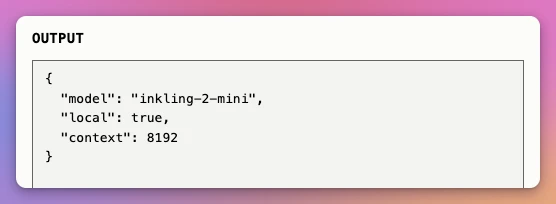
The screenshot goes in the same message as the question. Encode it as base64 and send it in images. Ollama vision API
base64 < formatter.png | tr -d '\n' |
  jq -Rs '{
    model: "inkling-2-mini",
    messages: [{
      role: "user",
      content: "Transcribe only the JSON in the Output box. Return raw JSON without Markdown.",
      images: [.]
    }],
    stream: false,
    options: {num_ctx: 8192, temperature: 0}
  }' |
  curl -fsS http://localhost:11434/api/chat \
    -H 'Content-Type: application/json' \
    --data-binary @- |
  jq -r '.message.content' | tee inkling-vision.json
Passing the request body through standard input keeps the encoded image out of a shell argument. The reply copied all three values correctly. Here’s what the same request looked like in a local test page.
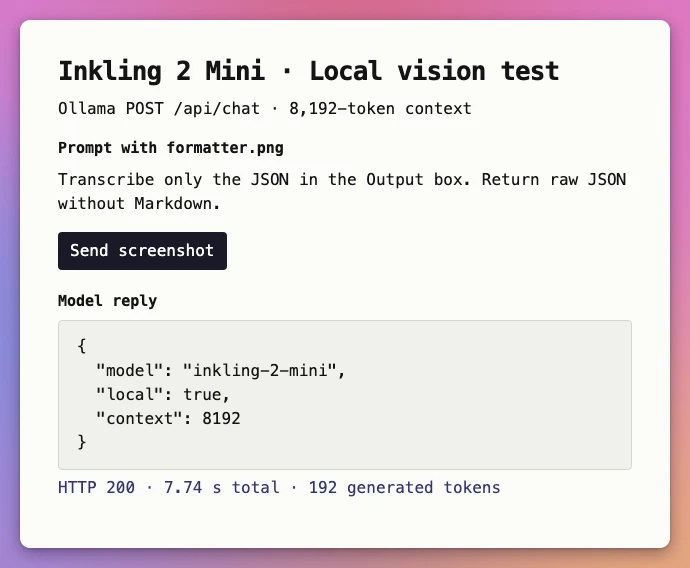
If you’re feeding the result into another program, check the values and types as well as the syntax. For this test we know exactly what the object should contain.
jq -e '. == {"model":"inkling-2-mini","local":true,"context":8192}' inkling-vision.jsonI got true. With a screenshot you haven’t read yourself, you can still check the expected keys and types. Comparing a sample of replies with the original images gives you a better sense of when to trust the values.
Where the loop fits
A normal forward pass moves through each decoder layer once. Inkling 2 Mini runs through a 6-layer prelude, then applies the middle 12 layers three times, then goes through the final six layers. Each pass through the middle starts with the prelude’s output. Passes two and three also receive information from the preceding pass.
That’s 6 + 12 × 3 + 6 = 48. The middle passes use shared weights, so making another pass adds computation without storing another copy of those weights. And it happens inside the processing of a token. The model can also generate reasoning tokens, which go through the same architecture as the other generated tokens.
Inkling 2 Mini is also a mixture of experts. In each layer the model routes a token to 8 of 128 experts. It has 26.4 billion total parameters and 3.4 billion active. After accounting for the loops, Thinking Machines reports 5.4 billion effective active parameters per token. That number counts repeated work. For a memory budget, start with the checkpoint size, then leave room for the runtime and its attention cache. Inkling 2 Mini model card
Thinking Machines trained and released the checkpoint in mixed low precision. The first 20 layers use NVFP4 and the last four use MXFP8. That helps explain how the published checkpoint fits in about 20 GB. Other distributions can use different formats and have different sizes.
How to read the benchmarks
The most relevant scores depend on what you’re going to ask the model to do. Each row compares Inkling 2 Mini with a similarly sized open-weights model on the same benchmark. The evaluation setups can differ by model. Thinking Machines’ release evaluation
| Evaluation | Inkling 2 Mini | Qwen3.8-27B | What it measures |
|---|---|---|---|
| DeepSWE v1.1 | 48.2% | 42.2% | Software engineering tasks resolved |
| Terminal Bench v2.1 | 71.6% | 73.0% | Terminal tasks completed |
| OmniDocBench v1.6 | 92.8% | 91.5% | Document parsing quality |
| ScreenSpot Pro, original | 76.5% | 57.6% | Finding an element in a screenshot |
I would use those results to pick tests for my own work. If I wanted to process screenshots of a Mac app, I would send captures from a few different states, including one where the requested control is absent. If I wanted help with code, I would start with a small repository and a change with tests I can run. Both experiments tell me more about my workflow than a score on its own.
Where I would use it
I’d try Inkling 2 Mini on screenshots from my Mac apps while writing their guides. I could ask it to transcribe a screen and identify the controls I need to describe, then check its answer against the image. Running it locally keeps the screenshots on my machine.
I’d start a coding session with the file and test output that matter. A large repository, repeated tool calls, and long replies can quickly fill the context on a laptop. If I need to supply more context than my Mac can handle, Thinking Machines also offers hosted inference through Tinker. The model weights are available separately if you want to run the model with a different supported runtime.
Want me to talk about your product? You can sponsor this site.
Related posts about ai: