Give your coding agent its own Docker Engine
By Flavio
Tagged: AI
What Docker’s new direction means for coding agents, from testing a Postgres migration to reviewing an infrastructure change.
Suppose I ask a coding agent to make email addresses unique in a Postgres database. It writes a migration, runs it against an empty database, and tells me the tests pass. Meanwhile, two customers who signed up in 2019 already share an email address. The first time that migration sees those rows could be during a deploy.
What I want to say to the agent is “Go find out what happens.” Start Postgres. Put those two customers in it. Run the migration. Change the code. Throw the database away and try again. I want the agent to have a whole machine for the afternoon, and I want my own database exactly where I left it.
That’s why I like the direction Docker announced on November 19, 2026. The company introduced a new brand, redesigned Moby (the whale), and put running AI agents at the center of its pitch. Docker Sandboxes and Docker AI Governance already existed. The announcement makes a bet about what developers will come to Docker for next. Docker’s announcement
The container stack is gone from Moby’s back. Screenshot from Docker’s brand announcement.
A little Linux machine with Docker already inside it
If you’ve used Docker Compose, you probably already have a description of a machine’s worth of services sitting in your repo. The app needs a database. The worker needs a queue. Your tests expect to find both. A coding agent that can edit the files but can’t start those services leaves a fair amount of the job to you.
A Docker Sandbox gives the agent a small virtual machine with its own Linux kernel and its own Docker Engine. That last detail is my favorite. When the agent starts Postgres with Compose, its Docker client talks to the engine inside the sandbox. The agent can build images, restart a worker, or remove its test containers. Your other project’s database belongs to a different engine. How Docker Sandboxes work
Why use a VM here if we already have containers? A Linux container shares the kernel of the system running it. On a Mac, Docker Desktop already runs Linux in a VM, and its ordinary Linux containers share that VM’s kernel. You can run a coding agent in a container. The awkward part comes when the agent itself needs Docker. Giving it access to your usual Docker daemon gives it authority over the other things that daemon manages. A private engine gives the agent somewhere else to do that work. Docker’s comparison of the two environments
There’s a cost. Each sandbox needs memory and disk for another Linux environment and the images you pull into it. For a CSS typo, I’d open the file and change it. For a bug that only shows up after a worker restarts halfway through a job, I want the extra machine.
The first thing I’d look at is the workspace
Once you’ve installed the sbx CLI, signed in, and configured Codex authentication, you can try Docker’s example from a project directory. Pick a scratch project for the first run. This form of the command shares the current directory with the agent.
sbx run --name learn-agent codex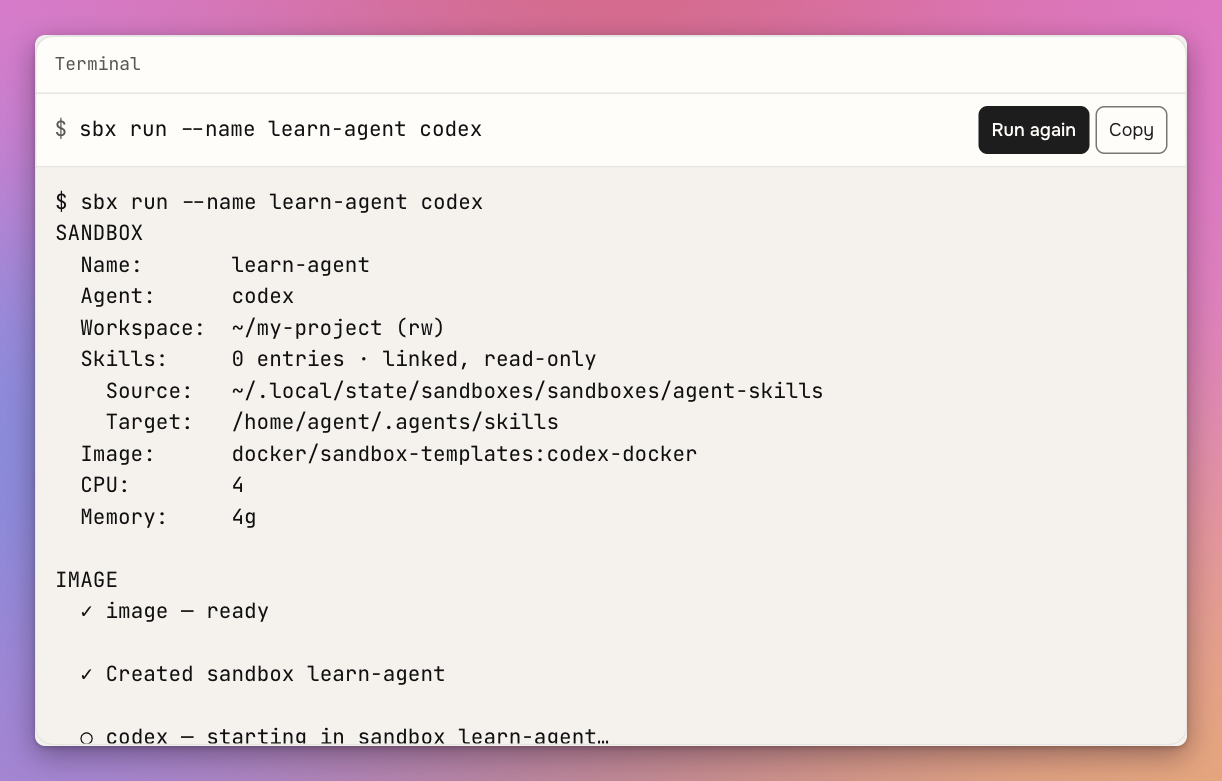
Docker’s simulated walkthrough. The detail to look for is Workspace: ~/my-project (rw). Try the interactive example.
That little rw means a save inside the sandbox changes the file you see in your editor. It’s handy when you want to watch the diff appear. It also means that if the agent deletes a file there, throwing away the VM won’t bring the file back. A hidden .env in that same directory is part of the workspace too. Docker’s workspace defaults
With a direct mount, both editors see the same files. Each Docker Engine manages its own containers.
For the migration job I’d use Docker’s clone mode. The sandbox gets its own writable checkout and mounts the source checkout read-only. I can keep working in my editor, then fetch the agent’s committed branch when it’s ready. The agent can even install Linux dependencies without leaving a Linux build of a native Node module in the node_modules directory on my Mac. If the agent should have no access to my local project files at all, Docker also supports creating a sandbox without a host workspace and cloning the repository inside it. Docker’s guide to sandbox checkouts
Give the agent an experiment it can finish
Back to the two customers. Their accounts have different IDs, separate orders, and the same email address. If I just ask for a unique constraint, the agent has to guess what should happen to those accounts. Giving it a VM doesn’t make it qualified to decide which customer keeps their order history. I can settle that part myself and give it a much better assignment.
Add a test fixture with two existing accounts that share an email address. Both have orders. Run the migration against that fixture in a disposable Postgres database. The migration should stop with a useful diagnostic and preserve both accounts and their orders. Also test a database with unique addresses and show that it rejects a new duplicate after the migration.
Here’s what PostgreSQL 17.11 did in a local test. Each database started with two accounts and one order per account. The migration was one statement.
ALTER TABLE accounts ADD CONSTRAINT accounts_email_key UNIQUE (email);| Starting data | Migration result | Accounts afterward | Orders afterward |
|---|---|---|---|
| Two different addresses | Constraint created | 2 | 2 |
| One shared address | Migration failed | 2 | 2 |
For the shared address, Postgres reported the exact value that blocked the migration.
ERROR:  could not create unique index "accounts_email_key"
DETAIL:  Key (email)=([email protected]) is duplicated.
In the database with two different addresses, an attempt to insert a third account using an existing email hit the new constraint.
Now the agent has a way to tell if it’s done. It can run the old version, seed the rows, try the new version, and query what survived. I can review the migration alongside a regression test that another developer can run in CI. If the test only checks that an error was raised, I can point to the missing assertion about the orders.
That changes what I want from an AI coding tool. Generating the first draft of the SQL saves a few minutes. Doing the slightly tedious work of setting up both databases makes it more likely we’ll discover the mistake before a customer does. The artifact worth keeping is that test fixture. It’ll still be useful six months after we delete the sandbox.
There are other jobs with the same shape. Give an agent a queue worker that sometimes sends an email twice. Let it start a local mail catcher, interrupt the worker after delivery, then process the same job again. Ask it for a test that counts how many messages arrived. That’s a much better use of an afternoon of agent time than asking it to read the worker and offer an opinion on whether retries look safe.
Where this gets interesting for infrastructure
The first infrastructure task I’d hand over is a restore rehearsal. A backup job can succeed for weeks while the restore instructions quietly go stale. Maybe someone added a Postgres extension to the application and forgot to add it to the recovery image. You’ll find out as soon as something tries to restore a database that uses it.
Give the agent a sanitized backup fixture and the same Postgres image your recovery instructions specify. Ask it to bring up an empty instance, restore the fixture, start the app against it, and read one known record through the app. Make the deliverable a script your CI runner can repeat from scratch. Now a change to the recovery image can break a test while someone still remembers making the change. A small fixture can exercise the procedure. To estimate the time needed to recover a production-sized database, you’d run a separate rehearsal with representative storage and data volume.
Infrastructure as code needs a different setup. Suppose you want to extend how long your staging database keeps backups. An agent can edit an OpenTofu module in its sandbox. To tell you what that edit would do to the existing database, something needs access to the staging state and provider API. Docker can isolate the process that runs the CLI. Your cloud provider decides what the identity calling its API is allowed to do. Removing the local VM later won’t undo a cloud change.
I’d have the agent open a pull request with the configuration change. A trusted CI job can produce the staging plan with an identity scoped for planning and the backend access it needs. The reviewer has a specific question to answer. Does this update the retention setting on the current database, or does the provider propose replacing it? A one-line diff can lead to either kind of operation. OpenTofu’s plan shows the proposed actions, and its documentation explains why the final plan can change if the infrastructure changes in the meantime. How OpenTofu plans work
If the plan changes after review, send the new plan back for approval.
The apply credential belongs in the approved deployment job. I’d also keep raw saved plans in restricted CI storage. A plan file can include sensitive values that the CLI hides in terminal output. The agent can explain a reviewed, redacted plan without needing a copy of every value in it. OpenTofu’s notes on saved plans
Which image did we give it in the first place?
An agent can faithfully reproduce a problem on the wrong version of Linux all afternoon. Before giving it a long-running infrastructure job, I want to know which image it started with and whether I can get that exact image again.
Docker Hardened Images come with signed records about their contents and how Docker built them. A software bill of materials, or SBOM, lists components. Build provenance records where the artifact came from. Docker Hub lets you inspect these records for a particular image variant. Docker Scout also exposes them from the command line. Docker’s image verification guide
For a restore rehearsal, I’d record the image digest alongside the test result. A tag like postgres:17 can move as maintainers publish updates. A digest identifies the image we tested. That gives us two useful runs. Rerun yesterday’s digest to reproduce yesterday’s failure. Then try the updated image to find out whether the fix works. If the agent installs more packages during the rehearsal, those additions belong in the project’s build or setup instructions so CI can reconstruct the environment too.
An agent can use a credential without ever seeing its value
Say the agent needs to read an issue from a private GitHub repository. Docker’s local sandbox proxy can attach a configured credential to matching outbound requests on the host side. The raw token can stay outside the guest while the agent makes the authorized request. Docker’s credential guide
I like that design, and I’d still give this agent a read-only credential. If the token can close issues, keeping its value hidden doesn’t take away the ability to make an authenticated request to close one. I want to choose the account and its permissions based on the task. The same reasoning applies to a package registry. An agent diagnosing a build may need to download private packages. Publishing a new version is a separate job.
Docker AI Governance extends this idea across a team. For example, an organization can set which host paths developers may mount and which network destinations their sandboxes may reach. For tools exposed through Docker’s MCP Gateway, administrators can allow particular calls or require confirmation. MCP is the Model Context Protocol, a way for an agent to use tools provided by another service. The gateway evaluates calls routed through it. A direct connection to a remote MCP service falls under the sandbox’s network policy. That distinction matters when you decide which endpoints to allow. How Docker AI Governance enforces policy
A team investigating a failed job can also use the audit records for sandbox policy decisions and session events. Those records can tell you that a policy denied an action and when it happened. For the question “Did the migration preserve both customers’ orders?”, you still want the SQL assertion in the test run. Each record has a different reader and a different job. Docker’s description of audit coverage
What I’d try first
I’d pick one repository with a Compose stack and one integration test that developers routinely skip because setting it up is annoying. Give a coding agent a private checkout, a small fixture, and enough access to pull the dependencies. Ask it to reproduce the bug and leave behind a test that fails on the old commit. Then run that same test in a clean CI job.
The question I’d ask afterward is “Can a teammate reproduce this with the agent switched off?” If they can, the experiment bought us something durable. We used a disposable machine to turn a piece of knowledge that lived in somebody’s head into a test the next developer can run. That’s what makes Docker’s new direction interesting to me.
Want me to talk about your product? You can sponsor this site.
Related posts about ai: