How to use GPT-6.2 Astra and Sol in Codex and the API
By Flavio
Tagged: AI
Choose between GPT-6.2 Astra and Sol, compare a real code review, and preserve conversation history with the OpenAI Responses API.
GPT-6.2 comes in two versions. Sol is the everyday model. Astra is the more capable option for difficult work, including changes across a large codebase and detailed work with documents.
Let’s use them for a small code review. You can start in Codex, then use the API example to see how a conversation continues across requests.
Choose a model
My advice is to start with Sol for a focused task. Try Astra when the work involves conflicting requirements, a difficult bug, or decisions that affect several parts of your app. Compare the result on the same task before changing your default.
Both models accept text and images and return text. Their API context window is 1,050,000 tokens, including up to 128,000 output tokens. Those are API limits; your coding tool manages its own context. See the Astra model page and Sol model page.
These are the Standard API rates for requests with up to 272,000 input tokens, in dollars per million tokens:
| Model | Input | Cached input reads | Output |
|---|---|---|---|
| GPT-6.2 Sol | $2 | $0.10 | $10 |
| GPT-6.2 Astra | $8 | $0.40 | $40 |
Astra’s listed token rates are four times Sol’s. A completed task can have a different ratio because the models use different amounts of reasoning and output. Cache writes, longer inputs, and faster service tiers also affect billing. Check OpenAI’s API pricing for those rates.
Try a coding task in Codex
The launch announcement lists both models for paid Plus, Pro, Enterprise, and Edu users in ChatGPT Work and Codex. Enterprise and Edu access can require an administrator to enable it.
You can select either model in Codex’s model selector. If you haven’t used the tool yet, start with my Codex tutorial.
I gave both models the same port-parser review, using Codex CLI at medium reasoning effort. The function uses parseInt(), which accepts strings such as 8080junk as port 8080. Its fallback also turns port 0 into port 3000.
Save this prompt as prompt.txt:
Review this JavaScript function. Do not call any tools or inspect files. Give two concrete inputs that expose incorrect port parsing and their returned values. Then provide a corrected function: default to 3000 only for undefined; otherwise accept only strings of decimal digits representing integers from 1 through 65535, and throw on all other inputs. Keep the reply under 220 words.

function parsePort(value) {
  return parseInt(value, 10) || 3000
}
Run it with Sol in a folder you can experiment with:
codex exec --ephemeral --skip-git-repo-check --sandbox read-only --model gpt-6.2-sol -c model_reasoning_effort=medium - < prompt.txt--sandbox read-only prevents the agent from changing project files. --ephemeral keeps this small review out of your saved CLI session history.
To compare Astra, repeat the command with its model ID:
codex exec --ephemeral --skip-git-repo-check --sandbox read-only --model gpt-6.2-astra -c model_reasoning_effort=medium - < prompt.txtSol identified 80abc returning 80 and 0 returning 3000. Astra used 80px and 0 to expose the same bugs.
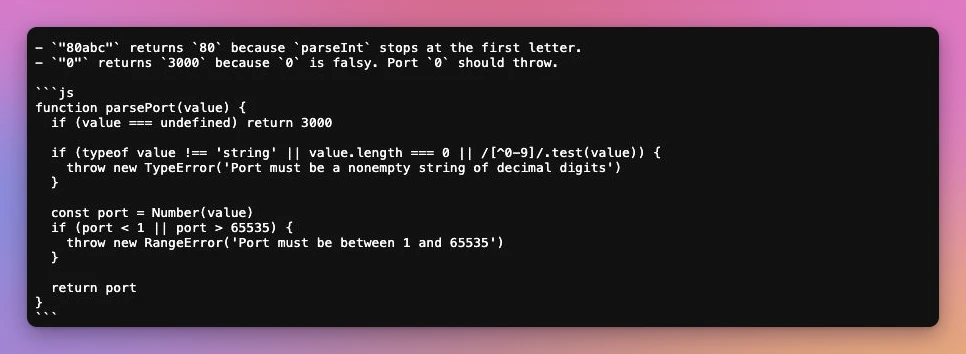
I ran both proposed functions against 18 inputs. Both passed every check, including undefined, an empty string, the port boundaries, numbers supplied as numbers, and strings containing spaces or a newline.
| Input | Original function | Sol’s fix | Astra’s fix |
|---|---|---|---|
undefined | 3000 | 3000 | 3000 |
'0' | 3000 | Throws | Throws |
'1' | 1 | 1 | 1 |
'65535' | 65535 | 65535 | 65535 |
'65536' | 65536 | Throws | Throws |
'8080junk' | 8080 | Throws | Throws |
'80\n' | 80 | Throws | Throws |
80 | 80 | Throws | Throws |
The two fixes used the same validation logic. Both checked the input type, rejected empty strings and non-digit characters, and checked the numeric range. This small task gave me no reason to choose Astra over Sol. A difficult change in an existing app needs its own comparison.
Make the same request through the API
Use Node.js 22 or newer. Set OPENAI_API_KEY in your terminal environment using a key from your OpenAI API project. API requests use API billing and limits.
Create a folder and install the official SDK:
mkdir gpt-6-2-demo
cd gpt-6-2-demo
npm init -y
npm install openai
Save this as review.mjs. The .mjs extension lets us use import and top-level await without changing package.json.
import OpenAI from 'openai'

const client = new OpenAI()
const model = process.argv[2] || 'gpt-6.2-sol'
const reasoning = { effort: 'medium' }

const first = await client.responses.create({
  model,
  reasoning,
  store: true,
  input: [
    {
      role: 'developer',
      content: 'Review JavaScript functions. Explain concrete bugs and keep proposed fixes small.',
    },
    {
      role: 'user',
      content: `Find an input where this function behaves incorrectly:
function parsePort(value) {
  return parseInt(value, 10) || 3000
}`,
    },
  ],
})

console.log(first.output_text)

const second = await client.responses.create({
  model,
  reasoning,
  store: true,
  previous_response_id: first.id,
  input: [{
    role: 'user',
    content: 'Use 3000 only for undefined. Otherwise accept only a string of decimal digits representing an integer from 1 through 65535. Throw on any other input. Show the smallest fix and check the boundary cases.',
  }],
})

console.log(second.output_text)
console.log(JSON.stringify(second.usage, null, 2))
Run it with Sol:
node review.mjsOr pass Astra’s model ID:
node review.mjs gpt-6.2-astraEach run makes two billable requests. It prints the initial review, the revised answer, and usage for the second response. The generated code is text for you to inspect; this script doesn’t execute it.
We set medium explicitly because OpenAI recommends it for a new integration. Use low if you need less reasoning. Both models reject none, and OpenAI’s migration guidance replaces older minimal settings with low.
Preserve the conversation
The second call passes previous_response_id: first.id. This lets the API continue from the earlier response, including its reasoning, while we append our new requirement. The model and reasoning setting stay the same.
That matters with GPT-6.2. If your integration rewrites earlier messages, changes tool definitions, or truncates an old tool result, the API can drop reasoning items that follow the change. The model may need to repeat work. An unchanged prefix also gives prompt caching more opportunities to reuse input. OpenAI explains this in Keep the prefix unchanged.
For an evolving requirement, append a message as we did. If you manage history yourself, preserve the original items in order, including reasoning items. When the context gets too large, use the supported compaction workflow.
This example uses stored responses. OpenAI saves response objects for 30 days by default, and previous input in the chain still counts toward billing. Applications using store: false or Zero Data Retention need a different history-management approach. See conversation state.
Update an existing integration
If you already use GPT-6.1 Sol, check the request around the model name when upgrading:
- Use
gpt-6.2-solorgpt-6.2-astraas the model ID. - Use the Responses API for tool calling. Chat Completions supports these models without tools.
- Remove
temperature,top_p, andtop_logprobsfrom Responses requests, and removemessage.output_text.logprobsfrominclude. - If you’re migrating from GPT-5.5 or earlier, replace
prompt_cache_retentionwithprompt_cache_options: { ttl: '30m' }.
The GPT-6.2 migration guidance covers the corresponding Chat Completions changes and data-retention options.
Try the upgrade on a task whose result you can check. For the port parser, that means running the proposed function against the inputs above and inspecting its handling of invalid values. For a change in your app, use the behavior and checks your project already relies on.
Want me to talk about your product? You can sponsor this site.
Related posts about ai: