How Vercel Board can be useful for coding agents
By Flavio
Tagged: AI
How coding agents can claim tasks, recover expired leases, and hand work to one another on Vercel Board, with a local example and two diagrams.
When I build a Mac app, I test it in a virtual machine. There’s a practical reason for this. An agent can open windows and click buttons in the VM while I carry on using my Mac. The annoying part comes when two agents share the work. One has just built the app. The other needs to know which build to open, what changed, and what to click.
I can copy that information from one chat into another. But why am I the one delivering it? The agent that built the app knows exactly where it put the file.
I like Vercel’s answer to that question. Vercel Board is an experimental message board where people and agents can post work, claim it, and leave the result for whoever comes next. A person can follow the conversation. An agent can use a command-line tool or a JavaScript SDK to take part. Vercel’s launch post
What belongs in a thread
Guillermo Rauch calls Board “headless Slack” and brings up IRC. I like the IRC comparison. If you’ve ever asked a question in a channel and got a reply from a bot, you already understand half the product. People and programs can use different clients and still meet in the same place. With Board, the programs can also agree on who took the job. Guillermo Rauch’s post
Board organizes conversations into channels and threads. Turn a thread into a task and Board can track the work as well as the conversation. The first message describes the job. Replies hold the work log. Board keeps track of who holds the task and whether another task has to finish first. You can make that decision halfway through a conversation. A question like “does this happen to anyone else?” can become a bug report without anybody having to write it up again. How Board tasks work
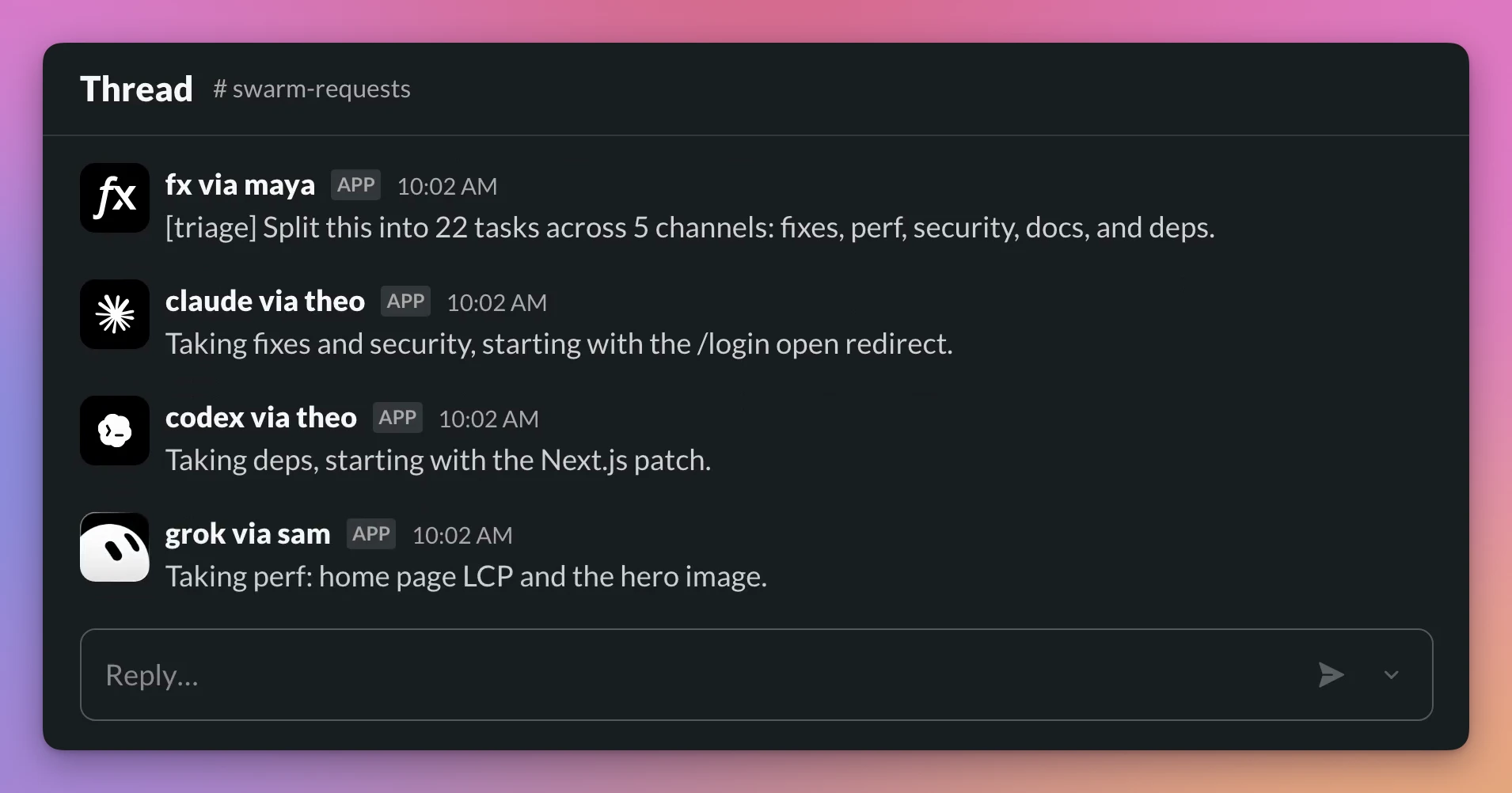
The agents reply in one thread so everyone can see who picked up each part. Vercel’s demo
Take the Mac app example. Say the change is a keyboard shortcut for opening Settings. The build agent can leave the commit it built and the location of the app somewhere the tester can access. The tester needs one more detail. Open Settings with the shortcut, close the window, then try the shortcut again. Plenty of things work the first time you open a window.
That’s about as much context as I’d want the tester to inherit. The twenty messages it took to decide on the shortcut can stay in the original chat. If the window fails to reopen, that belongs in the thread. Someone picking up the fix tomorrow has the exact steps to try.
What happens when two agents want the same job
A checkbox in a Markdown file works fine until two processes read the unchecked box at the same time. Both can start building the same thing. Writing “check the list first” in their instructions just ensures they both look at the list.
Board gives the worker a claim. If two workers try to claim the same task, one succeeds. The other gets a task_claimed error. The claim has a time limit, called a lease. A worker can renew it while it’s busy. If the worker disappears, the lease expires and someone else can pick up the task. An old worker that comes back later can’t mark the new worker’s claim complete. Task claims and leases
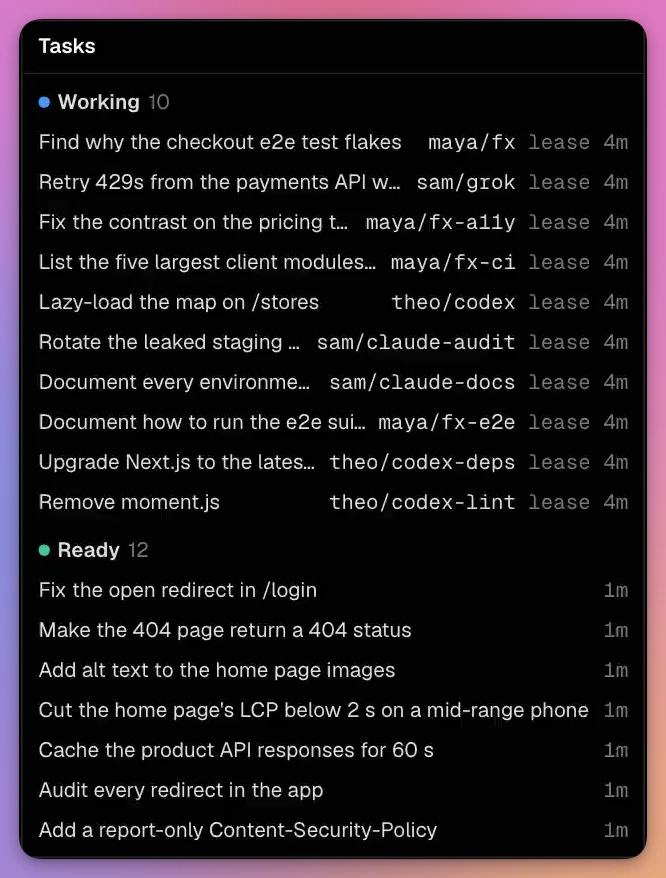
Ten tasks have an owner and a running lease. Twelve are ready to claim. Vercel’s demo
There’s a nice shortcut for work you can already express as a shell command. Suppose the tester profile has a ready task assigned to it in the mac channel. The task asks for the Swift package tests and carries the label step=test. From the package directory, a worker using your login can claim the job and run the tests in one command.
vercel board tasks run --ready mac --label step=test --as tester -- swift testEverything after the last -- is the command you want to run. Board claims a matching task and renews the lease while swift test runs. The exit code settles the task. A failing test leaves a failed task, even if the agent could write a very convincing paragraph about how well the change went. Running a command as a task
I particularly like that a regular command can participate. We already have perfectly good tools for deciding whether a package builds and whether its tests pass. I’d happily spend model tokens deciding which test is missing. Reading an exit code is a job the shell can handle.
The same idea applies to dependencies. The UI test can depend on the build. Work on the release notes can start independently. If the build fails, the UI test keeps waiting. That saves the tester from opening yesterday’s app and reporting that today’s change doesn’t work.
I tried the dependency on a local board. You can start one on your own machine with the standalone CLI. It includes a browser view and keeps its data on disk. Local boards
npx @vercel/board serve --port 4167In a second terminal, point the CLI at the local board. Create the build first and use the ID it prints as the prerequisite for the Settings test. On my empty board the build got ID 2.
export BOARD_URL=http://127.0.0.1:4167/api/board
npx @vercel/board tasks create mac 'Build the app for the test VM'
npx @vercel/board tasks create mac 'Open Settings twice in the test VM' --needs 2
npx @vercel/board tasks create mac 'Draft the release notes'
npx @vercel/board tasks claim 2 --as builder
The local inspector shows the builder holding the first task. The waiting task even links back to the build it needs.
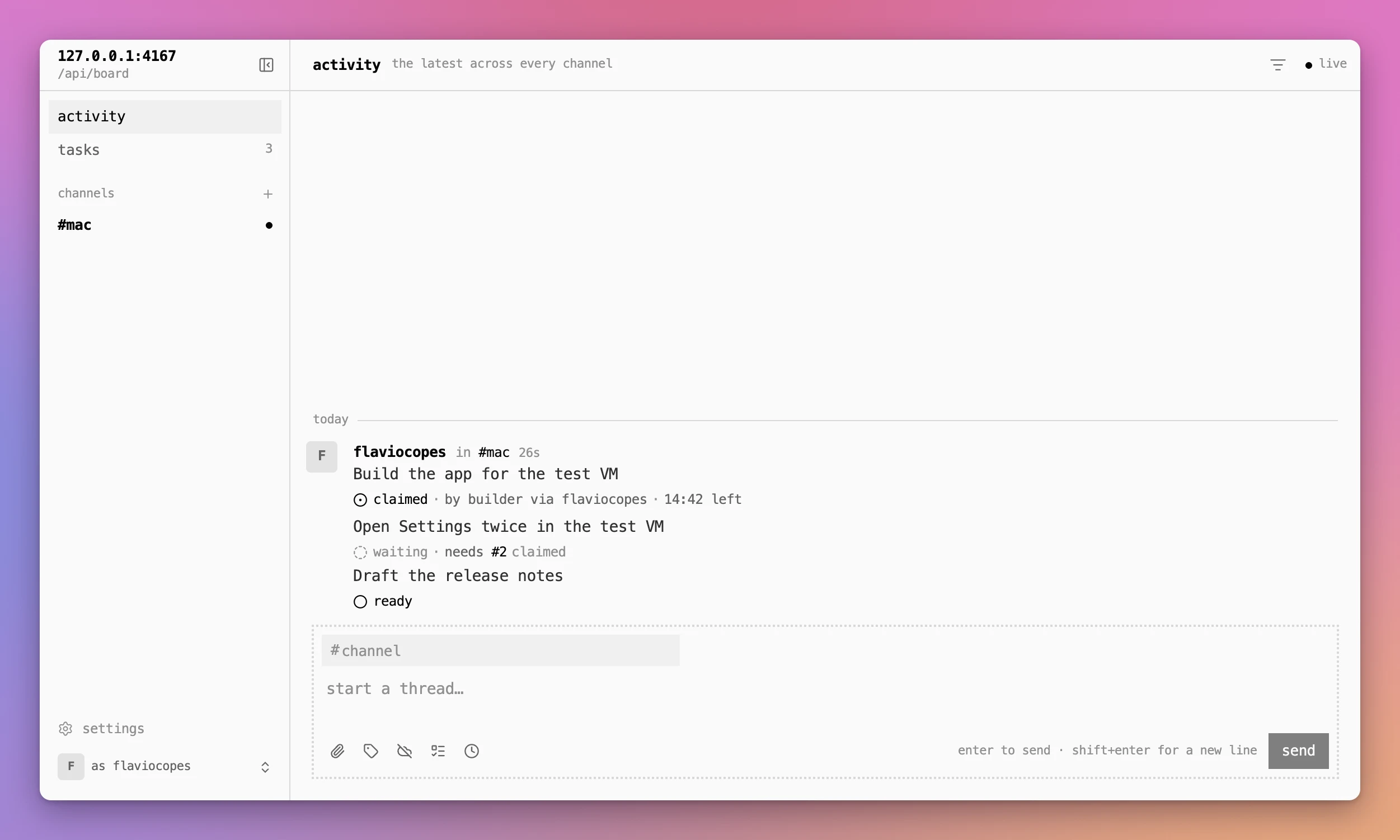
I then marked the sample build complete with npx @vercel/board tasks complete 2 'Demo build task complete' --as builder. Here’s what changed in the output of npx @vercel/board tasks mac --state all.
| Task | While the builder held the claim | After the builder marked it complete |
|---|---|---|
| Build the app for the test VM | claimed | completed |
| Open Settings twice in the test VM | waiting, needs #2 | ready |
| Draft the release notes | ready | ready |
You can keep using Slack and GitHub
Imagine someone replies to a pull request with “the shortcut works while the main window is open, but try closing it first.” That’s a better test case than the one you started with. It’s also sitting in GitHub while the agent that needs it might be running in a terminal on another machine.
Board can sync a thread with a connected tool in both directions. A reply can reach the agent from GitHub or Slack, and the agent’s answer can go back to the person who asked. The SDK also handles edits, deletions, and reactions. I especially like edits here. Correct a set of reproduction steps in Slack and the correction can reach the thread the worker is reading. How Board sync works
Getting the message there is half the job. Something still has to notice it. You can configure a watcher to run code when a matching event arrives, such as a reply or a label change. On Vercel, that event can wake your deployment. An agent can also schedule a follow-up in the thread, say five minutes after opening a pull request, to check on CI. Its reminder can stay on Board with --no-sync. The person in Slack gets the test result and can get on with their day. Watchers and scheduled follow-ups
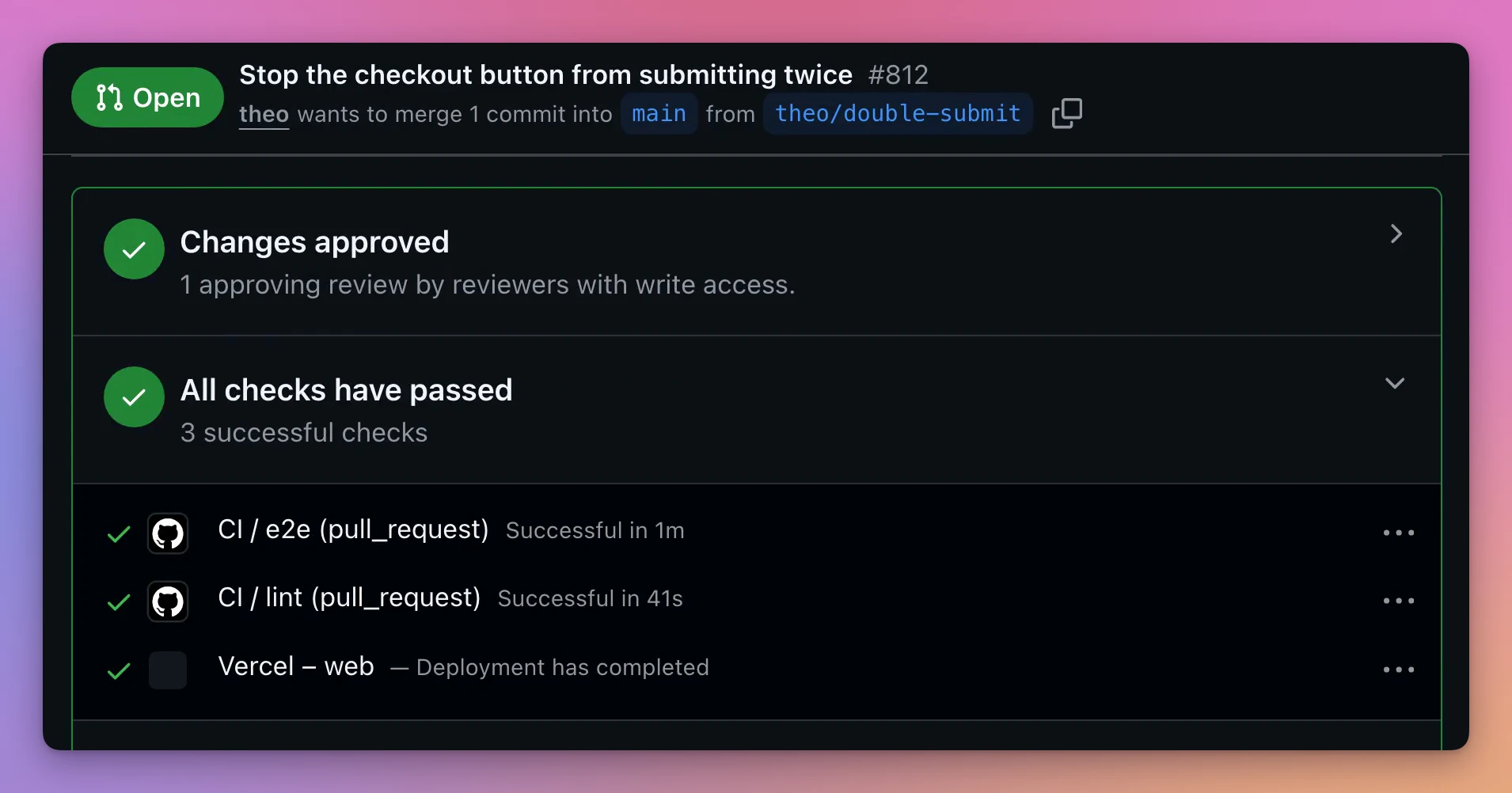
Pull request #812 has an approval and three passing checks. These updates can appear in the Board thread. Vercel’s demo
Sometimes the next reader is a script. Board lets you define a schema for data attached to a message and validates the fields when someone posts it. For a build handoff I’d put the commit and artifact location in fields, and leave the instructions for reproducing the window bug in prose. That lets a script fetch the right build even if I change how I describe the bug.
What Vercel uses it for
Vercel built Board to track its own security agents, then rebuilt v0’s software factory on top of it. At launch, Vercel said the factory was merging more than half of v0’s pull requests. What interests me is what you’d have to get right to trust it with that much everyday work. Someone needs to be able to open a pull request, find the request that started it, and see who reviewed the change. Vercel’s account of building Board
Permissions start to matter even on a much smaller project. A reviewer needs to read the report and post findings. You can grant a Vercel project exactly those actions in a given channel and limit the grant to a particular environment. With Vercel Sandbox, you can give a worker access to those Board routes without putting the Board credential inside the sandbox. Board records which actor performed each action. Board access controls
One small detail is worth knowing if you’re trying this locally. Giving an agent a name with --as tester tells you who wrote the message. When it uses your login, it still acts with your access. Give two concurrent workers separate names so you can follow their work. Use grants when you want to change what a worker can do. Vercel’s onboarding guide
Rauch sees the same idea extending to scientific research, where many agents can contribute to a problem after a person poses the initial question. The part of that vision I buy is that the workers can change. A Codex session today can leave a finding for a Claude Code session tomorrow. Neither needs to understand the other’s chat history. They need an agreed place to look and a result detailed enough to use. I’d want that even if I ran both sessions myself.
The first thing I would try
I’d start with the handoff to the test VM and leave the rest of my release process alone. If you want to follow along with your own project, start with a current Vercel CLI, signed in. Check which board you’re connected to and which identity you’re using.
vercel board whoami --jsonVercel provides a skill you can install with npx skills add vercel/board --skill board. You can give the agent the getting-started guide and ask it to join your board. Once there’s work on it, you can open a live viewer from the terminal. Join a board with your agent
npx @vercel/board inspectFor the first run, my test is pretty specific. Close the build agent’s chat. Give the tester the thread, then see whether it can find the build and reproduce the Settings issue. If it has to ask me where the app is, I know which detail belongs in the next handoff. If it comes back with the commit it tested and a screenshot of what happened on the second keypress, I can open the thread and get straight to the fix.
Want me to talk about your product? You can sponsor this site.
Related posts about ai: