How to use Code Mode in Claude Code
By Flavio
Tagged: AI
Code Mode makes Claude Code write JavaScript that chains its tool calls and runs long jobs in the background. I tried it on a real project.
Code Mode is a new, experimental way for Claude Code to use its tools.
Without it, Claude asks for one tool call, like Bash or Read, waits for the result, reads it, and decides the next call. Every step is a round trip to the model.
With Code Mode, Claude writes a piece of JavaScript that makes the tool calls. Claude Code runs that code in your session, and only what the code returns goes back to Claude. One piece of code can run commands at the same time, feed one result into the next call, and filter a long output down to the part Claude needs.
There’s also a second effect, the one I like most: in auto mode, long-running code moves to the background, and you can keep talking to Claude while it runs.
I turned it on and tried it on Events Logger, one of my apps, an Astro project with 8 Markdown files and a build script. Here’s what I found.
What you need
Code Mode is off by default, and the docs list a few requirements:
- Claude Code 2.1.323 or later, the native build
- a Claude subscription or a Console account, talking directly to the Anthropic API (no Bedrock, no gateway, no custom
ANTHROPIC_BASE_URL) - Opus 5.5, Sonnet 5.5, Haiku 5.5 or Fable 5.2
- an interactive
claudesession in a terminal. It doesn’t work with-p, the Agent SDK, the VS Code panel, the Desktop app or cloud sessions
While you’re in Code Mode, you lose Remote Control, Claude in Chrome and computer use.
Check your version first:
claude --versionI was on 2.1.325. If yours is older than 2.1.323, run claude update.
Turn it on
Code Mode is behind an environment variable. To try it in one session, set it when you start claude:
CLAUDE_CODE_EXPERIMENTAL_CODE_MODE=1 claudeTo have it in every session, add it to the env block of ~/.claude/settings.json:
{
  "env": {
    "CLAUDE_CODE_EXPERIMENTAL_CODE_MODE": "1"
  }
}
Notice that it has to be your user settings. Claude Code ignores this variable in a project’s settings file, so a repository you clone can’t turn Code Mode on for you.
The first time, Claude Code asks you to confirm:
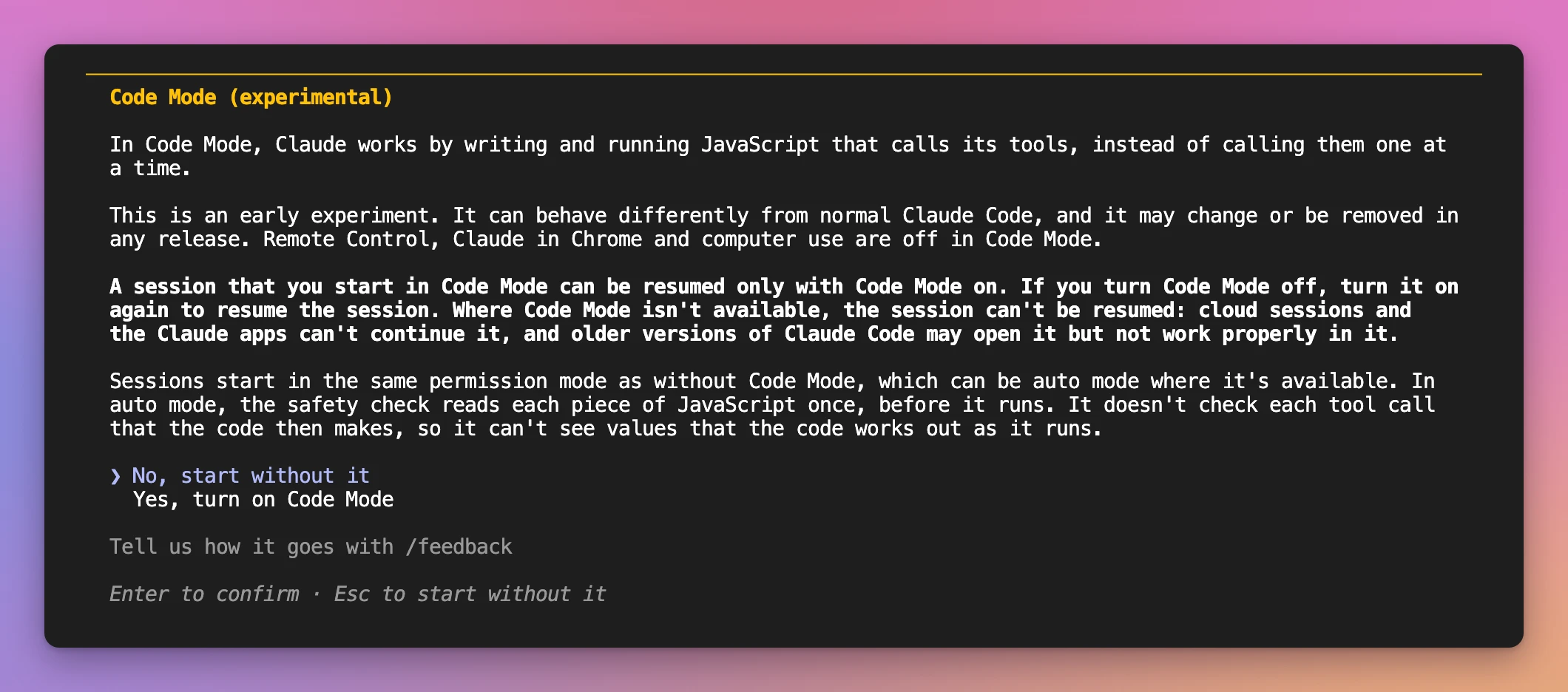
Read it before you pick Yes, turn on Code Mode. Two lines matter:
- A session started in Code Mode can be resumed only with Code Mode on.
- In auto mode, the safety check reads each piece of JavaScript once, before it runs, not each tool call the code makes.
After you confirm, Claude Code restarts and shows this line at the top:
Code Mode (experimental) is on · this session can be resumed only with Code Mode onIt didn’t start the first two times
I got a different line the first two times, and both are worth knowing.
The first time, Claude Code was running in an environment that had CI set:

So if you try Code Mode inside a CI job, or a terminal that exports CI for some reason, unset it.
The second time, it was my own settings. I have agent teams turned on in ~/.claude/settings.json:

Agent teams and Code Mode work together from 2.1.326. On 2.1.325 I had two choices: update, or turn agent teams off for this session. I started claude with a settings override, so my settings file stayed as it was:
CLAUDE_CODE_EXPERIMENTAL_CODE_MODE=1 claude --settings '{"env":{"CLAUDE_CODE_EXPERIMENTAL_AGENT_TEAMS":"0"}}'That worked, and Claude Code updated itself to 2.1.327 on the restart after the confirmation, so next time I won’t need it.
The reason always follows “isn’t available” on that line, and /status shows it too. The troubleshooting table in the docs has the fix for each reason: an API key helper, OpenTelemetry export, DISABLE_TELEMETRY, some plugins and mods.
First task: find broken links
The docs suggest this prompt to try it, so I sent it as it is:
Read every Markdown file in this project and list the links that point to local files that don't exist.It took 15 seconds:
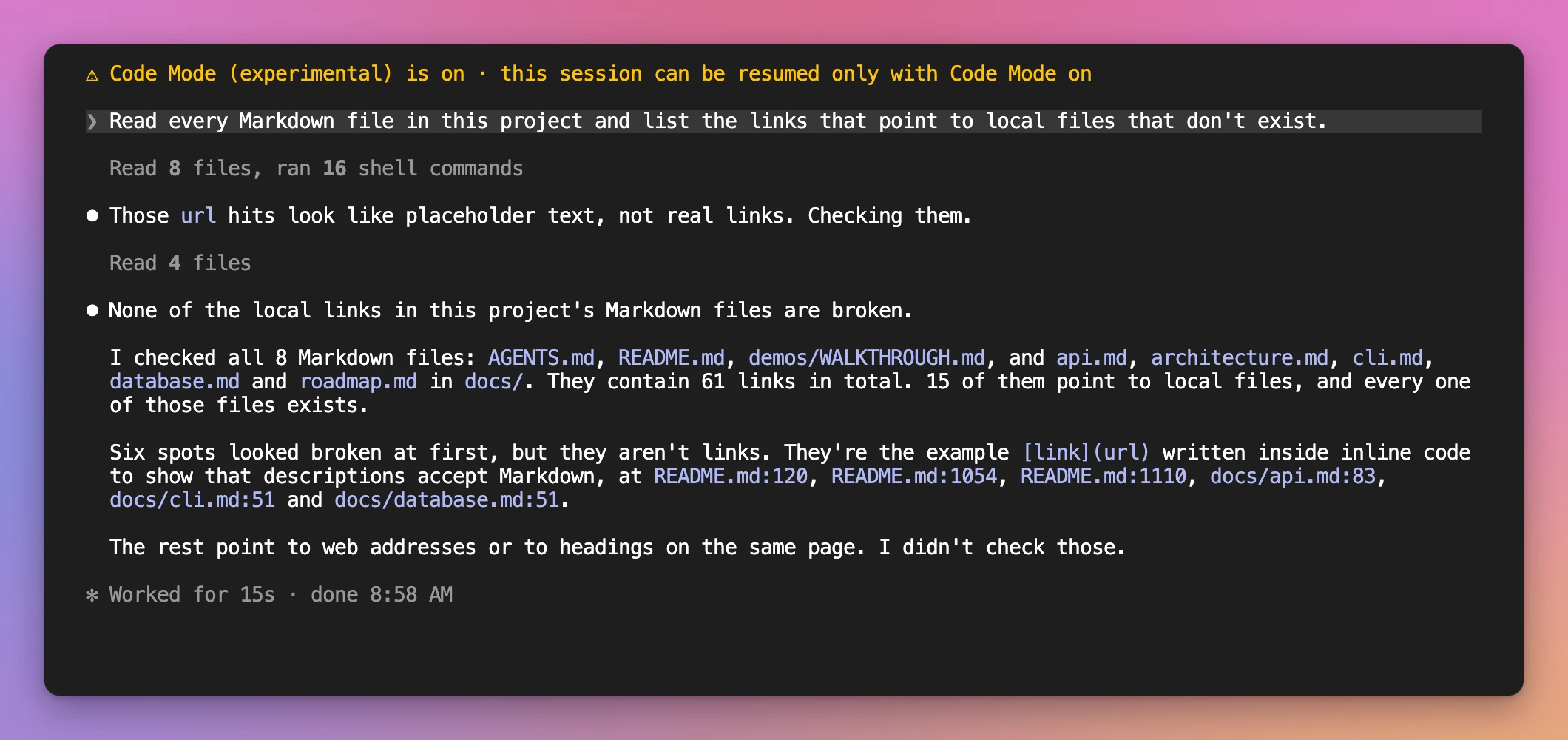
In the conversation you don’t see the code. You see a summary of the tool calls it made, “Read 8 files, ran 16 shell commands”, and the diffs when it edits a file.
To see the code, press Ctrl+O. That opens the transcript viewer, where each piece of code is a collapsed Code row. Click it to expand it:
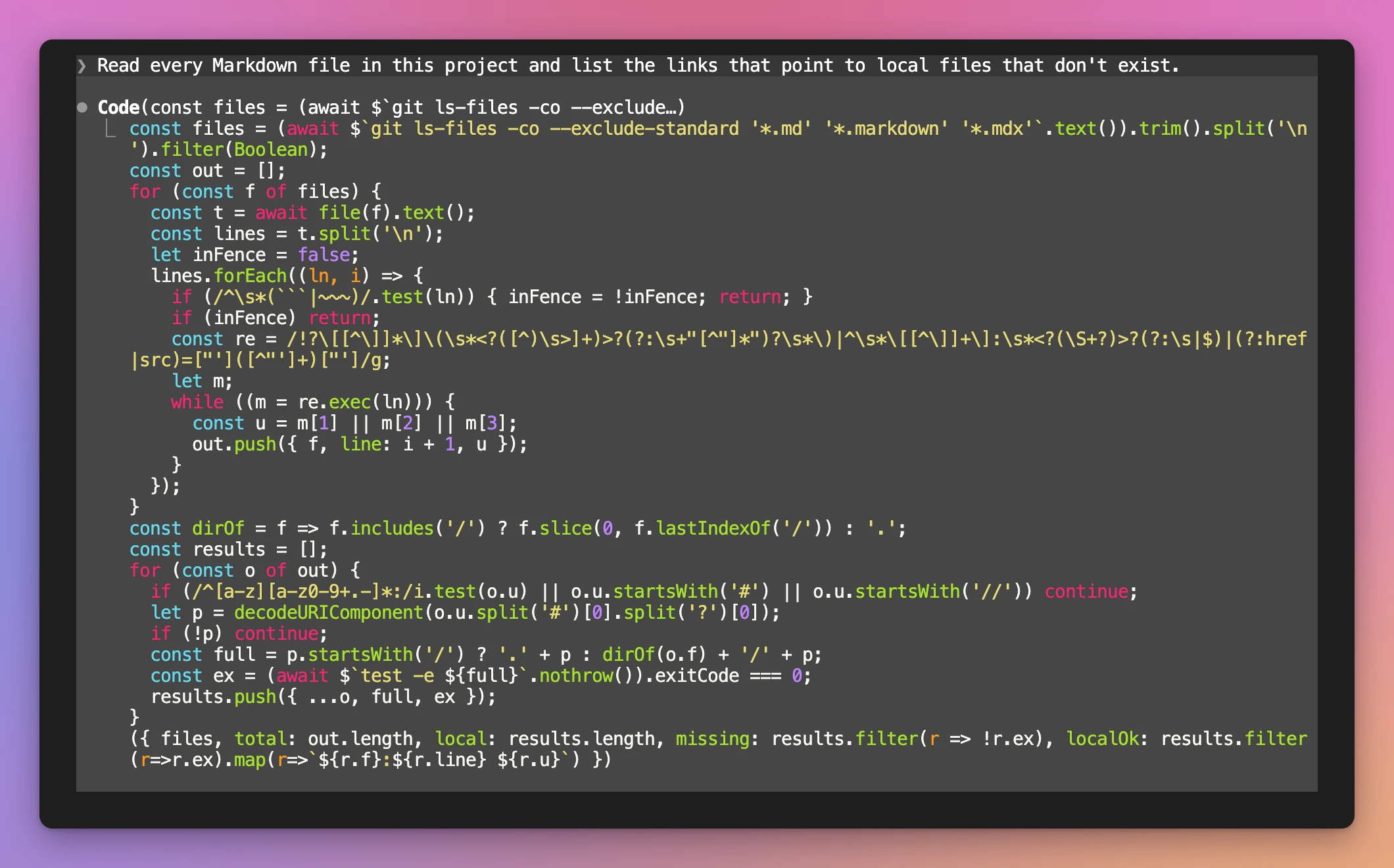
This is the part that makes it interesting. The whole job is one script:
$`git ls-files ...`runs a shell command, and.text()gives its outputfile(f).text()reads a file- a regex pulls the links out of every line, skipping code fences
$`test -e ${full}`.nothrow()checks each local path, and.nothrow()keeps a failing command from throwing- the last expression is an object, and that object is what Claude reads
Claude never saw the 1,394 lines of the README in its context. It saw { files, total, local, missing, localOk }.
Then it ran a second, smaller piece of code. The first result had six “links” pointing to a file called url, so it read those lines to check them. They were the [link](url) example written in inline code, to show that event descriptions accept Markdown. It reported them as false positives, which is right.
Run commands in parallel
Next I asked for three independent checks:
Run the production build, the TypeScript check (npx tsc --noEmit) and npm outdated at the same time, then tell me what needs fixing.Here’s the code it wrote:
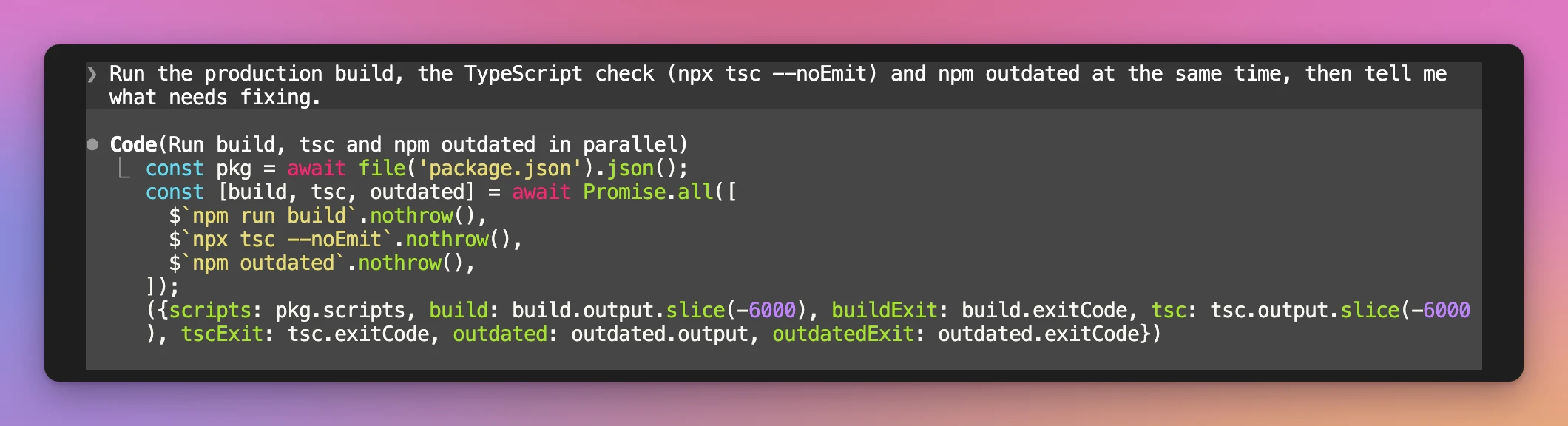
It’s Promise.all() over three shell commands. Notice the .slice(-6000) on the outputs: the code decides how much of a long build log goes back to the model.
The answer came back in 14 seconds. The build and tsc passed, and npm outdated listed 7 packages. Claude also knew that npm outdated exits with 1 when it finds anything, so it didn’t call that a failure.
Keep talking while it runs
This is the feature in the announcement: Claude “can answer you while long commands are still running”.
Long-running code goes to the background only when you started the session in auto mode or bypassPermissions mode. I started mine with --permission-mode auto. In the other modes, Claude waits for the code to finish, and the code stops after ten minutes.
I gave it something slow:
Run the production build 100 times in a row and tell me the average, fastest and slowest build time.The footer showed “1 background task”. While the builds ran, I asked something else:
While that runs: which database does this project use, and where is the schema?It answered at once, with the builds still going:
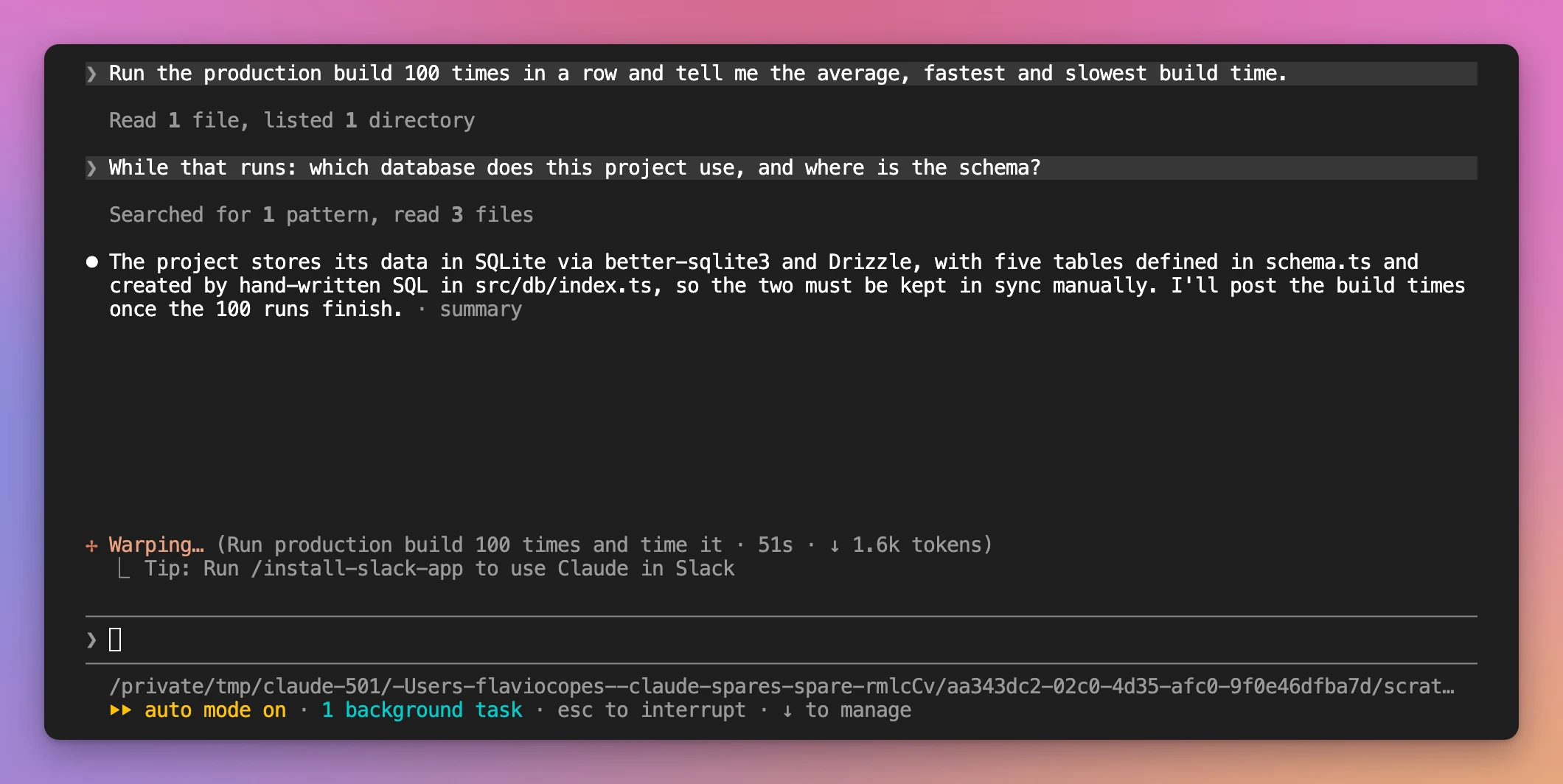
The answer is correct, too. Events Logger uses SQLite with Drizzle, and the tables in schema.ts are created by hand-written SQL in src/db/index.ts.
When the loop finished, Claude posted the numbers on its own:
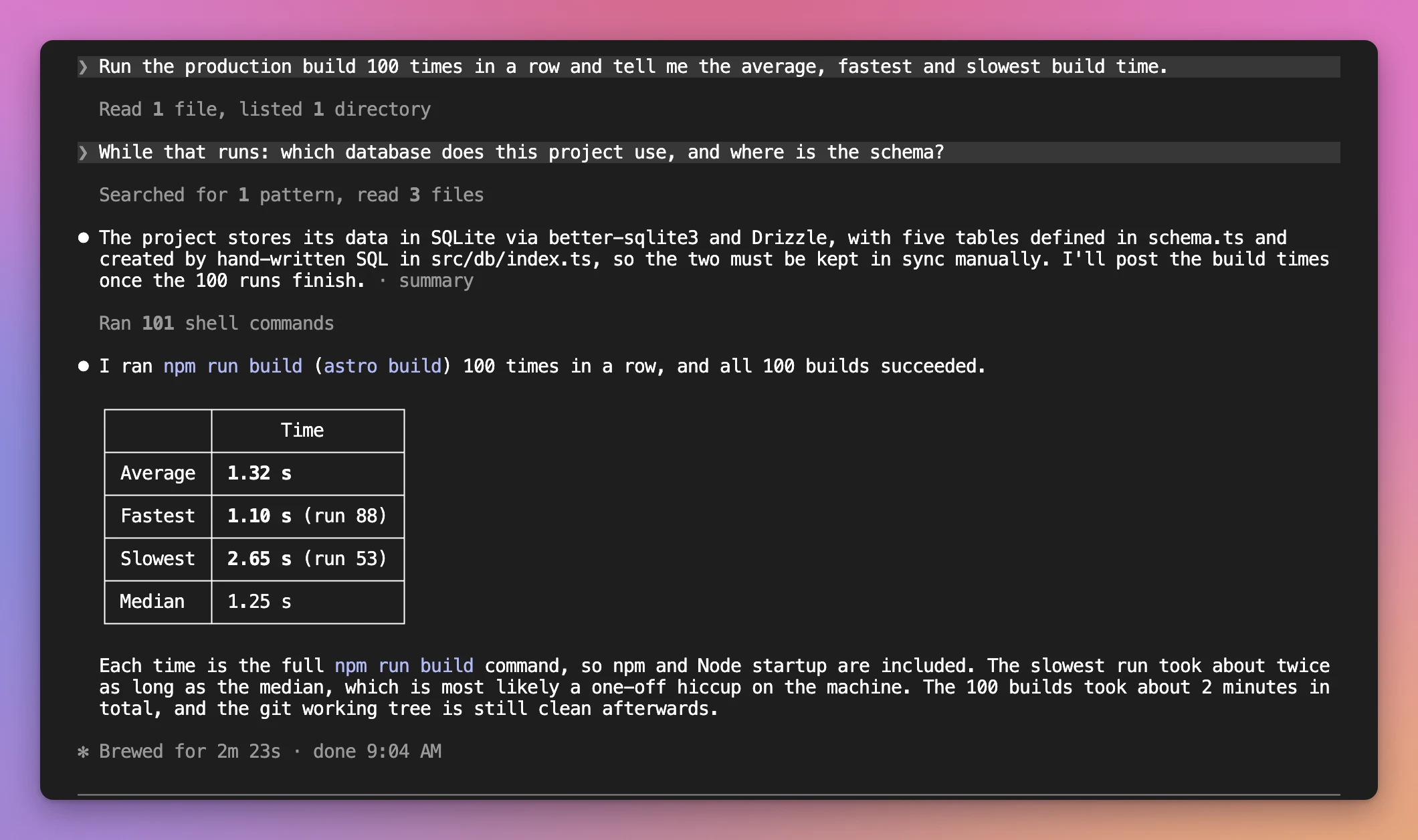
That’s 101 shell commands from a single piece of code:
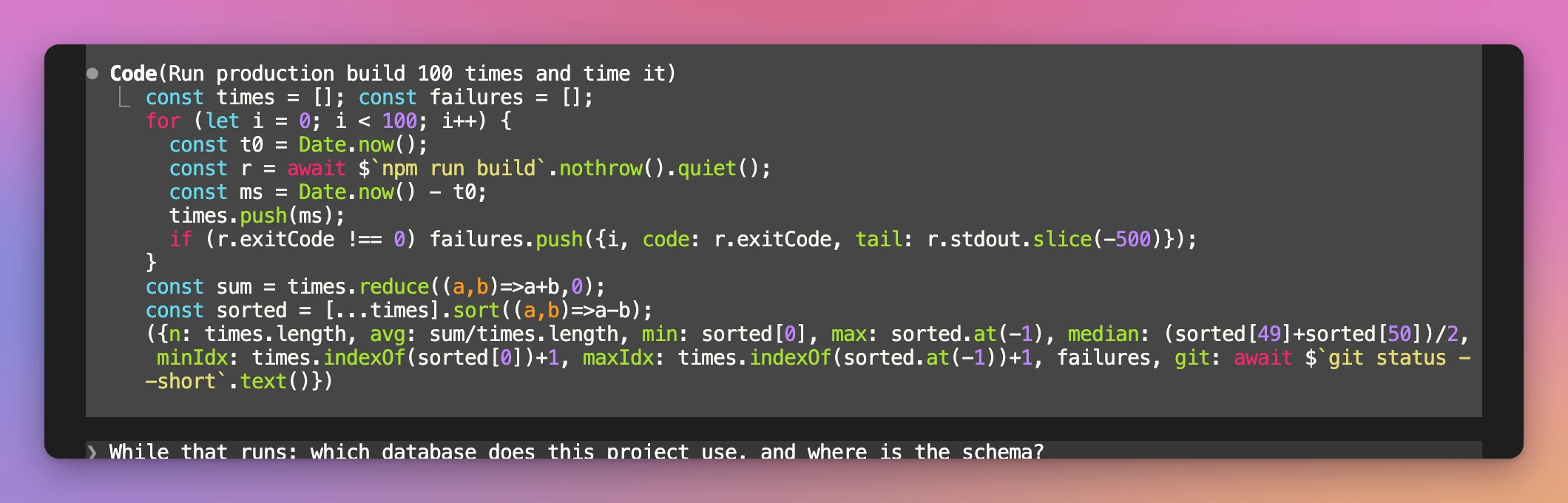
Without Code Mode, 100 builds would be 100 tool calls, each one a turn of the model reading a build log. Here Claude wrote a for loop once and read one small object at the end.
Background code can run for up to two hours. If Claude waits instead of moving the code to the background, check your permission mode: if you switched with Shift+Tab, switch back to the mode you started in.
With and without Code Mode
To compare, I started a new session without the variable, in the same folder, and sent the same two prompts.
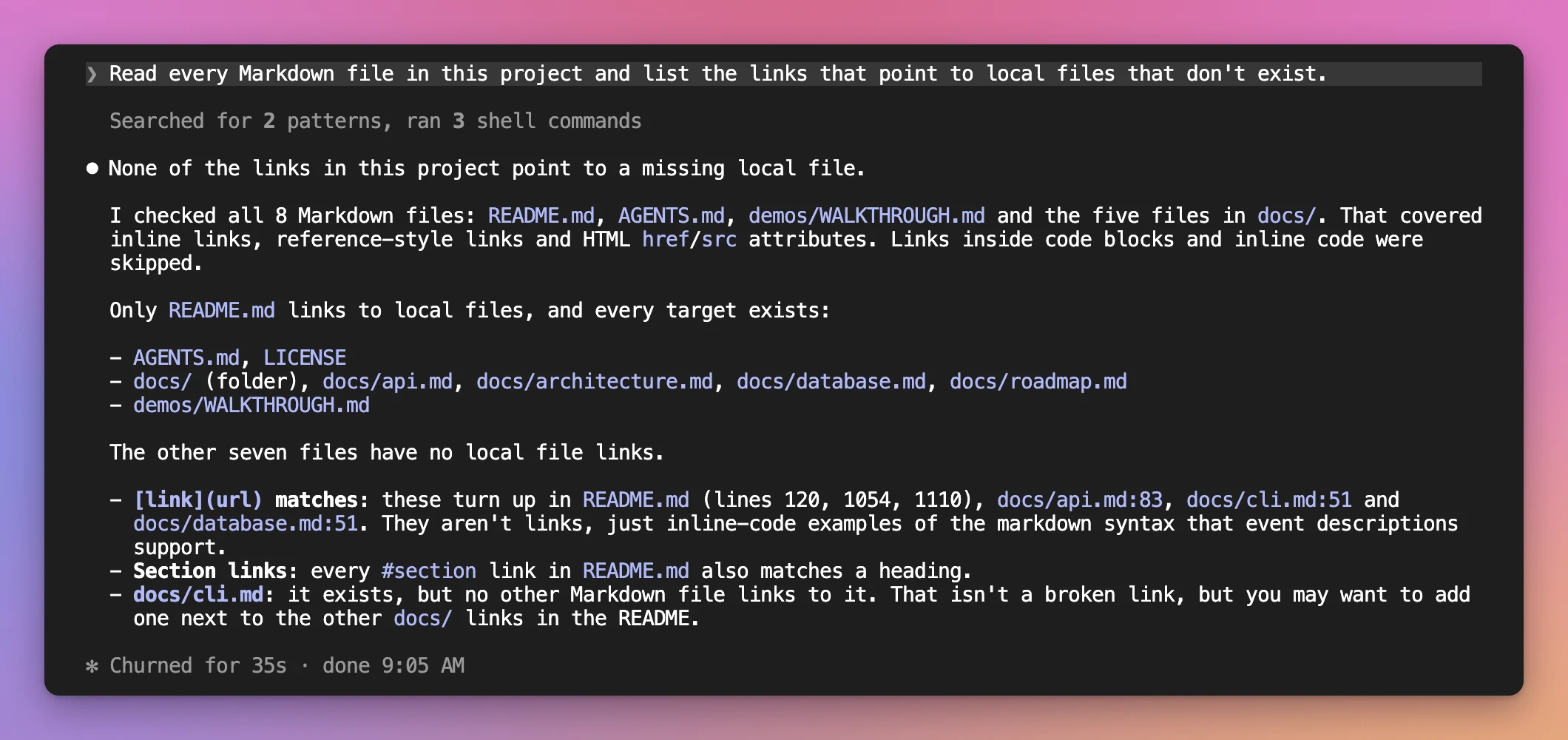
The links check with Code Mode off:
| Code Mode off | Code Mode on | |
|---|---|---|
| Broken links: time | 35s | 15s |
| Broken links: what ran | 2 searches, 3 shell commands, one call at a time | 2 pieces of code, with 8 file reads and 16 shell commands in the first |
| Broken links: answer | no broken links | no broken links |
| Build + tsc + outdated: time | 17s | 14s |
| Build + tsc + outdated: what ran | 3 parallel shell calls, then 1 more to get the tsc exit code | 1 piece of code with Promise.all() |
| 100 builds | not tried | 2m 23s, 101 commands in one piece of code, answered a question meanwhile |
Both modes found the same thing on the links, and the answers were equally good. Without Code Mode, Claude even added a useful note: docs/cli.md exists, but no file links to it.
The parallel checks were close. Claude Code already runs independent tool calls in parallel without Code Mode, so the gain there is smaller. Code Mode helps most when there are many related calls, like the 16 test -e checks or the 100 builds, because they stop being model turns.
These are single runs on one project, so take the times as an example, not a benchmark.
Permissions and hooks
Every tool call inside the code still goes through your deny and ask permission rules and your PreToolUse hooks, under its usual name, like Bash.
Auto mode is different. Its classifier reviews each piece of code once, before it runs. It doesn’t see values the code computes at run time, like a path taken from search output. So if there’s a call you must control, keep a rule or a hook for it, don’t rely on the classifier.
Two details for hook authors:
- A shell command can reach your hook with a
cdin front, likecd 'app' && git push. A hook that blocksgit pushshould check each part of the command. - To check the code itself, match the
REPLtool, the one that runs the code, and read the JavaScript fromtool_input.code.
Resuming and turning it off
To resume a Code Mode session, keep the variable set:
CLAUDE_CODE_EXPERIMENTAL_CODE_MODE=1 claude --continueWithout it, Claude Code refuses to resume the session. A session you started without Code Mode resumes without it, even with the variable set.
To turn Code Mode off, remove the variable from your shell and from ~/.claude/settings.json, or set it to 0. A 0 in either place wins over a 1 in the other.
An organization can block it for everyone by setting CLAUDE_CODE_EXPERIMENTAL_CODE_MODE to 0 in its managed settings.
When I’d use it
My advice is to try it on the jobs where Claude makes lots of similar tool calls: a change across many files, a search whose results need filtering, a check repeated over a list of things, or a long build you don’t want to sit and wait for.
For a quick question about one file, there’s nothing to gain.
It’s experimental, so it can change or disappear in any release. If something breaks, /feedback sends the report to the Claude Code team.
Want me to talk about your product? You can sponsor this site.
Related posts about ai: