
An app by Flavio
Clean Client ZIPs
Create one verified ZIP per folder, leave out Finder housekeeping files, and keep intentional hidden files on Mac.
Buy Clean Client ZIPs · $20One-time purchase. Plus tax where it applies.
macOS 14 or later · Apple silicon and Intel
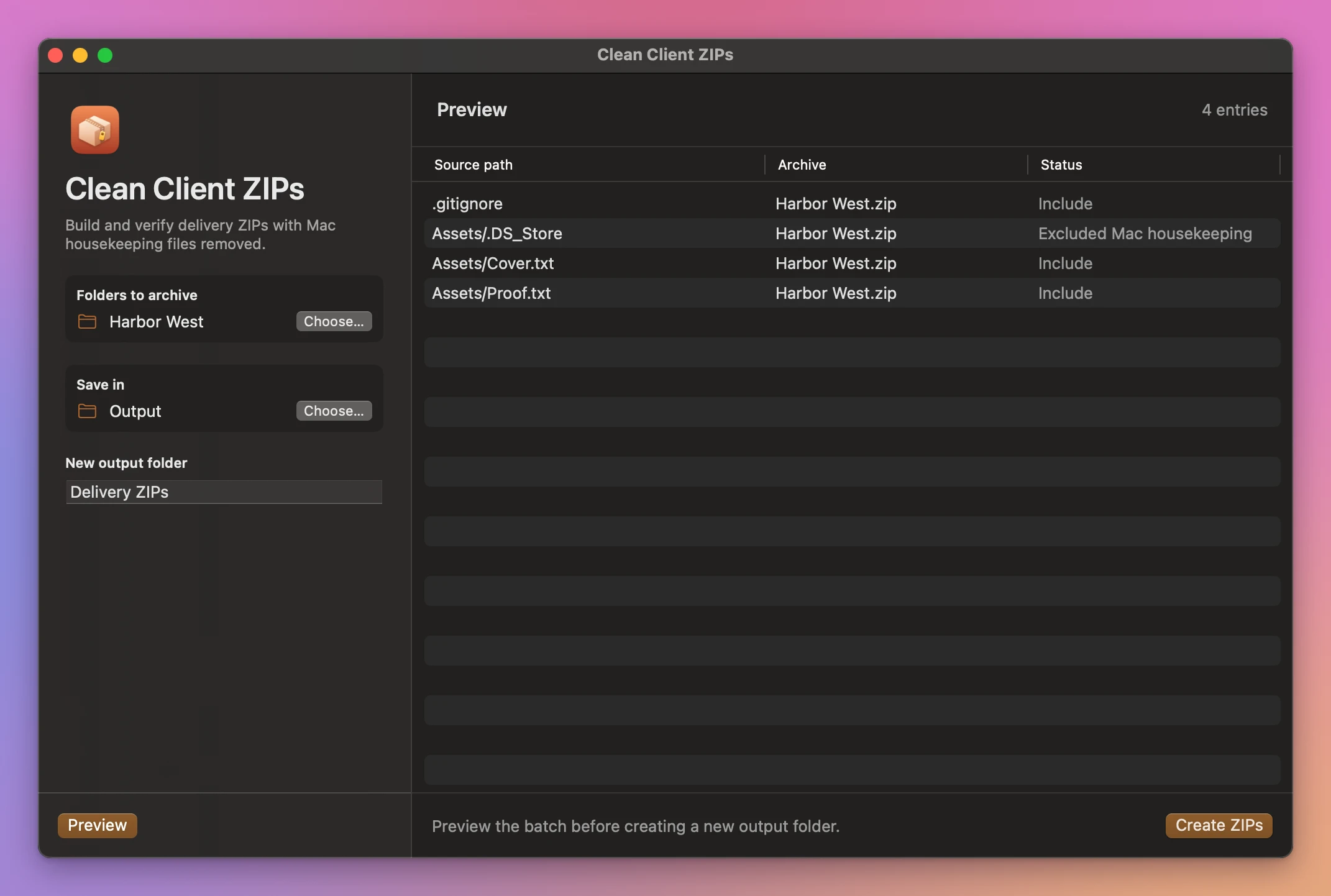
The Harbor West folder is ready to send. Finder has added a .DS_Store file and a metadata sidecar. The .gitignore in the delivery belongs there.
Clean Client ZIPs shows what each archive will contain. It excludes common Mac housekeeping files, keeps the deliberate dotfiles, and checks each completed archive.
Who it’s for
- Designers and agencies. You send final files to a client who opens them on Windows. A
__MACOSXfolder and a pile of._files in the ZIP make you look careless, and the client asks what they are. - Photographers. You deliver a gallery as a ZIP per shoot. Make a ZIP for each shoot folder in one go, with nothing in them except the photos.
- Developers. You hand over a project that needs its
.gitignoreor.env.example, but not the.DS_Storefiles Finder scattered in every folder. - Freelancers who submit work to portals. Upload systems for print shops, publishers and marketplaces sometimes reject archives with unexpected files, or count them as part of the delivery.
- Teachers. You collect students’ work in folders and send each one back as its own ZIP.
Why not use Finder’s Compress
Finder’s Compress puts everything in the archive, including the .DS_Store files and, when files carry extra Mac metadata, a __MACOSX folder. Your client sees those as junk. And Finder makes one archive at a time, so ten client folders means ten clicks and ten renames.
Clean Client ZIPs leaves that housekeeping out, keeps the hidden files you put there on purpose, and tests each ZIP before you send it.
Preview the exclusions
Pick one or more folders. Preview shows which files will be included and which Mac housekeeping entries will be left out. The app keeps the enclosing folder and preserves empty folders.
Make one ZIP per folder
Click Create ZIPs. A folder called Harbor West becomes Harbor West.zip. The app tests each archive before the delivery folder appears. Your source folders stay in place.
Buy Clean Client ZIPs
$20 plus tax where it applies, paid once. Download the app from the purchase page or your Creem receipt.
Unzip the download and drag the app to Applications. It runs on macOS 14 Sonoma or later on Apple silicon and Intel Macs. File processing happens on your Mac.
The app checks for updates once a day. When a new version is ready, click Install and Relaunch. To check anytime, choose Clean Client ZIPs → Check for Updates….