Why does a DJI drone split one flight into several video files?
By Flavio
You recorded one flight and the drone's card has three videos for it, each with an .SRT and an .LRF file next to it. Here's why a DJI drone cuts a long video into parts, what the parts look like in the Finder, and how to tell they belong together.
You pressed record once, flew for almost five minutes, and landed. On the card there are three videos for that flight, and the first one stops in the middle of it.
Nothing went wrong. Many DJI drones close the video file they’re writing when it reaches about 4 GB and go on in a new one, so a long flight ends up in several parts. Part 2 starts where part 1 stops. Put back in order, they’re the flight you recorded.
Why does the drone split the video?
Pilots on DJI’s own forum report the same thing on model after model: the parts come out a little under 4 GB each, and there’s no setting to turn it off.
It’s not the card that forces it. The DJI Mini 4 Pro manual lists exFAT as the card’s file system, and exFAT holds files much bigger than 4 GB. The drone splits anyway.
How long a part lasts depends on the video settings. The higher the bitrate, the faster the drone fills 4 GB. The Mini 4 Pro manual gives 150 Mbps as its highest video bitrate, and at that rate 4 GB fills in under four minutes. A lower-quality setting gives you longer parts.
What does it look like on the card?
I tried this on a stand-in card: a disk image formatted like a drone’s card, named NO NAME, with a DCIM/DJI_001 folder of made-up clips named the way a newer DJI drone names them, each with its .SRT and .LRF file. To keep it small, its parts are cut at 2 minutes instead of 4 GB. Everything else (the names, the order, the files next to each video) is a drone’s.
Open the card in the Finder, then DCIM, then DJI_001, and choose View > as List:
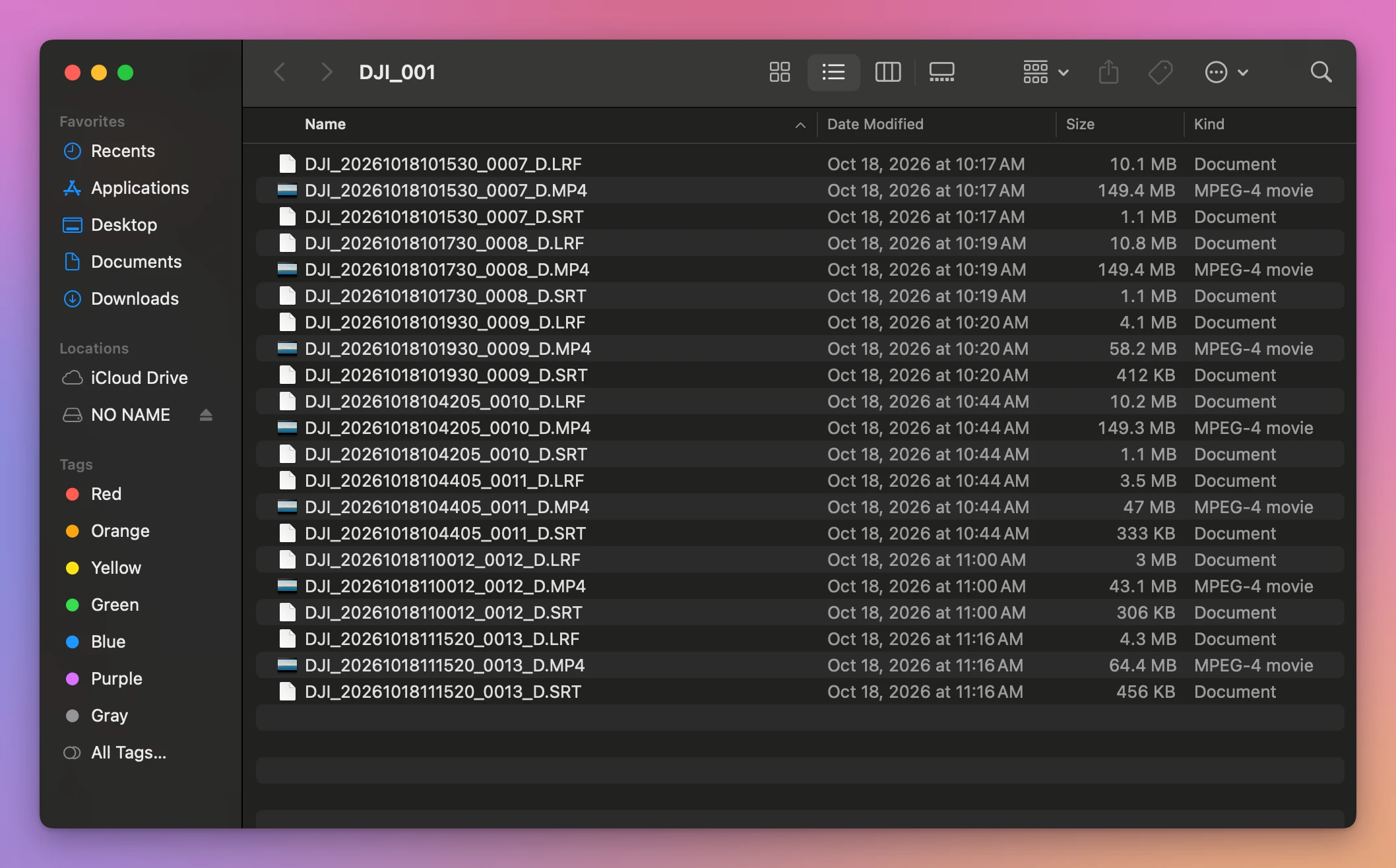
The card has 21 files, but only 7 are videos. Every .MP4 has a .SRT file, the flight data, and an .LRF file, a small low-quality copy, with the same name.
Here are the 7 videos, with the time in each name and each video’s length:
| File | Starts at (from its name) | Size | Length |
|---|---|---|---|
DJI_20261018101530_0007_D.MP4 | 10:15:30 | 149.4 MB | 2 min |
DJI_20261018101730_0008_D.MP4 | 10:17:30 | 149.4 MB | 2 min |
DJI_20261018101930_0009_D.MP4 | 10:19:30 | 58.2 MB | 47 sec |
DJI_20261018104205_0010_D.MP4 | 10:42:05 | 149.3 MB | 2 min |
DJI_20261018104405_0011_D.MP4 | 10:44:05 | 47 MB | 38 sec |
DJI_20261018110012_0012_D.MP4 | 11:00:12 | 43.1 MB | 35 sec |
DJI_20261018111520_0013_D.MP4 | 11:15:20 | 64.4 MB | 52 sec |
The first three are one flight, the next two are another, and the last two are short clips the drone didn’t need to split.
How do I know which files are one flight?
This is where a drone is harder than a GoPro. A GoPro gives every chapter of a recording the same number. A DJI drone gives each part a name of its own, with the date and time that part started and the next number of a counter. Nothing in DJI_20261018101730_0008_D.MP4 says it continues ..._0007_D.MP4.
Three hints work together:
- The times in the names. Part 1 starts at 10:15:30 and lasts 2 minutes. Part 2 starts at 10:17:30, exactly when part 1 ended. The single clip
..._0012_Dstarts at 11:00:12, long after..._0011_Dended at 10:44:43, so it’s a separate video. - The numbers. The parts of a flight have numbers that follow each other,
0007,0008,0009. - The sizes. Every part but the last is about the same size, the size the drone stops at. On a real card that’s close to 4 GB, then the last part is smaller.
Do I lose anything between the parts?
Played one after the other, the parts are the flight. Played one by one, each stops at its end and you have to open the next, and the .SRT file of each part starts its times from zero again. That’s what makes people look for a way to put them back into one video.
Let an app work it out for you
Joiner for DJI is a Mac app I made that finds the parts of each flight on the card and joins them into one video. It’s not made by, affiliated with or endorsed by DJI. It costs $20, paid once.
Put the card in, click Scan NO NAME, and each flight shows up as one row. Since the names don’t say which files go together, it checks the numbers, the video settings and whether each part starts where the one before ended, then asks you to confirm. Here’s the stand-in card:
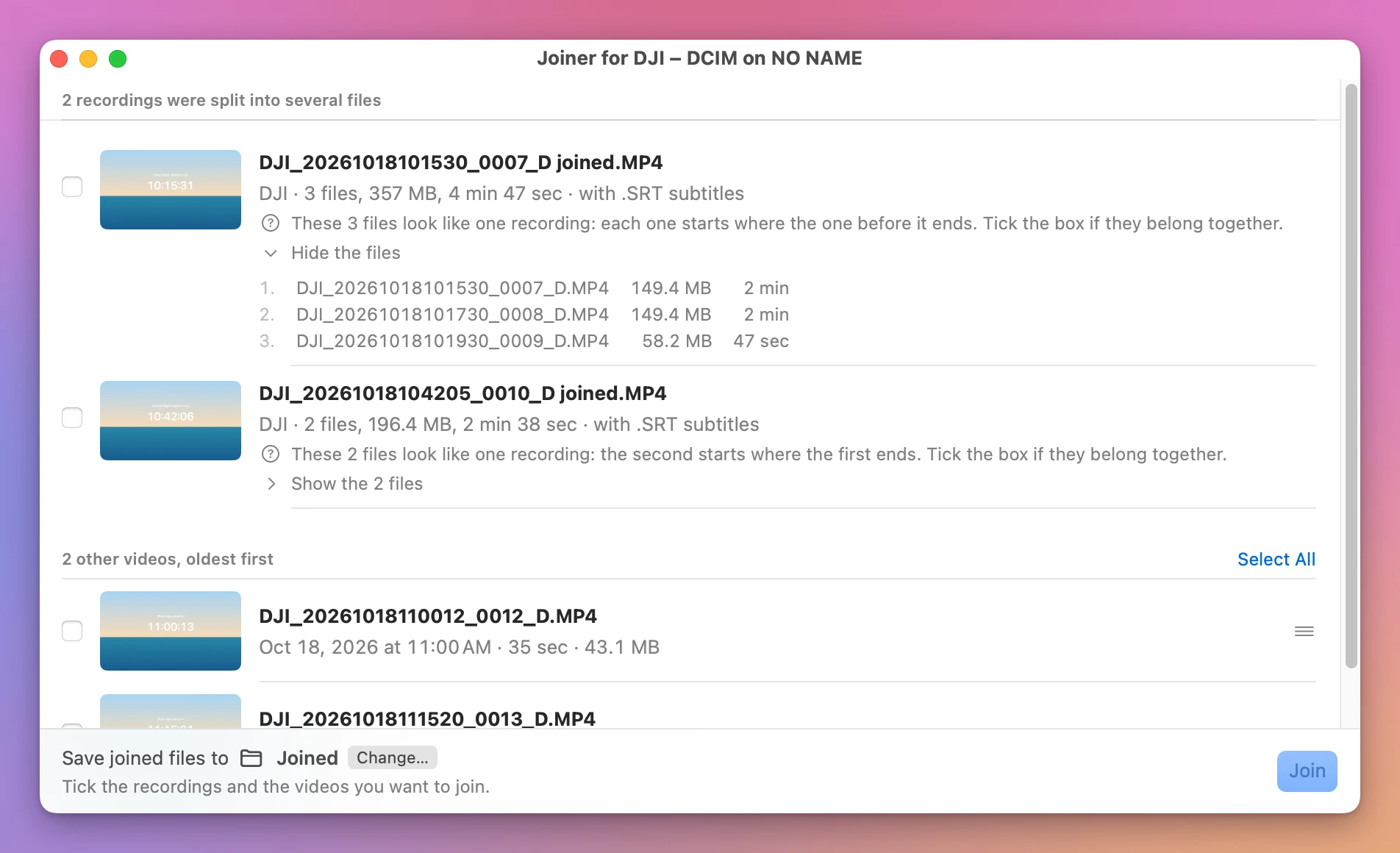
It found the two flights and listed the two short clips under 2 other videos, oldest first. The .SRT and .LRF files aren’t listed as videos. The row says “with .SRT subtitles” instead, because the app merges them too.
I ticked both flights and clicked Join 2 Recordings. In less than 15 seconds both rows said Joined and checked: DJI_20261018101530_0007_D joined.MP4 (357 MB) and DJI_20261018104205_0010_D joined.MP4 (196.4 MB), each with a joined .SRT file next to it. The stand-in card is a file on the Mac’s own disk, so a real card in a card reader takes longer. The parts stayed on the card, untouched.
Get Joiner for DJI
Put the parts your DJI drone split a flight into back together, into one video on your Mac, straight from the card, with the .SRT flight data merged to match. Nothing loses quality, and the small .LRF files can go with the originals.
See Joiner for DJI → · Read the docs · $20. See the app page for tax details.
Want me to talk about your product? You can sponsor this site.