Why does a GoPro split a long video into several files, and which ones belong together?
By Flavio
You recorded once and the card has three videos. Here's why a GoPro cuts a long recording into chapters, how to read the file names to see which chapters are one recording, and how to check it in the Finder.
You pressed record once, rode for half an hour, pressed stop. On the card there are three videos for it, and the first one ends in the middle of the ride.
Nothing went wrong. A GoPro cuts a long recording into several files, which GoPro calls chapters, each one about 4 GB, or about 12 GB on the newer cameras. Chapter 2 starts where chapter 1 stops, so together they’re the whole recording. The file names tell you which chapters go together: they end with the same four digits.
Why does it split the video?
That’s how GoPro cameras work, and you can’t turn it off. When the file it’s writing reaches a set size, the camera closes it and goes on in a new one.
GoPro does it on purpose. If a crash or a jolt damages the file the camera is writing, you lose one chapter and not the whole recording.
The size depends on the camera and on the card:
| Camera | Card | A chapter is about |
|---|---|---|
| HERO11 Black, HERO12 Black, HERO13 Black | 64 GB or bigger | 12 GB |
| HERO11 Black, HERO12 Black, HERO13 Black | 32 GB or smaller | 4 GB |
| HERO5 Black to HERO10 Black | Any size | 4 GB |
How many minutes fit in a chapter depends on the settings. The higher the resolution and frame rate, the faster the camera fills a chapter, so a 5K recording splits sooner than a 1080p one. For a 4 GB chapter, GoPro gives about 5 minutes at 5K and 30 frames per second, and about 7 and a half minutes at 1080p and 60. For a 12 GB chapter it’s about 15 and 25 minutes.
The numbers are from GoPro’s page about chapters.
How do I know which files are one recording?
Look at the names. A GoPro name has eight characters before .MP4:
GX(orGH): a video from the camera.01: the chapter number. The first chapter is01, the next02, and so on.0141: the recording number. Every chapter of one recording has the same one.
So GX010141.MP4, GX020141.MP4 and GX030141.MP4 are chapters 1, 2 and 3 of recording 0141. GX010143.MP4 is chapter 1 of another recording. If there’s no GX020143.MP4, recording 0143 was short enough to fit in one file.
What does it look like in the Finder?
I tried this on a stand-in card: a disk image formatted like a camera’s card, named NO NAME, with a DCIM/100GOPRO folder of made-up clips named the way a GoPro names them. To keep it small, its chapters are cut at 2 minutes instead of 4 GB. The names, the order and the small files next to the videos are a GoPro’s.
Open the card in the Finder, then DCIM, then 100GOPRO, and choose View > as List:
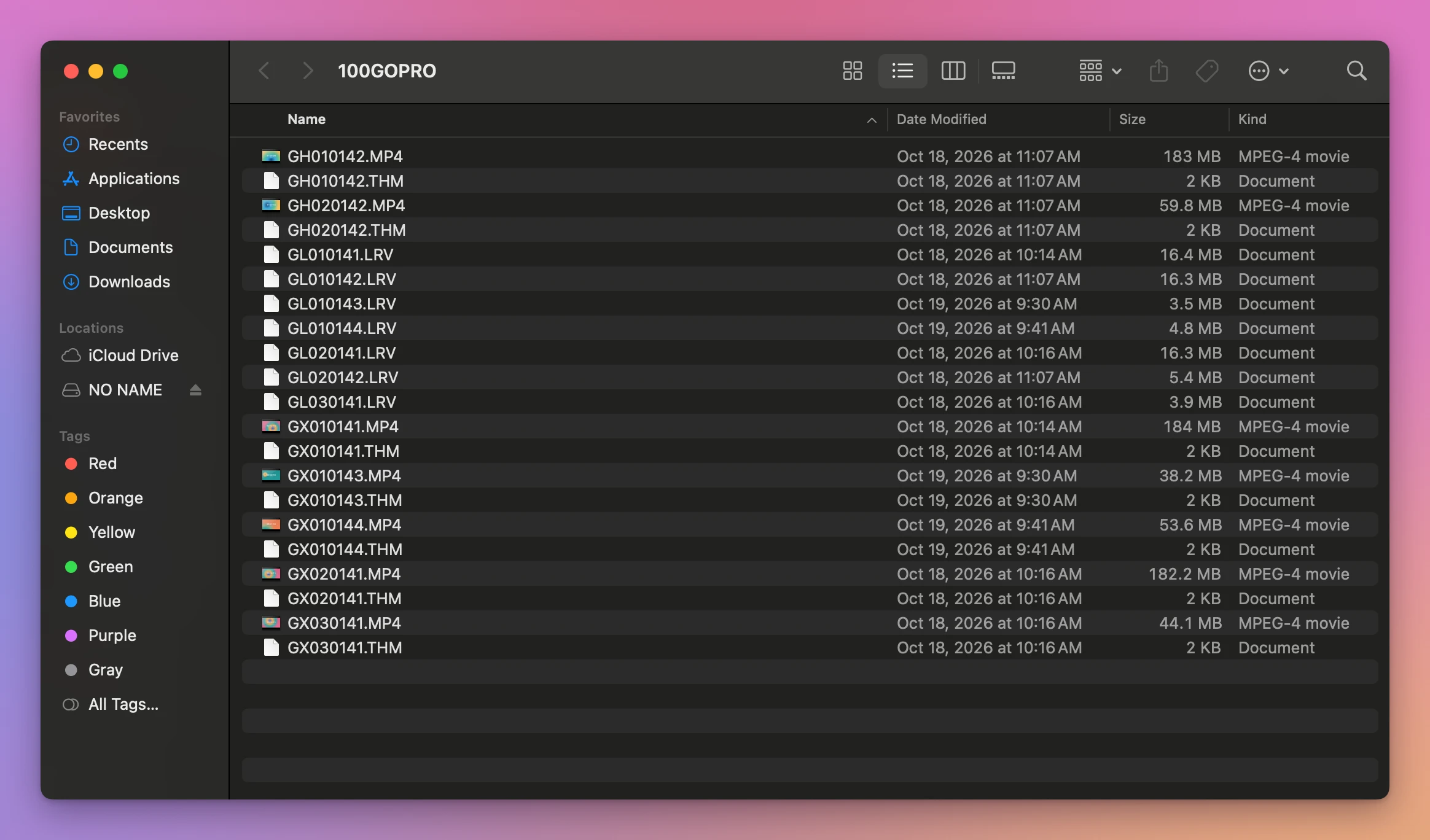
The card has 21 files, but only 7 are videos. The .THM and .LRV files are small extras the camera makes next to each video.
Sorted by name, the Finder doesn’t put a recording’s chapters together. GX010143.MP4 and GX010144.MP4, two other recordings, land between chapter 1 and chapter 2 of recording 0141. That’s because the chapter number comes before the recording number in the name.
Here are the videos on the stand-in card, grouped by recording number:
| Recording | Chapters | Size | Length | Date Modified |
|---|---|---|---|---|
| 0141 | GX010141.MP4 | 184 MB | 2 min 1 sec | Oct 18, 10:14 AM |
GX020141.MP4 | 182.2 MB | 2 min | Oct 18, 10:16 AM | |
GX030141.MP4 | 44.1 MB | 29 sec | Oct 18, 10:16 AM | |
| 0142 | GH010142.MP4 | 183 MB | 2 min 1 sec | Oct 18, 11:07 AM |
GH020142.MP4 | 59.8 MB | 39 sec | Oct 18, 11:07 AM | |
| 0143 | GX010143.MP4 | 38.2 MB | 25 sec | Oct 19, 9:30 AM |
| 0144 | GX010144.MP4 | 53.6 MB | 35 sec | Oct 19, 9:41 AM |
Two more hints that files belong together:
- The sizes. Every chapter but the last is about the same size, the size the camera stops at. The last one is smaller. On a real card that’s about 4 GB or about 12 GB, then less.
- The dates. Each chapter is saved when it’s full, so the Date Modified of the chapters of one recording follow each other, a chapter’s length apart.
A chapter on its own, like GX020150.MP4 with no GX010150.MP4 next to it, means the first chapter of that recording isn’t there: it was deleted, or not copied.
Do I lose anything between chapters?
No. GoPro writes chapter 2 right after chapter 1, without a gap. Played one after the other, they’re the recording you made.
Played one by one, though, each chapter stops at its end, and you have to open the next. That’s what makes people look for a way to put them back into one file.
Let an app read the names for you
Joiner for GoPro is a Mac app I made that does the grouping and the joining. It’s not made by, affiliated with or endorsed by GoPro. It costs $20, paid once.
Put the card in, click Scan NO NAME, and every recording that was split shows up as one row, already ticked. Show the 3 files lists its chapters in order, with their sizes and lengths. Here’s the stand-in card:
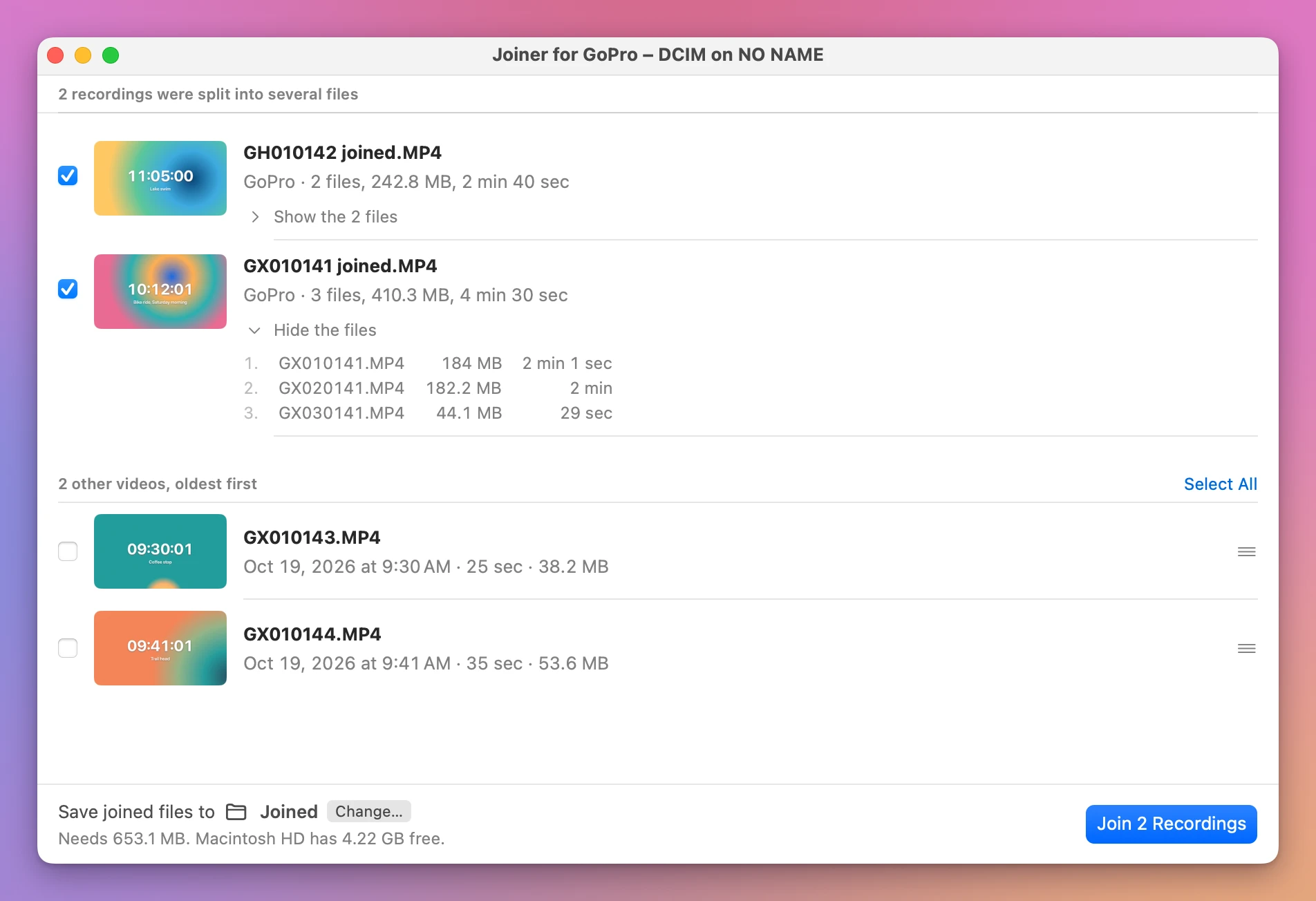
It found the two split recordings, and listed GX010143.MP4 and GX010144.MP4 on their own under 2 other videos, oldest first. The .THM and .LRV files aren’t listed: they’re not videos you’d want to join.
Join 2 Recordings made GX010141 joined.MP4 (410.4 MB, 4 min 30 sec) and GH010142 joined.MP4 (242.9 MB, 2 min 40 sec) in the folder I picked, one video per recording, with the chapters copied as they are. Both rows said Joined and checked about 5 seconds later. The stand-in card is a file on the Mac’s own disk, so a real card in a card reader takes longer. The chapters stayed on the card, untouched.
Get Joiner for GoPro
Put the chapters your GoPro split a long recording into back together, into one video on your Mac, straight from the card. Nothing loses quality, the GPS and motion data stay, and the small .THM and .LRV files can go with the originals.
See Joiner for GoPro → · Read the docs · $20. See the app page for tax details.
Want me to talk about your product? You can sponsor this site.