How to export or edit all the presenter notes in Keynote at once
By Flavio
Keynote can export or print every presenter note for reading, but edits happen one slide at a time. Here's the free way, and how to edit the whole script in one file and put it back into the deck.
You wrote your talk in Keynote’s presenter notes, one box under each slide. Now you want the whole script in one place, to read it top to bottom, fix it, send it to a co-speaker or a translator.
The short answer: Keynote can give you all the notes at once to read, in a PDF or on paper. It can’t take edited notes back. To edit them in one file and put them back into the right slides, you need Keynote Notes Editor, or a lot of copy and paste.
How do I get all the presenter notes out of Keynote?
Keynote has two ways to put every note on one page, both free:
- Export a PDF with the notes. Choose File › Export To › PDF, include the presenter notes, and save. You get each slide with its notes, in order.
- Print with the notes. Print the deck with its presenter notes, to paper or to a PDF.
Both are copies for reading. They’re good for rehearsing on the train or giving the script to someone who only needs to read it.
The outline view won’t help here. It shows the slide titles and the text on the slides, not the presenter notes.
How do I edit all the notes at once?
In Keynote, you don’t. Notes are edited one slide at a time, in the notes pane under the slide. There’s no view with all the notes, and no way to import notes from a file.
The free way is copy and paste. Copy each slide’s notes into a document, edit the document, then paste each part back into its slide. For a 40-slide talk that’s 80 trips between Keynote and your editor. It’s easy to paste into the wrong slide, and if someone moved a slide in the meantime, nothing tells you.
Edit the whole script in one file
Keynote Notes Editor is a Mac app I built for this. It costs $19, paid once, and it reads and writes the notes through Keynote, so you need Keynote installed.
The screenshots in this guide are from a test Mac, with made-up decks.
- Click Choose a Keynote Deck…, or drop the
.keyfile on the window. The first time, macOS asks you to let the app control Keynote. - The app lists every slide with its title, the start of its notes, the words and the speaking time.
- Under Notes file, pick Markdown or Plain text, then click Export Notes… and save the file.
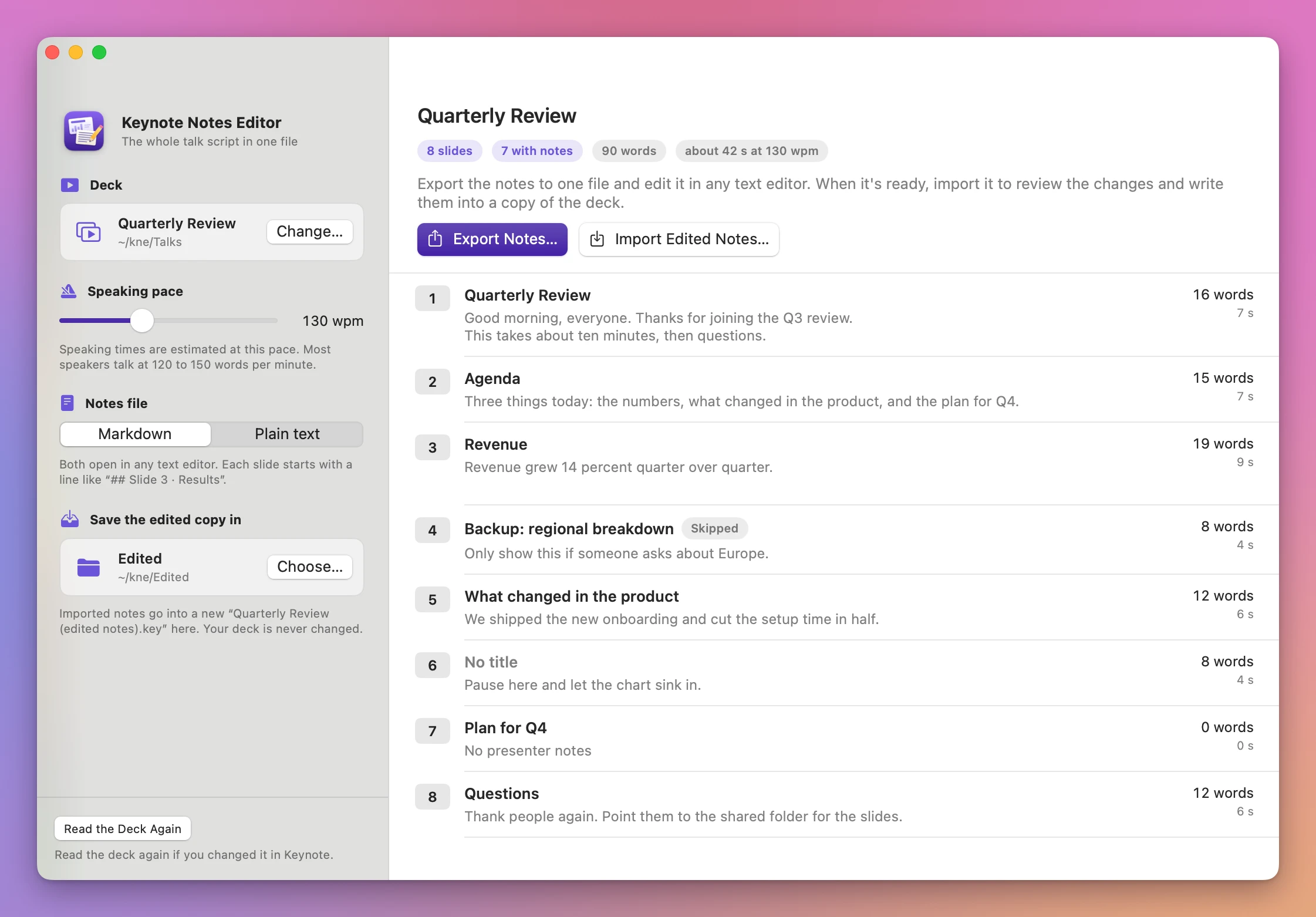
The sample deck here is “Quarterly Review”, eight slides. The exported file starts with a short block the app uses to match slides later, then one section per slide:
## Slide 2 · Agenda
Three things today: the numbers, what changed in the product, and the plan for Q4.

## Slide 3 · Revenue
Revenue grew 14 percent quarter over quarter.

Most of it came from the annual plans we launched in July.
Open it in TextEdit or any other text editor and change the notes. Keep the ## Slide lines and the block at the top as they are.
In the sample, the edit rewrote the agenda as a list, added a sentence about 40 new team accounts to the revenue slide, filled in the empty “Plan for Q4” slide, and added a section for a slide 9 that the deck doesn’t have.
How do I put the edited notes back?
Click Import Edited Notes… and pick the edited file. The app reads the deck again and shows a row for each slide, with a pill that says what will happen.
For the sample file, slides 2, 3 and 7 came up as New notes and were ticked, five slides were Unchanged, and slide 9 was No such slide, because the deck has eight. Its notes aren’t written anywhere.
Then something more realistic: the same file imported into a version of the deck where someone had moved the Revenue slide and changed a note in Keynote after the export.
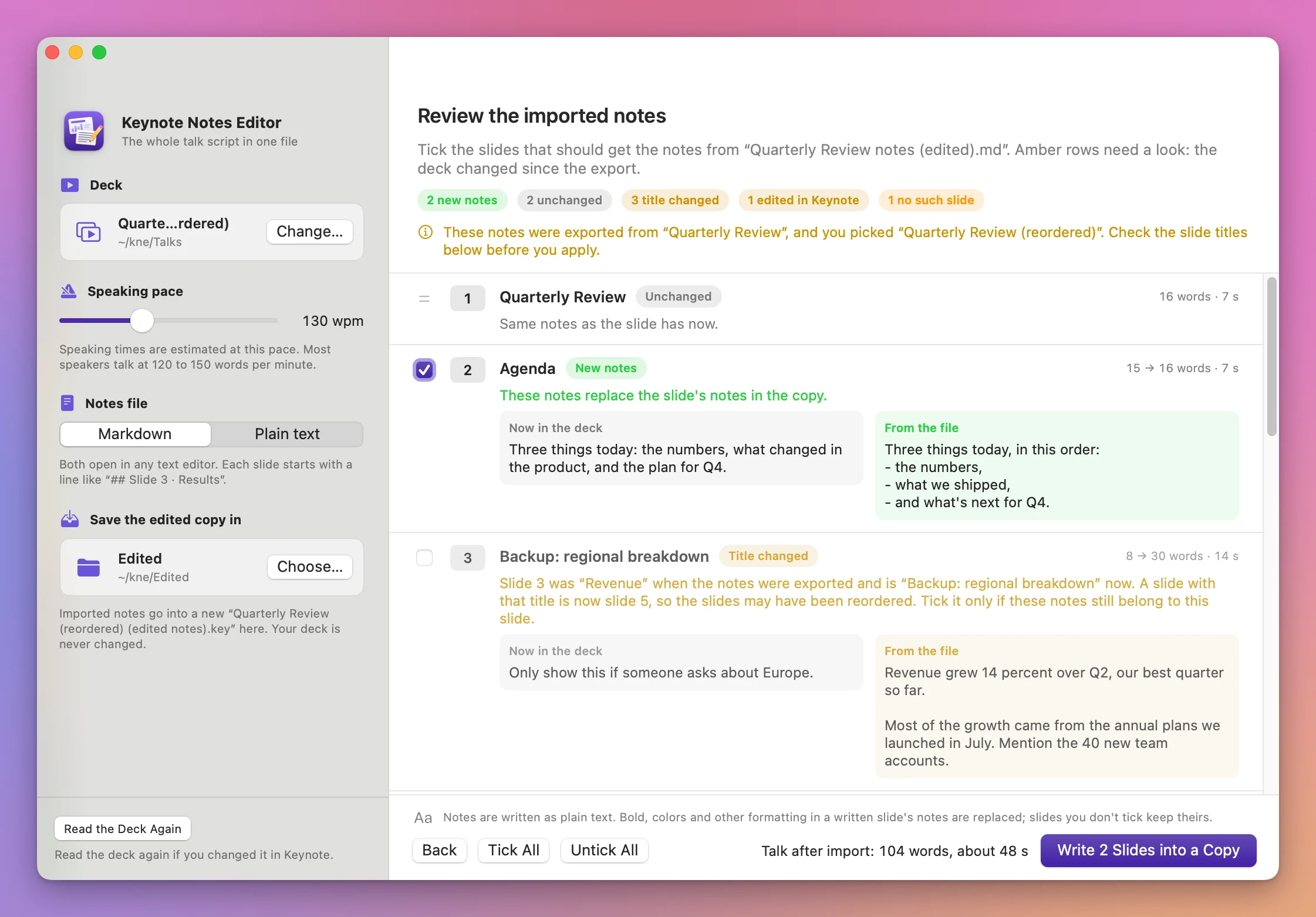
Slide 3 used to be “Revenue” and is now “Backup: regional breakdown”. The app says so, tells you the Revenue slide is now slide 5, and leaves the row unticked, so the revenue notes don’t land on the wrong slide. The slide whose notes were changed in Keynote shows Edited in Keynote, also unticked.
Tick the slides you want and click Write N Slides into a Copy. The app writes the notes into a new “Quarterly Review (edited notes).key”, saves it, opens it again and reads the notes back.
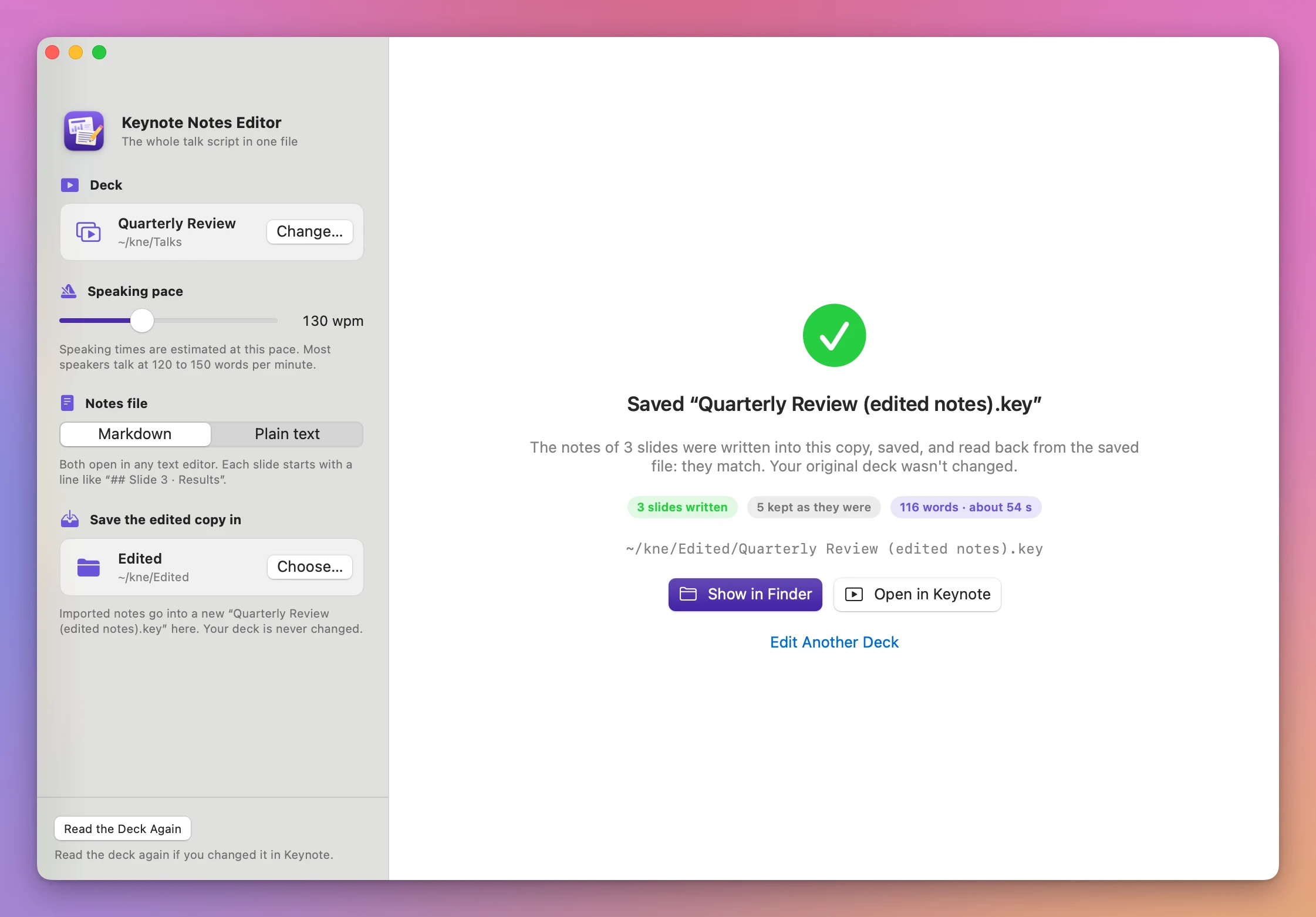
Your original deck isn’t changed. The app works on a private copy, even when the deck is open in Keynote.
Can I translate a talk this way?
Yes. Export as Plain text, send the .txt file to the translator, and import what comes back. A second sample deck, “Conference Talk”, got its seven notes translated into Italian this way, and the result went into “Conference Talk (edited notes).key”, next to the English deck.
The slide titles in the file stay in the original language. They’re only there to match the slides.
Keynote alone or Keynote Notes Editor?
| Keynote alone | Keynote Notes Editor | |
|---|---|---|
| Read every note at once | PDF export or print with notes | The exported .md or .txt file |
| Edit the whole script | One slide at a time | In one file, in any text editor |
| Put edits back | Paste each slide by hand | Import, tick, write |
| Slides moved since | Notes can land on the wrong slide | Title changed, left unticked |
| Original deck | Changed as you edit | Never changed, edits go into a copy |
| Speaking time | Count it yourself | Per slide and for the whole talk |
| Cost | Free | $19, paid once |
Notes are written as plain text, so bold and colors in a written slide’s notes are replaced. Slides you leave unticked keep theirs.
If the deck is going on a screen in a shop or a lobby afterwards, How to loop a Keynote presentation on a shop or reception screen covers that part.
Get Keynote Notes Editor
Export every presenter note of a Keynote deck to one file, edit it anywhere, and write the edited notes into a copy of the deck.
See Keynote Notes Editor → · Read the docs · $19. See the app page for tax details.
Want me to talk about your product? You can sponsor this site.