How to add a rotating shift schedule to Calendar on a Mac
By Flavio
Calendar can repeat an event every few days, so a 4 on 4 off, days and nights or Continental rota means several repeating events per cycle. Here's how to set it up by hand, and how to do it with a preview, leave and one-click undo.
You work a rotating pattern: 4 on 4 off, two days, two nights and two off, or a 28-day Continental rota of earlies, lates and nights. You want the shifts in Calendar on your Mac, so you and the people at home can see when you’re working.
Calendar can do it with repeating events, as long as you make one repeating event per working day of the cycle. For a short cycle that’s fine. For a long one, or a rota with leave and swaps, an app like Rotating Shift Calendar Maker is quicker and lets you check every shift before anything goes in.
Can Calendar repeat a 4 on 4 off pattern?
Not as one event. Calendar’s Repeat menu has Custom…, which repeats an event every so many days, or every so many weeks on the days you choose. That covers “every 8 days”, but a 4 on 4 off rota has four working days in each 8-day cycle.
So you make four events:
- Double-click your first day shift in Calendar and set the title and the times, like “Day shift”, 7:00 to 19:00.
- Set Repeat to Custom…, then repeat every 8 days. Set End Repeat to the last date you want.
- Do the same on the second, third and fourth day of the block.
Days, nights, off (D D N N O O) is four events repeating every 6 days. For each night, set the end on the next morning, or the shift ends at midnight.
For a short cycle, that works. It gets harder from there:
- Long cycles. A Continental rota of earlies, lates and nights over 28 days has 21 working days per cycle. Even with the weekly option and several days ticked, it’s around ten series.
- No preview. If day 1 of the cycle is off by one, you find out after everything is in Calendar, and you delete the series one by one.
- Leave and swaps. A week of annual leave means deleting “this event only” on every working day of that week.
- Changes. When nights move from 22:00 to 21:30, every night series needs editing from that date on, without touching the past.
Shift-work apps for the phone are another way. They’re good at drawing a rota. Before you pay for one, check whether it writes to your phone’s calendar and what happens there when the rota changes: some keep the shifts inside the app only.
| Calendar’s repeat | Rotating Shift Calendar Maker | |
|---|---|---|
| 4 on 4 off | Four repeating events | Pick the preset |
| Continental (28 days) | Around ten series or more | Pick the preset |
| See the whole rota first | No | Month grid before anything is created |
| Nights | Set the next-day end yourself | End the next day by themselves |
| Leave and swaps | Edit each day | Add Leave, Swap a Day |
| Rota changes | Edit every series | Only the shifts that differ are changed |
| Undo | Delete by hand | Undo |
| Cost | Free | $19, paid once |
How do I add a rota with Rotating Shift Calendar Maker?
The example here is a made-up ward rota, “Ward 7 Rota”: the Continental pattern from March 1 to May 31, 2027, with day 1 of the cycle on March 2, a week of annual leave from April 12 to 16, and March 20 swapped to a day off. The times are in London time. The screenshots are from macOS 15.
Pick a preset
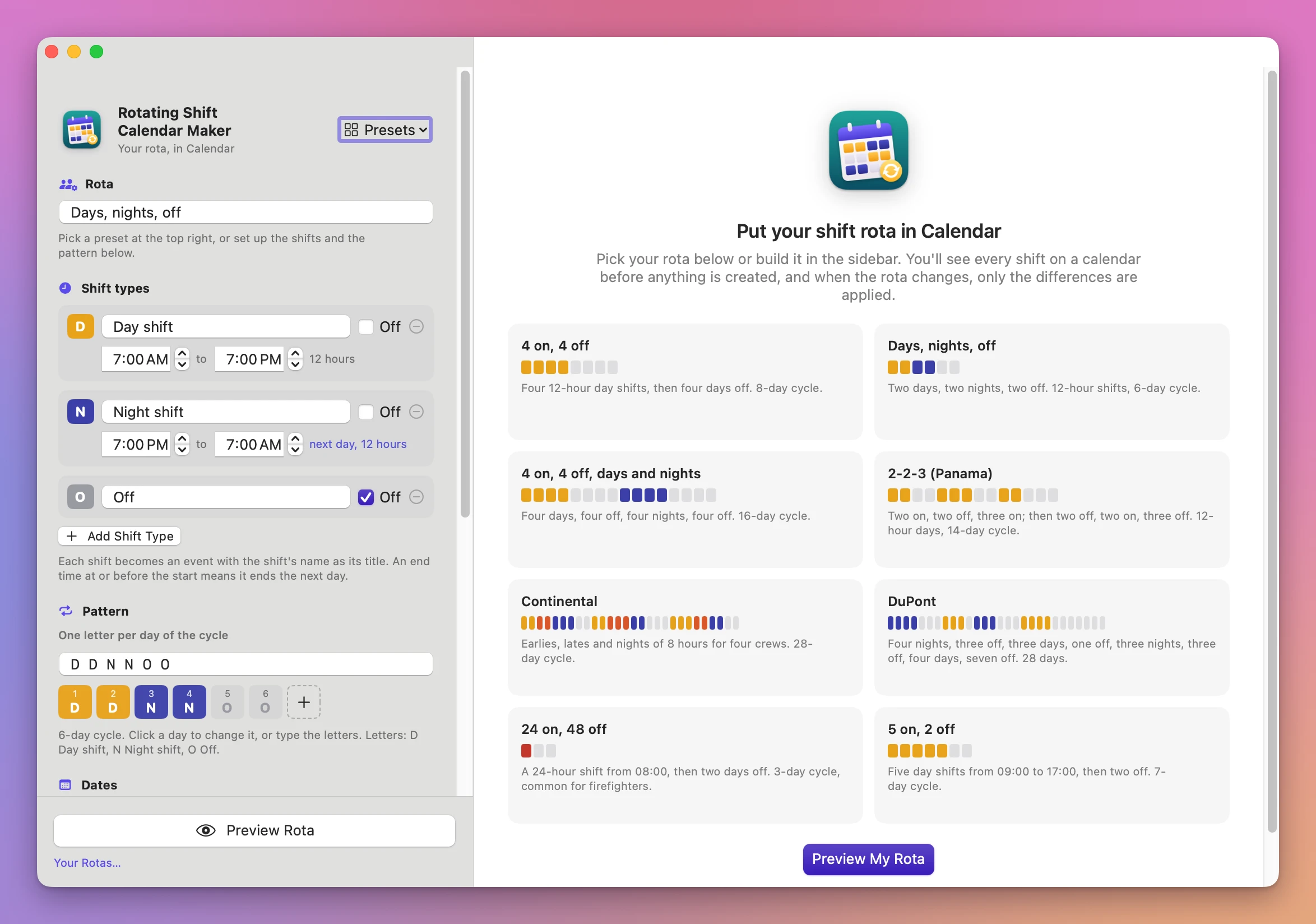
The start screen has eight common rotas: 4 on, 4 off, Days, nights, off, 4 on, 4 off, days and nights, 2-2-3 (Panama), Continental, DuPont, 24 on, 48 off and 5 on, 2 off. Each card draws its cycle in colors. Click one to load it.
Check the shifts and the pattern
The sidebar holds the rota. Under Shift types, the Continental preset has an Early shift from 6:00 AM to 2:00 PM, a Late shift from 2:00 PM to 10:00 PM, and a Night shift from 10:00 PM to 6:00 AM, which the app marks “next day, 8 hours”. The name of each type becomes the event title, so change “Early shift” to whatever you call it at work.
The pattern is a row of letters, one per day: E E L L N N N O O E E L L L N N O O O E E E L L N N O O. Your rota may be different: type it in, or click a day chip to change one day.
Under Dates, set Day 1 of the cycle to the first day of the pattern, here March 2. Set Create from and Until, or pick a Length like 6 months.
Add leave and swaps
Under Changes to the pattern, Add Leave with April 12 to 16 and the title “Annual leave” turns those five days into all-day leave events. Swap a Day on March 20, working “Off” instead, removes that day’s shift.
Preview the rota
Click Allow Calendar Access… the first time, then Preview Rota. This rota gives 23 early shifts, 22 late shifts, 22 night shifts and 5 days of leave, 535 hours in all.
The month grids are where you catch a wrong day 1. March 20 has a dashed outline because it was swapped, April 12 to 16 are green suns, and the night of March 27 has a small warning triangle. Its note says “7 hours long, not 8 hours: the clocks go forward during this shift”, because the UK clocks change that night.
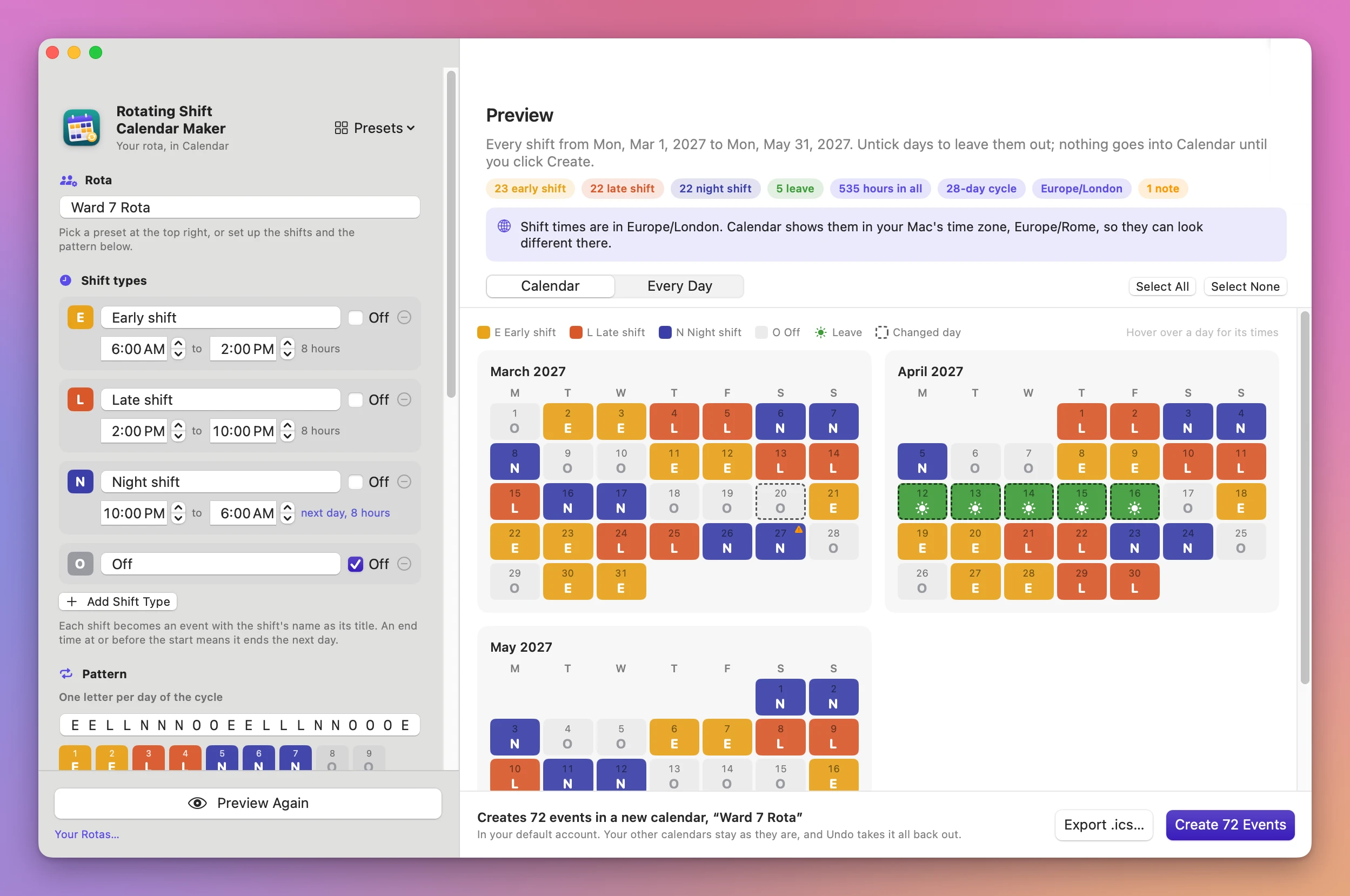
The Every Day tab lists each day as Calendar will have it, with a checkbox to leave a shift out. When it looks right, click Create 72 Events. The shifts go into a new calendar called “Ward 7 Rota”, and your other calendars stay as they were.
What if the rota changes?
Say nights now start at 21:30, and cycle day 9 becomes an early shift. Change the Night shift’s start time and click day 9’s chip, then click Preview Again.
Since the rota is already in Calendar, you get the Preview of the changes: 3 to add, 22 to change, 0 to remove and 50 unchanged. Each changed night shows its new time and the old one. Here the first night was unticked to leave it at 22:00, so the button read Apply 24 Changes.
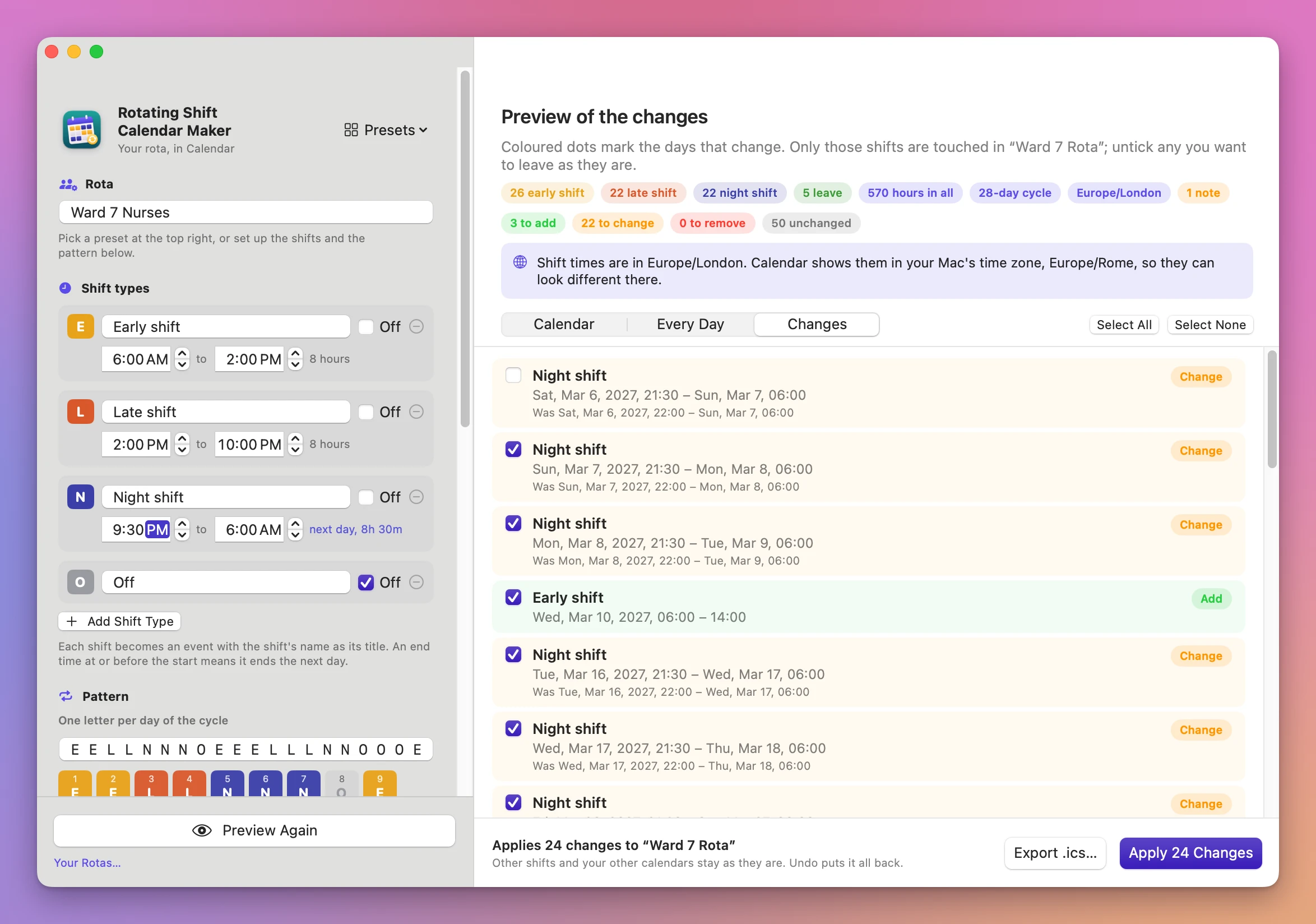
Only those 24 events changed. If the update was wrong, Undo removed the 3 new earlies and put the 21 nights back to 22:00. After the first run, Undo removes all the shifts and the calendar itself.
Will the shifts be on my phone?
They go in the account you pick under Account in the sidebar. A calendar in On My Mac stays on the Mac. Pick an account that syncs to your phone to see the shifts there.
The app doesn’t add alerts or invitations, and each shift is its own event. It doesn’t do payroll or check working-time rules: it puts the rota in Calendar and adds up the hours in the preview. For a one-off schedule that’s already in a spreadsheet, like term dates, importing a CSV file into Calendar is the better fit.
Rotating Shift Calendar Maker costs $19, paid once.
Get Rotating Shift Calendar Maker
Put a repeating shift rota like 4 on 4 off, days and nights or Continental in Calendar. Check every shift on a month grid first, apply only what changed when the rota changes, and undo any run.
See Rotating Shift Calendar Maker → · Read the docs · $19. See the app page for tax details.
Want me to talk about your product? You can sponsor this site.