WhatsApp Export Chat: with media or without media?
By Flavio
When you export a WhatsApp chat, the phone asks whether to include the photos and videos. With media, they come in the zip next to the text. Without media, you get the text alone, and the photos are only names. Here's what each choice gives you on a Mac.
You tap Export chat in WhatsApp and the phone asks a question before it sends anything: with the media, or without?
Pick the one with media if you want the photos and videos of the chat. Without media, you get the messages only, and each photo is a line with its file name. If the chat is for a lawyer or for a PDF with the pictures in it, take the media.
What does WhatsApp say about each choice?
WhatsApp’s Help Center page “How to export your chat history” has a version for each phone, and the choices aren’t named the same way.
On an iPhone, after Export chat, if the chat contains media you choose With all media, With selected media… or Without media. The page adds that the chat history is exported as a ZIP file, and that view once messages aren’t exported.
On Android, you tap Without media or Include media. The Android page has a note on Include media: “the most recent media sent will be added as attachments”. So on Android, the page doesn’t promise every photo of a long chat.
The same page has a version for WhatsApp on the web and on the Mac. There, Export chat makes a ZIP file without media, and the page says so: media isn’t included, unlike exports from a phone.
None of the versions gives a limit on how many messages or photos an export can hold. Both phone versions say the export can’t be imported back into WhatsApp, because it’s a text file and not a backup.
What does each one look like on the Mac?
There’s no phone in this test, so the files below are made up: an iPhone export of a chat between Nora Field and Sam Okafor, with media. To stand in for the same chat exported without media, its text file was zipped on its own. The screenshots are from a test Mac running macOS 15 Sequoia.
Side by side in the Finder, the export with media is 55 KB and the one without is 640 bytes:
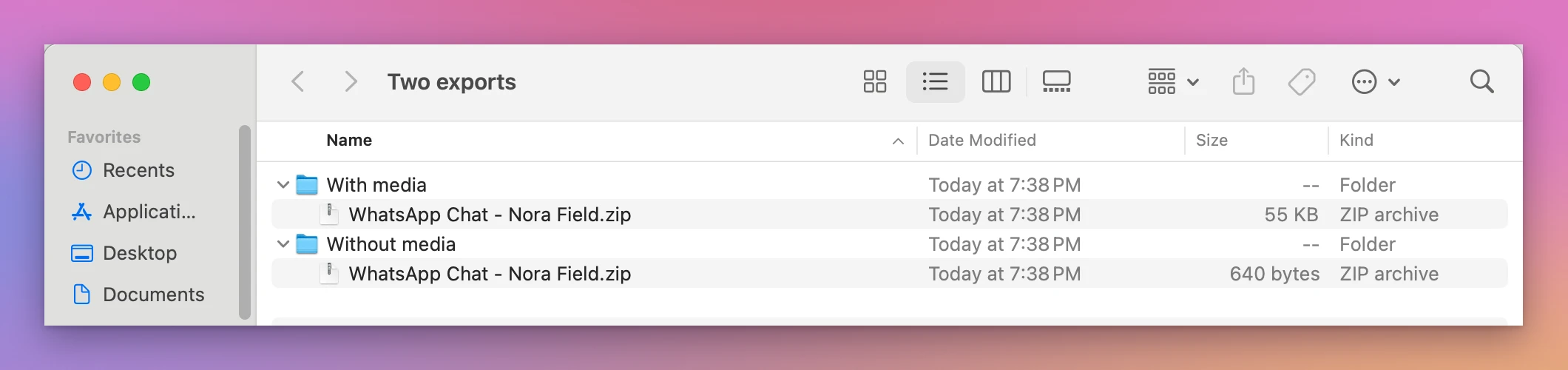
Unzipped, the one with media is a folder with _chat.txt, a photo, a video, a voice note and a PDF document. The one without media is _chat.txt alone. In this stand-in the text is the same in both, so each photo is still named, like <attached: 00000012-PHOTO-2023-05-14-21-07-02.jpg>, and only the export with media has the photo itself. The tutorial on opening an export explains every file in the folder.
A real chat with months of photos makes a much bigger zip than this small made-up one. Without media keeps the file small.
What does the PDF show for each?
Chat to PDF for WhatsApp is a Mac app I made that turns an export into a PDF. It’s my own app, not made by, affiliated with or endorsed by WhatsApp or Meta. It costs $19, paid once.
The export with media shows the photo inside Nora’s message, and the video as its first frame, as in the tutorial on saving a chat as a PDF.
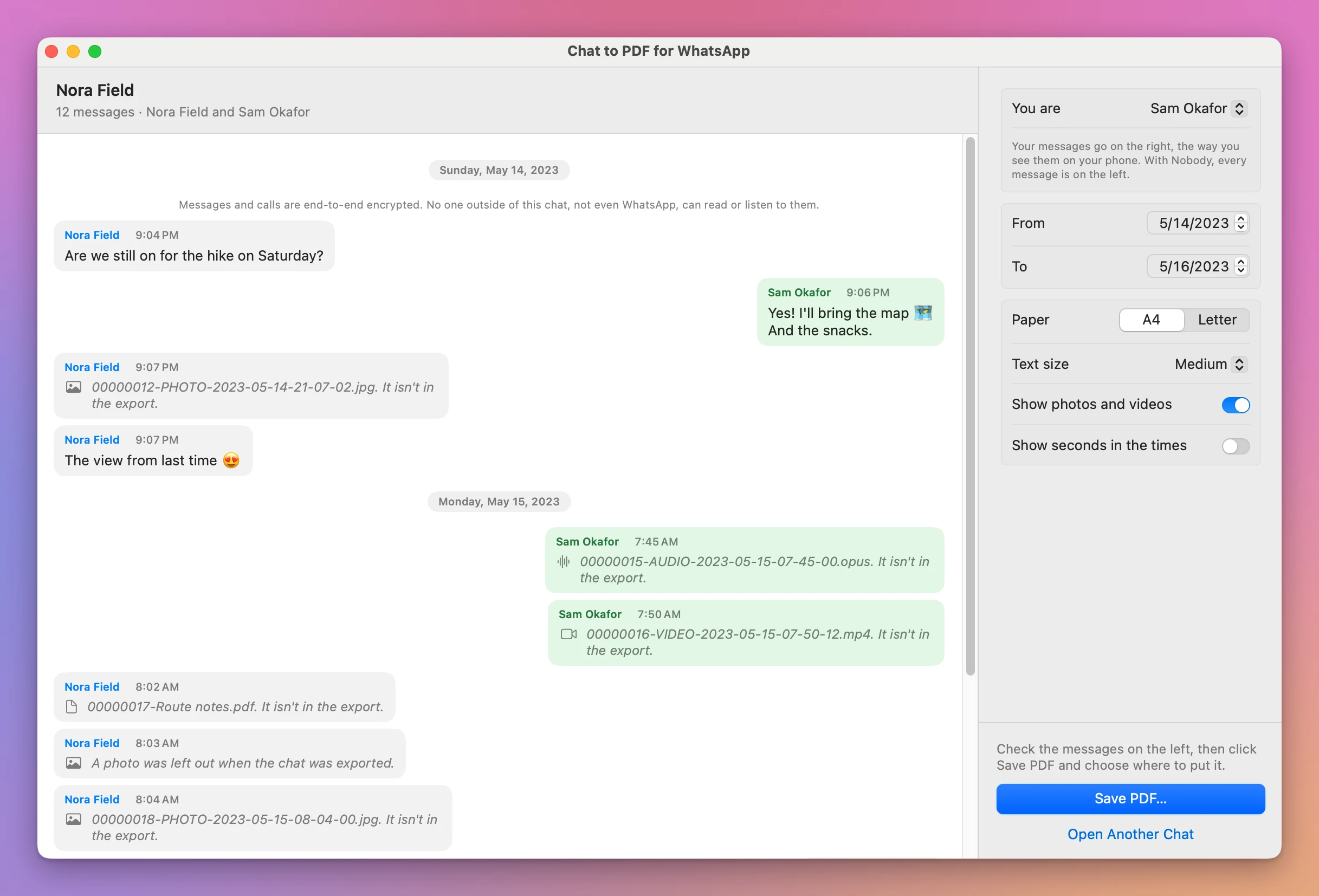
The export without media opens just as well, and the messages are all there. Where a file should be, the bubble has its name and “It isn’t in the export.”:
After Save PDF…, the window lists every missing file:
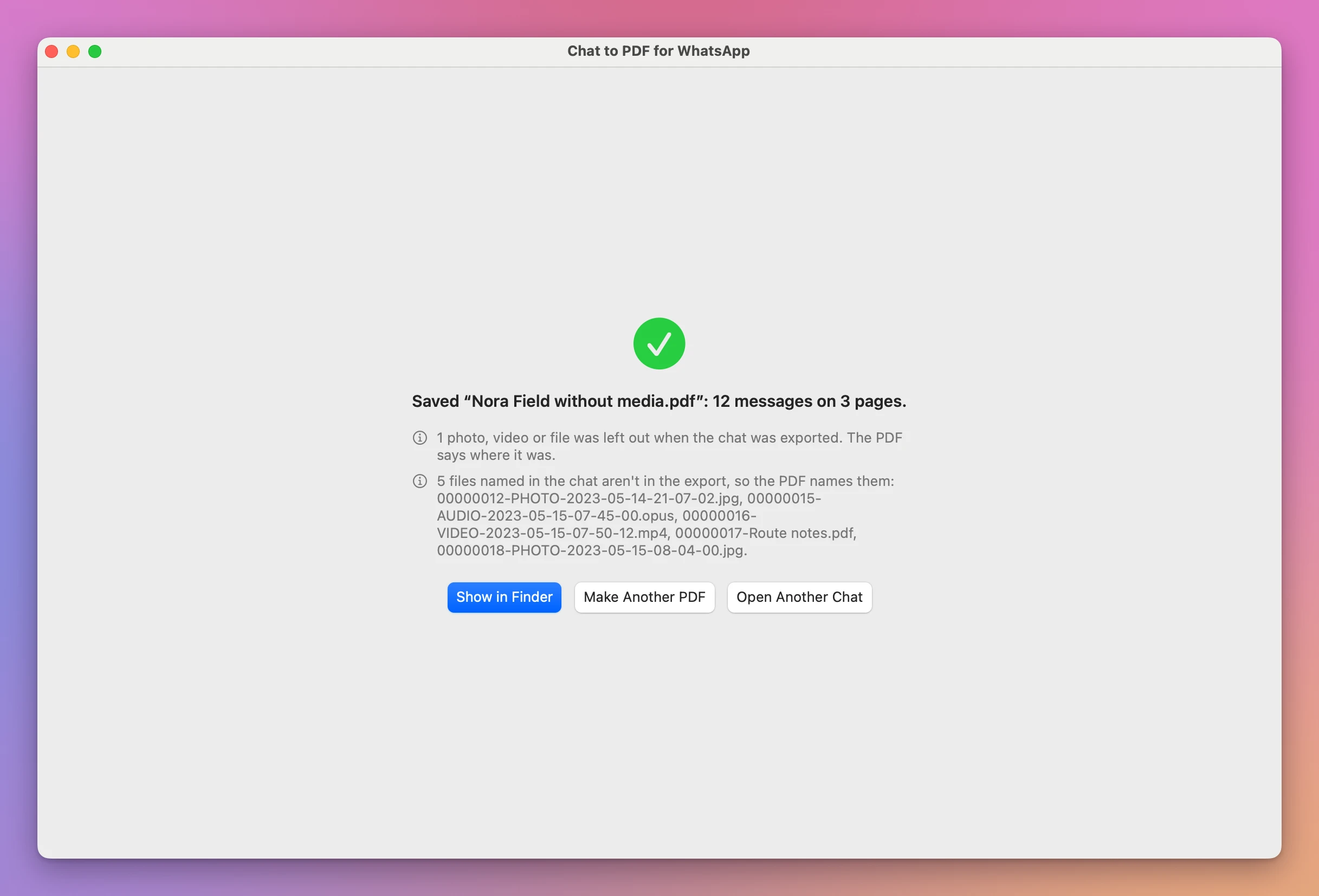
Both PDFs had 12 messages on 3 pages. Here’s the whole comparison for this chat:
| With media | Without media | |
|---|---|---|
| What’s in the zip | The text file, plus the photo, video, voice note and document | The text file only |
| Size of the made-up zip | 55 KB | 640 bytes |
| A photo in the PDF | The photo, inside the message | ”Photo: 00000012-PHOTO-….jpg. It isn’t in the export.” |
| A video in the PDF | Its first frame, with a play sign and its name | Its name, and “It isn’t in the export.” |
| The report after saving | 1 file named in the chat isn’t in the export | 5 files named in the chat aren’t in the export |
| Size of the PDF | 195 KB | 165 KB |
The app can only print what’s in the zip. If you exported without media and need the photos, export the chat again from the phone and pick the choice with media.
What about With selected media…?
The iPhone page lists it, between the other two. There was no phone to try it on here, so what it puts in the zip isn’t covered.
Get Chat to PDF for WhatsApp
Turn a chat exported from WhatsApp into a clean PDF: every message with its sender, date and time, the photos where they were sent, and page numbers. For a lawyer, a court, a landlord, or to keep.
See Chat to PDF for WhatsApp → · Read the docs · $19. See the app page for tax details.
Want me to talk about your product? You can sponsor this site.