Cloudflare Search for Agents: how it works and the limits to check first
By Flavio
Tagged: Cloudflare
Cloudflare Search for Agents turns any zone into a /.well-known/search endpoint for AI agents. Live GET and QUERY tests, real quirks, and Free plan limits.
Cloudflare just shipped Search for Agents, a single dashboard toggle that indexes your site and exposes a search endpoint at /.well-known/search on your own domain.
Their announcement on X and posts like Dan Mindru’s kicked off a wave of people telling every Cloudflare user to flip it on right away, especially since it works on the Free plan.
I haven’t turned it on for flaviocopes.com yet, because I wanted to test Cloudflare’s own live endpoints first and run the math on the limits before flipping a public AI endpoint on a 4,500-URL site. Here is what the feature actually does, what my live GET and QUERY requests returned, and the limits worth checking before you turn it on.
What the toggle actually creates
Earlier this year I wrote about serving my site as Markdown to AI agents and why I built static .md mirrors instead of using Cloudflare’s edge conversion. Markdown for Agents solves one half of the problem: giving an agent clean text once it already knows which URL to fetch.
Search for Agents tackles the other half: helping an agent find the right page without scraping your site one link at a time.
When you flip Search for Agents on under Overview > Quick Actions in the Cloudflare dashboard, Cloudflare creates an AI Search instance named search-for-agents-<ZONE_ID> in your default namespace. It points that instance at https://<YOUR_DOMAIN> and configures it with two main choices:
- Discover crawling finds pages through both your XML sitemaps and links it follows up to five hops deep, syncing every 24 hours with a 24-hour crawl cache.
- Hybrid search combines vector embeddings (
@cf/qwen/qwen3-embedding-0.6b) with keyword search using Reciprocal Rank Fusion (RRF), 1,024-token chunks with 10% overlap, and a 48-hour similarity cache.
Once the index is ready, your domain serves search results at https://<YOUR_DOMAIN>/.well-known/search. The endpoint returns ranked Markdown chunks directly, with no extra LLM generation step in the middle. The agent calling your site already has its own model, so it only wants the matching passages.
How agents discover the endpoint
A search endpoint on your domain only helps if an agent knows it exists. Cloudflare injects four <meta> tags into the <head> of HTML responses automatically.
Here is the exact metadata I pulled from developers.cloudflare.com:
<meta name="agent:instructions" content="Use this search API to find relevant content across this site with keywords or natural-language queries, instead of crawling individual pages. Results are returned in Markdown.">
<meta name="agent:endpoint" content="https://developers.cloudflare.com/.well-known/search?q={query}">
<meta name="agent:method" content="GET">
<meta name="agent:documentation" content="https://developers.cloudflare.com/ai-search/how-to/search-for-agents/">
If you also use Markdown for Agents, requesting the same URL with Accept: text/markdown puts those exact four fields into YAML frontmatter at the top of the Markdown document:
---
agent:
  instructions: "Use this search API to find relevant content across this site with keywords or natural-language queries, instead of crawling individual pages. Results are returned in Markdown."
  endpoint: "https://developers.cloudflare.com/.well-known/search?q={query}"
  method: "GET"
  documentation: "https://developers.cloudflare.com/ai-search/how-to/search-for-agents/"
---
Cloudflare also added a Search for Agents check to isitagentready.com. When I scanned developers.cloudflare.com, it scored 92 out of 100 (Level 5, Agent-Native) with both Markdown negotiation and Search for Agents passing:
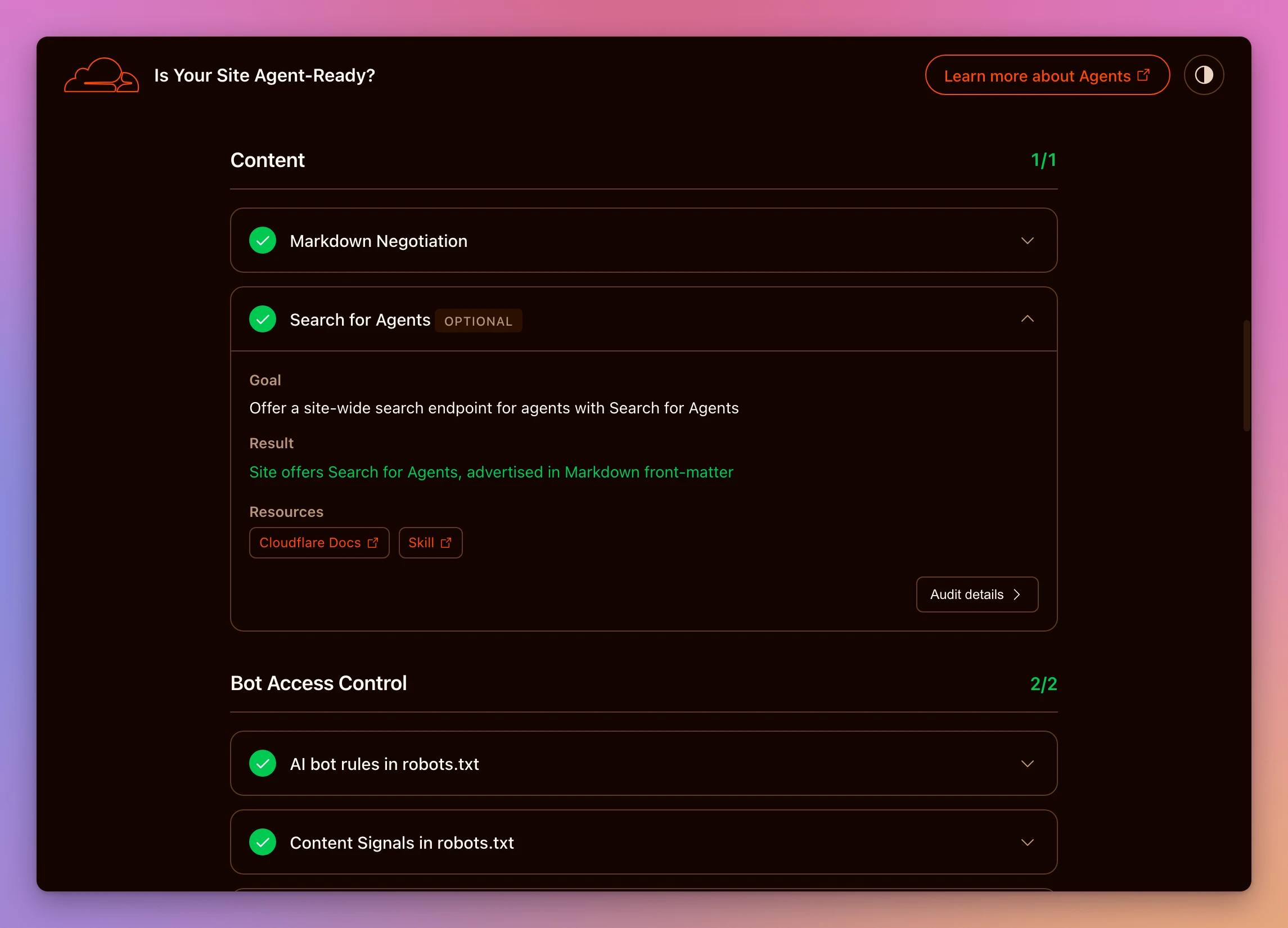
Scanning flaviocopes.com scored 25 out of 100 (Level 1, Basic Web Presence). Even though every post here has a static .md mirror, an llms.txt index, and explicit AI crawler rules in robots.txt, the scanner checks for Accept: text/markdown negotiation and /.well-known/search.
Live tests with GET and HTTP QUERY
Cloudflare already has Search for Agents running on developers.cloudflare.com and blog.cloudflare.com, so I ran a set of live requests against both.
The simplest call is a plain GET with a q query parameter. Here I asked the docs about Cloudflare Artifacts push limits:
curl --get "https://developers.cloudflare.com/.well-known/search" \
  --data-urlencode "q=What is the maximum push size for Cloudflare Artifacts?"
The top chunk came back with score: 1.000 and the exact table row (64 MiB per push), without my client ever needing to know the URL /artifacts/platform/limits/:
# Search results for: "What is the maximum push size for Cloudflare Artifacts?"

## docs/artifacts/platform/limits/index.limits-cloudflare-artifacts-docs.md (score: 1.000)

# Limits · Cloudflare Artifacts docs
Section: Limits · Cloudflare Artifacts docs
...
Maximum push size: 64 MiB per push. Includes all data sent in the push.
The endpoint also supports the HTTP QUERY method (RFC 10008, published in June 2026). Unlike POST, QUERY is defined as safe and idempotent, so caches and clients know it only reads data while still letting you put a long prompt in the request body instead of a query string.
You can pass QUERY as plain text or JSON:
curl -X QUERY "https://developers.cloudflare.com/.well-known/search" \
  -H "Content-Type: text/plain" \
  --data "What is the default chunk size in Search for Agents?"

curl -X QUERY "https://blog.cloudflare.com/.well-known/search" \
  -H "Content-Type: application/json" \
  --data '{"q":"Search for Agents"}'
Here are the exact status codes, timings, and payload sizes I observed across those live calls:
| Request | Status | Time | Response size | Content-Type |
|---|---|---|---|---|
GET HTML /ai-search/how-to/search-for-agents/ | 200 | 62 ms | 137,656 B | text/html |
GET same URL with Accept: text/markdown | 200 | 37 ms | 11,132 B | text/markdown; charset=utf-8 |
GET developers.cloudflare.com/.well-known/search (1st run) | 200 | 1,325 ms | 50,569 B | text/markdown; charset=utf-8 |
GET same query (2nd run) | 200 | 814 ms | 50,569 B | text/markdown; charset=utf-8 |
QUERY (text/plain) on developers.cloudflare.com | 200 | 869 ms | 55,736 B | text/markdown; charset=utf-8 |
QUERY (application/json) on blog.cloudflare.com | 200 | 929 ms | 73,601 B | text/markdown; charset=utf-8 |
POST (application/json) on developers.cloudflare.com | 405 | n/a | 40 B | text/plain; charset=utf-8 |
A few HTTP details stood out when I poked the edges:
- Every
200andHEADresponse includesaccept-query: text/plain, application/json, advertising the RFC 10008 body formats. - Sending
POSTreturns405withallow: GET, HEAD, QUERYand the bodyOnly GET, HEAD, and QUERY are supported. - Calling
GET /.well-known/searchwith noqparameter returns400(Missing query parameter: ?q=). - Even when I sent
Accept: application/jsonon aGET, the endpoint still returnedtext/markdown; charset=utf-8. If you want JSON responses or an MCP endpoint, you enable the separate public REST or MCP endpoints on the underlying AI Search instance.
Two real quirks I noticed in the output
Running real queries turned up two behaviors you should know before trusting the defaults.
First, payload sizes get big fast if you raise the result cap. New Search for Agents instances default to 10 chunks, which is sensible. Cloudflare’s own developers.cloudflare.com and blog.cloudflare.com endpoints are configured to return 50 chunks, producing 50 KB to 73 KB of Markdown per query. That is fine when the top chunk answers the question, but dumping 50 chunks into a coding agent’s context window burns tokens fast if the agent doesn’t truncate the output.
Second, crawl filters and sync lag matter. When I queried blog.cloudflare.com/.well-known/search for "Search for Agents" more than a day after Cloudflare published the launch post, the blog post itself wasn’t in the 50 returned results at all. The top match was https://blog.cloudflare.com/markdown-for-agents, and more than half of the 50 slots were translated duplicates of older posts (/fr-fr/, /it-it/, /ja-jp/, /ko-kr/, /de-de/, /es-es/, /zh-cn/, /zh-tw/).
On developers.cloudflare.com, the exact same query returned the new Search for Agents guide and changelog in the top 13 chunks.
If your site has localized mirrors, tag archives, pagination, or private draft paths, configure path filtering on the AI Search instance right after enabling the toggle. Note that path patterns match the full URL including scheme and hostname, so you write **/blog/**, not /blog/**.
Also watch your WAF rules. If you block bots aggressively, Cloudflare’s docs tell you to add a Skip rule for the AI Search crawler using Bot Detection ID 122933950, otherwise your own security rules can block indexing.
Free plan limits and December 1 pricing
“Available on the free plan” is accurate, with an important catch: AI Search billing starts on December 1, 2026, and the feature draws from your account’s AI Search allowance.
Every account gets the same monthly included bundle: 5 million ingestion tokens (counted with cl100k_base on the final chunks, including 10% overlap), 10 GB-month of storage, 1,000 semantic queries, and 1,000 full-text queries. Here is how Workers Free and Workers Paid compare in the official AI Search limits:
| Resource or limit | Workers Free | Workers Paid | Overage (from Dec 1, 2026) |
|---|---|---|---|
| Max pages crawled per day | 500 | Unlimited (100,000 per crawl) | n/a |
| Files per hybrid-search instance | 100,000 | 500,000 | n/a |
| AI Search instances per account | 100 | 5,000 included | $0.10 / instance / month |
| Ingestion tokens / month | 5 million included | 5 million included | $0.75 / million tokens |
| Index storage | 10 GB-month included | 10 GB-month included | $2.00 / GB-month |
| Semantic / hybrid queries / month | 1,000 included | 1,000 included | $0.75 / 1,000 queries |
| Full-text queries / month | 1,000 included | 1,000 included | $0.10 / 1,000 queries |
One nice detail in the billing rules: the Workers AI embeddings, reranking, R2 storage, Vectorize index, and Browser Run calls that AI Search runs under the hood do not show up as separate charges on those products. Only optional extras like answer generation, query rewriting, or file summaries bill separately.
The binding limit on Workers Free is 500 pages crawled per day. And the part to watch on a Paid account is the 1,000 included semantic/hybrid queries per month. Because Search for Agents uses hybrid search by default and exposes /.well-known/search to every agent on the internet, a busy public site can cross 1,000 queries quickly. The 48-hour similarity cache absorbs repeated questions, and your WAF and AI Crawl Control rules sit in front of the endpoint, so rate-limiting /.well-known/search is worth setting up if your site gets heavy bot traffic.
How I would use it (and why I haven’t flipped it on here yet)
I ran the numbers on flaviocopes.com to see what flipping the toggle would mean for this site.
Right now sitemap-0.xml lists 4,593 URLs, and src/posts/ alone holds 2,336 Markdown posts totaling 18.20 MB (about 2.91 million words, or roughly 4.77 million tokens before the 10% chunk overlap pushes it past 5 million). On Workers Free, the 500-pages-per-day crawl cap means the initial crawl would take ten days to finish, and a full re-index sits right on top of the monthly 5-million-token allowance.
More importantly, flaviocopes.com already serves a static .md file next to every post along with llms.txt and llms-full.txt, hosted on Cloudflare Pages with zero metered queries no matter how many agents visit. Paying $0.75 per 1,000 hybrid queries for an open public search endpoint on a high-traffic blog isn’t a trade I need to rush into before seeing how often real agents actually call /.well-known/search.
Where I would turn Search for Agents on right away:
- Documentation sites and small product sites under 500 pages. A Free-plan crawl finishes in one pass, storage stays well below 10 GB, and ingestion stays comfortably inside 5 million tokens.
- Sites built from a CMS or database without static Markdown mirrors. If you don’t already publish
.mdfiles andllms.txt, one toggle gives agents structured Markdown retrieval without touching your app code. - Sites where you want an embedded site search too. Since the toggle creates a regular AI Search instance, you can reuse the exact same index from a Workers binding, an MCP server, or an embedded search box for human visitors.
If you want to understand how Workers, WAF rules, and Cloudflare’s storage primitives fit together around features like this, my free Cloudflare Handbook walks through the full platform stack.
For smaller Cloudflare sites, flipping the toggle and adding path-filtering rules takes five minutes and gives agents a cleaner path than scraping your HTML. For large blogs or busy domains, check your sitemap size, add a rate limit on /.well-known/search, and keep an eye on query volume once billing starts on December 1.
Want me to talk about your product? You can sponsor this site.
Related posts about cloudflare: