Google Antigravity and Gemini Neon: what gets accounts banned (and how to stay safe)
By Flavio
Tagged: AI
What Google's Antigravity Terms allow and ban for Gemini 4 Neon, why developers fear Google account bans, what changes on Dec 2, and how to stay safe.
Gemini 4 Neon is one of the strongest coding models right now, and Google AI Ultra packs a huge amount of quota and perks into one plan.
Yet a lot of developers are nervous about using their Gemini subscription at all.
The worry is not just getting rate-limited or losing access to a coding app. People are seeing their entire Google account disabled, and that single login usually guards your Gmail, Google Drive, photos, banking logins, and years of personal history.
Why everyone is talking about Google account bans right now
On November 28, 2026, Noah (@itsnoahd) posted a screenshot of Google’s full account-disabled screen on his Gmail address.
The message said the account looked like it was created or used with multiple other accounts to violate Google’s policies, possibly by a computer program or bot, and would be considered for deletion starting October 24, 2027.
That post went straight through the developer community on X.
Steve Ruiz (@steveruizok) quoted it with one line:
im actually terrified of using my gemini sub
Morgan Linton (@morganlinton) explained why he decided to hold off on Antigravity and Neon until Google sorts this out:
If you get banned from Claude, Grok, Codex, etc. you just lose access to a coding tool, not your personal email that your whole life is connected to.
Me too. I use Antigravity and Neon within the Terms of Service and hope nothing ever triggers a ban, because losing my main Google account would be a huge problem.
What Google’s Terms of Service actually forbid
Most of the enforcement wave around Antigravity started because developers connected third-party harnesses, proxies, and automated account switchers to Google’s backend using Antigravity OAuth tokens.
Google put this rule directly into clause 6 of the Google Antigravity Additional Terms of Service:
You must not abuse, harm, interfere with, or disrupt the Service. This includes, but is not limited to, using the Service in connection with products not provided by us. Using third party software, tools, or services to access the Service (e.g. using OpenClaw with Antigravity OAuth) is a breach of this Agreement. Such actions may be grounds for suspension or termination of your Antigravity and/or Gemini CLI accounts.
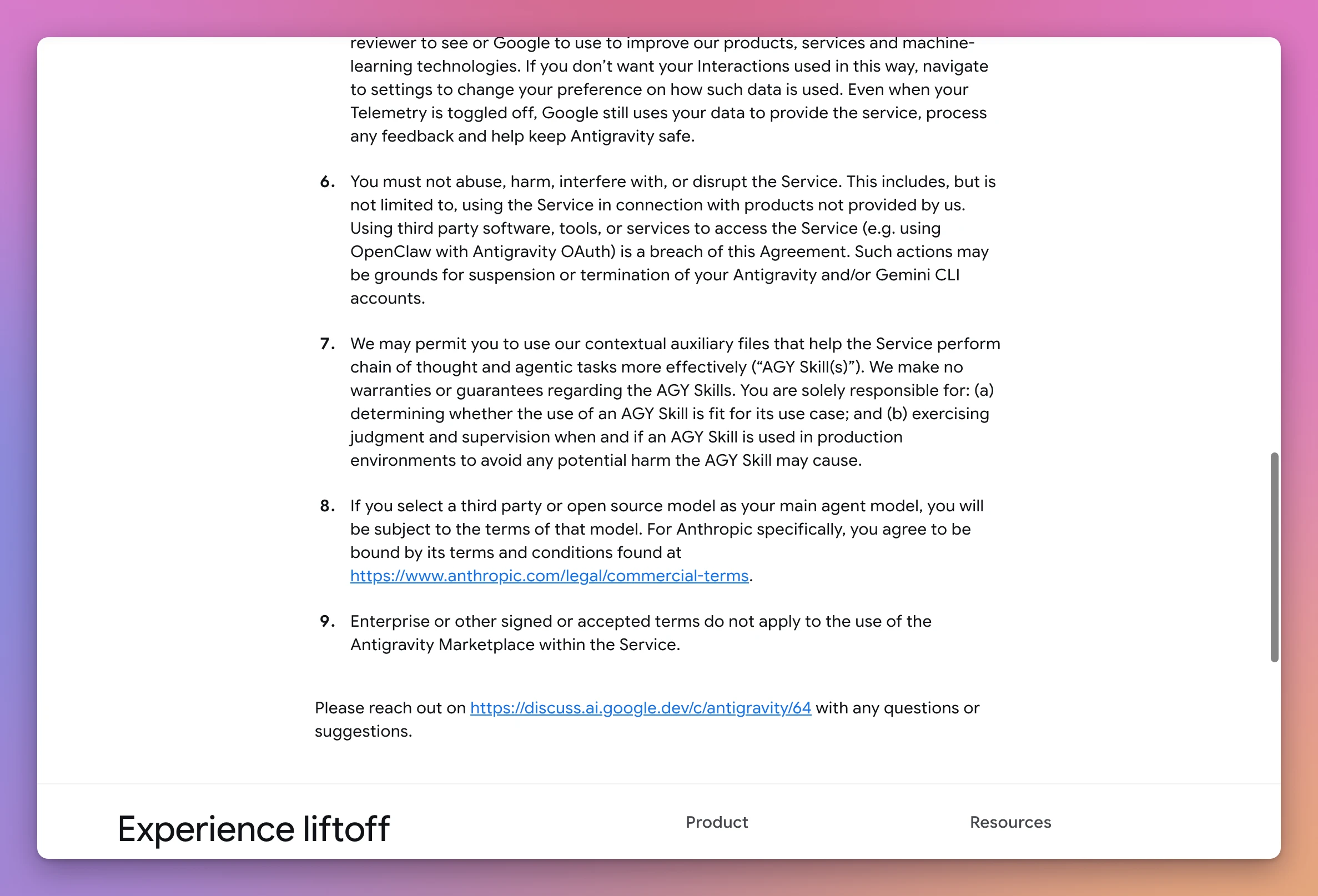
The official Antigravity FAQ is even more specific. It names Claude Code, OpenClaw, and OpenCode directly, and it adds a second rule about headless mode (agy -p) and account rotation:
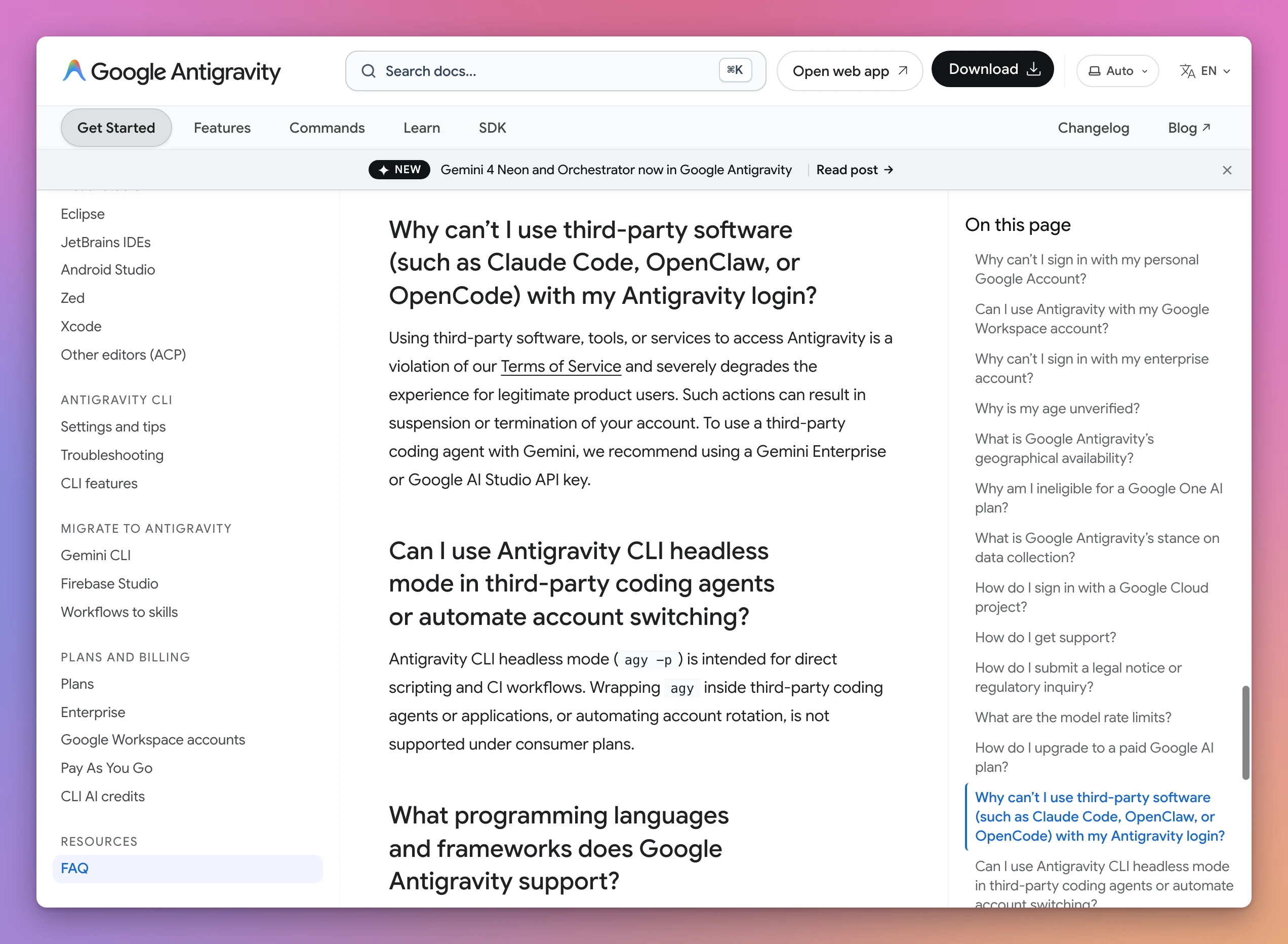
Notice two important details in those screenshots:
- First, Google explicitly tells you what to use if you want Gemini inside a third-party coding agent: a Gemini Enterprise account or a Google AI Studio API key.
- Second, the Antigravity Terms say violations can suspend or terminate your Antigravity and/or Gemini CLI accounts.
That is where the fear comes from.
On paper, an Antigravity violation should only stop you from using Antigravity and Gemini CLI.
In practice, Google’s broader automated anti-abuse systems can still disable your entire Google Account if they think you’re doing something suspicious, like using multiple accounts or using a bot. You’ll be locked out of everything until you get an appeal.
What you can and can’t do with a Gemini subscription
Before you run another coding session, it helps to separate what Google explicitly allows from what violates the Terms of Service.
| Setup or tool | Allowed on Pro / Ultra? | Why |
|---|---|---|
Antigravity App, Antigravity IDE, agy CLI, official IDE extensions, Antigravity SDK | Yes | First-party products covered by the consumer plan |
Official ACP editors launching agy acp (Zed, JetBrains IDEs, Android Studio, Xcode) | Yes | Documented in Google’s ACP guide |
Control planes spawning the real agy acp binary (such as T3 Code) | Yes (Gemini models) | Runs Google’s unmodified ACP server over stdio JSON-RPC |
agy -p headless mode in personal scripts or CI | Yes | Intended for direct scripting and CI on a single account |
Wrapping agy -p inside a third-party coding agent or app | No | Explicitly disallowed on consumer plans in the Antigravity FAQ |
| Third-party OAuth shims and proxies (OpenClaw, OpenCode, Pi shims, Claude Code over Antigravity OAuth) | No | Direct breach of clause 6 of the Antigravity Terms |
| Automated account switching or multi-account quota pooling | No | Disallowed in the FAQ and matches multi-account bot abuse signals |
| Running 2+ paid consumer accounts concurrently on one machine | No | Google support warns it looks identical to account pooling to anti-abuse systems |
| Manually signing out of one paid account and into a second one | Permitted on paper, risky in practice | Allowed per Google forum support, but users still report false-positive flags on the same machine |
| Third-party agents (OpenClaw, OpenCode, Pi, custom tools) with a Gemini API key | Yes | Recommended by Google’s FAQ, billed via Google Cloud or your monthly API credits |
| Antigravity Pay As You Go via a Google Cloud project or Gemini Enterprise | Yes | Governed by Google Cloud Terms of Service, telemetry off |
Here is how those request paths differ under the hood:
Why ACP tools like T3 Code are different from OAuth shims
I had a lot of confusion about this topic, because I had seen tools like T3 Code, Zed, JetBrains IDEs, Xcode, and many others mentioned as “third-party software” in the context of using them with Antigravity.
Turns out Google ships an official Agent Client Protocol (ACP) server right inside the agy CLI (agy acp), and they document it under Other editors (ACP). You can see it directly in your terminal:
agy --version
agy acp --help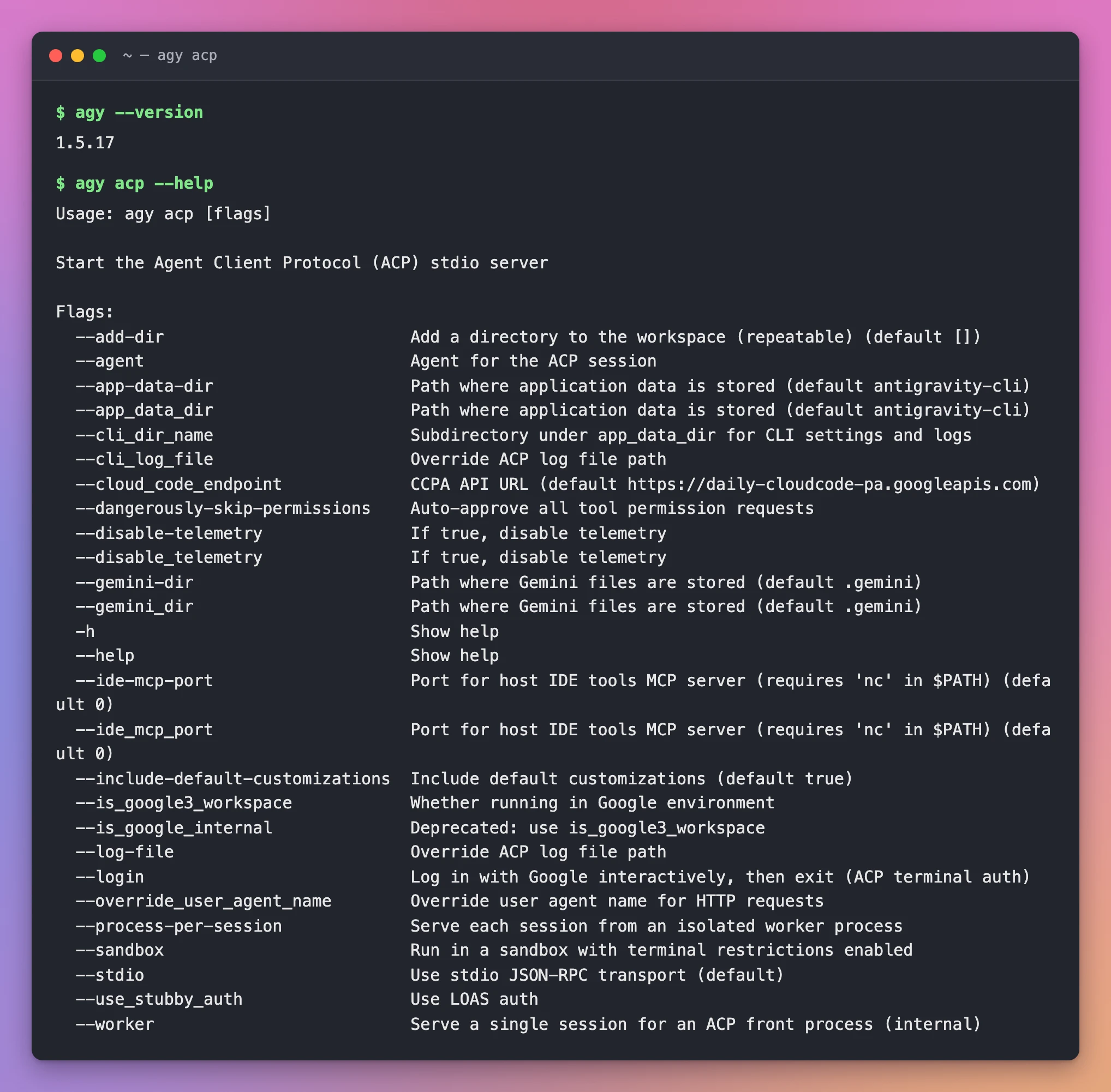
When an ACP client starts a session, it spawns Google’s own agy acp binary locally and talks to it over stdio JSON-RPC. The agent loop, tools, authentication, and telemetry settings stay inside Google’s CLI.
Theo summed up the difference on X:
T3 Code -> Antigravity binary -> Google API (allowed)
Pi -> (fake antigravity shim) -> Google API (not allowed)
One small detail from Google’s ACP docs is that Gemini models work in any ACP client, while third-party models (like Claude in Antigravity) are only available to JetBrains IDEs, Android Studio, Android Performance Analyzer, Zed, and Xcode.
What about paying for two subscriptions on two accounts?
A common question is whether you can simply buy two Google AI Pro or Ultra subscriptions on two different Google accounts to double your quota.
The answer depends on how you run them, and there is a gap between Google’s written answers and how their automated filters behave.
In a Google AI Developers Forum reply on October 19, 2026, Google support said one person maintaining two separately paid accounts and manually signing out of one and into the other through the official sign-in flow is allowed.
Running multiple paid consumer accounts at the same time on one machine (for example, hooking two or more Antigravity accounts into T3 Code in parallel) is a different story. In a November 16, 2026 forum reply, Google support said it is not supported:
To our automated anti-abuse systems, multi-account concurrency on one host is indistinguishable from account pooling/rotation and risks automated account suspension.
Even manual switching on the same computer carries real risk right now. Users have reported false-positive bans right after switching accounts inside the official Antigravity app, and Noah’s disabled Gmail screen specifically flagged the account as being used “with multiple other accounts to violate Google’s policies.”
If you outgrow one subscription, the safer options documented in Google’s Antigravity Plans guide stay inside a single account: turn on AI Credit Overages (so you buy extra credits only when your 5-hour or weekly quota runs out), move up a tier (Pro to Ultra 5x or Ultra 20x), or spill overflow into a Gemini API key backed by your monthly Cloud credits.
What Google says is changing on December 2
There are 2 promises from Google’s side on X right now, both from Logan Kilpatrick (@OfficialLoganK), who works on Gemini, Google AI Studio, and the Gemini API.
First, on November 20, 2026, Kun Chen (@kunchenguid) wrote that Gemini 4 Neon felt like a breath of fresh air and all Google needed to do was let people use their Gemini subscription in any harness.
December 2nd we take the first step
Second, on November 29, 2026, right under Steve Ruiz’s post saying he was terrified of using his Gemini subscription, Logan Kilpatrick replied:
don’t be, we will fix, you have my word
That’s encouraging, because it shows Google sees both sides of the problem: developers want to use their subscriptions outside a locked-down client, and nobody wants a coding tool to risk their personal Google account.
Still, we don’t know the exact details of the December 2 announcement yet. “The first step” could mean one officially supported partner harness, a scoped developer token, or updated terms, not a blanket green light for every third-party wrapper overnight.
Until Google actually ships the change and updates antigravity.google/terms, treat today’s written Terms as active.
How to lower your risk today
If you don’t want to bet your whole digital life on an automated abuse classifier, and you want to keep using Gemini 4 Neon and Antigravity, you have 4 realistic options:
| Setup | Blast radius if flagged | Works with Pro / Ultra quota? | Works with third-party harnesses? | Tradeoff |
|---|---|---|---|---|
| Primary personal Google account | High (Gmail, Drive, Photos, logins) | Yes | No (Antigravity & ACP only) | Convenient if you already keep Google One and YouTube Family there |
| Dedicated secondary Google account | Low (isolated from main Gmail) | Yes (needs its own plan) | No (Antigravity & ACP only) | You pay separately or split perks across two accounts |
| Gemini API key via Google AI Studio | Low (API / billing project scoped) | Uses monthly API credits | Yes | Pay-per-token once monthly credits run out |
| Google Cloud Pay As You Go or Gemini Enterprise | Low (Google Cloud Terms, org/project scoped) | No consumer quota | Yes (via API / Enterprise) | Per-token pricing or Enterprise seat cost, telemetry always off |
Here is what I recommend doing right now:
- Use only official surfaces with your subscription. Stick to the Antigravity App, Antigravity IDE,
agyCLI, official IDE extensions, or an ACP client running the unmodifiedagy acpbinary. If you are new to the official app, I wrote the complete guide to Google Antigravity (also available offline as the free Antigravity Handbook). - Skip OAuth shims and account rotators. Do not plug your Antigravity OAuth session into OpenClaw, OpenCode, Pi shims, or proxy pools, and do not script multi-account rotation. Those are the exact patterns Google calls out by name.
- Use your included API credits for third-party tools. Both Google AI Pro ($10/month) and Google AI Ultra ($40/month on 5x, $100/month on 20x) include monthly Google Cloud credits you can claim in Google AI Studio. I documented the exact steps in how to claim your free Gemini API credits with Google AI Ultra. An API key from that project works cleanly in any third-party harness or via the Gemini API CLI without touching Antigravity OAuth.
- Consider a separate Google account if you are starting fresh. If you have not bought Pro or Ultra yet and do not need the 30 TB Drive storage on your main Gmail, putting your coding subscription on a dedicated Google account keeps your primary inbox and Drive out of the blast radius.
- Do not keep single points of failure inside Gmail. Regardless of which AI tools you run, keep your password manager outside Chrome, export backups with Google Takeout occasionally, and make sure critical accounts have a recovery method that does not depend on one Gmail address.
How I am handling my own setup
I pay for Google AI Ultra on my Google account and I use Gemini 4 Neon every day through the official Antigravity runtime and T3 Code. I am 100% inside the Terms of Service: no third-party OAuth wrappers, no agy -p wrappers inside other harnesses, no switching between accounts.
When I want to call Gemini models from my own scripts or from tools outside Antigravity, I use a paid-tier Gemini API key backed by the $100/month Cloud credits included in my Ultra plan.
Even if I follow every rule, the coupling between a personal Google account and a coding subscription still makes me uncomfortable. Losing a coding tool is an annoyance. Losing your primary Google account is a disaster.
I am watching closely what Google will announce on December 2, and the single feature I want to see the most is what Morgan Linton asked for: a clean way to separate your AI developer profile from the personal Google account your whole life depends on.
Want me to talk about your product? You can sponsor this site.
Related posts about ai: