GPT-Live 1 tutorial: build a voice agent you can interrupt
By Flavio
Tagged: AI
How OpenAI's full-duplex voice model works, how to use it in ChatGPT, and how to build with gpt-live-1 in the API: delegation, web search, function tools, voices and real costs.
GPT-Live 1 is OpenAI’s voice model that listens and speaks at the same time. You can talk over it, change your mind halfway through a sentence, or stay quiet while you think, and it keeps up.
It shipped in ChatGPT Voice on July 8, 2026, and in the API as gpt-live-1 on September 10, 2026.
For developers, the big change is delegation. GPT-Live handles the conversation, and when a question needs reasoning, a web search or one of your tools, it hands the work to a text model you pick, then speaks the result.
I ran a few dozen sessions against the API for this tutorial. In total that was about 12 minutes of conversation, which cost around 60 cents. I didn’t speak into a microphone: I generated the questions with the macOS say command and streamed them in at real-time speed, so every transcript, timing and audio clip below comes from those runs.
How it compares to other voice setups
Until now you had two ways to build a voice agent with OpenAI. A chained pipeline (speech to text, then an LLM, then text to speech) or a Realtime model like gpt-realtime-2.1, which takes audio in and gives audio out, one turn at a time.
GPT-Live is a third option:
| Chained STT → LLM → TTS | Realtime (gpt-realtime-2.1) | GPT-Live (gpt-live-1) | |
|---|---|---|---|
| Turns | Turns, decided by your framework’s turn detection | Turns, decided by turn detection | No turns: it listens while it talks |
| Interruptions | Your framework stops the TTS | Supported, turn based | The model decides. It stopped 1.2 s after I cut in |
| Reasoning and tools | The LLM in the middle | The same model that talks | A separate backend model you choose |
| Price | Sum of three models | $32 / $64 per 1M audio tokens in / out | $0.05 per minute, plus backend tokens |
| End of a reply | Your TTS finishes | response.done event | No event: you track playback |
That last row bit me while testing, more on it below.
Here’s what happens when you ask something that needs work:
GPT-Live keeps talking to you while the backend works, and you can keep talking to it.
Using it in ChatGPT
In ChatGPT you don’t pick GPT-Live: it’s what runs when you start Voice, in the apps and on chatgpt.com. Go, Plus and Pro users get GPT-Live 1, Free users get GPT-Live 1 mini.
In the Mac app, Voice is the blue waveform button at the end of the message box. The microphone next to it is dictation, which only turns your speech into text. The shortcut for Voice is Control + Shift + V:
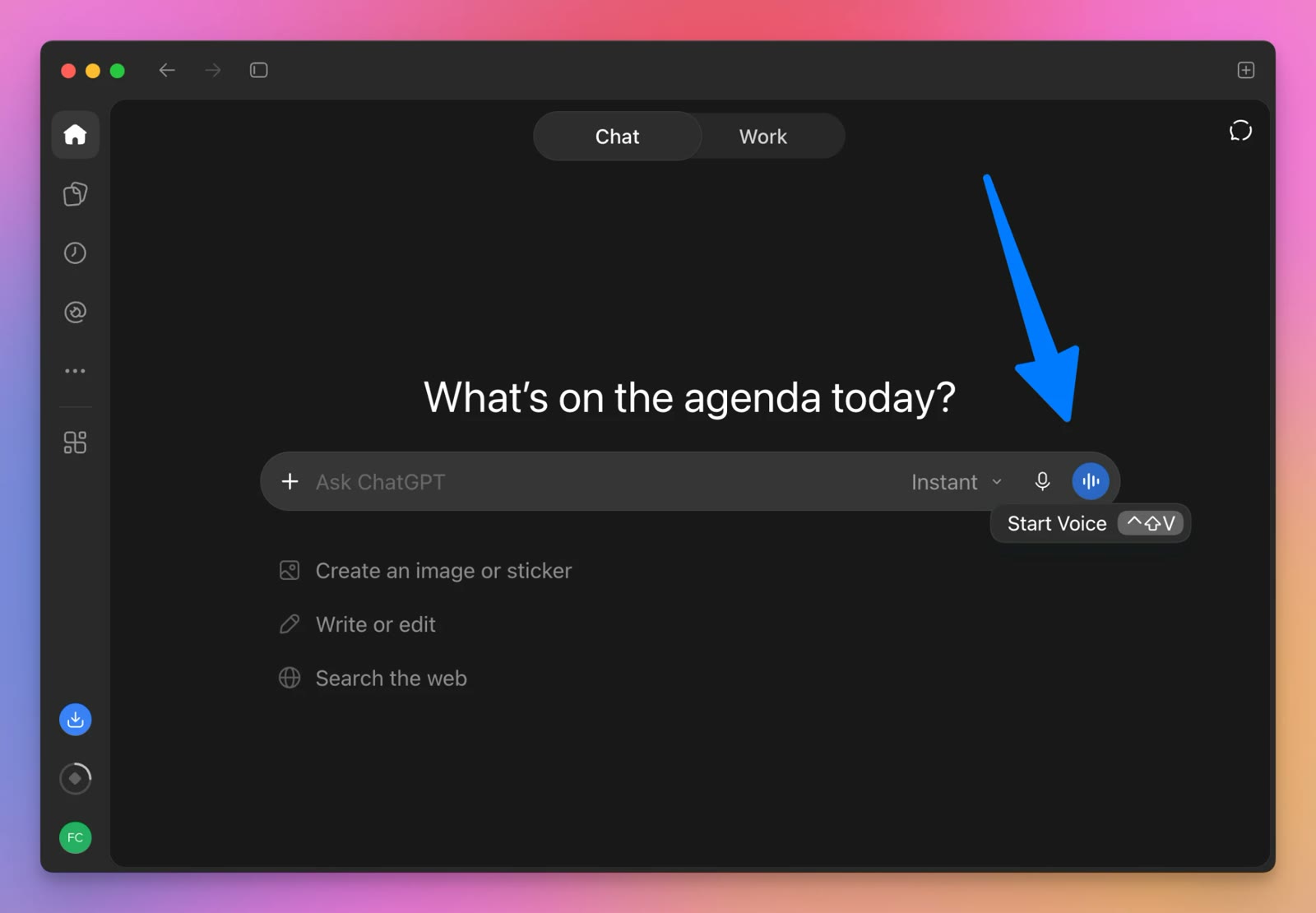
The model picker in the message box is the backend, the model GPT-Live delegates to when a question needs more thinking. At launch, Instant used GPT-5.5 Instant and Medium and High used GPT-5.5 Thinking, and OpenAI swaps in newer models as they ship. During my voice chat the picker showed GPT-6 Astra High.
Once you start, you get a “New voice chat” with a live transcript of both sides, an orb that moves while it talks, and buttons to mute the speaker, mute the microphone and end the call:
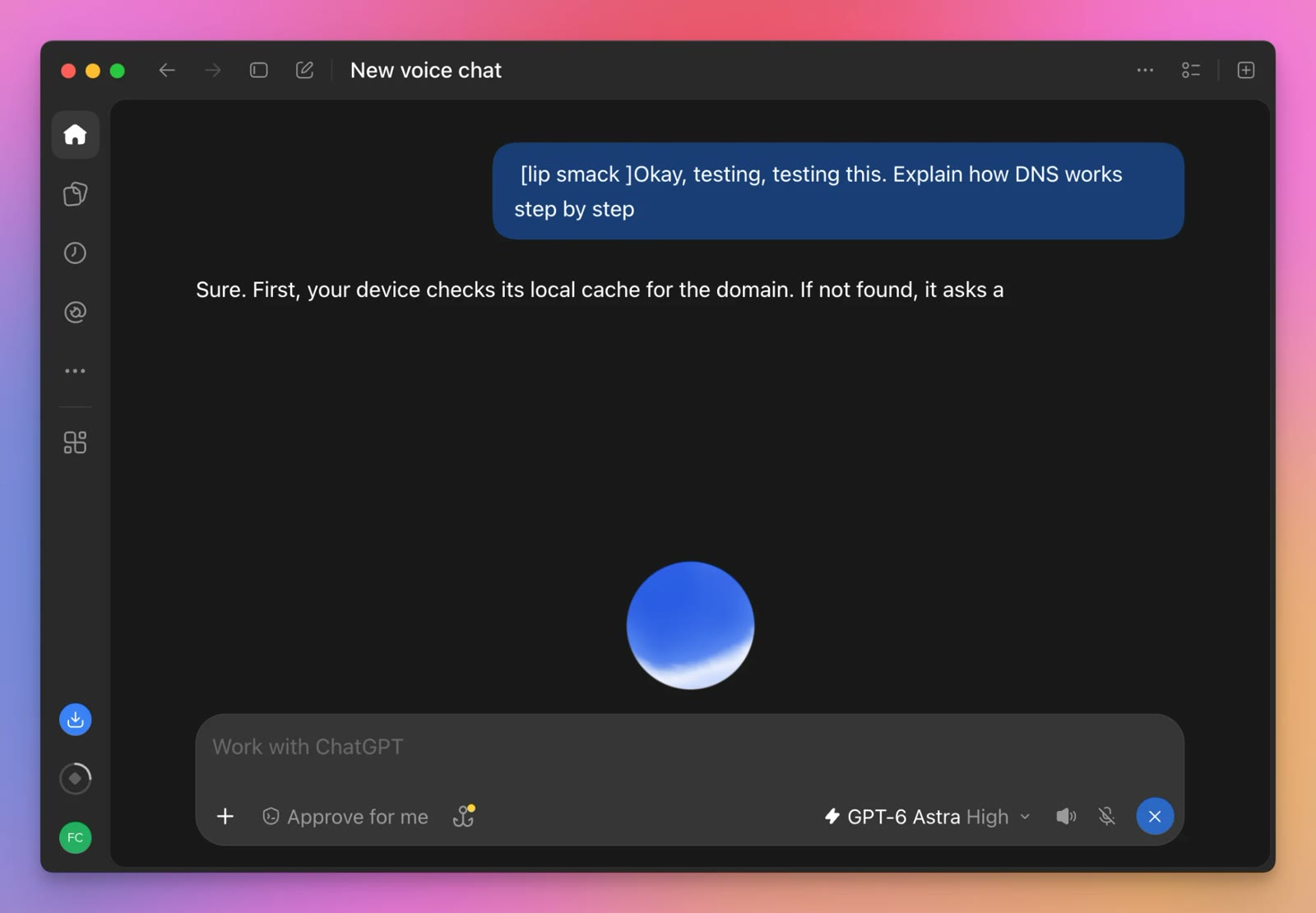
I asked it the same DNS question I used for the API tests. The transcript is very literal: it wrote down the lip smack before I started talking. The message box stays there during the call, so you can also type.
OpenAI’s launch notes suggest a few more things to try: tell it to stay quiet and just listen while you think out loud, or ask for the weather or a stock price, and it shows a card with the data while it talks. At launch, video and screen sharing didn’t work with GPT-Live.
What you need for the API
- an OpenAI API key in a project on a paid tier. The Free tier allows 0 concurrent Live sessions, the Build tier 50, Launch 300 and Grow 500
- Node.js and the
openaipackage, version 7.51.0 or later (that’s the one I used), plusws ffmpeg, to turn audio files into the raw format GPT-Live speaks
npm install openai wsGPT-Live wants raw mono PCM16 audio at 24 kHz, both in and out, no WAV headers.
Your first session
We connect with a WebSocket to wss://api.openai.com/v1/live/sessions, send a session.start event with the configuration, then stream audio in both directions.
This script reads audio from stdin, writes GPT-Live’s voice to stdout, and prints captions of both sides to stderr. Save it as talk.mjs:
import OpenAI from 'openai'
import { LiveWS } from 'openai/resources/live/ws'

const ws = new LiveWS(new OpenAI())
let speaker = ''

function caption(who, text) {
  if (who !== speaker) process.stderr.write(`\n${who}: `)
  speaker = who
  process.stderr.write(text)
}

ws.socket.on('open', () => {
  ws.send({
    type: 'session.start',
    session: {
      model: 'gpt-live-1',
      instructions:
        'You are a friendly assistant. Be concise. Delegate requests needing current information to the backend, which can search the web.',
      audio: {
        format: { type: 'audio/pcm', rate: 24000 },
        output: { voice: 'marin' },
      },
      delegation: {
        type: 'responses',
        responses: {
          model: 'gpt-6-luna',
          tools: [{ type: 'web_search' }],
        },
      },
    },
  })
})

ws.on('event', (event) => {
  switch (event.type) {
    case 'session.started':
      process.stdin.on('data', (chunk) => {
        ws.send({
          type: 'session.input_audio.append',
          audio: chunk.toString('base64'),
        })
      })
      process.stdin.on('end', () => ws.send({ type: 'session.close' }))
      break
    case 'session.output_audio.delta':
      process.stdout.write(Buffer.from(event.delta, 'base64'))
      break
    case 'session.input_transcript.delta':
      caption('you', event.delta)
      break
    case 'session.output_transcript.delta':
      caption('gpt-live', event.delta)
      break
    case 'session.delegation.created':
      caption('backend', '[working] ')
      break
    case 'session.closed':
      console.error('\n\nbilled seconds:', event.usage.seconds)
      ws.close()
      break
  }
})

ws.on('error', (error) => console.error('\nerror:', error.message))
The session config has two halves:
instructionsis the prompt for GPT-Live, the voice. Keep it short: tone, and when to delegate.delegationconfigures the backend. Here it’sgpt-6-luna, the small and cheap GPT-6 model, with the hostedweb_searchtool. OpenAI runs this loop for you, which is whattype: 'responses'means.
The OpenAI client reads your key from the OPENAI_API_KEY environment variable.
Notice we only start sending audio after session.started. And there’s no “now it’s your turn” call anywhere: you keep streaming audio, silence included, and GPT-Live decides when to talk.
To test it without a microphone, let’s make a question with say, add 15 seconds of silence so there’s time for the answer, and stream it at real-time speed with ffmpeg’s -re flag:
say -v Samantha -o weather.aiff "What's the weather like in Bologna, Italy, right now?"
ffmpeg -loglevel error -i weather.aiff -af apad=pad_dur=15 -ar 24000 -ac 1 weather.wav
ffmpeg -loglevel error -re -i weather.wav -f s16le -ar 24000 -ac 1 - | node talk.mjs > reply.pcm
This is what it printed:
you: What's the weather like in Bologna, Italy right now
backend: [working]
gpt-live: One moment—I'll check.It's cloudy in Bologna right now, about 10 degrees Celsius.

billed seconds: 17
To listen to the reply, convert it to MP3:
ffmpeg -f s16le -ar 24000 -ac 1 -i reply.pcm reply.mp3Be careful with how fast you send audio. My first attempt used
apadin the same command as-re, and ffmpeg generated the trailing silence as fast as it could. GPT-Live dropped it with this error: “Send audio at no more than 1.2x real-time speed with bursts of at most 5 seconds.” With a live microphone you never hit this, with files you do.
For a real app, OpenAI recommends WebRTC over WebSockets. In the browser it carries your microphone and speaker on media tracks, and the events on a data channel. The WebRTC quickstart has a browser and server example with the same session config.
Delegation: what happens while it searches
The weather question is a good one to look at in detail, because GPT-Live can’t answer it alone. Here’s the timeline of one run, measured from when I stopped talking:
| Time | What happened |
|---|---|
| +1.1 s | GPT-Live creates a delegation (session.delegation.created) |
| +1.2 s | It says “Checking that now.” |
| +3.3 s | The backend runs a web search |
| +5.0 s | The backend’s answer is ready: “It’s cloudy in Bologna right now, about 10°C (51°F).” |
| +5.3 s | GPT-Live says “It’s cloudy in Bologna, about ten degrees Celsius.” |
So you hear something after about a second, and the actual answer after five, with no dead air in between. Notice GPT-Live doesn’t read the backend’s text verbatim, it rewords it for speech.
The backend used 5,213 input tokens and 256 output tokens for this, most of it the search results. At gpt-6-luna prices that’s less than a tenth of a cent, plus $0.01 for the web search call.
Calling your own functions
Web search runs on OpenAI’s side. Most voice agents need your data, so let’s give the backend a function to call.
I made a voice guide for this blog. It answers “did Flavio write about X?” by searching the Markdown files of the posts. Here’s the search, in search-blog.mjs:
import fs from 'node:fs'

const dir = '/Users/flaviocopes/www/flaviocopes.com/src/posts'
const today = new Date().toISOString().slice(0, 10)

export function searchBlog({ query }) {
  const words = query.toLowerCase().split(/\W+/).filter((w) => w.length > 2)
  const posts = []
  for (const file of fs.readdirSync(dir).filter((f) => f.endsWith('.md'))) {
    const frontmatter = fs.readFileSync(`${dir}/${file}`, 'utf8').split('---')[1]
    const title = frontmatter.match(/^title:\s*"?(.*?)"?$/m)?.[1] ?? ''
    const date = frontmatter.match(/^date:\s*(\S{10})/m)?.[1]
    if (/^draft:\s*true/m.test(frontmatter) || date > today) continue
    const score = words.filter((w) => title.toLowerCase().includes(w)).length
    if (score) posts.push({ score, title, date })
  }
  posts.sort((a, b) => b.score - a.score || b.date.localeCompare(a.date))
  return posts.slice(0, 5).map(({ title, date }) => ({ title, date }))
}
The line that skips drafts and future dates wasn’t there in my first version. In that run, the guide happily told me about a post scheduled for later in the month, because the function returned it. A voice agent will say whatever your tools give it, so filter in the tool, not in the prompt.
Copy talk.mjs to blog-guide.mjs, import the function, and change the prompt and the delegation part of the config:
import { searchBlog } from './search-blog.mjs' instructions:
"You are the voice guide for flaviocopes.com, Flavio Copes' programming blog. Be concise and warm. When the user asks whether Flavio wrote about something, delegate to the backend.", delegation: {
type: 'responses',
responses: {
model: 'gpt-6-luna',
instructions:
'Use search_blog to find posts on flaviocopes.com. Answer with the one or two most relevant titles and their dates. Never invent posts.',
tools: [
{
type: 'function',
name: 'search_blog',
description: 'Search flaviocopes.com posts by keywords',
parameters: {
type: 'object',
properties: { query: { type: 'string' } },
required: ['query'],
additionalProperties: false,
},
strict: true,
},
],
},
},The backend gets its own instructions. That’s where the rules for the task go, while the GPT-Live prompt stays about how to talk.
Backend events reach us wrapped in a response.event envelope. When the backend finishes a function call, we run it, send the result with response.item.create, then tell the backend to continue with response.create. Add this case to the switch:
    case 'response.event':
      if (
        event.event.type === 'response.output_item.done' &&
        event.event.item.type === 'function_call'
      ) {
        const call = event.event.item
        const posts = searchBlog(JSON.parse(call.arguments))
        caption('backend', `[search_blog ${call.arguments}] `)
        ws.send({
          type: 'response.item.create',
          item: {
            type: 'function_call_output',
            call_id: call.call_id,
            output: JSON.stringify(posts),
          },
        })
        ws.send({ type: 'response.create' })
      }
      break
response.create takes no other fields. I first passed it the delegation_id, and got back Unknown parameter: 'delegation_id'. The backend config lives in the session, so there’s nothing else to say.
I asked two questions, about 20 seconds apart:
you:  Hey. Did Flavio write anything about running macOS in a terminal
backend: [working]
gpt-live:  Hmm. Lemme check.
backend: [search_blog {"query":"running macOS in a terminal"}]
gpt-live:  Yep—there’s a post called “Run a macOS VM in your terminal for AI agents with terminal-mac,” from November fourth, twenty twenty-six. Want a quick summary?
you:  Cool, and what about Tailscale? Anything there
backend: [working]
gpt-live:  Checking Tailscale.
backend: [search_blog {"query":"Tailscale"}]
gpt-live:  Yes! There are two: “Tailscale alternatives for your own servers,” from November third, and “How to secure a VPS with Tailscale and Cloudflare Tunnel,” from October twenty-third.

billed seconds: 41
Both answers are right, and those posts exist: terminal-mac, Tailscale alternatives and the Tailscale and Cloudflare Tunnel VPS setup.
Here’s a recording of a run of the same conversation (the questions are the say voice):
I ran this conversation four times with logging on. The acknowledgment and the answer came at these times after the end of each question:
| Run | Question | Acknowledgment | Answer starts |
|---|---|---|---|
| 1 | macOS in a terminal | 0.5 s “That’s a fun one. Checking” | 4.5 s |
| 1 | Tailscale | 0.6 s “Checking now.” | 2.8 s |
| 2 | macOS in a terminal | 0.6 s “Hmm, let’s take a look.” | 4.4 s |
| 2 | Tailscale | 0.3 s “One sec, checking.” | 3.5 s |
| 3 | macOS in a terminal | 1.3 s “Checking.” | 6.3 s |
| 3 | Tailscale | 0.1 s “Yep, looking.” | 5.1 s |
| 4 | macOS in a terminal | 0.5 s “Hmm. Lemme check.” | 4.6 s |
| 4 | Tailscale | 0.5 s “Checking Tailscale.” | 5.3 s |
The acknowledgment was different every time, which is a big part of why it sounds less robotic than a fixed “Please hold on” message.
It wasn’t perfect, though. Across all eight tool runs I did, one never spoke the answer to the first question: the function ran, the result went back, and GPT-Live stayed silent until the next question. No error event. Log your sessions, and in production keep a timeout that nudges the conversation if a delegation finishes and nothing is said.
Interruptions
This is what full duplex is for. I asked for a detailed explanation of DNS, then cut in five seconds into the answer:
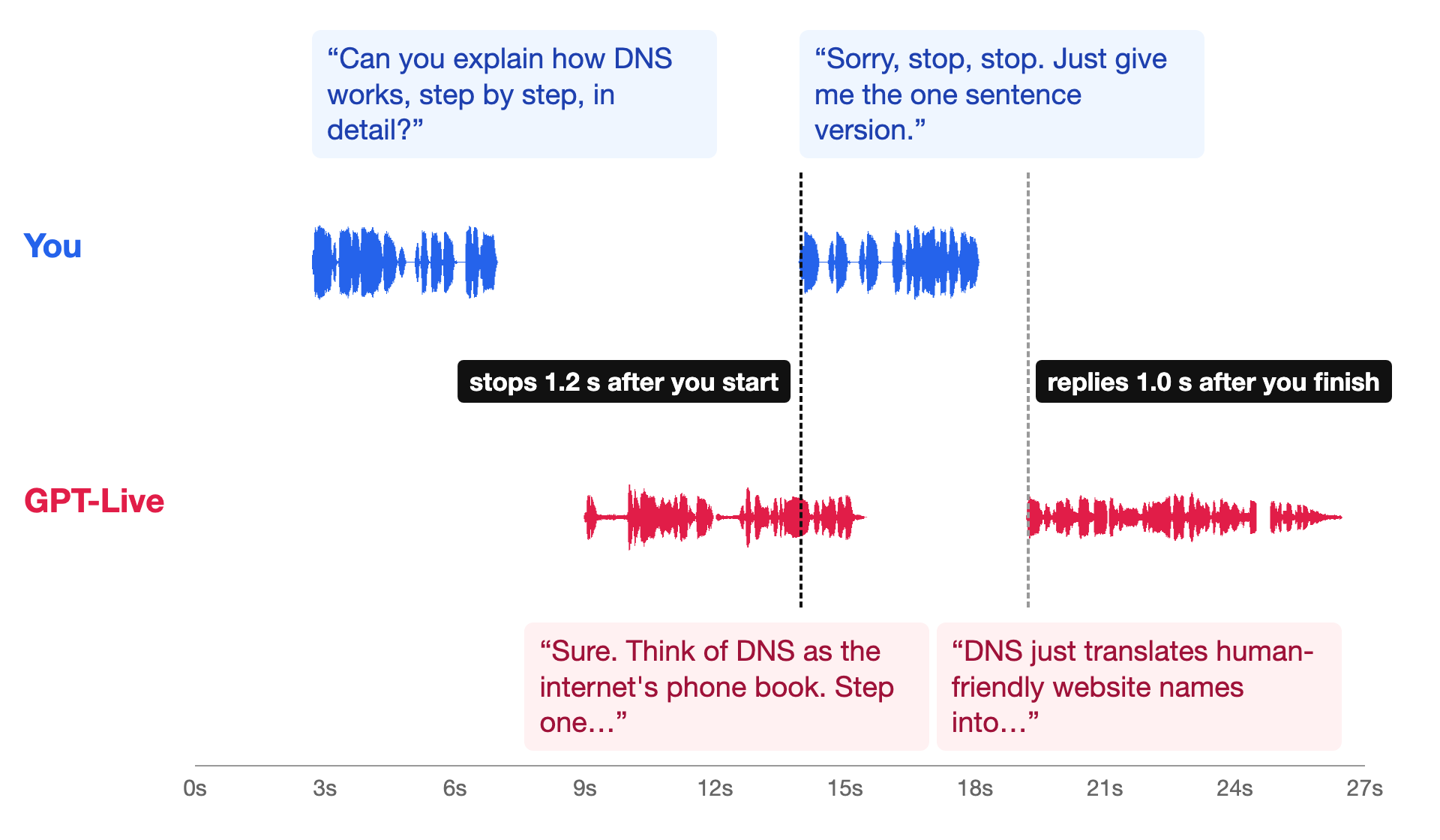
you: Can you explain how DNS works, step by step, in detail
gpt-live: Sure. Think of DNS as the internet's phone book. Step one: You type a domain name like example dot
you: Sorry, stop, stop. Just give me the one sentence version
gpt-live: DNS just translates human-friendly website names into the numerical IP addresses computers use to find and connect to servers.
It stopped 1.2 seconds after I started talking, which is about the time it takes to say “Sorry, stop”, and answered 1.0 seconds after I finished.
Now the gotcha from the comparison table. There’s no event that says “the reply is over”. GPT-Live keeps streaming session.output_audio.delta events full of silence between replies, so my test harness first thought the assistant never stopped talking. I ended up checking the volume of each chunk. Your player knows what it played, so track the end of a reply there.
Prompting the voice
Two things I learned from the prompts.
First, give it a name. With the generic prompt it introduced itself as ChatGPT in all three runs: “Hi, you’re talking to ChatGPT, an AI assistant.” With the blog guide prompt it never did.
Second, it follows the language of the speaker. I asked in Italian, with the macOS Italian voice:
you: Ciao! Mi spieghi in due frasi cos'è una closure in JavaScript
gpt-live: È una funzione che “ricorda” le variabili del suo contesto esterno anche dopo che quel contesto ha finito di eseguire. Questo permette di mantenere stato e dati privati, o di creare funzioni specializzate usando quelle variabili.
you: Grazie, adesso ripetilo in inglese, per
gpt-live: It’s
you: favore
gpt-live: a function that “remembers” variables from its outer scope even after that scope has finished running. This lets you keep state and data private, or create specialized functions that use those variables.
The prompt only said “Answer in the language the user speaks”, and the switch to English took one request.
Look at the second exchange: GPT-Live started “It’s” before the end of “per favore”. It had heard enough to know what I wanted, which a turn-based model can’t do because it waits for the silence.
OpenAI’s prompting guide has more on this, including how to set a backchannel policy (how often it says “mm-hmm” while you talk) and an interruption policy.
Voices
The API launched with a larger set of voices than Realtime had. I asked five of them the same thing, “Can you welcome me to the blog?”, with the same one-sentence prompt:
| Voice | What it said | Reply after |
|---|---|---|
marin | “Welcome to flaviocopes.com—let’s explore programming together!” | 1.1 s |
cedar | “Welcome to flaviocopes.com, a blog about programming, software, and tech topics.” | 1.0 s |
quartz | “Welcome to flaviocopes.com, your friendly spot for programming tips and tutorials.” | 0.9 s |
vesper | “Welcome to flaviocopes.com, a blog about programming and building things on the web.” | 1.1 s |
cinder | “Welcome to flaviocopes.com, a programming blog packed with tutorials and insights to help you learn and build.” | 1.3 s |
marin:
cedar:
quartz:
vesper:
cinder:
You set the voice in audio.output.voice when you start the session. Custom voices exist too, but only for approved customers through OpenAI sales.
What it costs
The voice layer costs $0.05 per minute, billed per second. The question is: seconds of what?
The answer is seconds of open session. I compared the usage.seconds from session.closed with how long each session was open and how long GPT-Live actually spoke:
| Session | Open for | Billed | GPT-Live speaking |
|---|---|---|---|
| Greeting and weather | 34.2 s | 32 s | 11.6 s |
| Blog guide, two questions | 50.2 s | 48 s | 21.6 s |
| Interruption | 31.3 s | 28 s | 11.7 s |
| Italian | 46.2 s | 44 s | 23.9 s |
| One voice sample | 13.1 s | 11 s | 3.8 s |
You pay for the whole time the session is open, minus a couple of seconds of setup, including every second of silence. Muting the microphone doesn’t stop the meter, closing the session does. So close sessions when the user leaves, and set a maximum duration.
The backend is billed on top, at normal Responses prices. With gpt-6-luna it’s tiny: each blog guide answer took two backend calls of 900 to 1,500 tokens each, a fraction of a cent. A bigger backend like gpt-6-sol changes that, and so do tools with a per-call price like web search.
For a five-minute support call with gpt-6-luna behind it, expect about 25 cents for the voice and a cent or two for the backend.
Running it in production with LiveKit
The WebSocket script is good for learning and for server-side tests. Real users need more than the model: audio that survives a bad mobile connection, phone numbers, an agent process that scales, and a way to see what happened in each call.
That’s what LiveKit does. LiveKit isn’t a voice model, it’s the infrastructure you run voice models on, and it already supports GPT-Live. Full disclosure: LiveKit sponsors this site.
You can use GPT-Live in LiveKit Agents in two ways:
- through LiveKit Inference, as
openai/gpt-live-1. You use your LiveKit Cloud credentials instead of an OpenAI key, LiveKit bills the usage, and there’s a dedicated EU endpoint - through the OpenAI plugin, with your own OpenAI API key. LiveKit’s docs point you here if you want to manage your own billing or use OpenAI’s hosted tools, like the web search we used above
With LiveKit Inference in Node.js, GPT-Live goes in the llm slot of the agent session, and the backend settings go in responsesOptions. This is adapted from LiveKit’s docs:
import { AgentSession, inference } from '@livekit/agents'

const session = new AgentSession({
  llm: new inference.DuplexModel({
    model: 'openai/gpt-live-1',
    voice: 'marin',
    modelOptions: {
      responsesOptions: {
        model: 'gpt-5.6-luna',
        instructions: 'Use tools when current information is required.',
      },
    },
  }),
})
Everything from this tutorial carries over: a short prompt for the voice, a separate prompt and tools for the backend, and the same delegation model. LiveKit takes care of the browser and phone audio, so you don’t write the WebSocket code yourself.
My LiveKit tutorial builds a full voice agent from the template, with tools, tests, phone numbers, deployment and observability. GPT-Live is one of the models you can pick in step 4.
If you’d rather wire the transport yourself, OpenAI recommends WebRTC for browsers and mobile apps, supports SIP for phone calls, and lets your server watch or steer a running session through a second WebSocket it calls a sideband. OpenAI also published the OpenAI Live Console, a local sample app that shows delegation and tool calls in a UI while you talk.
Want me to talk about your product? You can sponsor this site.
Related posts about ai: