
An app by Flavio
Events Logger
Track signups, orders, deploys and errors in your own SQLite dashboard. Includes an HTTP API, CLI, charts and full MIT source.
Buy Events Logger · $20One-time purchase. Tax included. Full source code.
Node.js 18+ · self-hosted web app
Events Logger collects your app events in one self-hosted dashboard.
It is a self-hosted dashboard that shows what is happening across your apps.
Signups, orders, payments, deploys, errors. You push events from any app, and they appear in one feed.
I built it because I wanted to know what was going on in my projects without sending data to a third-party analytics service.
Every tool I tried was either too complex, too expensive, or required shipping my data to someone else’s servers.
Events Logger runs on your machine. Events go into a local SQLite database and stay there.
It is built with the AHA Stack (Astro, HTMX, and Alpine.js), with Drizzle and SQLite for storage.
The HTTP API
Events Logger has a JSON HTTP API you can call from any app.
The base URL is http://localhost:4321 when you run it locally, or the URL where you deploy it.
The app generates one global API key when it starts for the first time. Requests that create projects, push events, or update insights send it as a Bearer token. Read-only endpoints don’t need a key.
The API lets you:
- create and list projects
- push events
- query events by project or category
- search events and paginate through the results
- create or update KPI insight cards
- read event counts grouped by category and day
Push an event
You push an event with a single HTTP call:
curl -X POST http://localhost:4321/api/events \
  -H "Content-Type: application/json" \
  -H "Authorization: Bearer ev_your-key-here" \
  -d '{
    "project": "q4q8nb18qc2i",
    "category": "orders",
    "title": "Order Placed",
    "description": "Order **#1234** placed by **Maria**"
  }'
The API returns the stored event as JSON with a 201 status code. New categories are created automatically.
The description supports bold text and links. You can also attach an emoji icon, a URL, a user ID, searchable key-value tags, and a notify flag for browser notifications.
You can read the events back over HTTP too:
curl "http://localhost:4321/api/events?project=q4q8nb18qc2i&category=orders&limit=20"The response includes the events and a cursor for the next page. You can also search titles, descriptions, and tags.
The built-in playground lets you prepare and test a request. It shows the exact HTTP call and gives you a code snippet to copy.
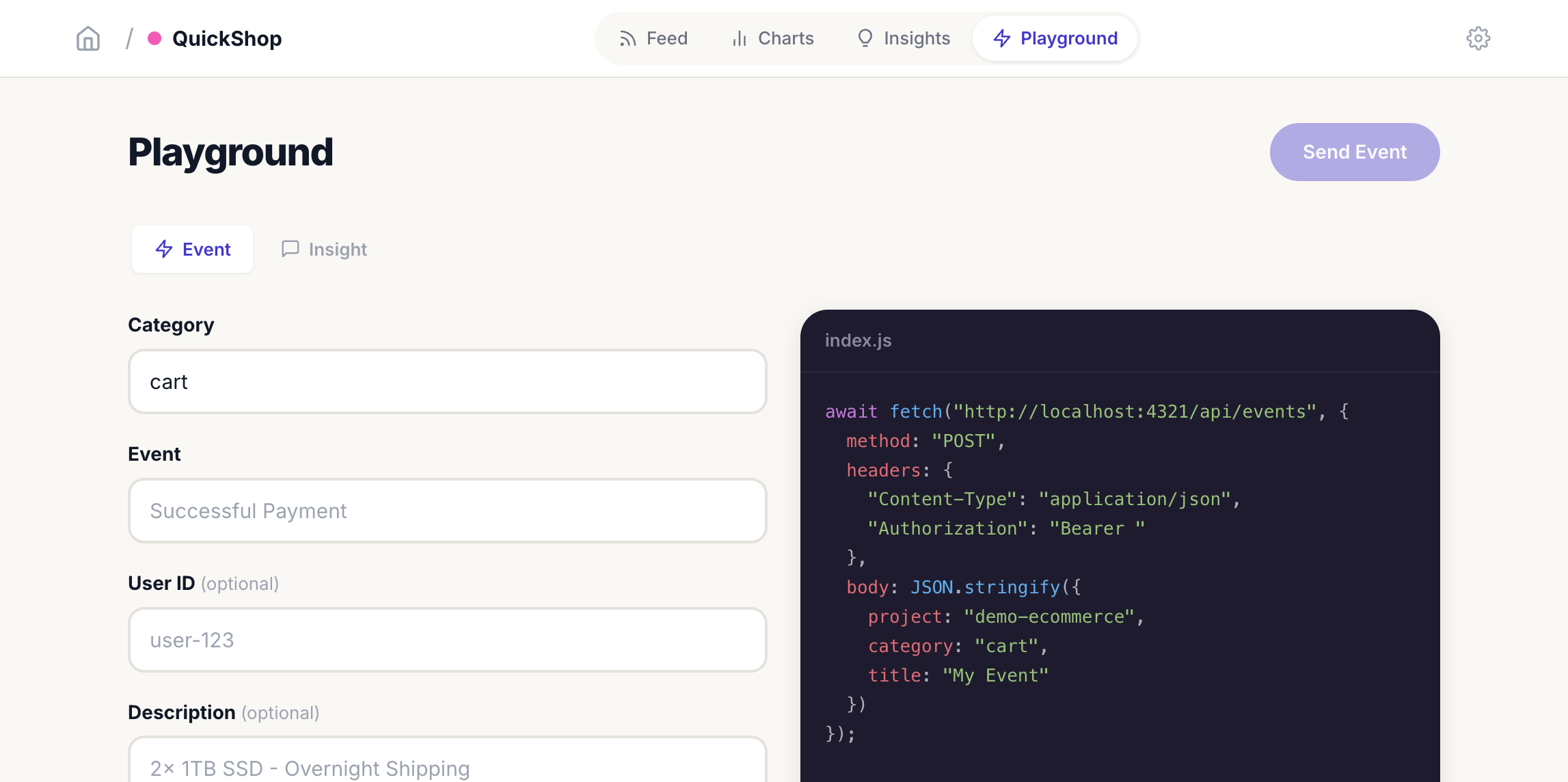
Or use the included CLI:
node cli/index.js push \
  --api-key ev_your-key-here \
  --project q4q8nb18qc2i \
  --category signups \
  --title "User Registered"
Any language works. The package includes code examples for JavaScript, Python, PHP, Ruby, and Go.
The feed
Events appear in a chronological stream.
HTMX polls for new events, so the feed updates without page reloads.
You can search, filter by category, mark favorites, and turn on browser notifications for the events that matter.
Each app gets its own project, with its own feed, charts, insights, and settings.
Charts and insight cards
The charts page shows event frequency per category over time, so you can see how activity evolves.
Insight cards track KPIs. You upsert a card by title, so the same call updates the value:
node cli/index.js insight \
  --api-key ev_your-key-here \
  --project q4q8nb18qc2i \
  --title "Online Users" \
  --value 28
Users online, revenue, active sessions. Any number you want on the dashboard.
Demos and exports
Four demo scenarios ship in the box, with 1800+ sample events for an e-commerce store, a SaaS, a DevOps pipeline, and a content platform:
node cli/index.js load --file demos/all-scenarios.jsonYou can export everything to JSON anytime:
node cli/index.js export --file backup.jsonBecause the export is plain JSON, you are not locked into a hosted vendor.
Everything stays local
Events Logger runs with Node.js 18 or newer.
SQLite stores data in a local file with zero configuration. No account, cloud service, or external API key is required.
What you get
The purchase includes the dashboard source and the tools to integrate it with your apps.
The download includes:
- the complete Astro + HTMX + Alpine.js source
- the REST API with CRUD for events, insights, and projects
- the CLI tool for pushing events, managing insights, and loading demos
- the Drizzle ORM schema with auto-migration on startup
- four demo scenarios with 1800+ sample events
- architecture, decisions, customization, deployment, configuration, security, and build guides
- instructions for coding agents
- an MIT license
You can use it as it is, add Slack or email alerts, layer multi-user auth for a small team, or point an AI agent at the architecture docs and rebuild the same idea on your preferred stack.
Buy Events Logger and get the source
Events Logger costs $20 including tax, paid once. The purchase includes the full source code under the MIT license, with setup instructions so you can run and customize your own copy.
After buying, connect your GitHub account in Polar and accept the invitation to the private Events Logger repository. Download the source from its Releases page, or clone the repository after authenticating with the GitHub account you connected. Future source updates are available from the same private repository.
This purchase supplies the software source. You provide the runtime, accounts and infrastructure described below.
Run your own dashboard
Download and unzip the source, open Terminal in that folder, and run:
npm install
npm run dev
Open the local URL shown by Astro. The README explains production builds and deployment. If you put the dashboard online, follow its security guide and add access controls for your installation; the read-only API endpoints described above do not require an API key.