
An app by Flavio
Post Slide Deck
Collect posts on X, arrange them into slides and record a clean slideshow offline. Includes a Mac app, Chrome extension and full MIT source.
Buy Post Slide Deck · $20One-time purchase. Tax included. Full source code.
macOS 14+ · Chrome extension

$20 including tax, one-time purchase. Full MIT source included.
Post Slide Deck is a Mac app with a Chrome extension. It turns posts on X into slides I talk over while I record a video. I click a small icon under a post, and the post shows up in the app as a slide, with the author, the avatar, the text and the images.
Here’s how it works in 30 seconds:
I record videos where I talk about posts on X. Recording X itself means the timeline, the replies, the ads and the sidebar all end up in the frame, and I scroll around looking for the next post while I’m talking. I wanted a clean slideshow of just the posts I picked, in the order I want to talk about them.
One click under a post
The extension adds a slide icon next to Like, under every post on X. Click it, and a message at the bottom of the page tells you where the post went, like Added to “This week’s apps”, slide 6.
The post goes to the slideshow selected in the app, so you can keep one slideshow per video. ⌘N creates a new one, and a double-click renames it.
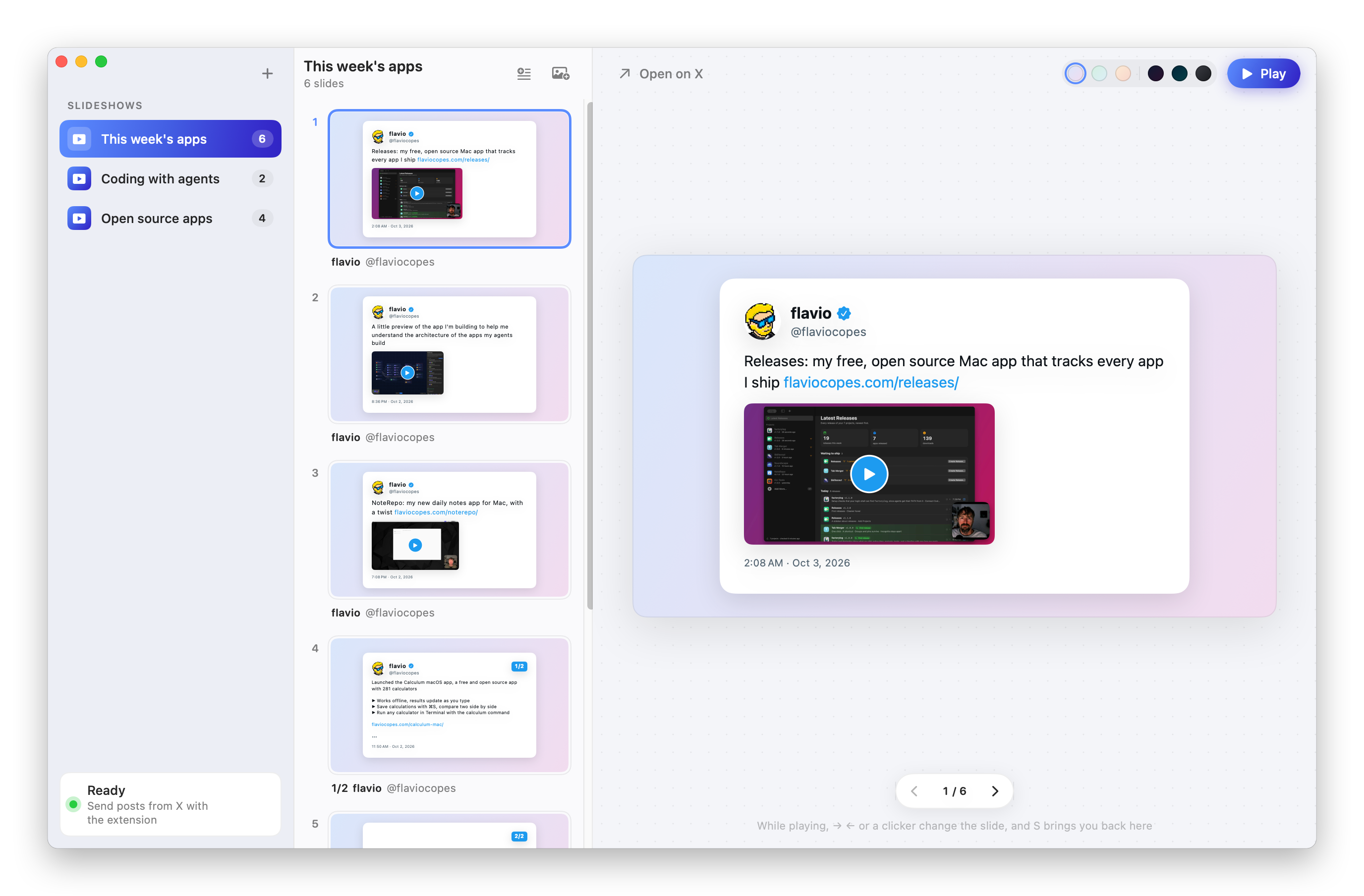
These slides use my original posts on X, before I renamed the apps.
Each post becomes a small slide in the middle column. Drag the slides to put them in the order you want, or drop one on another slideshow in the sidebar to move it there. Press Delete to remove a slide, or right-click it to open the post on X.
The sun and moon switch next to Play changes every slide between light and dark.
Playing the slideshow
When I’m ready to record, I press ⌘↩. The window shows only the slide, with no sidebar, no buttons and no traffic lights, so a recording of the Post Slide Deck window is just the slide. I record it with Borumi. I wrote about what a recording tool needs before an agent can help with it.

→ and ← change the slide, and so do Space, Page Up and Page Down, so a presentation clicker works too. S takes me back to the slideshow, on the slide I stopped at.
A few details make the slides easier to talk over:
- Shorter posts get bigger text, so a one-liner fills the slide.
- Replies show who they reply to.
- Videos show up as their thumbnail with a play button.
- X cuts long posts short in the timeline. Open the post and click the icon again, and Post Slide Deck replaces the text with the full one.
The app downloads the avatar and the images when a post arrives. The slides don’t depend on X while I record, and they work offline.
How it works
A content script on the X page can’t talk to an app on your Mac, so the page hands the post to the extension’s service worker. The worker sends it to a tiny HTTP server inside the app, on 127.0.0.1:7678. That server only listens on your Mac, and it refuses requests from web pages, so a website can’t add slides behind your back.
Reading a post from X is the fragile part, because X changes its markup. The extension handles the current markup and the older one, reads the date from the post ID (X’s IDs carry a timestamp), and skips anything inside a quoted post. Its test loads the extension into Chromium and clicks posts on real X pages saved in the repo, so when X changes something, I save fresh pages and see what broke.
Each slide is laid out on a 1920×1080 canvas, and every size is scaled to the window width. That keeps the text and the images sharp in a small window, in full screen, and in the thumbnails.
The app is SwiftUI with no dependencies. Your slideshows stay in one JSON file on your Mac, with the images in a folder next to it. There are no accounts and no analytics.
Buy Post Slide Deck and get started
Post Slide Deck costs $20 including tax, paid once. You get the app and its full source code under the MIT license, so you can read it, change it and build your own version.
After buying, connect your GitHub account in Polar and accept the invitation to the private Post Slide Deck repository. Then open its Releases page to download it. Future updates are available from the same private GitHub Releases page.
Once you have repository access, download the zip from the latest release and unzip it. Drag Post Slide Deck to your Applications folder. It runs on macOS 14 Sonoma or later, on Apple silicon and Intel Macs. It’s signed with my Apple Developer ID and notarized by Apple, so it opens like any other app you download.
The zip also has the Post Slide Deck Extension folder. Move it somewhere it can stay, open chrome://extensions, turn on Developer mode, click Load unpacked and pick the folder. Reload X, and the slide icon shows up under every post. That load-unpacked path is how I ship this one. Publishing to the Chrome Web Store is a separate workflow.
The README covers every feature and shortcut.