Networking and resource loading
Efficiently load JavaScript with defer and async
Learn how the async and defer attributes change the way scripts load on an HTML page, how they affect parsing and rendering, and which to choose for speed.
When you load a script on an HTML page, be careful not to hurt the loading performance of the page.
A script is traditionally included like this:
<script src="script.js"></script>When the HTML parser finds this line, it fetches the script and executes it. Only then does parsing resume.
On a slow network, or a shaky mobile connection, the visitor stares at a blank page until the script has loaded and run.
The position matters
When you first learn HTML, you’re told script tags live in the <head>:
<html>
  <head>
    <title>Title</title>
    <script src="script.js"></script>
  </head>
  <body>
    ...
  </body>
</html>
The parser hits the script, fetches it, runs it, and then parses the body. Lots of delay.
The classic fix is to put the script tag at the bottom, just before </body>. The script loads and runs after the whole page is parsed. That’s a huge improvement, and it’s your only option if you need to support very old browsers.
Async and defer
Both are boolean attributes:
<script async src="script.js"></script><script defer src="script.js"></script>If you specify both, async wins on modern browsers. Older browsers that support defer but not async fall back to defer.
For the support table, check caniuse.com for async https://caniuse.com/#feat=script-async and for defer https://caniuse.com/#feat=script-defer
These attributes only make sense for scripts in the head. At the end of the body they’re useless, parsing is already done.
Performance comparison
Let’s compare the four cases.
No defer or async, in the head
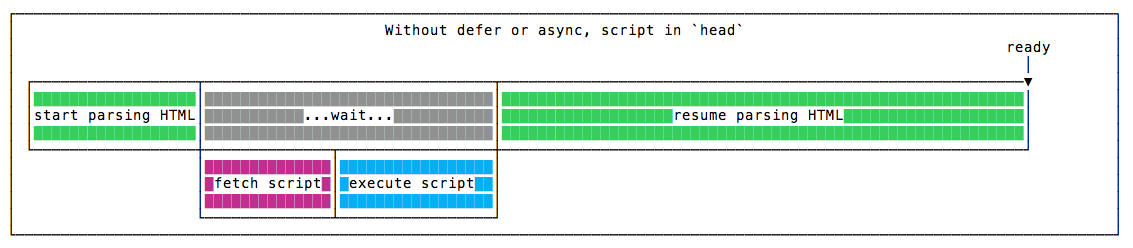
Parsing pauses until the script is fetched and executed. Then it resumes.
No defer or async, in the body

Parsing runs without pauses. When it finishes, the script is fetched and executed. The page shows up much earlier.
With async, in the head
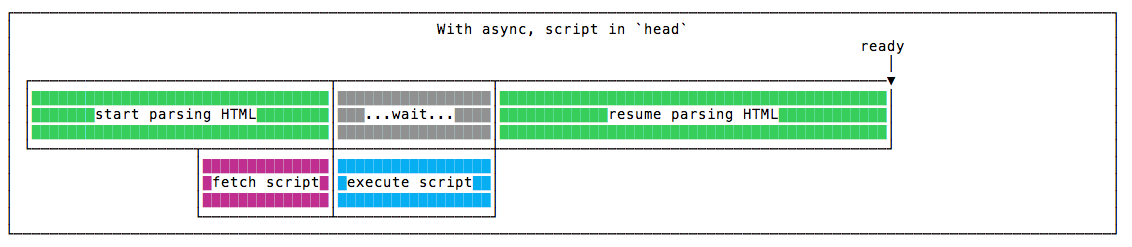
The script downloads in parallel with parsing. As soon as it’s ready, parsing pauses to execute it, then resumes.
With defer, in the head
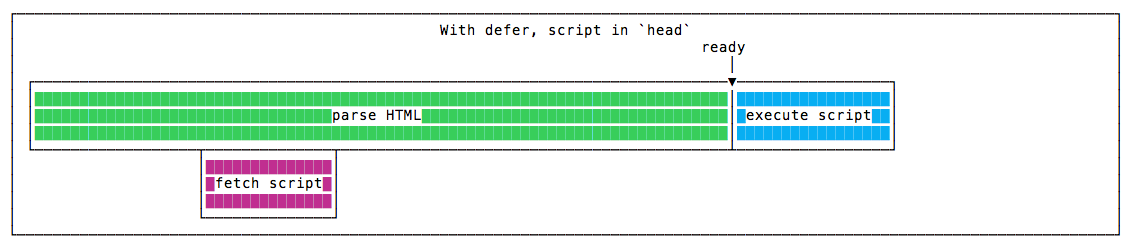
The script downloads in parallel and runs only after parsing is done.
Parsing finishes just like with the script at the end of the body, but the script finishes earlier overall, because it downloaded while the HTML was being parsed.
This is the winning solution in terms of speed 🏆
Blocking parsing and rendering
async blocks parsing while it executes. defer does not.
Neither guarantees anything about rendering. That’s up to you and your script, for example by running your code after the load event.
domInteractive
Scripts marked defer run right after domInteractive, the moment the HTML is parsed and the DOM is built. CSS and images may still be loading. Then the browser fires domComplete, and then load.
domInteractive matters because its timing is used as a measure of perceived loading speed. See the MDN for more.
Keeping things in order
One more point for defer. async scripts run in whatever order they finish downloading. defer scripts run in the order they appear in the markup. If script B depends on script A, defer keeps them in order.
Just tell me the best way
Put your scripts in the head and add defer:
<script defer src="script.js"></script>This triggers the fastest domInteractive. Given all its pros, defer beats async in most situations.
Use async only for scripts that depend on nothing and that nothing depends on, like an analytics snippet. For everything else, defer.
Lesson completed