The JavaScript engine
Browser task queues and a responsive page
Follow the call stack, timer callbacks and promise jobs to see how long-running JavaScript blocks a browser page.
A page can stop responding while JavaScript is busy. To understand why, follow the call stack and the queues where timer callbacks and promise jobs wait.
This lesson focuses on what keeps browser work waiting and how that affects the page. For the broader explanation, read the event loop in JavaScript.
Your JavaScript code runs single threaded. There is just one thing happening at a time. This is very helpful: you never worry about concurrency issues. You just need to avoid anything that blocks the thread, like synchronous network calls or infinite loops.
In most browsers there is an event loop for every tab, so one page with an infinite loop can’t freeze the whole browser. Web Workers run in their own event loop too. Your code runs on a single event loop, so write it so it doesn’t block.
Blocking the event loop
Any JavaScript that takes too long to return control to the event loop blocks every other piece of JavaScript in the page, and the UI with it. The user can’t click, can’t scroll, nothing.
Almost all I/O in JavaScript is non-blocking: network requests, Node.js filesystem operations, and so on. Blocking is the exception. This is why JavaScript leans so much on callbacks, promises and async/await.
The call stack
The call stack is a LIFO queue (Last In, First Out).
The event loop keeps checking the call stack for functions to run, and executes them in order.
You know the stack trace you see when something throws? The browser builds it from the call stack:
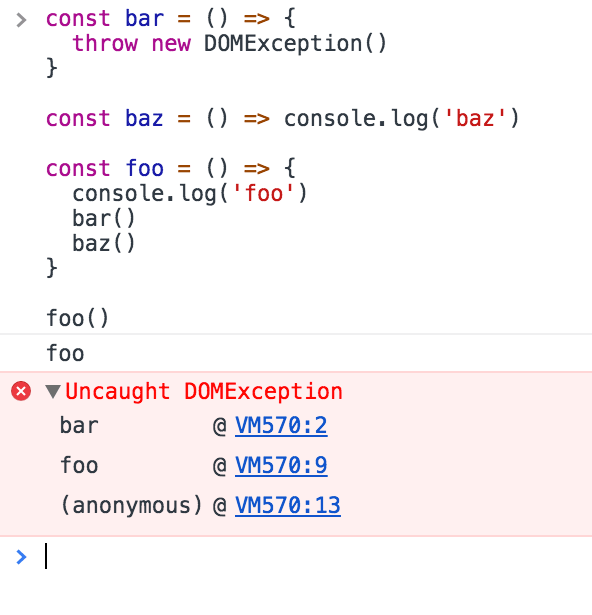
A simple event loop explanation
Let’s pick an example:
I use
foo,barandbazas random names. Enter any kind of name to replace them
const bar = () => console.log('bar')

const baz = () => console.log('baz')

const foo = () => {
  console.log('foo')
  bar()
  baz()
}

foo()
This code prints
foo
bar
baz
as expected.
foo() is called first. Inside it we call bar(), then baz(). The call stack looks like this:
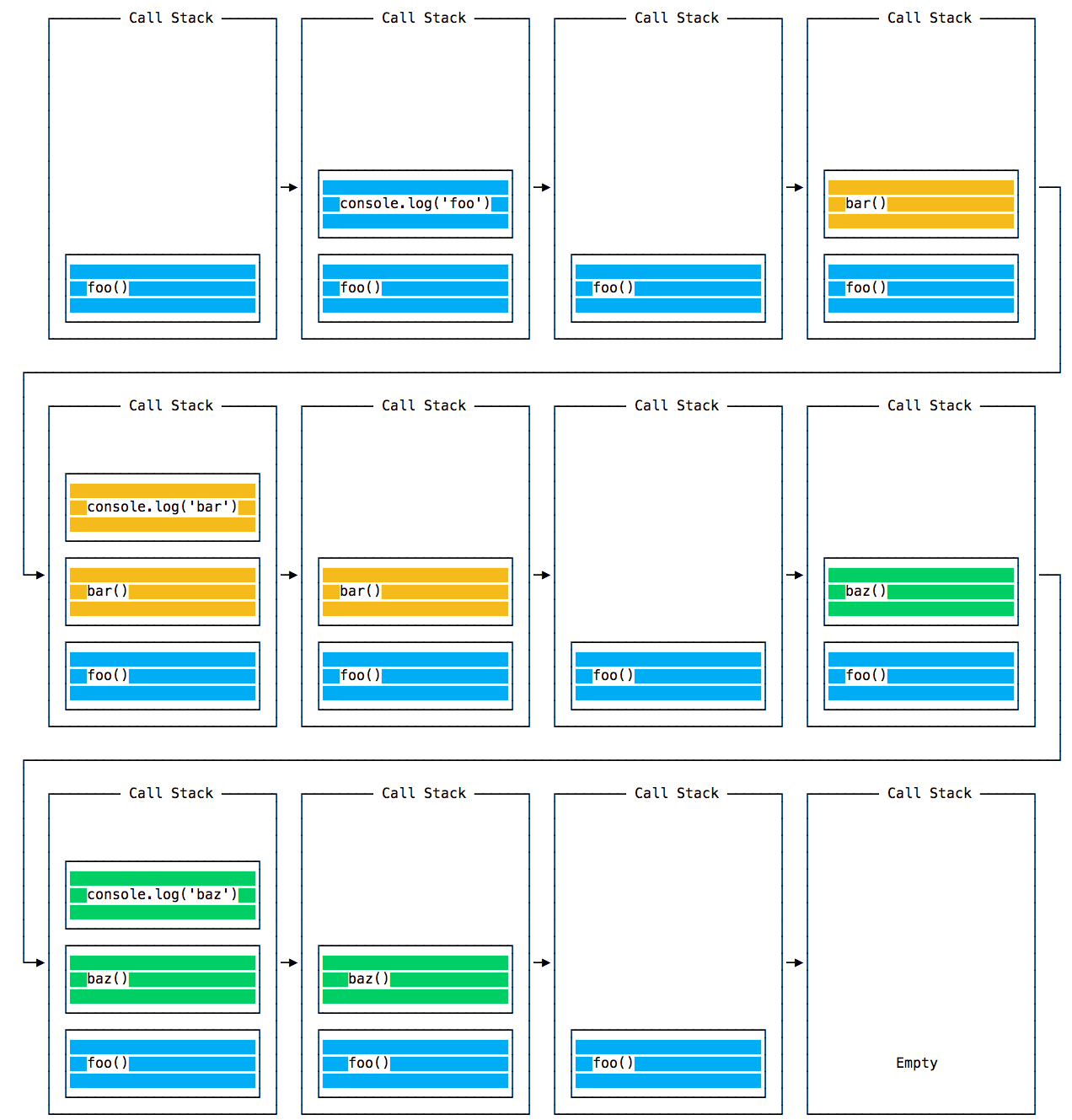
On every iteration the event loop checks the stack and runs what it finds:
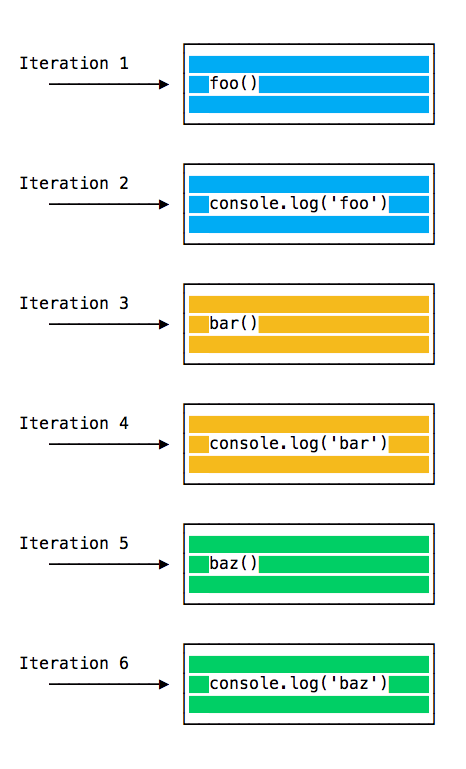
until the stack is empty.
Queuing function execution
Now let’s defer a function until the stack is clear. That’s what setTimeout(() => {}, 0) is for: run a function, but only after every other function in the current code has run.
const bar = () => console.log('bar')

const baz = () => console.log('baz')

const foo = () => {
  console.log('foo')
  setTimeout(bar, 0)
  baz()
}

foo()
This prints, maybe surprisingly:
foo
baz
bar
foo() is called. Inside it we call setTimeout, passing bar and a timer of 0, then we call baz(). The call stack:
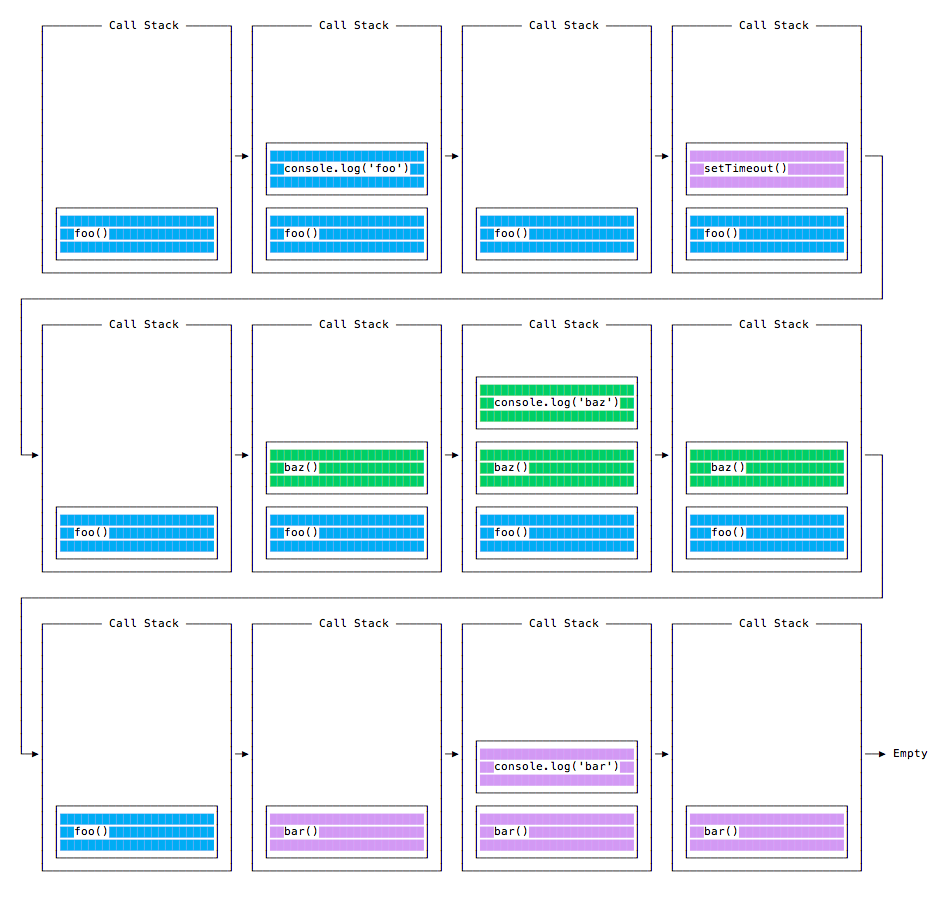
And the execution order:
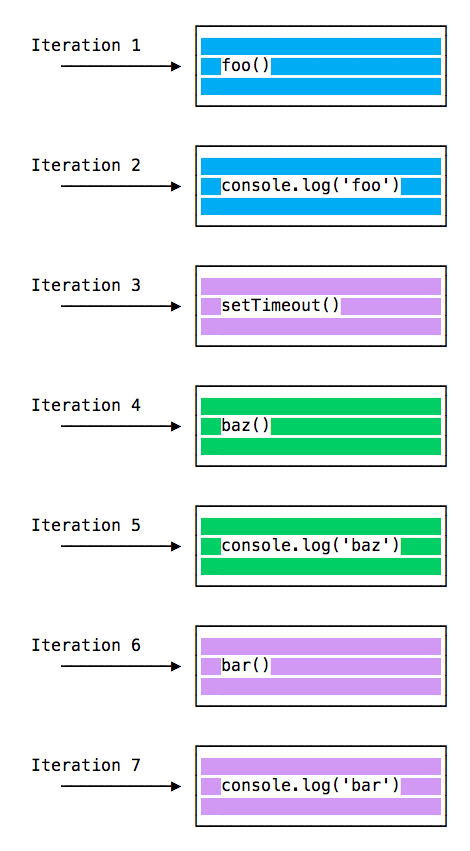
Why does bar print last?
The Message Queue
When setTimeout() is called, the browser or Node.js starts the timer. When it expires, immediately in our case, the callback goes into the Message Queue. That’s also where click and keyboard events, fetch responses, and DOM events like onLoad wait for your code.
The loop gives priority to the call stack. It runs everything in the stack first, and only when the stack is empty it picks up things from the message queue.
We don’t wait for setTimeout or fetch to do their work. The browser provides them and they run on their own threads. A 2 second timeout doesn’t block you for 2 seconds. The waiting happens elsewhere.
ES6 Job Queue
ECMAScript 2015 introduced the Job Queue, used by Promises. It runs the result of an async function as soon as possible, instead of sending it to the back of the message queue.
A promise that resolves before the current function ends runs right after the current function.
I like the rollercoaster analogy. The message queue puts you at the back of the line. The job queue is the fastpass ticket that lets you ride again right after you finished.
Example:
const bar = () => console.log('bar')

const baz = () => console.log('baz')

const foo = () => {
  console.log('foo')
  setTimeout(bar, 0)
  new Promise((resolve, reject) =>
    resolve('should be right after baz, before bar')
  ).then(resolve => console.log(resolve))
  baz()
}

foo()
This prints
foo
baz
should be right after baz, before bar
bar
That’s the big difference between Promises (and async/await, built on them) and plain asynchronous work through setTimeout() or other platform APIs.
I built a free event loop visualizer where you can step through code like this and watch the call stack, microtask queue and macrotask queue in action.
Lesson completed