See what the model sees
Explore embedding space
Use the embedding map to see learned proximity while remembering that the two-dimensional view is only a projection.
An embedding is a learned vector assigned to a token ID. It gives the transformer a numerical representation to update with context.
With embedding width four, one token might begin like this:
cat → [0.12, -0.40, 0.08, 0.31]The values are learned during training. Nobody labels one dimension “animal” or another “grammar.”
Open Embeddings and inspect the map.
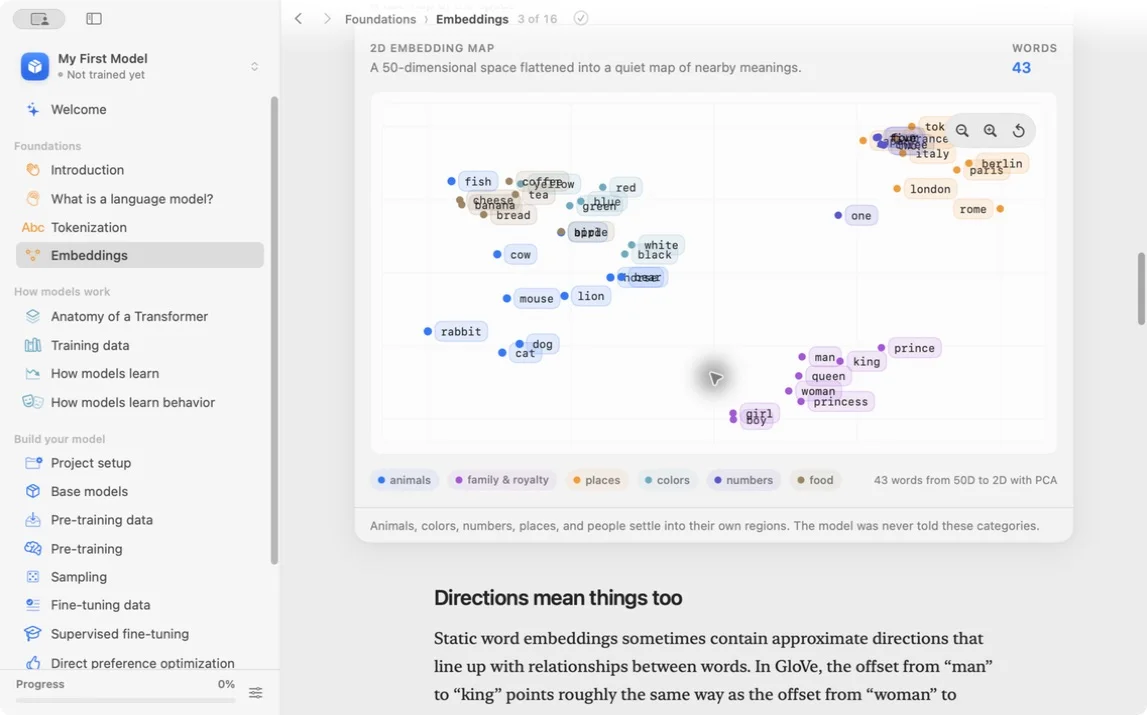
Pick one animal, one color, and one place. Find their nearest visible neighbors. Write down one cluster that makes sense and one relationship that looks weak.
Search for fox and note its three closest neighbors in the map. If two neighbors are other story animals, that fits a story dataset. If the closest neighbor is a punctuation token, write that down too. Dataset artifacts show up here.
The original vectors have many dimensions. The app flattens them into two dimensions so we can see them. Some distances and overlaps are distorted by that projection.
The map also shows one vector per token, not a fixed meaning for a word in every sentence. Contextual representations inside later transformer layers change with surrounding tokens.
Compare an early and late checkpoint if the tool allows it. Use the same tokens and projection settings. A cluster moving is an observation. Claiming the model “understands animals” requires stronger evidence.
Nearest neighbors can reveal dataset artifacts too. Two names may be close because they repeatedly appeared in the same story template, not because they share a real-world category.
Do not read too much into one pretty cluster. The 2D map is a teaching view. The model still has to predict the next token one step at a time.
What to observe: related use can produce nearby vectors without anyone manually entering category labels.
Lesson completed