Managing secrets and API keys on your own infrastructure
By Flavio
Tagged: Security
Store, deliver, scope, and rotate API keys across your Mac, Cloudflare Workers, a Linux VPS, PaaS, and GitHub Actions without plaintext .env files.
Managing secrets for one app is simple. You put three keys in a .env file on your laptop, paste them into your host’s dashboard, and move on.
The mess starts when your infrastructure grows past one box. On my own setup, this blog runs on Cloudflare Pages with serverless functions, the Mac app update service and support portal run on Cloudflare Workers, analytics and the newsletter run on Linux droplets, scheduled rebuilds run on GitHub Actions, and a pile of local CLIs run on my Mac.
That is five different places that need API keys, webhook secrets, signing keys, and database credentials. Without a clear system, you end up with old keys in .env files across twelve folders, one broad GitHub token reused everywhere, and no idea what breaks when you rotate a key.
Here is the model that keeps it sane: every secret has one master copy in a vault you control, scoped runtime copies delivered into each host through its native mechanism, and zero plaintext copies in Git or build output.
Where secrets actually live across your infra
You do not need one giant secret server to run a clean setup. Most of the time, the right answer is pairing a local master store with the secret mechanism your host already gives you.
| Option | Where it lives | Encrypted at rest | How the app reads it | Extra service to run? | Best fit |
|---|---|---|---|---|---|
macOS Keychain (security) | Local Mac | Yes (OS keychain) | CLI pipe or Keychain API | No | Solo developer master copies and local CLIs |
| 1Password Environments | 1Password cloud + desktop | Yes | Named pipe .env or op run | No | Teams or cross-platform local dev |
| Cloudflare Worker & Pages secrets | Cloudflare edge | Yes | env.SECRET_NAME binding | No | Per-service secrets on Workers and Pages |
| Cloudflare Secrets Store (open beta) | Cloudflare account | Yes | await env.SECRET.get() | No | Sharing one secret across several Workers |
VPS .env (chmod 600) | Server disk | No (OS permissions only) | EnvironmentFile= or env_file: | No | Simple single-user VPS setups |
Docker Compose secrets: | Host file mounted to tmpfs | Host file only | Read /run/secrets/<name> | No | Containers where you want secrets out of docker inspect |
systemd-creds | Host disk, key-bound | Yes (host key or TPM2) | Read $CREDENTIALS_DIRECTORY/<name> | No | Native Linux services on Debian 12/13 or Ubuntu 24.04 |
| GitHub Actions secrets / OIDC | GitHub / cloud STS | Yes | ${{ secrets.NAME }} or short-lived token | No | CI/CD pipelines and deploy hooks |
| Doppler / Infisical / AWS Secrets Manager / SOPS | Managed cloud or encrypted Git | Yes | Sync agent, SDK, or decrypt step | Yes (or CLI step) | Multi-person teams, fleets, or audit requirements |
Notice how far you get without running a dedicated vault server. A self-hosted vault is another high-value server to patch, back up, and unseal after a reboot. Add one when your team size or server count demands it, not on day one.
Separate public config from secrets, and document names in Git
Before choosing a store, draw a hard line between configuration and secrets. A public Turnstile site key, an API base URL, a sender display name, or a soft rate limit are configuration. They belong in Git so you can review changes in diffs.
An API key, webhook signing secret, HMAC key, or admin bearer token is a secret. It stays out of Git completely.
In this site’s wrangler.jsonc, public configuration sits in vars while secrets are listed only as comments explaining where they go:
{
  "name": "flaviocopes",
  "pages_build_output_dir": "./dist",
  // Public Turnstile site key for public forms; it is not secret.
  // Secret values (RESEND/SENDY/TURNSTILE_SECRET) are
  // set via `wrangler pages secret put`, never here.
  "vars": {
    "PUBLIC_TURNSTILE_SITE_KEY": "0x4AAAAAACY8rOhfTTM_S7_E"
  }
}
I follow the same rule on the update Worker at updates.flaviocopes.com. Its wrangler.jsonc puts CREEM_API, CREEM_TEST_API, SOFT_ACTIVATION_LIMIT, and ALERT_FROM in vars, then ends with a comment inventory of every secret the Worker expects and where its master copy lives:
  // Secrets, set with `npx wrangler secret put <NAME>`:
  // CREEM_API_KEY: live Creem API key.
  // CREEM_WEBHOOK_SECRET: HMAC secret for /v2/webhooks/creem (prod).
  // CREEM_TEST_API_KEY / CREEM_TEST_WEBHOOK_SECRET: sandbox secrets.
  // LICENSE_HMAC_KEYS: JSON versioned secret map, e.g. {"v1":"..."}.
  // LICENSE_ENC_KEYS: separate JSON versioned secret map (base64 32-byte keys).
  // ADMIN_API_TOKEN: bearer token for /v2/admin/* operations.
  // RESEND_API_KEY: Resend API key (Keychain: support.resend.api-key).
  // GITHUB_TOKEN: fine-grained token on flaviocodes org, read-only Contents.
For a Node.js or Docker project, use a committed .env.example file with empty values for the same purpose. Six months from now, when you rebuild a server or onboard a new machine, you want a complete list of every variable name without digging through source code.
Your Mac: store master copies in Keychain and pipe them out
If you work on a Mac, you already have an encrypted local secret store built into the operating system: macOS Keychain.
Instead of exporting API keys in ~/.zshrc or scattering .env files across ~/dev, store the master copy in Keychain under a clear service name. Leave the value off the command line by passing -w with no argument so security prompts silently and nothing enters your shell history:
security add-generic-password -U -a flavio -s updates.creem.api-key -wThe -U flag updates the entry if it already exists. Naming services as <project>.<provider>.<purpose> keeps dozens of keys easy to find later.
You can check when a secret was created or updated without revealing its value by omitting -w:
security find-generic-password -a flavio -s updates.webhook.demokeychain: "/Users/admin/Library/Keychains/login.keychain-db"
class: "genp"
attributes:
"acct"<blob>="flavio"
"cdat"<timedate>=... "20261124070332Z"
"mdat"<timedate>=... "20261124070332Z"
"svce"<blob>="updates.webhook.demo"When you need to push a secret to Cloudflare or feed it to a CLI, pipe it straight from Keychain so it never hits a file or your clipboard:
security find-generic-password -a flavio -s codex.github.updates-token -w \
  | npx wrangler secret put GITHUB_TOKEN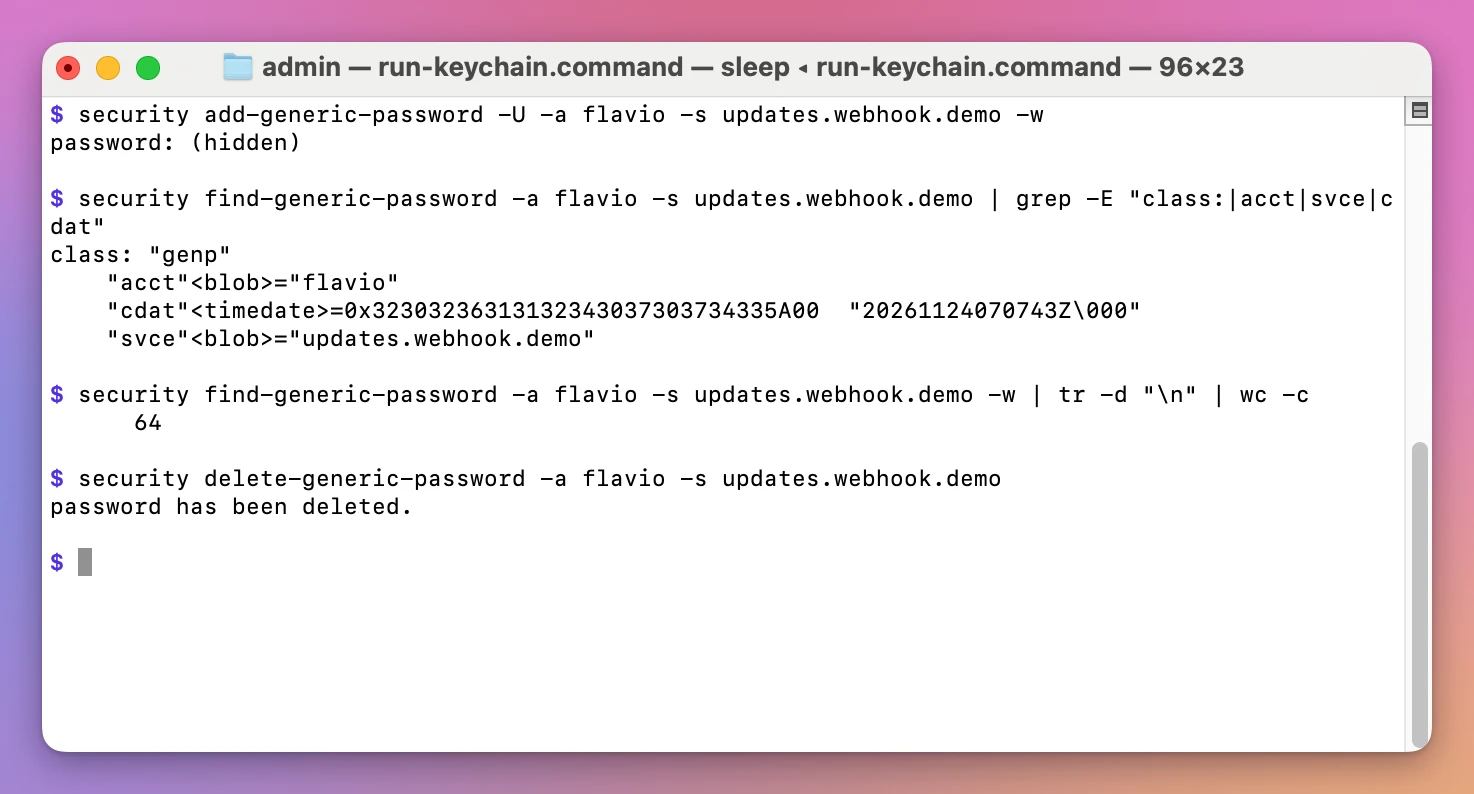
That single pipe pattern is how I sync secrets to my Workers and how my local analytics and admin CLIs read their tokens. None of them ask you to paste a key into a chat or save it into a dotfile.
If you work on a team or switch between macOS and Linux, macOS Keychain stays locked to your Mac. Use 1Password Developer Environments there instead. It injects secrets into a command with op run or mounts a virtual .env named pipe that never writes plaintext to disk.
Cloudflare Workers and Pages: per-Worker secrets vs Secrets Store
On Cloudflare, secrets are encrypted at rest and exposed to your code on the env object, just like plain vars. You can verify which secret names are attached to a Pages project or Worker without exposing any values.
For flaviocopes.com on Cloudflare Pages:
wrangler pages secret list --project-name flaviocopesThe "production" environment of your Pages project "flaviocopes" has access to the following secrets:
- CF_AIG_TOKEN: Value Encrypted
- FROM_EMAIL: Value Encrypted
- RESEND_API_KEY: Value Encrypted
- SENDY_API_KEY: Value Encrypted
- TURNSTILE_SECRET_KEY: Value EncryptedFor a Worker, wrangler secret list returns JSON with the names and types:
wrangler secret list[
{ "name": "ADMIN_API_TOKEN", "type": "secret_text" },
{ "name": "CREEM_API_KEY", "type": "secret_text" },
{ "name": "CREEM_WEBHOOK_SECRET", "type": "secret_text" },
{ "name": "GITHUB_TOKEN", "type": "secret_text" },
{ "name": "LICENSE_ENC_KEYS", "type": "secret_text" },
{ "name": "LICENSE_HMAC_KEYS", "type": "secret_text" },
{ "name": "RESEND_API_KEY", "type": "secret_text" }
]Locally, wrangler dev reads secrets from a gitignored .dev.vars file filled with sandbox keys, never production ones. The full multi-environment setup and the binding-inheritance gotcha are in Cloudflare Workers: secrets and environments and my complete Cloudflare guide.
One choice comes up as soon as you run three or four Workers: what about a key that multiple Workers need, like RESEND_API_KEY?
You have two clean options:
- Separate provider keys per Worker. Create one Resend key for
support.flaviocopes.comand another forflaviocopes.com. Rotating or revoking one leaves the other running, and provider logs tell you which Worker sent the mail. - Cloudflare Secrets Store. Available via
wrangler secrets-store(open beta), it holds account-level secrets that you bind to multiple Workers inwrangler.jsoncand read asynchronously withawait env.MY_SECRET.get(). Use it when several Workers genuinely share one credential and you want one place to update it.
When the provider lets you create unlimited scoped keys for free, I still prefer separate keys per Worker. Smaller blast radius beats saving thirty seconds on rotation.
Linux VPS: .env permissions, Docker secrets:, and systemd-creds
A Linux VPS gives you none of the guardrails a PaaS gives you, so it is the easiest place to leave readable secrets around. Once you lock down the network (see how to secure a VPS with Tailscale and Cloudflare Tunnel and the free Linux Server & Self-Hosting Handbook), look at how secrets sit on disk and enter your processes.
The baseline: a root-owned .env outside the repo
If you use an environment file for a service, keep it outside the Git checkout and web root, such as /etc/myapp/env, and lock down its permissions so other local users cannot read it:
sudo install -d -m 750 -o root -g myapp /etc/myapp
sudo install -m 640 -o root -g myapp /dev/null /etc/myapp/env
Never put secrets inside a Dockerfile with ENV or ARG. Those values get baked into image layers and survive in docker history.
There is still a catch with plain environment variables in Docker. Passing secrets via environment: or env_file: puts every value into the container metadata, where anyone who can run docker inspect can print them in plain text. Environment variables are also inherited by child processes and frequently dumped by crash reporters.
Better for Docker: Compose secrets:
Docker Compose can mount each secret as a read-only file inside /run/secrets/ on an in-memory filesystem. On the host, store each secret in a chmod 600 file outside the repo, then reference it in compose.yml:
services:
  api:
    image: ghcr.io/flavio/billing-api:1.4
    secrets:
      - resend_api_key
      - webhook_secret
    environment:
      RESEND_API_KEY_FILE: /run/secrets/resend_api_key
      WEBHOOK_SECRET_FILE: /run/secrets/webhook_secret

secrets:
  resend_api_key:
    file: /etc/billing-api/secrets/resend_api_key
  webhook_secret:
    file: /etc/billing-api/secrets/webhook_secret
Your application reads the file once at startup (falling back to the plain env var locally):
import { readFileSync } from 'node:fs'

function readSecret(name) {
  const file = process.env[`${name}_FILE`]
  if (file) return readFileSync(file, 'utf8').trim()
  return process.env[name]
}

const resendKey = readSecret('RESEND_API_KEY')
Now docker inspect shows /run/secrets/resend_api_key, not the key itself.
Better for native Linux services: systemd-creds
If you run a binary, Node.js service, or background worker directly under systemd on Debian 12/13 or Ubuntu 24.04, systemd already ships an encrypted credential store.
Encrypt a secret on the host with systemd-creds encrypt. It binds the ciphertext to the machine’s host key (and TPM2 if present):
sudo mkdir -p /etc/credstore.encrypted
printf '%s' "$WEBHOOK_SECRET" \
  | sudo systemd-creds encrypt --name=webhook_secret - /etc/credstore.encrypted/webhook_secret.cred
Then attach it to your service unit:
[Service]
ExecStart=/usr/bin/node /srv/billing/server.js
LoadCredentialEncrypted=webhook_secret:/etc/credstore.encrypted/webhook_secret.cred
When systemd starts the unit, it decrypts webhook_secret into a private tmpfs directory exposed via $CREDENTIALS_DIRECTORY, readable only by that service, and removes it when the service stops. Your app reads ${process.env.CREDENTIALS_DIRECTORY}/webhook_secret. You get encryption at rest on a single VPS with zero extra daemons.
CI/CD and PaaS: minimal permissions and separate environments
On PaaS hosts like Railway, Render, or Fly.io, store secrets through the platform’s own CLI or dashboard (railway variables, fly secrets set) and split staging and production into separate environments so a preview deploy never touches live keys.
In GitHub Actions, two habits eliminate most CI leaks:
- Set
permissions: {}at the workflow level and grant only the exact permission a job needs. - Scope secrets to the step and environment that need them.
Here is the real workflow that triggers the daily scheduled rebuild of flaviocopes.com. It has zero repository write permissions and exposes only one deploy hook URL to the single step that calls curl:
permissions: {}

jobs:
  trigger-rebuild:
    runs-on: ubuntu-latest
    steps:
      - name: Trigger Cloudflare Pages deploy
        env:
          CF_PAGES_DEPLOY_HOOK: ${{ secrets.CF_PAGES_DEPLOY_HOOK }}
        run: |
          curl -fsS -X POST "$CF_PAGES_DEPLOY_HOOK"
For production deploys, put live keys inside a GitHub Environment with branch restrictions (such as master only) rather than plain repository secrets, so an untrusted pull request or stray branch cannot reach them. When deploying to AWS, Google Cloud, or Azure, replace long-lived static keys with GitHub OIDC federation so each job mints a short-lived token. I cover CI token boundaries in the free Testing, Debugging & CI/CD Handbook and agent deployment guards in how to protect secrets when coding agents deploy your app.
Scoping and zero-downtime rotation
Where you store a key only protects it at rest. Scoping and rotation decide how bad a leak is and how painful it is to recover.
Scope every key like it will leak
Give every service its own credential with the narrowest permissions the provider offers:
- GitHub tokens: use a fine-grained personal access token restricted to the exact repositories and permissions needed. The
updates.flaviocopes.comWorker uses a fine-grained token with read-only Contents access on the release repositories, so even if it leaked, nobody could push code or change repo settings. - Payment and email keys: keep sandbox keys (
CREEM_TEST_API_KEY) completely separate from production keys (CREEM_API_KEY), and name each key after the service that holds it (resend-support-portal,resend-blog-forms). - Spend limits vs alerts: remember that billing alerts notify you after money is spent. Set hard rate limits or monthly caps where the provider supports them.
The free Web & API Security Handbook goes deeper on scoping API credentials. If a third-party tool or AI vendor ever reports a breach involving one of your keys, follow the key revocation checklist: revoke at the issuer first, check usage logs, then reissue a dedicated key.
Rotate your own keys with zero downtime using a key ring
Third-party API keys are easy to rotate because most providers let you create a second key before deleting the first. Secrets you generate yourself, like HMAC signing keys, webhook secrets, or database encryption keys, are harder. If you overwrite LICENSE_HMAC_KEY with a new string, every existing token or hash breaks at the exact second of the deploy.
The fix I use on updates.flaviocopes.com is storing a versioned key ring as a small JSON object in one secret (LICENSE_HMAC_KEYS and LICENSE_ENC_KEYS), and storing the key version alongside each signed token or database row.
Here is a runnable Node.js version of that pattern using timingSafeEqual so signature checks stay constant-time:
import { createHmac, timingSafeEqual } from 'node:crypto'

function parseKeyRing(raw) {
  const keys = JSON.parse(raw)
  const versions = Object.keys(keys)
  return { current: versions[versions.length - 1], keys }
}

function sign(ring, payload) {
  const mac = createHmac('sha256', ring.keys[ring.current])
    .update(payload)
    .digest('hex')
  return `${ring.current}.${mac}`
}

function verify(ring, payload, token) {
  const [ver, mac] = token.split('.')
  const secret = ring.keys[ver]
  if (!secret || !mac) return false
  const expected = createHmac('sha256', secret).update(payload).digest('hex')
  if (mac.length !== expected.length) return false
  return timingSafeEqual(Buffer.from(mac), Buffer.from(expected))
}

const payload = 'order:ord_9142:app:video-loudness-checker'

const stage1 = parseKeyRing(JSON.stringify({ v1: 'k1_demo_7f9a2c4e' }))
const tok1 = sign(stage1, payload)
console.log('1. v1 only  -> tok1:', tok1.slice(0, 22) + '...', '| verify tok1:', verify(stage1, payload, tok1))

const stage2 = parseKeyRing(JSON.stringify({ v1: 'k1_demo_7f9a2c4e', v2: 'k2_demo_3b8e1d9a' }))
const tok2 = sign(stage2, payload)
console.log('2. v1 + v2  -> verify tok1:', verify(stage2, payload, tok1), '| verify tok2:', verify(stage2, payload, tok2))

const stage3 = parseKeyRing(JSON.stringify({ v2: 'k2_demo_3b8e1d9a' }))
console.log('3. v2 only  -> verify tok1:', verify(stage3, payload, tok1), '| verify tok2:', verify(stage3, payload, tok2))
Running it shows all three stages of the cutover:
1. v1 only  -> tok1: v1.a58339a8de1feefd267... | verify tok1: true
2. v1 + v2  -> verify tok1: true | verify tok2: true
3. v2 only  -> verify tok1: false | verify tok2: true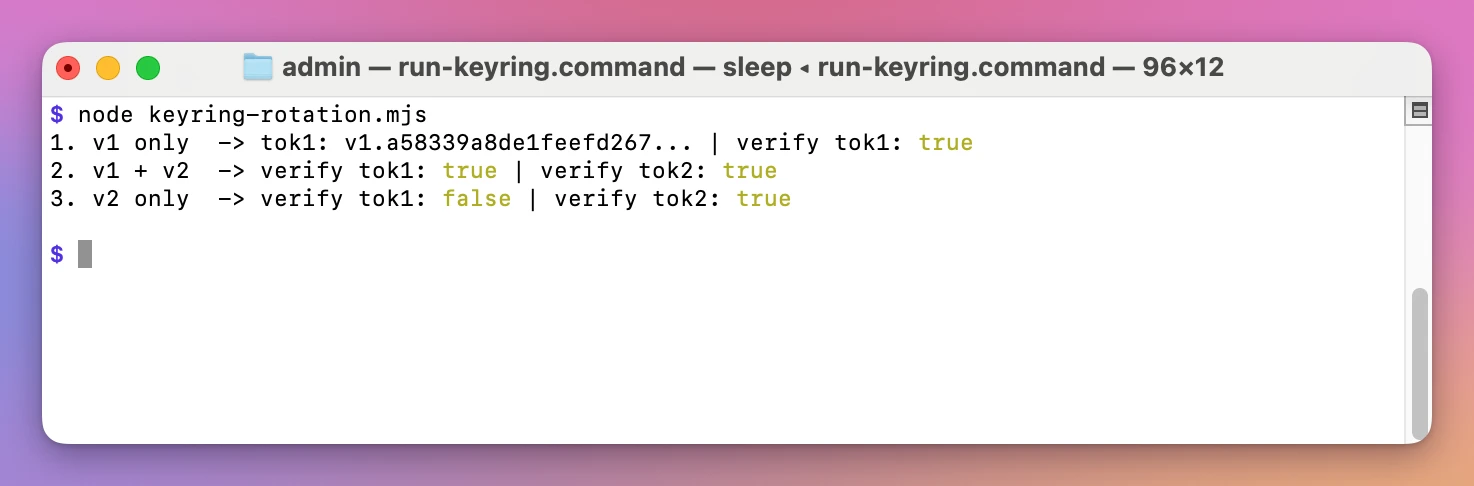
You don’t need any secret-manager magic for zero-downtime rotation. Designing the secret format as a versioned map from day one costs twenty lines of code and saves you an outage later.
Catch leaks before they leave your machine
Good storage habits still leave room for human mistakes and fast-moving coding agents. Put a scanner in front of your commits and builds:
- Enable GitHub push protection on your repositories so known key formats are rejected before they land on the remote.
- Run a secret scanner like
gitleaksor Secrets Free against both Git history and build output directories (since files copied intopublic/ordist/can ship a key even if Git ignores.env). - If a real secret ever hits a commit, rotate it first. Rewriting Git history cleans up the repo, but anyone who cloned or scraped the commit already has the old value.
When to add a central secret manager
A dedicated secret manager becomes worth its weight when your setup crosses one of these lines:
- Three or more developers need shared project secrets and clean offboarding when someone leaves.
- Dozens of servers or containers need automatic secret sync without SSHing into boxes one by one.
- Compliance or audit logs require proving which workload read which secret and when.
- Short-lived dynamic database credentials are needed instead of static passwords.
When you hit that point, match the tool to what you already run:
- 1Password Environments if your team already pays for 1Password.
- SOPS + age if you keep infrastructure config in Git and want encrypted secret files committed right next to your Docker Compose or Terraform files.
- Doppler or Infisical if you want one dashboard syncing secrets out to Cloudflare, Railway, GitHub Actions, and Linux hosts.
- AWS Secrets Manager (or GCP Secret Manager) if your workloads already run inside that cloud and authenticate with IAM roles.
Avoid deploying HashiCorp Vault for a small indie stack. It is built for large fleets and dynamic credentials; on a two-server setup it usually becomes the most fragile piece of infrastructure you own.
How I manage secrets on my own infra
My setup stays small on purpose because I run it alone:
- Master copies live in macOS Keychain (and 1Password for human logins), named by service and purpose (
updates.admin-api-token,support.resend.api-key,codex.github.updates-token). - Every Worker and Pages project gets only the secrets it needs, piped directly from Keychain with
security find-generic-password ... -w | npx wrangler secret put .... Public config stays inwrangler.jsoncundervars, and secret names are documented in comments right below. - Self-generated signing and encryption keys use versioned JSON maps (
{"v1": "..."}) so rotating them never invalidates live data. - Local CLIs read their tokens from Keychain instead of
.envfiles, andwrangler devuses gitignored.dev.varsfiles with sandbox keys. - VPS services keep secrets out of Git and container metadata, and GitHub Actions runs with
permissions: {}and single-purpose secrets.
If you are setting up your own stack today, start by auditing every .env file on your machine, moving the real keys into Keychain or 1Password, documenting only the variable names in Git, and scoping each runtime to its own keys. For the broader trust-boundary model behind all of this, see my free Web & API Security Handbook.
Want me to talk about your product? You can sponsor this site.
Related posts about security: