MCP + CLI · version 1.0.1
Cloudflare Domains Toolkit
A guarded Cloudflare Registrar MCP server and a companion DNS CLI. Let an AI check and prepare a domain purchase, approve the exact live price yourself, then manage the domain’s DNS from a focused command-line tool.
Why I built this
An AI is genuinely useful when you are naming a project. It can explore ideas, check exact domains, and compare current prices faster than a long dashboard session. The problem begins when a helpful tool can also create a real charge.
I built the MCP server to put the financial boundary in code. The AI can search and prepare a quote, but the server repeats the live checks, enforces a $20 complete-initial-charge limit, and asks the MCP client to show the exact domain and price to a person before registration.
Registration is only half the job. The companion CLI covers what comes next: list zones, inspect records, and make deliberate DNS changes without turning the MCP server into a broad Cloudflare administration tool.
From domain idea to working DNS
Let AI prepare. Approve the purchase. Connect the domain.
- Search for domain ideas.
- Check live availability and price.
- Create a five-minute guarded quote.
- Approve it, then manage DNS with the CLI.
Features
Client-neutral MCP tools
Use the same local stdio server from Cursor, Codex, or another MCP client instead of maintaining client-specific automation scripts.
Authoritative availability
Check one exact domain against the registry and return current availability, registration price, renewal price, and any rejection reason.
Domain idea search
Turn a phrase or partial name into Cloudflare-supported suggestions, while keeping discovery results separate from purchase decisions.
Short-lived quotes
Create a five-minute, single-use quote containing the exact domain, currency, term, initial charge, renewal price, and auto-renew state.
Human approval in the client
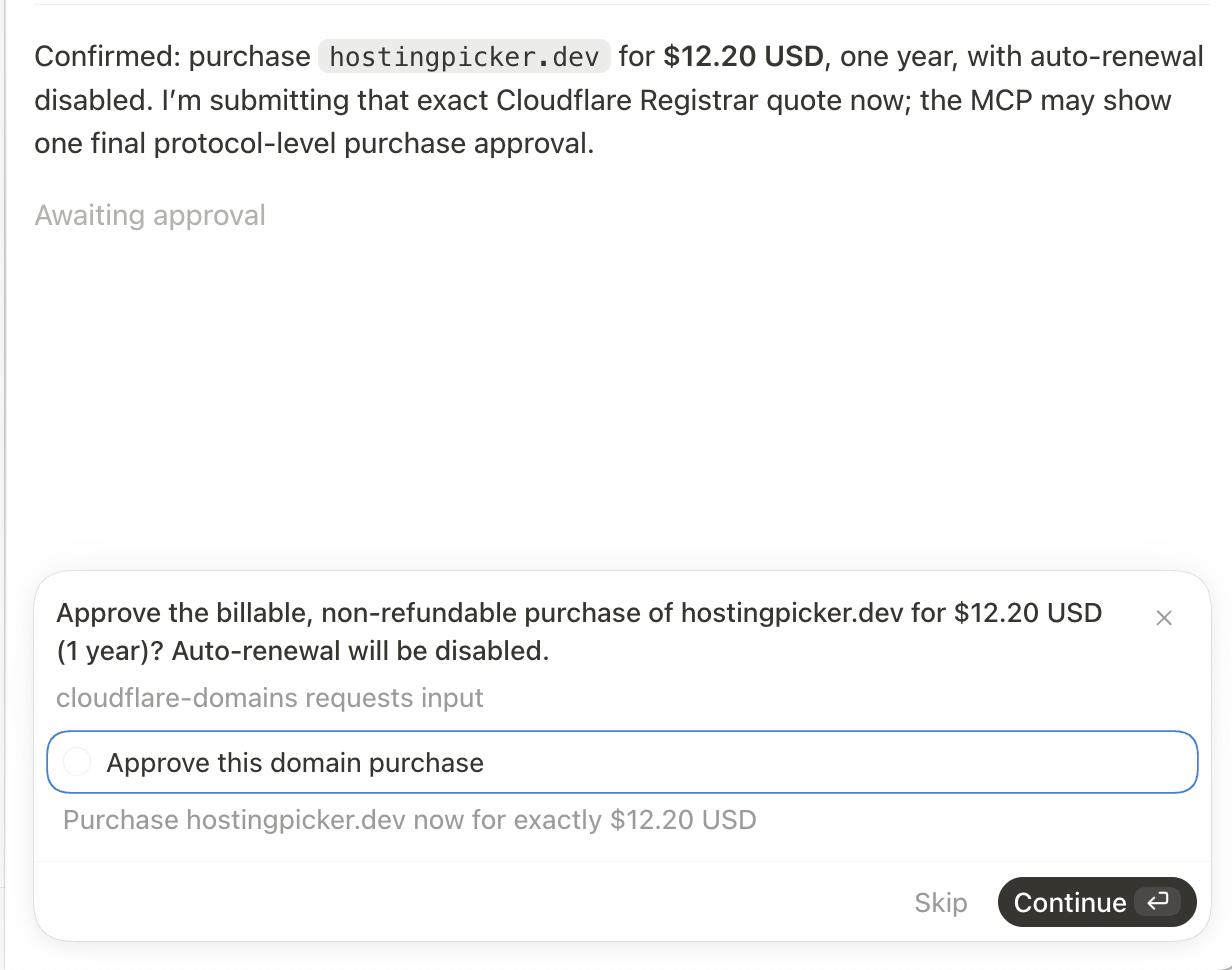
Use standard MCP elicitation to display the exact billable purchase after the final live price check and require an explicit true response.
Hard $20 limit
Calculate the complete initial charge in integer cents and reject any purchase above $20, including extensions with multi-year minimums.
Price-change protection
Recheck availability, price, and minimum term before approval. Any difference invalidates the quote and requires a new one.
Local secret storage
Read the token from macOS login Keychain or a process environment supplied by another operating system or secret manager.
Safe defaults
Reject premium and non-USD purchases, keep quotes in memory, disable auto-renewal, and never retry an ambiguous registration automatically.
Companion DNS CLI
Use cf-domains to list zones and records, create records, update selected fields, and delete only after a negative-default confirmation.
Separate least-privilege tokens
Keep billable Registrar permission apart from Zone and DNS permissions, with distinct macOS Keychain service names and portable secret-provider fallbacks.
Automated verification
Run focused domain, money, quote, approval, and replay tests plus a real MCP handshake and tool-discovery smoke test.
Use cases
Name a new product
Brainstorm domain options with an AI, then confirm the final candidate against live Cloudflare registry data.
Check availability from chat
Ask whether a domain is available without opening Cloudflare or giving an AI access to a browser session.
Compare real prices
See registration and renewal costs before deciding which extension fits a small project.
Approval-gated registration
Let an agent prepare the purchase while keeping the final domain and price decision in your own client UI.
Learn MCP architecture
Study a compact server with typed tools, stdio transport, external API calls, elicitation, and destructive-action boundaries.
Build another guarded tool
Reuse the quote, recheck, approval, and adapter patterns for another local AI workflow with real-world consequences.
Connect a purchased domain
Inspect the new zone, add its website or verification records, and review the exact Cloudflare result from the terminal.
Give an AI readable DNS tools
Let many coding agents call a small, documented CLI instead of handing them a general-purpose raw Cloudflare API script.
Tech stack
Local runtime
Node.js
Runs the stdio child process, uses native fetch for Cloudflare requests, and reads macOS Keychain through the system security command.
Application boundaries
TypeScript
Keeps Registrar responses, quote state, money rules, approval details, and registration workflows explicit.
Client protocol
MCP SDK
Provides the stdio transport, tool discovery, tool calls, capability negotiation, results, and form elicitation.
Tool validation
Zod
Validates domain, quote ID, currency, and total cents before application code handles a request.
Registry and purchase boundary
Cloudflare Registrar API
Supplies domain suggestions, authoritative availability, pricing, extension metadata, and registration workflows.
DNS command interface
Commander and Prompts
Provide explicit subcommands and flags, readable help, password input, and negative-default confirmation before deletion.
Zone and record boundary
Cloudflare DNS API
Lists accessible zones and performs allow-listed create, partial update, and delete operations on DNS records.
Verification
Node test runner
Covers the safety policy with fake Registrar clients, exact money tests, and no real registration calls.
CLI
The included cf-domains command is the practical companion for DNS work after registration. It uses a separate Zone/DNS token and confirms deletion unless you deliberately pass --yes.
cf-domains auth loginVerify a DNS-scoped token and save it in the macOS login Keychain.
cf-domains zonesList every Cloudflare zone available to the configured token.
cf-domains records example.comInspect records and copy the exact ID needed for an update or deletion.
cf-domains add example.com --type A --name www --content 203.0.113.10 --proxiedCreate a normalized DNS record using explicit fields.
cf-domains update example.com record-id --content 203.0.113.11Patch only the fields supplied on the command line.
cf-domains delete example.com record-idAsk for confirmation before deleting one exact DNS record.
Screenshots and demos
Usage manual
Run it and make it yours.
The setup and usage guide from the ZIP. Read it before downloading so you know what the software needs.
Cloudflare Domains Toolkit contains two focused local tools:
- Cloudflare Domain MCP lets an AI search, check, quote, and register a domain through Cloudflare Registrar. A person must approve the exact domain and live price before the billable call.
- Cloudflare Domains CLI lists zones and manages DNS records after a domain is on Cloudflare.
Both tools are client-neutral, open source, and designed to keep Cloudflare API tokens outside the project folder.
Current release: 1.0.1 (1.0.1 in both package manifests).
What you get
- a standard local stdio MCP server
- domain search and authoritative availability checks
- exact registration quotes that expire after five minutes
- standard MCP human approval during a purchase
- a hard $20 maximum for the complete initial domain charge
- a second availability, price, and term check before approval
- a companion
cf-domainsDNS command-line tool - confirmation before interactive DNS deletion
- macOS login Keychain support
- environment-variable support for other systems
- Cursor, Codex, and generic MCP client examples
- automated unit tests and an MCP smoke test
- beginner setup guides and technical architecture notes
- the complete creation story and a real MCP purchase-approval screenshot
safety limit happen to be the same amount. They are separate controls.
Start here
Read these files in order:
WHY.mdexplains why the bundle contains both MCP and CLI tools.BUILDING.mdtells the complete story of how I created and verified it.CONFIGURATION.mdexplains the two least-privilege Cloudflare tokens.ARCHITECTURE.mdshows how each request moves through the code.SECURITY.mdexplains the financial and DNS safety boundaries.
Each tool also has a focused guide:
code/mcp/README.mdcode/cli/README.md
Quick verification
Verify the MCP server:
cd code/mcp
npm install
npm run check
npm test
npm run smoke
Verify the DNS CLI:
cd ../cli
npm install
npm run check
npm test
The automated tests use fakes and placeholder credentials. They do not buy a domain or change DNS.
Requirements
- Node.js 20 or newer
- a Cloudflare account
- a Registrar-capable Cloudflare account for domain purchases
- two narrowly scoped API tokens: one for Registrar and one for DNS
- a default payment method and registrant contact for Registrar
- an MCP client with stdio support
- MCP form elicitation support for AI-assisted purchases
- macOS for Keychain storage, or another local secret provider
Cloudflare currently describes the Registrar API as beta. Supported extensions and API behavior can change.
Project structure
├── code/
│ ├── mcp/ Domain discovery and guarded registration server
│ └── cli/ Zone and DNS record command-line tool
├── screenshots/ Real MCP purchase-approval example
├── AGENTS.md Rules for AI coding agents
├── ARCHITECTURE.md Components and request flows
├── BUILDING.md Complete creation and verification story
├── CHANGELOG.md Release history
├── CONFIGURATION.md Cloudflare, secret, and client setup
├── CUSTOMIZATION.md Safe extension ideas
├── DECISIONS.md Why the project works this way
├── DEPLOYMENT.md Local installation and distribution
├── SECURITY.md Threat model and safety invariants
└── WHY.md Product rationale
License
MIT. You can use, modify, and redistribute the source. Keep the license notice with substantial copies.
Architecture
See how the software is put together.
Review the system flow, boundaries, integrations, and replaceable parts before you download it.
The bundle contains two local programs with independent package manifests, dependencies, token storage entries, and Cloudflare permissions.
flowchart TD
ai["AI client"] -->|MCP tools + approval| server["MCP server"]
server --> service["Registrar service"] --> registrar["Cloudflare Registrar API"]
operator["Person or AI tool"] -->|cf-domains commands| cli["DNS CLI"]
cli --> adapter["Cloudflare adapter"] --> dns["Cloudflare Zones + DNS API"]
classDef entry fill:#332d23,stroke:#e8a830,stroke-width:2px,color:#f0e4cc
classDef core fill:#c85520,stroke:#e8a830,stroke-width:2px,color:#fff8ea
classDef service fill:#2d2a25,stroke:#a87628,color:#f0e4cc
classDef external fill:#211f1c,stroke:#5b5143,color:#d2c4aa
class ai,operator entry
class server,cli core
class service,adapter service
class registrar,dns external
Neither program opens a local network port. The MCP server communicates over stdio. The CLI runs one command and exits.
Registrar MCP layer
code/mcp/src/server.ts creates the MCP server and registers four typed tools:
search_domainscheck_domain_availabilityquote_domain_purchasepurchase_domain
Zod validates tool arguments. MCP annotations mark discovery tools as read-only and registration as destructive. The same layer sends the standard MCP elicitation request containing the exact domain, price, term, and warning.
Registrar service layer
code/mcp/src/service.ts owns the purchase policy. It normalizes domains,
creates and stores quotes, enforces exact matching, recalculates live pricing,
requests approval, and finally calls the registration adapter.
Because this layer does not know about JSON-RPC or HTTP, tests can use a fake Registrar client and a fake approval callback.
Registrar API adapter
code/mcp/src/cloudflare.ts owns Cloudflare HTTPS requests: search,
authoritative availability checks, extension metadata, and registration.
config.ts reads the account ID and Registrar token. domain.ts validates
ASCII domain names. money.ts converts decimal USD strings to integer cents so
the purchase boundary never relies on floating-point arithmetic.
Availability flow
flowchart LR
request["Availability request"] --> tool["check_domain_availability"]
tool --> validate["Validate exact domain"]
validate --> registry["Check registry availability<br/>and live pricing"]
registry --> result["Return read-only result"]
classDef entry fill:#332d23,stroke:#e8a830,stroke-width:2px,color:#f0e4cc
classDef core fill:#c85520,stroke:#e8a830,stroke-width:2px,color:#fff8ea
classDef step fill:#2d2a25,stroke:#a87628,color:#f0e4cc
classDef output fill:#211f1c,stroke:#5b5143,color:#d2c4aa
class request entry
class tool core
class validate,registry step
class result output
No quote or mutable state is created.
Purchase flow
flowchart TD
quote["quote_domain_purchase"] --> check["Authoritative availability<br/>and pricing check"]
check --> guard["Reject premium,<br/>non-USD, or over $20"]
guard --> term["Read minimum term<br/>and total initial charge"]
term --> saved["Store five-minute quote"]
saved --> purchase["purchase_domain"]
purchase --> match["Match quote ID, domain,<br/>currency, and cents"]
match --> recheck["Recheck availability,<br/>price, and term"]
recheck --> unchanged{"Anything changed?"}
unchanged -->|Yes| newquote["Reject and require<br/>a new quote"]
unchanged -->|No| approval["Request human approval"]
approval --> used["Mark quote used"] --> register["Register domain"]
classDef entry fill:#332d23,stroke:#e8a830,stroke-width:2px,color:#f0e4cc
classDef core fill:#c85520,stroke:#e8a830,stroke-width:2px,color:#fff8ea
classDef step fill:#2d2a25,stroke:#a87628,color:#f0e4cc
classDef decision fill:#4a3824,stroke:#e8a830,stroke-width:2px,color:#f0e4cc
classDef stop fill:#321f1c,stroke:#c85520,color:#f0e4cc
classDef output fill:#211f1c,stroke:#5b5143,color:#d2c4aa
class quote,purchase entry
class check,guard,term,match,recheck,approval,used step
class saved core
class unchanged decision
class newquote stop
class register output
Quotes live in an in-memory Map. Restarting the MCP process invalidates them.
The quote is marked used before registration to prevent an automatic retry
when a network failure leaves Cloudflare's final state unclear.
DNS CLI command layer
code/cli/src/cli.js defines commands with Commander and interactive prompts
with Prompts. It parses flags, prints tables, and requires confirmation before
deletion unless --yes is explicitly passed.
DNS API adapter
code/cli/src/cloudflare.js finds the exact zone, handles pagination,
normalizes record names, builds allow-listed request bodies, and reports
Cloudflare API errors.
The client accepts an injected fetch implementation, which lets tests inspect
requests without network access.
code/cli/src/keychain.js reads the DNS token from the process environment or
the macOS login Keychain.
DNS change flow
flowchart LR
command["cf-domains update"] --> token["Read DNS token"]
token --> zone["Find exact zone"]
zone --> patch["Build allow-listed<br/>PATCH body"]
patch --> api["Send to Cloudflare"]
api --> result["Print updated record"]
classDef entry fill:#332d23,stroke:#e8a830,stroke-width:2px,color:#f0e4cc
classDef core fill:#c85520,stroke:#e8a830,stroke-width:2px,color:#fff8ea
classDef step fill:#2d2a25,stroke:#a87628,color:#f0e4cc
classDef output fill:#211f1c,stroke:#5b5143,color:#d2c4aa
class command entry
class token,zone,patch step
class api core
class result output
Create and update requests allow-list supported fields. Unexpected CLI values are not copied into the Cloudflare request body.
What’s included
- Cloudflare Domains Toolkit version 1.0.1 with two complete sanitized source packages
- Registrar MCP server with typed TypeScript source and client-neutral stdio transport
- Four typed MCP tools for search, check, quote, and approval-gated purchase
- Cloudflare Registrar adapter with structured API errors
- Exact domain validation and integer-cent price calculations
- Five-minute quote storage, replay prevention, and live price rechecks
- macOS login Keychain helper plus portable environment-variable support
- Companion cf-domains CLI for zones and DNS record list, create, update, and delete
- Separate Keychain identities and permission guidance for Registrar and DNS tokens
- Cursor and Codex configuration templates with placeholders only
- Automated unit tests, MCP smoke test, and read-only live-check script
- README, build guide, agent guide, architecture, decisions, customization, deployment, configuration, security, and rationale documentation
- The complete creation story and the real hostingpicker.dev MCP approval screenshot
- MIT license, reproducible package lock, package manifest, and audited ZIP
Documentation
The ZIP includes project context for you and your coding agents.
README.md
The starting point: what the software does, prerequisites, local setup, commands, and the shortest path to a working copy.
CHANGELOG.md
The release history and the public changes included in each version.
BUILDING.md
The build story: how the software was made, the difficult parts, how it was verified, and what could come next.
AGENTS.md
Project context and operating rules for Codex, Claude Code, Cursor, and other AI coding agents.
ARCHITECTURE.md
How the major parts fit together, where data flows, and where to make structural changes.
DECISIONS.md
The main technical and product choices, including tradeoffs worth preserving or revisiting.
CUSTOMIZATION.md
A practical map for changing the brand, interface, features, data model, and integrations.
DEPLOYMENT.md
A production checklist covering resources, environment setup, builds, and deployment verification.
CONFIGURATION.md
Every setting and environment variable, where it is used, and how to configure local and production environments.
SECURITY.md
Credential handling, trust boundaries, sensitive data, and checks to run before publishing your version.
WHY.md
Additional project documentation included with the source package.
Why download this
- Start with a working financial-action boundary instead of trusting an AI prompt to behave
- Reuse standard MCP elicitation for a real human approval inside supported clients
- Study a small codebase where protocol, policy, API, secrets, domains, and money stay separate
- Give Cursor and Codex the same tools without duplicating client-specific scripts
- Get the companion DNS CLI in the same download instead of building a second tool after registration
- Adapt a tested quote and recheck workflow for another guarded API action
- Own and modify the complete source with no hosted service or subscription
Customize it
Use the working source as a foundation. Keep it small, change it for your own workflow, or turn it into a different product.
- Add batch availability checks so one prompt can compare a short list without changing the one-domain purchase boundary.
- Add Linux Secret Service or Windows Credential Manager behind the existing configuration adapter.
- Expose registration status as another read-only MCP tool for workflows that remain in progress or require action.
- Add a DNS plan mode that prints an allow-listed change without sending it to Cloudflare.
- Package client presets for another MCP host and document exactly how it handles destructive tools and elicitation.
- Reuse the quote, live recheck, and approval pattern for another billable API where an agent should prepare but a person must decide.
MIT license
Every source ZIP includes an MIT LICENSE file. You can use, copy, change, publish, distribute, sublicense, or sell the code, including as part of a commercial product.
Keep the copyright and license notice with copies or substantial portions of the code. Third-party dependencies and assets keep their own licenses.
Keep learning
AI Workshop
Explore a practical MCP workflow where AI prepares an action and a person keeps the final authority.

