Web App · version 1.0
Events Logger
A self-hosted event tracking dashboard. Push events from any app via REST API or CLI, visualize activity with charts, and monitor KPI insight cards. Built with Astro, HTMX, Alpine.js, SQLite, and Drizzle.
Why I built this
I wanted to know what was happening across my apps — signups, deploys, errors, sales — without sending data to a third-party analytics service.
Events Logger is a self-hosted dashboard with a REST API and CLI. Push events from any language, categorize them with tags, track KPIs with insight cards, and keep every record in a local SQLite database.
From any app to one local dashboard
Push an event. See it. Chart it. Track the KPI.
- Create a project and copy the API key.
- Push events with HTTP or the included CLI.
- Watch the live feed, charts, and insight cards.
- Load demos or export your data anytime.
Features
Real-time event feed
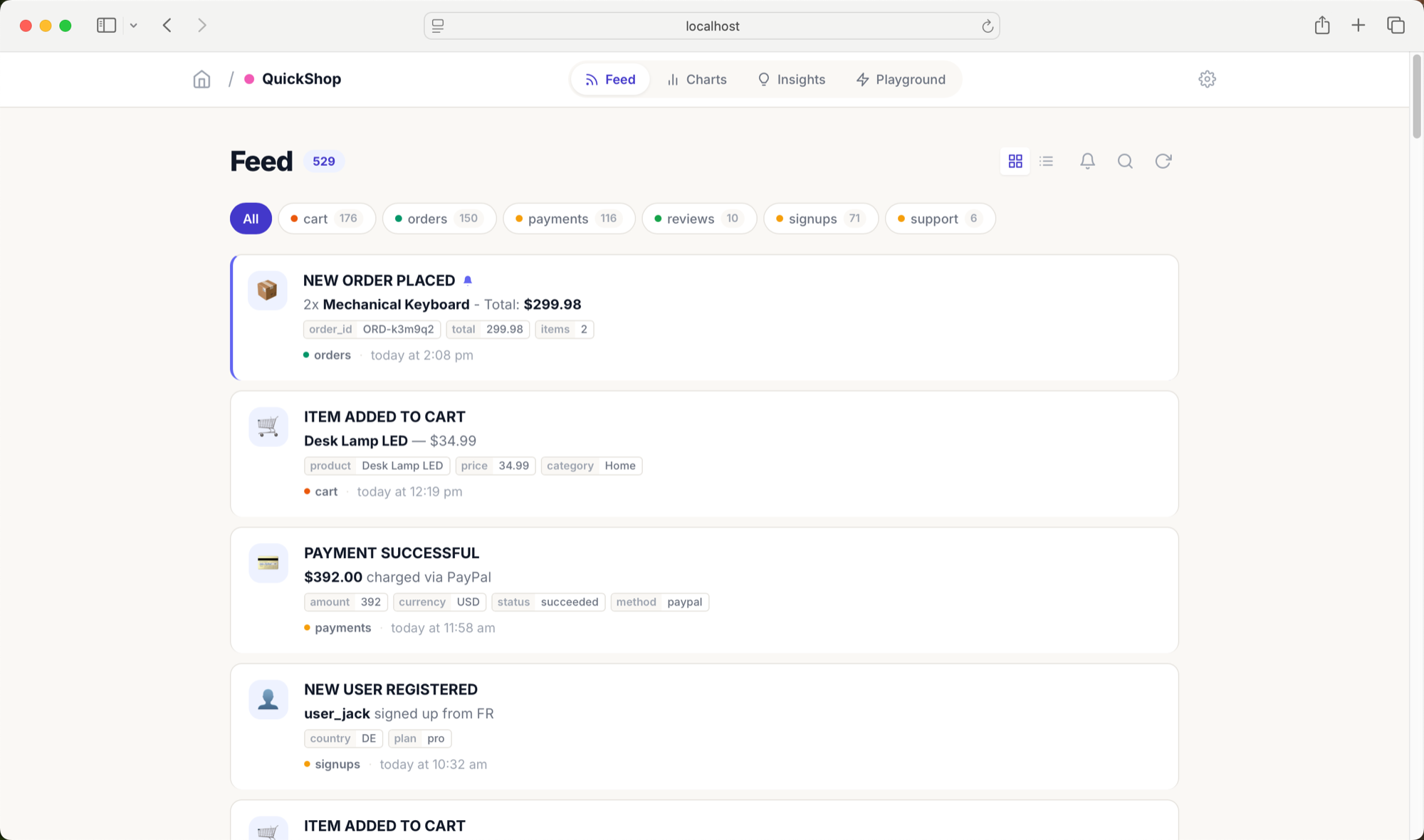
Push events from any app and see them appear in a chronological stream with search, category filters, favorites, and HTMX auto-refresh.
REST API + CLI
Publish with a simple POST or the included CLI. Code examples cover JavaScript, Python, PHP, Ruby, and Go.
Insight dashboard cards
Upsert KPI cards by title so the same call updates the value — users online, revenue, sessions, or any metric you care about.
Charts & analytics
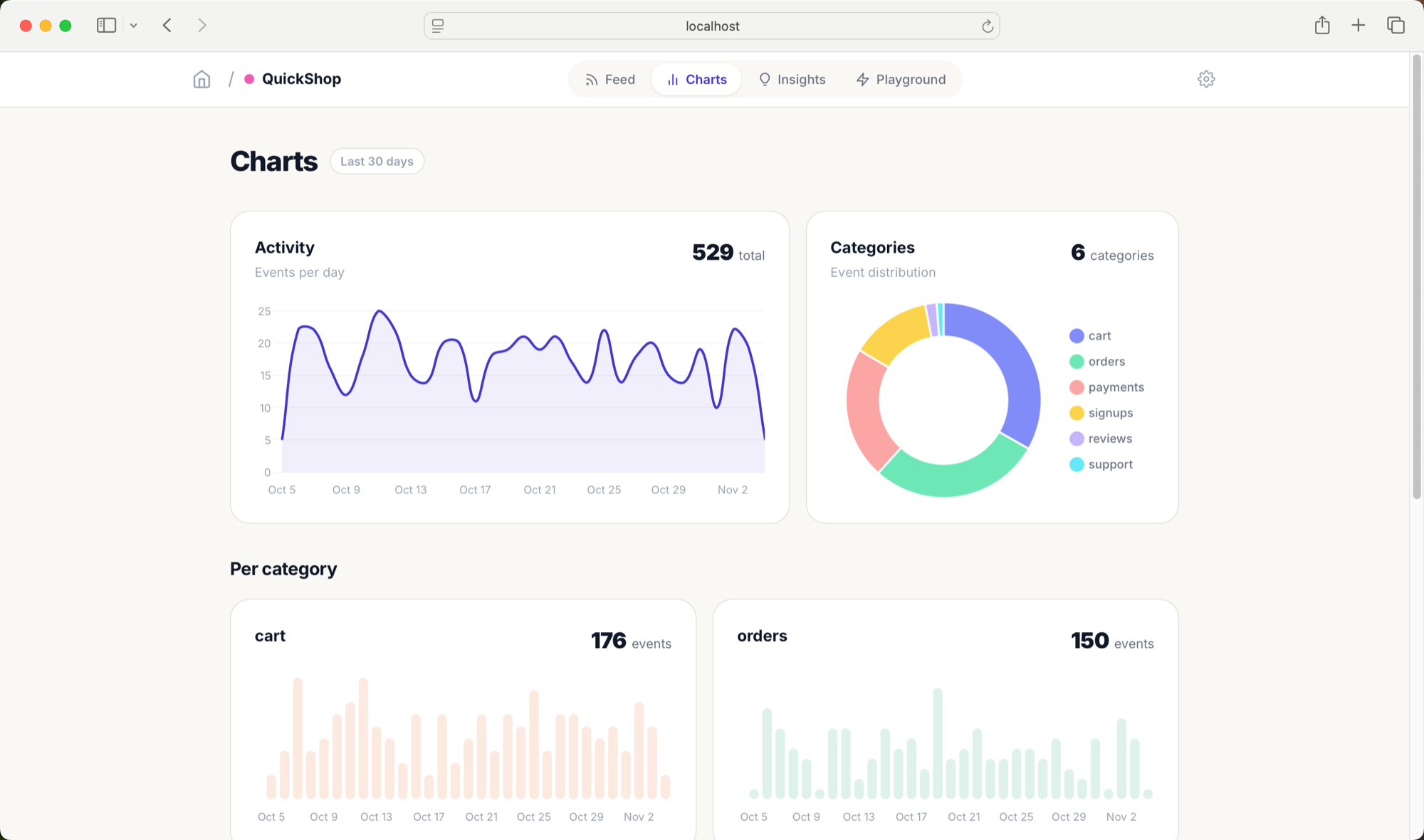
See event frequency by category over time with Chart.js, then filter by date range or category.
Multi-project support
Create separate projects for different apps. Each project has its own feed, charts, insights, and settings.
Interactive playground
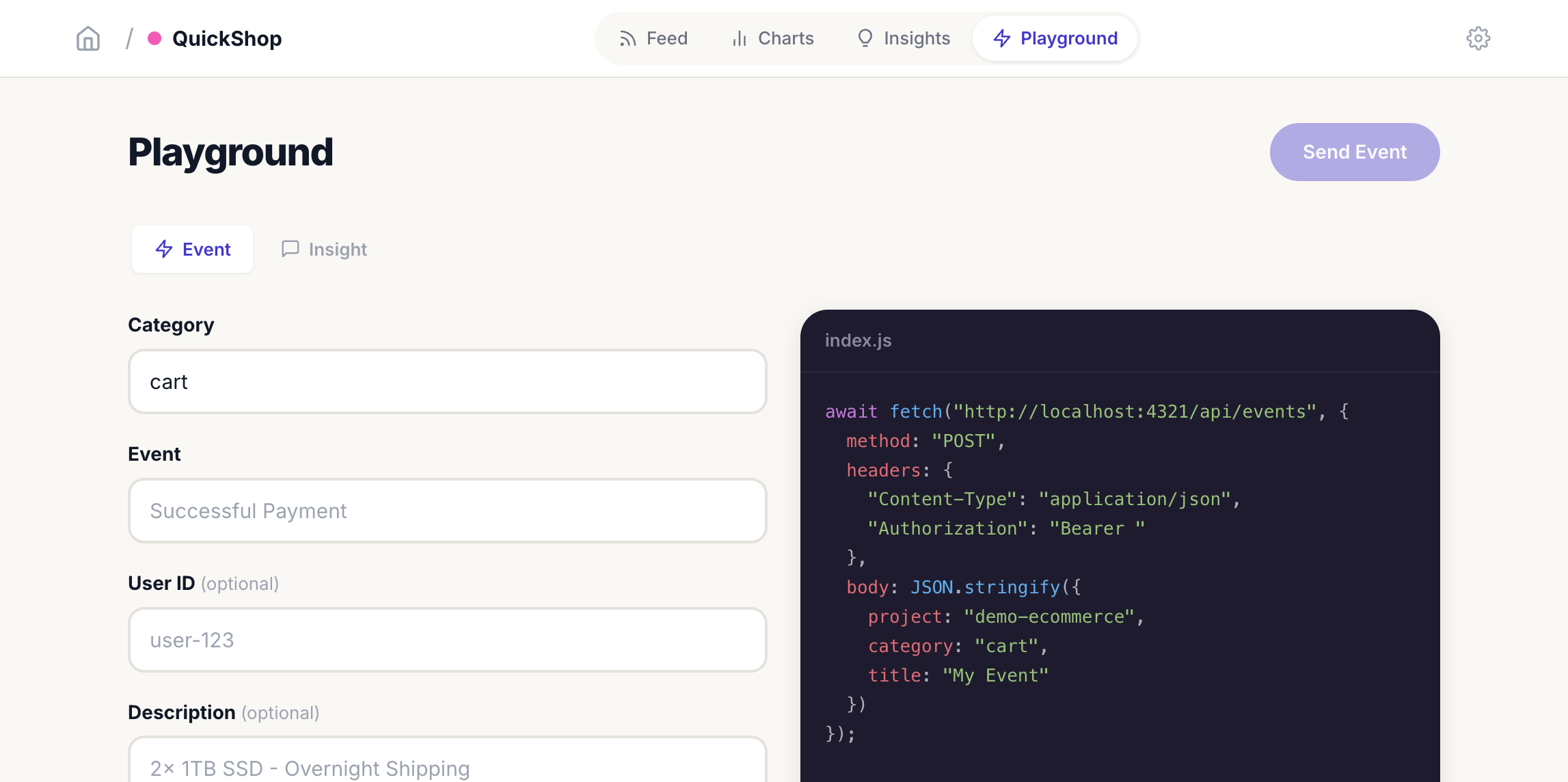
Test event publishing with a built-in form, inspect the raw API call, and copy a language-specific snippet.
Demo scenarios
Four pre-built scenarios with 1800+ events for e-commerce, SaaS, DevOps, and content platforms.
Export & import
Export JSON backups, load demos, or merge data through the CLI without locking yourself into a hosted vendor.
Use cases
Product analytics
Track signups, feature usage, and conversion events without sending product data to a third party.
DevOps monitoring
Log deploys, build results, incidents, and releases from CI and see status in one feed.
E-commerce tracking
Monitor orders, payments, cart events, and support tickets as they happen.
Indie project dashboard
Watch waitlist signups, feedback, and revenue milestones for a side project from one local board.
Team activity log
Push events from internal tools and keep categories and tags organized for later review.
Content platform metrics
Track posts, subscriber growth, newsletter opens, and traffic sources in a custom dashboard.
Tech stack
Application
Astro
SSR pages, API routes, and HTML partials live in one project with the Node adapter.
Live updates
HTMX
Powers feed polling, search, filters, and partial page updates without a SPA framework.
Client interactivity
Alpine.js
Handles sidebar state, playground forms, dropdowns, and notification preferences.
Persistence
SQLite + Drizzle
Single-file storage with a typed schema, auto-create on startup, and simple local backups.
Visualization
Chart.js
Renders activity and category charts on the analytics page only.
CLI
Commander
Creates projects, pushes events, upserts insights, and imports or exports demo data.
API overview
The dashboard exposes a JSON API at your own base URL. Create projects, ingest events, query the live feed, update KPI insight cards, and read chart aggregates without sending product data to a third-party analytics service.
Authentication: Events Logger generates one global API key on first run and shows it on the home page. Send it as a Bearer token for project creation, event ingestion, and insight updates. Read-only endpoints need no key.
curl -X POST http://localhost:4321/api/events \
-H "Content-Type: application/json" \
-H "Authorization: Bearer ev_your-api-key" \
-d '{
"project": "q4q8nb18qc2i",
"category": "orders",
"title": "Order Placed",
"description": "Order #1234 placed",
"user_id": "user-456",
"tags": { "amount": "89.99", "currency": "USD" }
}'| Method | Path | Auth | Purpose |
|---|---|---|---|
| POST | /api/projects | API key | Create a project and return its ID. |
| GET | /api/projects | Public | List every configured project. |
| POST | /api/events | API key | Push an event into a project feed. |
| GET | /api/events | Public | Query events by project, category, search, limit, or cursor. |
| POST | /api/insight | API key | Create or update a KPI card by project and title. |
| GET | /api/charts | Public | Read event counts grouped by category and day. |
| POST | /api/events/:id/favorite | Dashboard | Toggle an event as a feed favorite. |
| POST | /api/events/:id/delete | Dashboard | Delete an event from the local database. |
CLI
The ZIP includes a Commander CLI for people, scripts, and coding agents. Server-backed commands talk to the local dashboard; export and load work directly on the SQLite file.
node cli/index.js init --api-key ev_… --name "my-app"Create a project through the running dashboard.
node cli/index.js push --api-key ev_… --project <id> --category signups --title "User Registered"Push an event into a project feed.
node cli/index.js insight --api-key ev_… --project <id> --title "Online Users" --value 28Create or update a KPI insight card.
node cli/index.js load --file demos/all-scenarios.jsonLoad the four demo scenarios with sample events.
node cli/index.js export --file backup.jsonExport projects, events, and insights to JSON.
Screenshots and demos


Usage manual
Run it and make it yours.
The setup and usage guide from the ZIP. Read it before downloading so you know what the software needs.
A self-hosted event tracking and visualization dashboard. Track events from your applications -- signups, orders, deploys, payments -- and visualize them in a clean, real-time dashboard.
Built with the AHA stack: Astro + HTMX + Alpine.js.
Project documentation
The package includes BUILDING.md, a detailed guide to how I built the software, the order I followed, the difficult parts, the verification process, and what I would change next. It also includes architecture, decisions, customization, deployment, configuration, security, and AI-agent guides.
Quick Start
npm install
npm run dev
Open http://localhost:4321, create a project, and start pushing events. Your global API key is displayed on the home page.
Push Your First Event
Create a project via the CLI:
node cli/index.js init --api-key ev_your-key-here --name "my-app"
Push an event:
node cli/index.js push \
--api-key ev_your-key-here \
--project q4q8nb18qc2i \
--category signups \
--title "User Registered" \
--description "New user **[email protected]** signed up" \
--icon "👤" \
--user-id "user-123"
Or use the API directly:
curl -X POST http://localhost:4321/api/events \
-H "Content-Type: application/json" \
-H "Authorization: Bearer ev_your-key-here" \
-d '{
"project": "q4q8nb18qc2i",
"category": "orders",
"title": "Order Placed",
"description": "Order **#1234** placed by **Maria**",
"icon": "🛍️",
"user_id": "user-456",
"tags": {"email": "[email protected]", "amount": "$89.99"}
}'
Or use the built-in Playground page to test events interactively with a form and live code preview.
API Integration
The app uses a single global API key (shown on the home page). All write endpoints require this key in the Authorization header and a project ID in the request body.
JavaScript / Node.js
await fetch("http://localhost:4321/api/events", {
method: "POST",
headers: {
"Content-Type": "application/json",
"Authorization": "Bearer ev_your-key-here",
},
body: JSON.stringify({
project: "q4q8nb18qc2i",
category: "signups",
title: "User Registered",
description: "New user **[email protected]** signed up",
icon: "👤",
user_id: "user-123",
tags: { plan: "pro", source: "google" },
}),
});
Python
import requests
requests.post("http://localhost:4321/api/events", json={
"project": "q4q8nb18qc2i",
"category": "payments",
"title": "Payment Received",
"description": "**$49.99** from user-456",
"icon": "💰",
"user_id": "user-456",
"tags": {"amount": "49.99", "currency": "USD"},
}, headers={
"Authorization": "Bearer ev_your-key-here",
})
Event Fields
| Field | Type | Required | Description |
|---|---|---|---|
project |
string | yes | Project ID |
category |
string | yes | Category name (auto-created if new) |
title |
string | yes | Event title |
description |
string | no | Supports **bold** and [link](url) markdown |
icon |
string | no | Emoji icon |
tags |
object | no | Key-value metadata |
url |
string | no | Link to external resource (e.g. order page, ticket, deploy) |
user_id |
string | no | User identifier |
notify |
boolean | no | Trigger browser notification + highlight in feed (default: false) |
See API.md for the full API documentation with examples in JavaScript, Python, PHP, Ruby, and Go, plus integration patterns for Stripe webhooks, CI/CD pipelines, and more.
Features
- Feed -- chronological event stream with live search, auto-refresh, and browser notifications
- Charts -- bar charts showing event frequency per category over time
- Insights -- KPI dashboard cards for real-time metrics
- Playground -- interactive form to test event publishing with live code preview
- Categories -- auto-created groupings to organize events
- User tracking -- associate events with user IDs via the
user_idfield - Favorites -- mark events as favorites and filter the feed to show only starred items
- Search -- filter events by title, description, or tags
- Delete -- remove individual events or insight cards from the dashboard
- Settings -- project info, rename, delete project
- CLI -- command-line tool to push events and manage projects
- REST API -- JSON API for integration with any service
- Export/Import -- export all data to JSON, load demo scenarios or backups
- Demo scenarios -- 4 pre-built scenarios with 1800+ events for presentations
- Responsive -- mobile-friendly layout with collapsible sidebar
Tech Stack
- Astro 5 (SSR mode with Node adapter) -- pages, layouts, API routes
- HTMX -- live feed updates, search, polling without page reloads
- Alpine.js -- dropdowns, toggles, sidebar, playground interactivity
- SQLite via better-sqlite3 -- local database, zero configuration
- Drizzle ORM -- type-safe schema and queries
- Chart.js -- bar charts on the charts page
- Commander -- CLI tool
Project Structure
See docs/architecture.md for the full project layout and component descriptions.
API Reference
See API.md for complete API documentation with code examples in multiple languages.
See docs/api.md for the endpoint reference in compact form.
CLI Reference
See CLI.md for all commands and options.
Database
See docs/database.md for the schema, tables, and indexes.
Demo Scenarios
Load pre-built demo data to showcase the app without using personal data:
# Load all 4 scenarios (1800+ events across 30 days)
node cli/index.js load --file demos/all-scenarios.json
# Load a single scenario
node cli/index.js load --file demos/ecommerce.json
# Export your current data first (backup)
node cli/index.js export --file my-backup.json
# Regenerate fresh random demo data
node demos/generate.js
| Scenario | Project | Events | Description |
|---|---|---|---|
| E-commerce | QuickShop | ~530 | Orders, cart, payments, reviews, support |
| SaaS | LaunchPad | ~540 | Logins, billing, API usage, errors, features |
| DevOps | DeployBot | ~340 | Deploys, builds, incidents, releases, monitoring |
| Content | BlogWave | ~400 | Subscribers, articles, newsletters, traffic |
See demos/WALKTHROUGH.md for a full presentation script.
Roadmap
See docs/roadmap.md for planned features.
Use Cases
- E-commerce -- user registrations, cart events, orders, shipping, reviews
- SaaS -- signups, trial conversions, subscription changes, feature usage
- CI/CD -- build status, deploys, test results, rollbacks
- Content platforms -- posts published, comments, subscriber growth
- Indie projects -- waitlist signups, feedback, revenue milestones
Scripts
| Command | Description |
|---|---|
npm run dev |
Start development server on port 4321 |
npm run build |
Build for production |
npm run preview |
Preview production build |
npm run db:push |
Push schema changes to database |
node cli/index.js export --file data.json |
Export all data to JSON |
node cli/index.js load --file data.json |
Load data from JSON (replaces existing) |
node demos/generate.js |
Regenerate demo scenario files |
License
MIT
API reference
Endpoints, auth rules, and integration examples.
The API manual included in the package, with request shapes and practical examples.
Events Dashboard exposes a REST API that any application can use to push events, update metrics, and query data. All responses are JSON.
Base URL: http://localhost:4321 (or wherever you deploy the app)
Quick Start
# 1. Create a project (requires API key)
curl -X POST http://localhost:4321/api/projects \
-H "Content-Type: application/json" \
-H "Authorization: Bearer ev_your-api-key" \
-d '{"name": "my-app"}'
# Response: {"id": "q4q8nb18qc2i", "name": "my-app"}
# 2. Push an event
curl -X POST http://localhost:4321/api/events \
-H "Content-Type: application/json" \
-H "Authorization: Bearer ev_your-api-key" \
-d '{"project": "q4q8nb18qc2i", "category": "signups", "title": "User Registered", "icon": "👤"}'
# 3. Query events
curl "http://localhost:4321/api/events?project=q4q8nb18qc2i"
Authentication
All write endpoints (POST /api/events, POST /api/insight, POST /api/projects) require the global API key in the Authorization header:
Authorization: Bearer ev_your-api-key-here
A single API key is auto-generated when the app starts for the first time. It is displayed on the home page. The key is prefixed with ev_ and looks like ev_pf7au9f9-sb8r-aa2w-eog8-sw42acp7m4bj.
Read-only endpoints (GET /api/events, GET /api/projects, GET /api/charts) do not require authentication.
Endpoints
POST /api/projects
Create a new project. Requires authentication.
Body:
| Field | Type | Required | Description |
|---|---|---|---|
name |
string | yes | Project name |
Example:
curl -X POST http://localhost:4321/api/projects \
-H "Content-Type: application/json" \
-H "Authorization: Bearer ev_your-api-key" \
-d '{"name": "my-saas-app"}'
Response 201:
{
"id": "q4q8nb18qc2i",
"name": "my-saas-app"
}
Errors:
| Status | Reason |
|---|---|
| 400 | Missing or empty name |
| 401 | Missing or invalid API key |
GET /api/projects
List all projects.
curl http://localhost:4321/api/projects
Response 200:
[
{
"id": "q4q8nb18qc2i",
"name": "my-saas-app",
"createdAt": "2026-02-27T08:00:00.000Z"
}
]
POST /api/events
Push an event. Requires authentication.
Body:
| Field | Type | Required | Description |
|---|---|---|---|
project |
string | yes | Project ID |
category |
string | yes | Category name (auto-created if new) |
title |
string | yes | Event title |
description |
string | no | Supports **bold** and [link](url) markdown |
icon |
string | no | Emoji icon |
tags |
object | no | Key-value metadata for filtering and display |
url |
string | no | Link to external resource (clicking the event title opens this URL) |
user_id |
string | no | Associate the event with a user |
notify |
boolean | no | Trigger browser notification + highlight in feed (default: false) |
Response 201:
{
"id": 42,
"projectId": "q4q8nb18qc2i",
"category": "orders",
"title": "Order Placed",
"description": "Order **#1234** placed by **Maria**",
"icon": "🛍️",
"tags": "{\"email\":\"[email protected]\",\"amount\":\"$89.99\"}",
"url": "https://shop.example.com/admin/orders/1234",
"userId": "user-456",
"notify": false,
"favorited": false,
"createdAt": "2026-02-27T08:12:03.000Z"
}
Errors:
| Status | Reason |
|---|---|
| 400 | Missing project, category, or title |
| 401 | Missing or invalid API key |
| 404 | Project not found |
Examples by Use Case
User signup:
curl -X POST http://localhost:4321/api/events \
-H "Content-Type: application/json" \
-H "Authorization: Bearer ev_your-key" \
-d '{
"project": "q4q8nb18qc2i",
"category": "signups",
"title": "User Registered",
"description": "New user **[email protected]** signed up via Google OAuth",
"icon": "👤",
"user_id": "usr_abc123",
"tags": {"email": "[email protected]", "source": "google", "plan": "free"}
}'
Payment received:
curl -X POST http://localhost:4321/api/events \
-H "Content-Type: application/json" \
-H "Authorization: Bearer ev_your-key" \
-d '{
"project": "q4q8nb18qc2i",
"category": "payments",
"title": "Payment Received",
"description": "**$49.99** payment from user-456 for Pro plan",
"icon": "💰",
"url": "https://dashboard.stripe.com/payments/pi_abc123",
"user_id": "user-456",
"notify": true,
"tags": {"amount": "49.99", "currency": "USD", "plan": "pro"}
}'
Deploy completed:
curl -X POST http://localhost:4321/api/events \
-H "Content-Type: application/json" \
-H "Authorization: Bearer ev_your-key" \
-d '{
"project": "q4q8nb18qc2i",
"category": "deploys",
"title": "Deploy Succeeded",
"description": "Version **v2.4.1** deployed to production in 43s",
"icon": "🚀",
"tags": {"version": "v2.4.1", "environment": "production", "duration": "43s"}
}'
Error alert:
curl -X POST http://localhost:4321/api/events \
-H "Content-Type: application/json" \
-H "Authorization: Bearer ev_your-key" \
-d '{
"project": "q4q8nb18qc2i",
"category": "errors",
"title": "500 Internal Server Error",
"description": "Unhandled exception in **/api/checkout**: NullPointerException",
"icon": "🔴",
"url": "https://sentry.io/issues/ERR-78901",
"notify": true,
"tags": {"endpoint": "/api/checkout", "status": "500", "count": "12"}
}'
Subscription change:
curl -X POST http://localhost:4321/api/events \
-H "Content-Type: application/json" \
-H "Authorization: Bearer ev_your-key" \
-d '{
"project": "q4q8nb18qc2i",
"category": "billing",
"title": "Plan Upgraded",
"description": "**Maria** upgraded from Free to **Pro** plan",
"icon": "⬆️",
"user_id": "user-456",
"tags": {"from": "free", "to": "pro", "mrr_change": "+49.99"}
}'
Minimal event (only required fields):
curl -X POST http://localhost:4321/api/events \
-H "Content-Type: application/json" \
-H "Authorization: Bearer ev_your-key" \
-d '{"project": "q4q8nb18qc2i", "category": "logs", "title": "Cron job completed"}'
GET /api/events
Query events for a project. Supports filtering, search, and cursor-based pagination.
Query parameters:
| Param | Type | Required | Description |
|---|---|---|---|
project |
string | yes | Project ID |
category |
string | no | Filter by category name |
search |
string | no | Search across title, description, and tags |
cursor |
integer | no | Return events with id < cursor (for pagination) |
limit |
integer | no | Max results per page (default: 50, max: 100) |
Get all events:
curl "http://localhost:4321/api/events?project=q4q8nb18qc2i"
Filter by category:
curl "http://localhost:4321/api/events?project=q4q8nb18qc2i&category=payments"
Search events:
curl "http://localhost:4321/api/events?project=q4q8nb18qc2i&search=maria"
Paginate through results:
# First page
curl "http://localhost:4321/api/events?project=q4q8nb18qc2i&limit=10"
# Response includes "nextCursor": 35
# Next page
curl "http://localhost:4321/api/events?project=q4q8nb18qc2i&limit=10&cursor=35"
# Response includes "nextCursor": 22
# Keep going until nextCursor is null
Response 200:
{
"events": [
{
"id": 42,
"projectId": "q4q8nb18qc2i",
"category": "signups",
"title": "User Registered",
"description": "New user **[email protected]** signed up",
"icon": "👤",
"tags": "{\"email\":\"[email protected]\",\"source\":\"google\"}",
"userId": "usr_abc123",
"notify": false,
"createdAt": "2026-02-27T08:12:03.000Z"
}
],
"nextCursor": 41
}
nextCursor is null when there are no more results.
Errors:
| Status | Reason |
|---|---|
| 400 | Missing project parameter |
POST /api/events/:eventId/delete
Delete an event by ID. No authentication required.
Example:
curl -X POST http://localhost:4321/api/events/42/delete
Response 200:
{ "id": 42, "deleted": true }
Errors:
| Status | Reason |
|---|---|
| 400 | Invalid event ID |
| 404 | Event not found |
POST /api/events/:eventId/favorite
Toggle the favorite status of an event. No authentication required.
Example:
curl -X POST http://localhost:4321/api/events/42/favorite
Response 200:
{ "id": 42, "favorited": true }
Errors:
| Status | Reason |
|---|---|
| 400 | Invalid event ID |
| 404 | Event not found |
POST /api/insight
Create or update an insight card (a KPI metric displayed on the dashboard). Requires authentication.
Insights are upserted by project + title: if an insight with the same title already exists, its value is updated. This makes it easy to keep metrics current by re-posting with the latest value.
Body:
| Field | Type | Required | Description |
|---|---|---|---|
project |
string | yes | Project ID |
title |
string | yes | Insight name (unique key per project) |
value |
string or number | yes | Display value |
icon |
string | no | Emoji icon |
Examples:
# Total revenue
curl -X POST http://localhost:4321/api/insight \
-H "Content-Type: application/json" \
-H "Authorization: Bearer ev_your-key" \
-d '{"project": "q4q8nb18qc2i", "title": "Total Revenue", "value": "$12,340", "icon": "💰"}'
# Active users
curl -X POST http://localhost:4321/api/insight \
-H "Content-Type: application/json" \
-H "Authorization: Bearer ev_your-key" \
-d '{"project": "q4q8nb18qc2i", "title": "Active Users", "value": 1284, "icon": "👥"}'
# Conversion rate
curl -X POST http://localhost:4321/api/insight \
-H "Content-Type: application/json" \
-H "Authorization: Bearer ev_your-key" \
-d '{"project": "q4q8nb18qc2i", "title": "Conversion Rate", "value": "3.2%", "icon": "📈"}'
# Update an existing insight (same title = update)
curl -X POST http://localhost:4321/api/insight \
-H "Content-Type: application/json" \
-H "Authorization: Bearer ev_your-key" \
-d '{"project": "q4q8nb18qc2i", "title": "Total Revenue", "value": "$13,500", "icon": "💰"}'
Response 200:
{ "ok": true }
Errors:
| Status | Reason |
|---|---|
| 400 | Missing project, title, or value |
| 401 | Missing or invalid API key |
| 404 | Project not found |
POST /api/insight/:insightId/delete
Delete an insight by ID. No authentication required. Redirects (303) to the insight-grid partial.
Example:
curl -X POST http://localhost:4321/api/insight/5/delete?project=q4q8nb18qc2i
Errors:
| Status | Reason |
|---|---|
| 400 | Invalid insight ID |
| 404 | Insight not found |
GET /api/charts
Get event counts grouped by category and day. Used to render bar charts on the dashboard.
Query parameters:
| Param | Type | Required | Description |
|---|---|---|---|
project |
string | yes | Project ID |
days |
integer | no | Number of days to look back (default: 30) |
category |
string | no | Filter to a specific category |
Examples:
# All categories, last 30 days
curl "http://localhost:4321/api/charts?project=q4q8nb18qc2i"
# Last 7 days
curl "http://localhost:4321/api/charts?project=q4q8nb18qc2i&days=7"
# Single category
curl "http://localhost:4321/api/charts?project=q4q8nb18qc2i&category=signups"
Response 200:
{
"orders": [
{ "day": "2026-02-25", "count": 5 },
{ "day": "2026-02-26", "count": 8 },
{ "day": "2026-02-27", "count": 3 }
],
"signups": [
{ "day": "2026-02-25", "count": 2 },
{ "day": "2026-02-26", "count": 4 },
{ "day": "2026-02-27", "count": 1 }
]
}
Errors:
| Status | Reason |
|---|---|
| 400 | Missing project parameter |
Language Examples
JavaScript / Node.js
const API_URL = "http://localhost:4321";
const API_KEY = "ev_your-key-here";
// Push an event
const res = await fetch(`${API_URL}/api/events`, {
method: "POST",
headers: {
"Content-Type": "application/json",
Authorization: `Bearer ${API_KEY}`,
},
body: JSON.stringify({
project: "q4q8nb18qc2i",
category: "signups",
title: "User Registered",
description: "New user **[email protected]** signed up",
icon: "👤",
user_id: "user-123",
tags: { plan: "pro", source: "google" },
}),
});
const event = await res.json();
console.log("Created event:", event.id);
// Query events
const res = await fetch(
`${API_URL}/api/events?project=q4q8nb18qc2i&category=signups&limit=10`
);
const { events, nextCursor } = await res.json();
// Update an insight
await fetch(`${API_URL}/api/insight`, {
method: "POST",
headers: {
"Content-Type": "application/json",
Authorization: `Bearer ${API_KEY}`,
},
body: JSON.stringify({
project: "q4q8nb18qc2i",
title: "Total Users",
value: 1284,
icon: "👥",
}),
});
Python
import requests
API_URL = "http://localhost:4321"
API_KEY = "ev_your-key-here"
HEADERS = {
"Content-Type": "application/json",
"Authorization": f"Bearer {API_KEY}",
}
# Push an event
response = requests.post(f"{API_URL}/api/events", json={
"project": "q4q8nb18qc2i",
"category": "payments",
"title": "Payment Received",
"description": "**$49.99** from user-456",
"icon": "💰",
"user_id": "user-456",
"tags": {"amount": "49.99", "currency": "USD"},
}, headers=HEADERS)
event = response.json()
print(f"Created event: {event['id']}")
# Query events
response = requests.get(f"{API_URL}/api/events", params={
"project": "q4q8nb18qc2i",
"category": "payments",
"limit": 20,
})
data = response.json()
for event in data["events"]:
print(f"{event['title']} - {event['createdAt']}")
# Update an insight
requests.post(f"{API_URL}/api/insight", json={
"project": "q4q8nb18qc2i",
"title": "Monthly Revenue",
"value": "$12,340",
"icon": "💰",
}, headers=HEADERS)
PHP
$apiUrl = "http://localhost:4321";
$apiKey = "ev_your-key-here";
// Push an event
$ch = curl_init("$apiUrl/api/events");
curl_setopt_array($ch, [
CURLOPT_POST => true,
CURLOPT_RETURNTRANSFER => true,
CURLOPT_HTTPHEADER => [
"Content-Type: application/json",
"Authorization: Bearer $apiKey",
],
CURLOPT_POSTFIELDS => json_encode([
"project" => "q4q8nb18qc2i",
"category" => "orders",
"title" => "Order Placed",
"description" => "Order **#1234** for **$89.99**",
"icon" => "🛍️",
"user_id" => "user-456",
"tags" => ["amount" => "89.99", "product" => "Widget Pro"],
]),
]);
$response = curl_exec($ch);
$event = json_decode($response, true);
curl_close($ch);
Ruby
require "net/http"
require "json"
api_url = "http://localhost:4321"
api_key = "ev_your-key-here"
uri = URI("#{api_url}/api/events")
http = Net::HTTP.new(uri.host, uri.port)
request = Net::HTTP::Post.new(uri)
request["Content-Type"] = "application/json"
request["Authorization"] = "Bearer #{api_key}"
request.body = {
project: "q4q8nb18qc2i",
category: "signups",
title: "User Registered",
description: "New user **[email protected]** signed up",
icon: "👤",
user_id: "user-789",
tags: { email: "[email protected]", plan: "starter" }
}.to_json
response = http.request(request)
event = JSON.parse(response.body)
puts "Created event: #{event['id']}"
Go
package main
import (
"bytes"
"encoding/json"
"fmt"
"net/http"
)
func main() {
payload, _ := json.Marshal(map[string]interface{}{
"project": "q4q8nb18qc2i",
"category": "deploys",
"title": "Deploy Succeeded",
"description": "Version **v2.4.1** deployed to production",
"icon": "🚀",
"tags": map[string]string{"version": "v2.4.1", "env": "production"},
})
req, _ := http.NewRequest("POST", "http://localhost:4321/api/events", bytes.NewBuffer(payload))
req.Header.Set("Content-Type", "application/json")
req.Header.Set("Authorization", "Bearer ev_your-key-here")
resp, err := http.DefaultClient.Do(req)
if err != nil {
panic(err)
}
defer resp.Body.Close()
fmt.Println("Status:", resp.StatusCode)
}
Integration Patterns
Track signups from your auth system
Call the API after a user registers:
async function onUserRegistered(user) {
await fetch("http://localhost:4321/api/events", {
method: "POST",
headers: {
"Content-Type": "application/json",
Authorization: "Bearer ev_your-key",
},
body: JSON.stringify({
project: "q4q8nb18qc2i",
category: "signups",
title: "User Registered",
description: `**${user.email}** signed up`,
icon: "👤",
user_id: user.id,
tags: { email: user.email, provider: user.authProvider },
}),
});
}
Track payments from Stripe webhooks
app.post("/webhooks/stripe", async (req, res) => {
const event = req.body;
if (event.type === "checkout.session.completed") {
const session = event.data.object;
await fetch("http://localhost:4321/api/events", {
method: "POST",
headers: {
"Content-Type": "application/json",
Authorization: "Bearer ev_your-key",
},
body: JSON.stringify({
project: "q4q8nb18qc2i",
category: "payments",
title: "Payment Received",
description: `**$${(session.amount_total / 100).toFixed(2)}** from **${session.customer_email}**`,
icon: "💰",
notify: true,
user_id: session.client_reference_id,
tags: {
amount: (session.amount_total / 100).toFixed(2),
currency: session.currency,
stripe_session: session.id,
},
}),
});
}
res.sendStatus(200);
});
Track deploys from CI/CD
Add to your GitHub Actions workflow:
- name: Track deploy
run: |
curl -X POST ${{ secrets.EVENTS_DASHBOARD_URL }}/api/events \
-H "Content-Type: application/json" \
-H "Authorization: Bearer ${{ secrets.EVENTS_API_KEY }}" \
-d '{
"project": "${{ secrets.EVENTS_PROJECT_ID }}",
"category": "deploys",
"title": "Deploy to Production",
"description": "Commit **${{ github.sha }}** by **${{ github.actor }}**",
"icon": "🚀",
"tags": {
"commit": "${{ github.sha }}",
"branch": "${{ github.ref_name }}",
"actor": "${{ github.actor }}",
"run": "${{ github.run_id }}"
}
}'
Update dashboard KPIs on a schedule
Run a cron job to keep insight cards current:
#!/bin/bash
API_KEY="ev_your-key-here"
URL="http://localhost:4321"
# Fetch counts from your database and post as insights
TOTAL_USERS=$(psql -t -c "SELECT count(*) FROM users")
MRR=$(psql -t -c "SELECT sum(amount) FROM subscriptions WHERE status='active'")
curl -s -X POST "$URL/api/insight" \
-H "Content-Type: application/json" \
-H "Authorization: Bearer $API_KEY" \
-d "{\"project\": \"q4q8nb18qc2i\", \"title\": \"Total Users\", \"value\": \"$TOTAL_USERS\", \"icon\": \"👥\"}"
curl -s -X POST "$URL/api/insight" \
-H "Content-Type: application/json" \
-H "Authorization: Bearer $API_KEY" \
-d "{\"project\": \"q4q8nb18qc2i\", \"title\": \"MRR\", \"value\": \"\$$MRR\", \"icon\": \"💰\"}"
Notes
- Categories are auto-created. The first time you push an event with a new category name, the category is created automatically. No setup needed.
- Insights upsert by title. Posting an insight with the same title updates the existing value instead of creating a duplicate.
- Tags are stored as JSON. They're searchable via the
searchparameter onGET /api/events. - Descriptions support markdown. Use
**bold**and[link text](url)in descriptions for richer display in the dashboard. - Pagination is cursor-based. Use
nextCursorfrom the response as thecursorparameter in the next request. This is more reliable than offset-based pagination. - Rate limits: None. This is a self-hosted app, so you control the infrastructure.
CLI reference
Commands for terminals, scripts, and coding agents.
The command-line workflows and options included with the software.
The CLI is at cli/index.js. The init, push, and insight commands require the dashboard server to be running. The export and load commands talk directly to the SQLite database and work without the server.
node cli/index.js <command> [options]
Server-dependent commands accept --url <url> to point to a different server (default: http://localhost:4321).
Commands
init
Create a new project.
node cli/index.js init --api-key ev_your-key --name "my-store"
| Option | Required | Description |
|---|---|---|
--api-key <key> |
yes | API key |
--name <name> |
yes | Project name |
--url <url> |
no | Server URL (default: http://localhost:4321) |
push
Push an event to a project.
node cli/index.js push \
--api-key ev_your-key \
--project q4q8nb18qc2i \
--category orders \
--title "Order Placed" \
--description "Order **#1234** by John" \
--icon "📦" \
--user-id "user-123" \
--tags '{"email":"[email protected]"}'
| Option | Required | Description |
|---|---|---|
--api-key <key> |
yes | API key |
--project <id> |
yes | Project ID |
--category <name> |
yes | Category name |
--title <title> |
yes | Event title |
--description <text> |
no | Description (supports **bold** and [link](url)) |
--icon <emoji> |
no | Emoji icon |
--tags <json> |
no | JSON object of key-value tags |
--action-url <url> |
no | Link to external resource (e.g. order page, ticket) |
--user-id <id> |
no | User ID to associate with the event |
--notify |
no | Trigger browser notification + highlight in feed |
--url <url> |
no | Server URL |
insight
Create or update an insight KPI card.
node cli/index.js insight \
--api-key ev_your-key \
--project q4q8nb18qc2i \
--title "Online Users" \
--value 28 \
--icon "🔴"
| Option | Required | Description |
|---|---|---|
--api-key <key> |
yes | API key |
--project <id> |
yes | Project ID |
--title <title> |
yes | Insight name (unique per project -- updates if exists) |
--value <value> |
yes | Display value |
--icon <emoji> |
no | Emoji icon |
--url <url> |
no | Server URL |
export
Export all data (projects, categories, events, insights) to a JSON file. Does not require the server to be running — reads directly from SQLite.
node cli/index.js export --file backup.json
| Option | Required | Description |
|---|---|---|
--file <path> |
no | Output file path (default: export.json) |
--db <path> |
no | Database file path (default: data/events.db) |
load
Load data from a JSON file. Replaces all existing data by default. Does not require the server — writes directly to SQLite. Restart the dev server after loading.
node cli/index.js load --file demos/ecommerce.json
| Option | Required | Description |
|---|---|---|
--file <path> |
yes | JSON file to load |
--db <path> |
no | Database file path (default: data/events.db) |
--merge |
no | Merge with existing data instead of replacing |
Demo Scenarios
Pre-built demo scenarios are in demos/. Each contains realistic data spanning 30 days.
| Scenario | File | Description |
|---|---|---|
| QuickShop | demos/ecommerce.json |
E-commerce: orders, carts, payments, reviews |
| LaunchPad SaaS | demos/saas.json |
SaaS app: logins, billing, API usage, errors |
| DeployBot | demos/devops.json |
CI/CD: deploys, builds, incidents, monitoring |
| BlogWave | demos/content.json |
Content platform: subscribers, articles, newsletters |
| All | demos/all-scenarios.json |
All 4 scenarios combined |
# Load all demo data
node cli/index.js load --file demos/all-scenarios.json
# Load just one scenario
node cli/index.js load --file demos/ecommerce.json
# Regenerate random demo data
node demos/generate.js
See demos/WALKTHROUGH.md for a full presentation script.
Examples
Track an e-commerce order flow:
API_KEY="ev_your-key"
PROJECT="q4q8nb18qc2i"
node cli/index.js push --api-key $API_KEY --project $PROJECT --category signups --title "User Registered" --icon "👤" --user-id "user-42"
node cli/index.js push --api-key $API_KEY --project $PROJECT --category orders --title "Order Placed" --description "Order **#1001**" --icon "🛍️" --user-id "user-42"
node cli/index.js push --api-key $API_KEY --project $PROJECT --category shipping --title "Order Shipped" --icon "🚚"
node cli/index.js push --api-key $API_KEY --project $PROJECT --category shipping --title "Order Delivered" --icon "📦"
node cli/index.js insight --api-key $API_KEY --project $PROJECT --title "24h Sales" --value "\$1,449" --icon "☀️"
node cli/index.js insight --api-key $API_KEY --project $PROJECT --title "Orders Processing" --value 23 --icon "🏭"
Track CI/CD deploys:
node cli/index.js push --api-key $API_KEY --project $PROJECT --category deploys --title "Deploy Succeeded" --description "v2.4.1 to production" --icon "🚀"
node cli/index.js insight --api-key $API_KEY --project $PROJECT --title "Deploys Today" --value 5 --icon "📊"
Architecture
See how the software is put together.
Review the system flow, boundaries, integrations, and replaceable parts before you download it.
Events Logger uses Astro, HTMX, Alpine.js, SQLite, Drizzle ORM, and Commander.
Main areas
src/pages/api/receives and validates incoming events.src/pages/renders dashboards and HTMX partials.src/db/and Drizzle files own the schema and persistence.cli/provides terminal commands for creating projects and pushing events.
Change flow
Start from the user-facing route or command, follow its call into the domain or data module, change the narrowest responsible layer, and verify the result with the commands in README.md. Keep external-service calls behind existing server or integration boundaries.
What’s included
- Events Logger version 1.0 with complete Astro + HTMX + Alpine.js source
- REST API with CRUD for events, insights, and projects
- CLI tool for pushing events, managing insights, and loading demos
- Drizzle ORM schema with auto-migration on startup
- SQLite database with zero-config local setup
- Four demo scenarios with 1800+ sample events
- README, changelog, agent guide, architecture, decisions, customization, deployment, configuration, security, and build guides
- Package manifest and audited ZIP included in the free ZIP download
Documentation
The ZIP includes project context for you and your coding agents.
README.md
The starting point: what the software does, prerequisites, local setup, commands, and the shortest path to a working copy.
CHANGELOG.md
The release history and the public changes included in each version.
BUILDING.md
The build story: how the software was made, the difficult parts, how it was verified, and what could come next.
AGENTS.md
Project context and operating rules for Codex, Claude Code, Cursor, and other AI coding agents.
ARCHITECTURE.md
How the major parts fit together, where data flows, and where to make structural changes.
DECISIONS.md
The main technical and product choices, including tradeoffs worth preserving or revisiting.
CUSTOMIZATION.md
A practical map for changing the brand, interface, features, data model, and integrations.
DEPLOYMENT.md
A production checklist covering resources, environment setup, builds, and deployment verification.
CONFIGURATION.md
Every setting and environment variable, where it is used, and how to configure local and production environments.
SECURITY.md
Credential handling, trust boundaries, sensitive data, and checks to run before publishing your version.
CLI.md
Command-line usage, options, common workflows, and automation examples.
API.md
Endpoints, request and response shapes, authentication, and integration examples.
WHY.md
Additional project documentation included with the source package.
Why download this
- See what is happening across your apps in one self-hosted place
- Keep analytics data on your machine instead of a third-party SaaS
- Push events from any language with a single HTTP call or the included CLI
- Study a real Astro SSR + HTMX + Alpine.js product with API auth and pagination
- Give an AI coding agent architecture, API docs, and customization guidance
- Own the complete source with no subscription
Customize it
Use the working source as a foundation. Keep it small, change it for your own workflow, or turn it into a different product.
- Grow it into a self-hosted product-analytics suite: funnels, cohorts, retention views, and shareable dashboards per project.
- Offer agencies a white-label event inbox so every client launch, deploy, and signup lands in one branded place.
- Add Slack, email, or webhook alerts when revenue, errors, or launches cross a threshold you define.
- Layer multi-user auth and roles so a small team can own feeds without shipping data to a third-party SaaS.
- Turn insight cards into a public status or launch page your customers can bookmark.
- Point an AI agent at the architecture docs and rebuild the same idea on Postgres, Next.js, or your preferred stack.
MIT license
Every source ZIP includes an MIT LICENSE file. You can use, copy, change, publish, distribute, sublicense, or sell the code, including as part of a commercial product.
Keep the copyright and license notice with copies or substantial portions of the code. Third-party dependencies and assets keep their own licenses.
Keep learning
Bootcamp
Study a complete Astro, HTMX, Alpine.js, API, and database application while learning full-stack development.