Desktop App · version 1.0
Livestream Recorder
A native macOS app for recording live YouTube streams from now or from the available beginning, following catch-up progress, and finalizing reliable local MP4 files. Includes source, tests, and agent-ready instructions for customization or cross-platform rewrites.
Why I built this
Saving a livestream sounds like one command until you need a usable desktop workflow: browser-session access, start-now and catch-up modes, visible progress, cancellation, retries, process cleanup, separate media tracks, and an MP4 that opens reliably after an interrupted recording.
Livestream Recorder is the working result. It turns that fragile command-line path into a focused native interface and keeps the difficult pieces—process state, output parsing, live-edge tracking, artifact discovery, conservative tail cleanup, and finalization—separate and tested.
From live URL to verified MP4
The recording lifecycle is already connected.
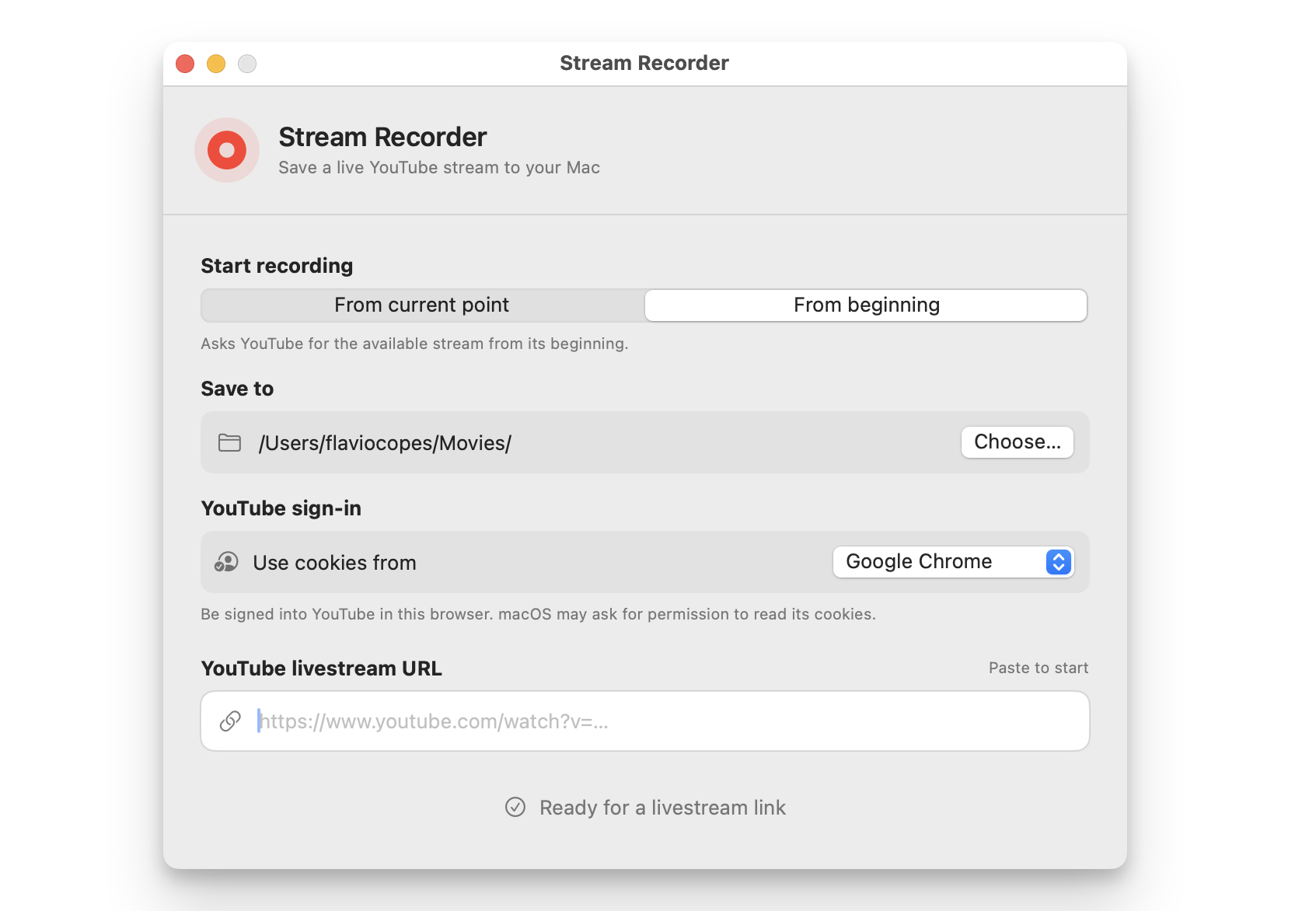
- Choose start mode, destination, and browser.
- Paste an authorized live YouTube URL.
- Follow download and catch-up progress.
- Stop, finalize, and reveal the MP4.
Features
Two recording modes
Start at the current live point or request the stream from its available beginning and catch up toward live.
Paste to record
Choose the destination and browser once, then paste a supported YouTube livestream URL to begin.
Catch-up visibility
See captured media time, wall-clock time, download progress, and when the recording reaches the live edge.
Browser-session support
Select a local signed-in browser for streams that require YouTube cookies without storing cookie values in the software.
Reliable finalization
Locate merged or separate artifacts, remux or merge them with FFmpeg, and verify the resulting MP4.
Safe interruption
Stop gracefully, escalate a stuck process, finish work during app termination, and conservatively remove only clearly unusable tails.
Use cases
Personal stream archive
Save an authorized live broadcast to a local MP4 with a small, understandable workflow.
Creator backup tool
Adapt the software for creators who want a local copy while broadcasting.
Cross-platform desktop product
Port the service boundaries into a Windows, Linux, or cross-platform interface.
Command-line recorder
Replace SwiftUI with flags, progress output, signals, and meaningful exit codes.
Media workflow foundation
Add quality, codec, audio-only, naming, queue, and post-processing controls.
Process-integration reference
Study a tested native wrapper around long-running command-line tools and asynchronous output.
Tech stack
Application logic
Swift 6
Provides strict concurrency, typed state, process orchestration, parsing, and media-service boundaries.
Desktop interface
SwiftUI and AppKit
Build the focused window, native folder picker, saved preferences, Finder reveal, and termination flow.
Stream acquisition
yt-dlp
Discovers formats, reads an explicitly selected local browser session, and downloads the live media.
Media pipeline
FFmpeg and ffprobe
Inspect durations, merge tracks, remux output, analyze interrupted tails, and verify MP4 files.
Extraction runtime
Deno
Supplies the JavaScript runtime used by current YouTube extraction behavior.
Verification
XCTest
Covers URL rules, commands, parsing, state, preferences, artifact discovery, timelines, and finalization.
Screenshots and demos
Usage manual
Run it and make it yours.
The setup and usage guide from the ZIP. Read it before downloading so you know what the software needs.
Livestream Recorder is a native macOS app for saving live YouTube streams as local MP4 files. Paste a livestream URL, record from the current point or catch up from the available beginning, follow progress in a focused SwiftUI interface, and let the software merge and verify the final recording.
Current release: 1.0 (1.0.0 in the Xcode project). See CHANGELOG.md for release notes.
The included Swift implementation is a working reference, not a platform limit. Its recording workflow, process management, parsing, finalization, and tests can be rewritten as a Windows or Linux desktop program, a CLI, a web-controlled service, or another interface with an AI coding agent.
What is included
- Complete Swift 6 and SwiftUI source in
code/ - Xcode project, shared scheme, and optional XcodeGen specification
- Current-point and from-beginning recording modes
- Browser-cookie selection for streams that require a signed-in YouTube session
yt-dlp, FFmpeg, ffprobe, and Deno discovery and process integration- Live progress, catch-up status, cancellation, retry, finalization, and Finder reveal flows
- Conservative cleanup for interrupted catch-up recordings
- Unit tests for URL validation, command construction, output parsing, state, file discovery, preferences, timeline inspection, and video finalization
- Human instructions plus dedicated guidance for AI coding agents
Human quick start
1. Prerequisites
- macOS 14 or newer
- Xcode 16 or newer
- Homebrew
- A browser in which you are signed into YouTube
Install the recording tools:
brew install yt-dlp ffmpeg deno
2. Build and test
cd code
xcodebuild -project StreamRecorder.xcodeproj \
-scheme StreamRecorder \
-destination 'platform=macOS' \
test CODE_SIGNING_ALLOWED=NO
Open StreamRecorder.xcodeproj in Xcode and run the StreamRecorder scheme. If you use XcodeGen, xcodegen generate can recreate the project from project.yml.
3. Record a stream
Choose whether to start at the current point or request the available stream from its beginning. Pick a destination and the browser whose YouTube cookies may be used, then paste a live YouTube URL. The software starts automatically, reports progress, finalizes an MP4 when stopped, and can reveal the saved file in Finder.
Only record streams you are entitled to save. Review YouTube's terms and applicable copyright law for your use.
Project map
code/StreamRecorder/App/— app lifecycle and safe terminationcode/StreamRecorder/Views/— SwiftUI recording interfacecode/StreamRecorder/Controllers/— recording process orchestration and statecode/StreamRecorder/Models/— preferences, browser choices, and recording statecode/StreamRecorder/Services/— validation, tool discovery, commands, parsing, media inspection, and finalizationcode/StreamRecorderTests/— unit and tool-assisted media testscode/project.yml— optional XcodeGen source of project settings
Read ARCHITECTURE.md for the runtime flow and AGENTS.md before handing the package to an AI coding agent.
Architecture
See how the software is put together.
Review the system flow, boundaries, integrations, and replaceable parts before you download it.
Overview
Livestream Recorder is a native SwiftUI macOS application that coordinates command-line media tools. The interface collects recording preferences and a YouTube livestream URL. RecordingController validates the destination, launches yt-dlp directly with structured arguments, consumes machine-readable progress markers, tracks media duration with ffprobe, and asks FFmpeg to produce a verified MP4.
There is no database, backend, account system, analytics service, or embedded API credential.
Recording flow
ContentViewloads saved mode, destination, and browser preferences.YouTubeURLValidatoraccepts supported YouTube URL shapes.ToolchainLocatorfindsyt-dlp,ffmpeg, anddenoin the shell path and common installation locations.YTDLPCommandBuilderproduces an executable URL, argument array, and enriched process environment.RecordingControllerlaunches one process and consumes stdout and stderr asynchronously.YTDLPOutputParserconverts prefixed lines into progress, start-time, file, and error events.- In from-beginning mode,
MediaTimelineInspectoruses ffprobe to estimate captured media duration and detect the live edge. - On completion or a user stop,
CompletedFileLocatoridentifies merged or separate media artifacts. VideoFinalizermerges or remuxes the sources into MP4, optionally consultingInterruptedTailAnalyzerfor a clearly unusable interrupted tail.- The UI reports the saved file and can reveal it in Finder.
Main boundaries
Views/ContentView.swift— presentation and user inputControllers/RecordingController.swift— process lifecycle and application stateServices/YTDLPCommandBuilder.swift— recording command contractServices/YTDLPOutputParser.swift— external-process output boundaryServices/MediaTimelineInspector.swift— ffprobe duration and live-edge checksServices/CompletedFileLocator.swift— output artifact discoveryServices/VideoFinalizer.swift— merge, remux, trim, and output verificationServices/InterruptedTailAnalyzer.swift— conservative interrupted-tail analysisModels/RecordingState.swift— explicit UI-visible state machine
Porting model
The product behavior separates cleanly from SwiftUI. A Windows, Linux, or CLI rewrite needs:
- URL and destination validation
- dependency discovery or bundled-tool management
- safe process spawning without shell interpolation
- asynchronous stdout/stderr parsing
- explicit recording and cancellation states
- artifact discovery and FFmpeg finalization
- platform-appropriate credential/session handling
- tests for command construction, parsing, state, and media output
Use the existing tests and service boundaries as the contract. Port behavior rather than translating Swift files line by line.
What’s included
- Livestream Recorder version 1.0 with sanitized Swift 6 and SwiftUI source and no browser data, recordings, signing identities, personal paths, or build output
- Xcode project, shared scheme, and optional XcodeGen project specification
- Current-point and from-beginning recording workflows
- Tool discovery, safe process launching, progress parsing, retry, cancellation, and termination handling
- Media timeline inspection, output discovery, MP4 finalization, and conservative interrupted-tail analysis
- Unit and tool-assisted media tests
- Human quick start, versioned changelog, and dedicated AI-agent instructions
- Architecture, decisions, customization, configuration, security, distribution, and build guides
- Audited source ZIP included in the free ZIP download
Documentation
The ZIP includes project context for you and your coding agents.
README.md
The starting point: what the software does, prerequisites, local setup, commands, and the shortest path to a working copy.
CHANGELOG.md
The release history and the public changes included in each version.
BUILDING.md
The build story: how the software was made, the difficult parts, how it was verified, and what could come next.
AGENTS.md
Project context and operating rules for Codex, Claude Code, Cursor, and other AI coding agents.
ARCHITECTURE.md
How the major parts fit together, where data flows, and where to make structural changes.
DECISIONS.md
The main technical and product choices, including tradeoffs worth preserving or revisiting.
CUSTOMIZATION.md
A practical map for changing the brand, interface, features, data model, and integrations.
DEPLOYMENT.md
A production checklist covering resources, environment setup, builds, and deployment verification.
CONFIGURATION.md
Every setting and environment variable, where it is used, and how to configure local and production environments.
SECURITY.md
Credential handling, trust boundaries, sensitive data, and checks to run before publishing your version.
Why download this
- Skip the fragile process-management and media-finalization groundwork
- Start with a real native app instead of a command pasted into a button
- Give an AI coding agent explicit behavior, architecture, tests, and porting guidance
- Customize the macOS version without reverse-engineering its edge cases
- Rewrite it for Windows, Linux, a CLI, or another interface while preserving the product contract
- Own the source and every dependency, packaging, and distribution decision
Customize it
Use the working source as a foundation. Keep it small, change it for your own workflow, or turn it into a different product.
- Ship it under your studio name: window, copy, icon, signing, and the recording habits your audience expects.
- Add quality, codec, audio-only, and filename controls until it feels like a product people pay to keep open.
- Build a queue for several authorized streams so a show night does not mean babysitting one URL.
- Port the same engine to Windows, Linux, Electron, or Tauri and sell a cross-platform companion.
- Expose a CLI with progress and exit codes for automation, agents, and headless capture jobs.
- Add another provider behind a clean validator and contract—only where terms and tests say you should.
MIT license
Every source ZIP includes an MIT LICENSE file. You can use, copy, change, publish, distribute, sublicense, or sell the code, including as part of a commercial product.
Keep the copyright and license notice with copies or substantial portions of the code. Third-party dependencies and assets keep their own licenses.

