Skip to content
FLAVIO COPES
flaviocopes.com
Port Pilot diagram connecting local services to ports and health checks

CLI · version 1.0

Port Pilot

Control every local service from a native macOS menu bar companion, live terminal dashboard, or agent-friendly CLI — with shared health context and safe process actions.

SwiftUINode.jsTypeScriptReactInkCommander

Join the Flavio Copes newsletter

Join the newsletter to access my complete download library, including books, courses, and software. I’ll also email you about new software, building products with AI, and my courses. You can unsubscribe anytime.

Your email is stored on a secure server in the EU. Every email has an unsubscribe link. Unsubscribing stops future emails; you can keep using the public download library.

Why I built this

A busy local port usually begins a scavenger hunt through lsof, ps, browser tabs, and kill commands. Port Pilot turns that repeated debugging ritual into one readable view with enough context to act confidently.

The native menu bar companion is for everyday work; the terminal dashboard is for keyboard-driven sessions; and structured JSON, exit codes, waits, aliases, and lifecycle events give coding agents and scripts the same reliable understanding of the machine.

Your local services, under control

See the port. Understand the process. Act safely.

  1. Control services from the macOS menu bar.
  2. Inspect every listener and verify its health.
  3. Wait and watch from scripts or agents.
  4. Stop the right process tree deliberately.

Features

Compact menu companion

See cached ports immediately while startup refreshes in the background, search or show all listeners, open in-panel details, and safely stop local services without Dock clutter.

Live terminal dashboard

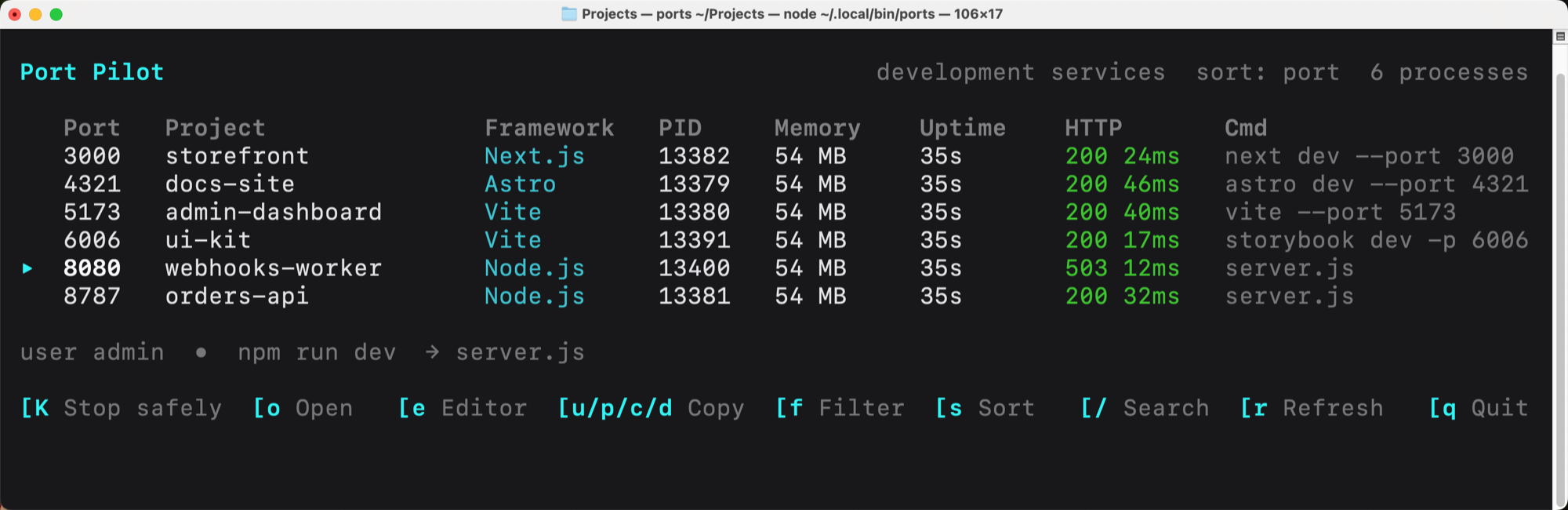
See listeners, projects, frameworks, owners, PIDs, CPU, memory, uptime, commands, and process ancestry in one keyboard-driven terminal interface.

HTTP health context

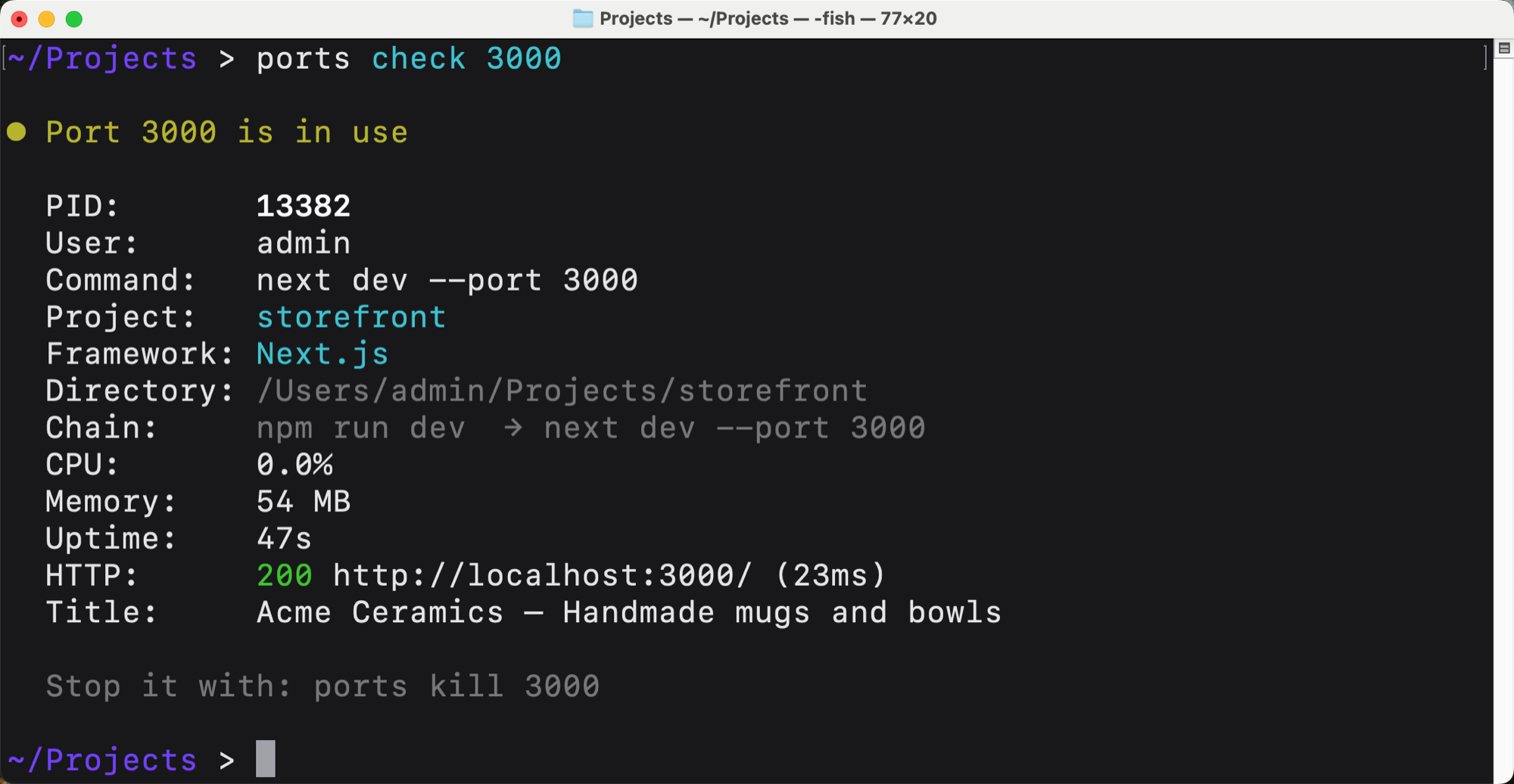
Recognize likely web services and show protocol, response status, page title, final URL, and response time with bounded local probes.

Safe process trees

Preview the exact target, confirm explicitly, signal descendants before the listener, and escalate from graceful termination only when necessary.

Agent-ready JSON

Use structured list, check, wait, watch, alias, and stop results without scraping colored terminal tables.

Automation primitives

Check availability through exit codes, wait for ready/free/HTTP conditions, and stream start, stop, or change events.

Docker awareness

Map published ports to container name, image, and private port automatically when Docker is available.

Development-first views

Start with services backed by project, framework, runtime, or Docker evidence, then opt into system and unknown listeners with a CLI flag, terminal filter, or native toggle.

Aliases and actions

Name important ports, open services and editors, and copy URLs, ports, commands, or directories from the dashboard.

Native notifications

See service start, stop, and HTTP health changes through macOS notifications; optionally launch the companion at login.

Use cases

Daily development

Understand every local listener before starting another web app, database, worker, or proxy.

Menu bar workflow

Keep service health, details, common actions, and aliases within one compact click on macOS.

AI coding agents

Let agents inspect JSON state, test port availability, wait for readiness, and stop only explicitly authorized disposable processes.

Startup orchestration

Wait until APIs return the expected HTTP status before starting dependent services or browser tests.

Container debugging

Connect host ports to Docker containers without switching to a separate process or container dashboard.

Team tooling

Distribute one consistent, documented port-inspection and safety workflow across a development team.

Product foundation

Reuse the scanner adapters, typed records, SwiftUI companion, Ink dashboard, Commander tree, and two test suites for another developer utility.

Tech stack

Runtime

Node.js

Runs the CLI, probes local HTTP endpoints, and talks to operating-system tools without a hosted backend.

Domain model

TypeScript

Keeps port, process, health, Docker, filters, aliases, and command results explicit.

Terminal interface

React and Ink

Render the live dashboard, selection state, confirmation, detail context, and keyboard actions.

Automation CLI

Commander

Defines discoverable commands and flags for people, shell scripts, CI, and coding agents.

System adapters

Execa

Invokes lsof, ss, ps, Docker, and clipboard providers with bounded, structured execution.

Native companion

SwiftUI and AppKit

Create a data-rich menu bar window with notifications, workspace actions, user defaults, and launch at login.

CLI

The same scanner and safety model are available as structured commands for terminal workflows, scripts, CI, and coding agents.

ports

Open the interactive development-service dashboard.

ports list --json

Return detected development services as structured JSON.

ports list --all

Include system and unknown listeners explicitly.

ports check 4321 --json

Inspect one port with process and HTTP context.

ports wait 4321 --http 200

Wait until a local web service is healthy.

ports kill 4321

Preview and confirm safe process-tree termination.

Screenshots and demos

Port Pilot macOS menu bar companion showing development services, ports, runtimes, uptime, memory use, and HTTP health
Port Pilot macOS menu bar companion showing development services, ports, runtimes, uptime, memory use, and HTTP health. Open the full-size image.
Port Pilot interactive terminal dashboard listing development services with framework, process, memory, uptime, HTTP health, and keyboard actions
Port Pilot interactive terminal dashboard listing development services with framework, process, memory, uptime, HTTP health, and keyboard actions. Open the full-size image.
Port Pilot command-line help showing list, check, is-free, kill, open, wait, watch, alias, and completion commands
Port Pilot command-line help showing list, check, is-free, kill, open, wait, watch, alias, and completion commands. Open the full-size image.

Usage manual

Run it and make it yours.

The setup and usage guide from the ZIP. Read it before downloading so you know what the software needs.

See every local service, understand what launched it, check whether it is healthy, and stop it safely from a native macOS menu bar companion, interactive terminal dashboard, or agent-friendly CLI.

What is included

  • Live terminal dashboard with search, filters, sorting, browser/editor actions, safe process stopping, and clipboard shortcuts
  • Compact SwiftUI menu bar companion with instant cached startup, background refresh, dense service rows, in-panel details, native stop confirmation, aliases, lifecycle notifications, and launch at login
  • Scriptable commands with JSON output, meaningful exit codes, aliases, wait conditions, and lifecycle watch events
  • HTTP status, response time, page title, Docker mapping, process owner, resource use, and parent-process context
  • macOS and Linux port scanners, shell completions, tests, and a reproducible TypeScript build
  • Project documentation covering architecture, configuration, security, customization, deployment, and the build story

Requirements

  • Node.js 20 or newer
  • npm
  • macOS with lsof and ps, or Linux with ss/lsof and ps
  • macOS 13 or newer plus Xcode/Swift to build the optional native companion
  • Docker is optional; container context appears automatically when available

Quick start

cd code
npm install
npm run verify
npm link
ports

Useful non-interactive commands:

ports list
ports list --all
ports check 4321 --json
ports is-free 4321
ports wait 4321 --http 200
ports kill 4321
ports watch --json
ports watch --all --json

List, watch, the terminal dashboard, and the macOS companion show services with development evidence by default. Use --all, cycle the terminal filter, or turn on Show all in the companion when you need system and unknown listeners too.

Read code/README.md for the complete command reference.

To run the macOS companion after installing the CLI:

cd code/macos/PortPilotMenuBar
swift test
./scripts/build-app.sh
open ".build/release/Port Pilot.app"

Read code/macos/PortPilotMenuBar/README.md for its architecture and distribution notes.

Architecture

See how the software is put together.

Review the system flow, boundaries, integrations, and replaceable parts before you download it.

Port Pilot has three interfaces over one typed port-scanning pipeline: Commander commands for scripts and agents, an Ink/React terminal dashboard, and a native SwiftUI menu bar companion for macOS. The Node.js CLI remains the engine for every interface.

Data flow

  1. src/lib/scan.ts selects the macOS lsof adapter or Linux ss adapter and deduplicates listeners.
  2. src/lib/process-info.ts reads one process table, resolves working directories, detects projects/frameworks, and builds parent chains.
  3. src/lib/docker.ts optionally maps published ports to containers.
  4. src/lib/http-health.ts probes likely web listeners with strict timeouts.
  5. The scanner returns complete PortEntry records to src/commands/ or src/tui/.

The TUI and commands never implement their own scanning rules. Shared development-service detection requires project, framework, development-runtime, or Docker evidence; port number alone is not enough. The macOS app invokes ports list --all --json through CLIClient.swift, then presents the same development-first list with a Show all toggle; it never reparses operating-system command output or terminates a process directly. Filters, JSON serialization, aliases, clipboard access, and process termination remain separate library boundaries.

macOS companion

The Swift package in code/macos/PortPilotMenuBar/ separates reusable models and services into PortPilotKit and keeps the SwiftUI MenuBarExtra entry point small. PortStore restores its last successful snapshot, begins polling ports list --all --json as soon as the app launches, refreshes the visible list in place, diffs snapshots for lifecycle notifications, and routes mutations back through alias and kill commands.

Finder-launched apps do not receive a complete interactive shell PATH. The companion therefore checks common npm/Homebrew locations and stores an explicitly selected ports executable path. The generated app uses LSUIElement to remain a menu bar utility and SMAppService for opt-in launch at login.

Safety boundary

src/lib/terminate.ts owns destructive behavior. It discovers descendants, signals them before the root process, and escalates only after a grace period. The CLI requires confirmation unless --yes is explicit; the TUI requires a second confirmation key. The macOS app displays a native confirmation sheet with port, PID, project, command, path, and ancestry before it is allowed to invoke kill --yes --json.

Persistent state

Live operating-system state remains authoritative. Only optional aliases persist, in $XDG_CONFIG_HOME/port-pilot/config.json or ~/.config/port-pilot/config.json.

Platform support

  • macOS: lsof, ps, and pbcopy
  • Linux: ss with lsof fallback, ps, and an available clipboard provider (wl-copy, xclip, or xsel)
  • Docker metadata is best-effort and never required

Windows needs a new scanner/process/clipboard adapter; it should not be added by branching behavior throughout commands.

What’s included

  • Complete sanitized TypeScript source and reproducible package lock
  • Complete SwiftUI menu bar companion source, Swift package, native tests, and reproducible app-bundle script
  • Interactive dashboard plus scriptable inspection and process commands
  • macOS and Linux scanners with optional Docker and HTTP enrichment
  • JSON output, exit codes, waits, watch events, aliases, filters, and completions
  • Automated tests, type checking, production build, and smoke-test guidance
  • README, changelog, agent guide, architecture, decisions, customization, deployment, configuration, security, and build-story documentation
  • Package manifest and audited ZIP included in the free ZIP download

Documentation

The ZIP includes project context for you and your coding agents.

README.md

The starting point: what the software does, prerequisites, local setup, commands, and the shortest path to a working copy.

CHANGELOG.md

The release history and the public changes included in each version.

BUILDING.md

The build story: how the software was made, the difficult parts, how it was verified, and what could come next.

AGENTS.md

Project context and operating rules for Codex, Claude Code, Cursor, and other AI coding agents.

ARCHITECTURE.md

How the major parts fit together, where data flows, and where to make structural changes.

DECISIONS.md

The main technical and product choices, including tradeoffs worth preserving or revisiting.

CUSTOMIZATION.md

A practical map for changing the brand, interface, features, data model, and integrations.

DEPLOYMENT.md

A production checklist covering resources, environment setup, builds, and deployment verification.

CONFIGURATION.md

Every setting and environment variable, where it is used, and how to configure local and production environments.

SECURITY.md

Credential handling, trust boundaries, sensitive data, and checks to run before publishing your version.

Why download this

  • Start from a substantial terminal product instead of another single-purpose kill-port script
  • Reuse a typed, best-effort process-enrichment pipeline that stays useful when optional context is unavailable
  • Give coding agents machine-readable state and safe, explicit process authority
  • Study one domain model shared cleanly between a native SwiftUI client, Ink TUI, and Commander CLI
  • Own and distribute a customized version with no hosted infrastructure or recurring cost
  • Extend tested operating-system boundaries rather than spreading shell parsing across commands

Customize it

Use the working source as a foundation. Keep it small, change it for your own workflow, or turn it into a different product.

  1. Turn it into the port desk your team opens every morning: shared aliases, project groups, and a signed macOS companion.
  2. Publish through npm or Homebrew and make “what is on :3000?” a one-command habit for every machine.
  3. Add Windows, Podman, or remote-host scanners so the same mental model works beyond a single laptop.
  4. Wire JSON watch/wait output into editor tasks, CI gates, or MCP tools that wait until a service is ready.
  5. Detect frameworks, readiness rules, and custom columns so the table explains your stack instead of raw PIDs.
  6. Pair it with Local Hoster and sell (or gift) a complete local-dev toolkit under your own brand.

MIT license

Every source ZIP includes an MIT LICENSE file. You can use, copy, change, publish, distribute, sublicense, or sell the code, including as part of a commercial product.

Keep the copyright and license notice with copies or substantial portions of the code. Third-party dependencies and assets keep their own licenses.

Keep learning

Ship Factory

Build repeatable software workflows where people and coding agents can inspect the same system state.

Explore Ship Factory →

Join the newsletter to access my complete download library, including books, courses, and software. I’ll also email you about new software, building products with AI, and my courses. You can unsubscribe anytime.

Your email is stored on a secure server in the EU. Every email has an unsubscribe link. Unsubscribing stops future emails; you can keep using the public download library.