
An app by Flavio
Waiting Lists
Collect confirmed subscribers with your own forms, dashboard and agent CLI. Includes full MIT source for deployment in your Cloudflare account.
Buy Waiting Lists · $20One-time purchase. Tax included. Full source code.
Node.js 22.12+ · Cloudflare Workers, D1 and Email Service
Waiting Lists is a self-hosted service for collecting confirmed subscribers before a launch.
It gives every project its own waiting-list endpoint.
Your site keeps the form you already designed. It sends an email address and explicit consent to Waiting Lists. The service handles confirmation, delivery tracking, storage, removal, and exports.
Waiting Lists is built for coding agents.
Give your agent one instruction. It can create a list, connect the form, check how many people joined, change the settings, and export the confirmed subscribers.
Here’s a run through a local copy with five fictional product lists: the dashboard, a signup with double opt-in, and the agent CLI:
The products, subscribers and addresses are fictional. Running locally, the confirmation email is saved as a file instead of being sent.
The source package includes the private JSON API and command-line client for your own installation.
This is self-hostable software. I distribute the complete source code, deployment instructions, and instructions written for coding agents with your purchase.
You can give the project to your agent and customize it in any way you want.
The form on the waitinglists.dev homepage already uses Waiting Lists. The product is collecting its own waiting list.
Why I built it
I built a lot of products during this Summer of Code.
Almost every product needed the same thing before launch: a waiting list.
The HTML form was easy. The work started after someone pressed the button.
Did they clearly agree to receive updates? Did they confirm the address? Did the confirmation email arrive? What happens if it bounced? Can they remove themselves? How long should I keep an unconfirmed request? What should I export when the product is ready?
Until now I used Sendy for this.
Sendy works well for my newsletters. But creating a waiting list for every new idea became a bulky process.
I had to create another list, set up all the pieces, connect the form, check the confirmation flow, and repeat the same work for the next product.
That is a lot of setup for an idea when I do not know if people want it yet.
I could also use a form builder or a CRM, but a waiting list does not need to become a marketing system.
I think many people will need this for the same reason.
Coding agents let us build a ton of things, but building something quickly does not mean we should immediately distribute the complete product to everyone.
Sometimes we want to see if there is any demand before building further.
Sometimes the product already works, but we only want to show a small preview while we keep testing it privately.
A waiting list gives us that middle step.
We can show enough to explain the idea, see who is interested, and decide what deserves more work. The complete product can stay private until it is ready.
I wanted one quiet place for all my launches, with an endpoint for each product and a small dashboard. The final export should contain only confirmed addresses.
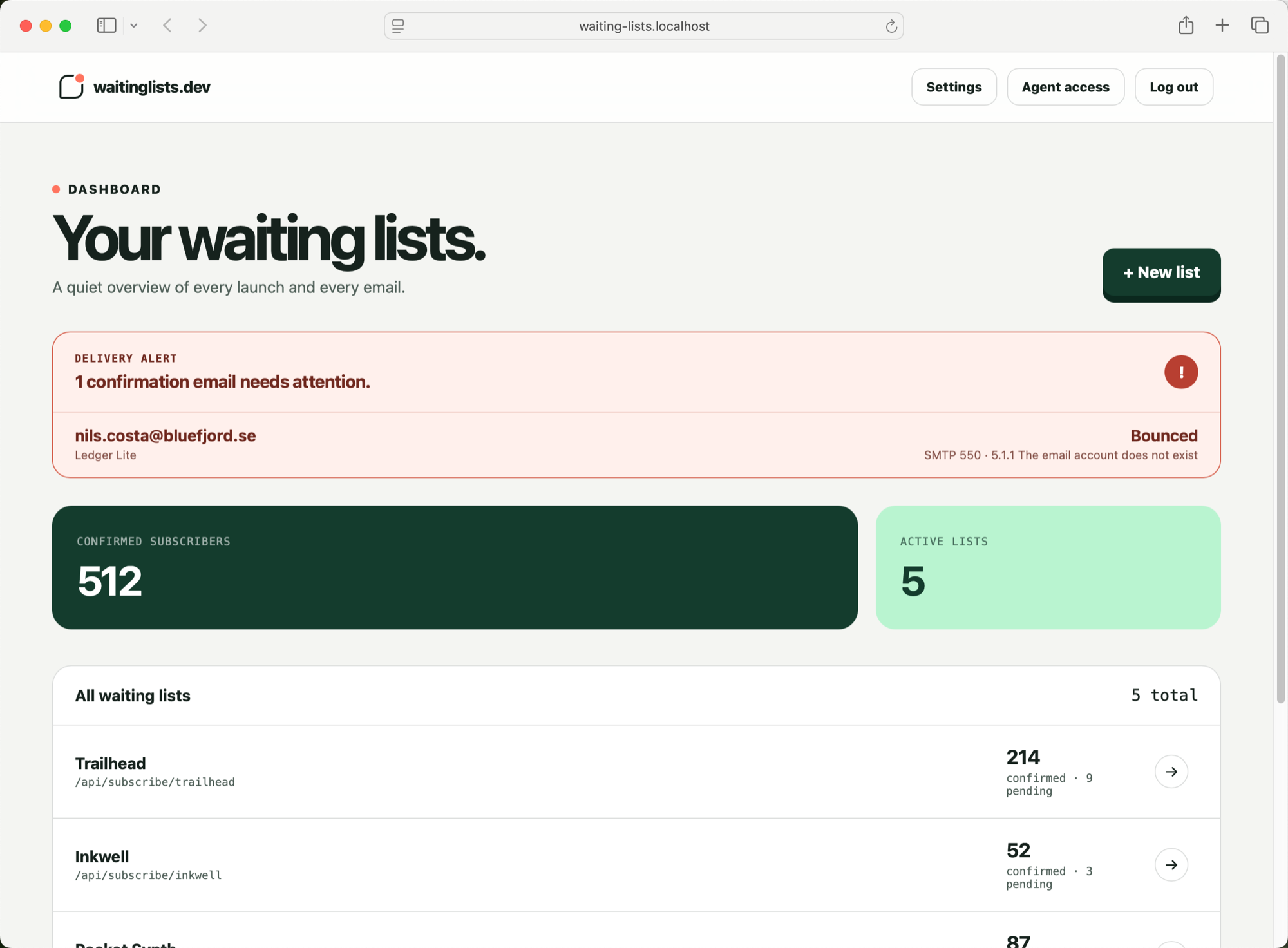
I also wanted to remove the dashboard from the normal workflow. Coding agents already build and change my sites, so they should be able to connect the small backend service the site needs.
I summarized the idea like this:
Tell your agent. Launch your list.
You get the source code
I distribute Waiting Lists as self-hostable software instead of a closed service you can only use through my dashboard.
You get the complete source code and the instructions needed to deploy your own copy. Your Worker, database, email configuration, domain, and subscriber data live in your Cloudflare account.
The package also includes instructions made for coding agents.
Those instructions explain how the project works, where the important security boundaries are, how to verify changes, and which files control each part of the product.
You can use the default version or ask your agent to change it.
For example, you could:
- redesign the dashboard around your brand
- change the confirmation flow or retention rules
- add the fields and metadata your project needs
- connect another email provider or export format
- add accounts, teams, webhooks, or other integrations
The version running at waitinglists.dev is the reference implementation.
The README walks you through local setup and deployment to your own Cloudflare account.
But the source is yours to adapt.
Your frontend stays yours
Waiting Lists gives you an endpoint rather than a widget you need to restyle.
A normal HTML form is enough. This example uses the reference service; replace its URL and list slug with the endpoint from your own installation:
<form
  method="post"
  action="https://waitinglists.dev/api/subscribe/my-product"
>
  <input type="email" name="email" required />
  <label>
    <input type="checkbox" name="consent" value="yes" required />
    I want updates about this product.
  </label>
  <button>Join the waitlist</button>
</form>
Each list has its own name, endpoint slug, and allowed browser origins.
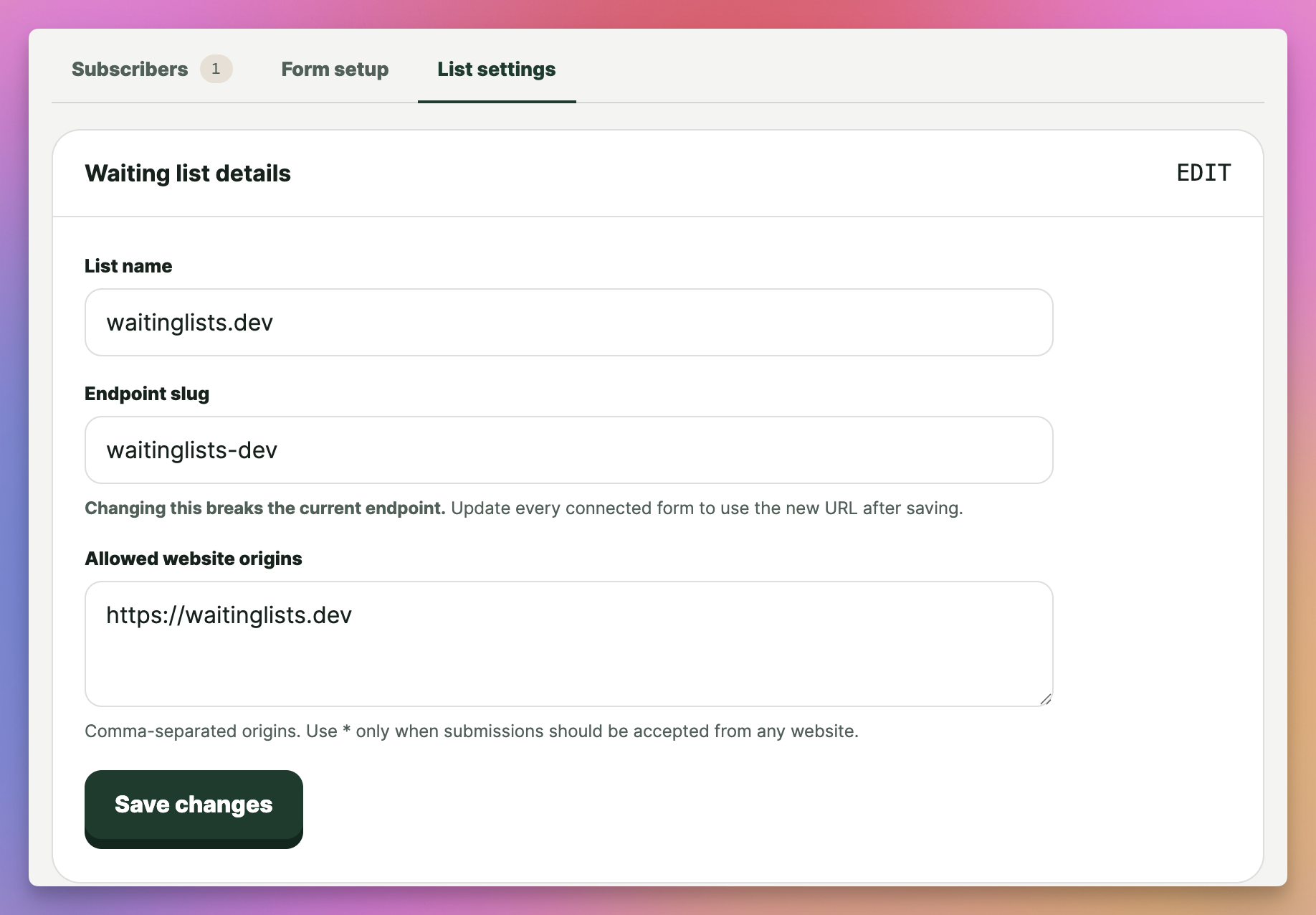
The endpoint accepts exactly two fields: email and consent. It does not accept a name, profile, custom metadata, or anything else that might quietly turn into personal data I did not need.
After signup, the address is pending.
The person receives a confirmation email. Only confirmed subscribers appear in usable exports.
The dashboard shows confirmed and pending counts, confirmation delivery status, and failures like bounces or rejections. I can resend a failed confirmation with a fresh link.
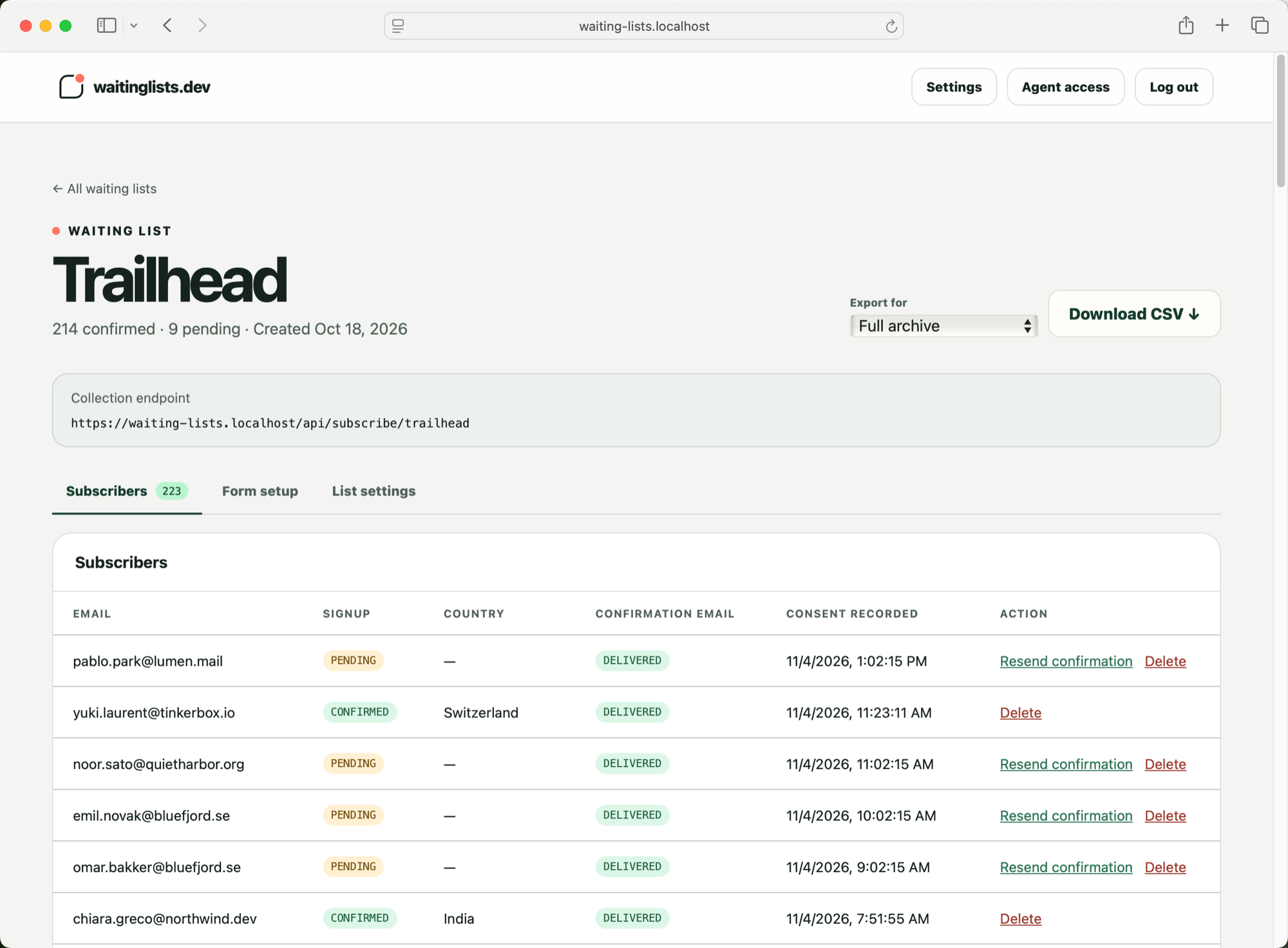
When I am ready to launch, I can export a complete consent archive or a file prepared for Sendy, Kit, or Mailchimp.
The agent becomes the dashboard
The included command-line interface operates the private JSON API on your installation.
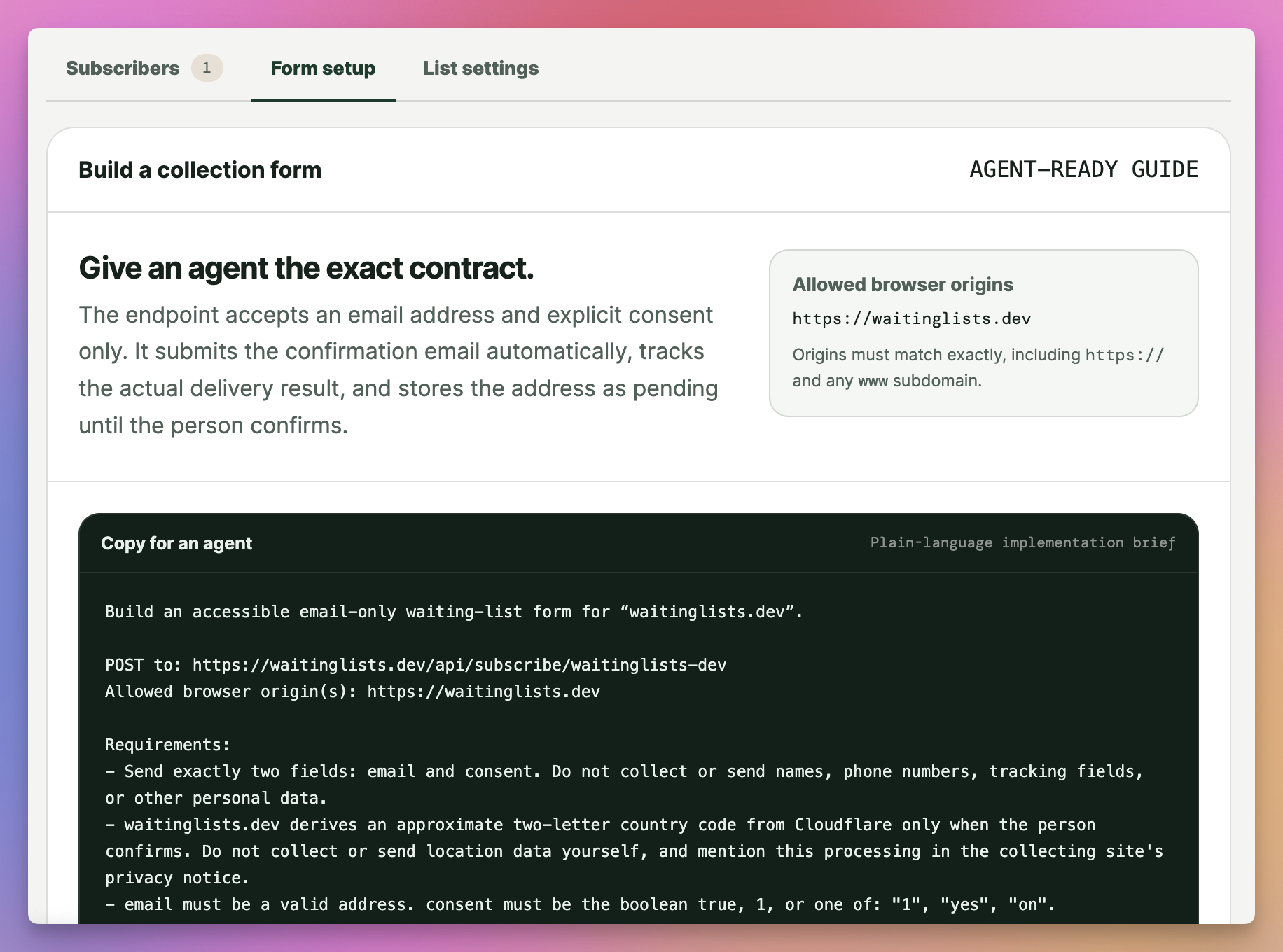
An agent can create a waiting list and connect it to the current project with one command:
waitinglists init \
  --name "My product" \
  --origin "https://myproduct.com"
The command creates the list, restricts browser submissions to the product domain, and saves the public endpoint in the project.
The secret API key is stored outside the repository. The project file contains only the list ID, slug, and collection endpoint.
Exports are handled carefully too. Subscriber data is never printed in the terminal. The agent must write it to a new file, with private file permissions, and it cannot overwrite an existing export by accident.
I designed the API to be easy to call while making the unsafe action harder.
Double opt-in has a surprising problem
The basic double opt-in flow looks simple:
- someone submits an email
- the service sends a confirmation link
- the person opens the link
- the address becomes confirmed
But email security systems also open links.
They scan messages before the person reads them. If opening the URL confirms the address, a security scanner can join the waiting list on the person’s behalf.
The confirmation link therefore opens a page with a Confirm my place button. The address is confirmed only after the person presses that button and sends a POST request.
The confirmation token contains 256 random bits. I store only its keyed hash in D1. It expires after 24 hours and works once.
Repeated signups are idempotent. An already confirmed address stays confirmed, while a pending address does not receive a new message every time someone submits the form.
The public response is deliberately generic too. It does not reveal whether an address already exists.
Handling all this work around one email input is why I wanted this service to exist.
Sending an email is not delivering an email
I used Cloudflare Email Service for confirmation messages.
The Worker sends the email directly through a restricted binding. Cloudflare manages the sending SPF, DKIM, bounce MX, and DMARC records for the domain.
Submitting a message returns an ID. It does not mean the message reached the inbox.
Delivery, deferral, bounce, rejection, complaint, and failure events arrive later through a Cloudflare Queue. The Worker consumes those events and updates the dashboard.
An email event can arrive before the request has finished connecting its message ID to the D1 delivery record. If the Queue consumer cannot find the message yet, it waits and retries instead of discarding the event.
If someone confirms through the emailed link while delivery tracking still says processing or deferred, I treat the confirmation as stronger evidence. The dashboard marks the message as delivered.
Minimal data by design
Waiting Lists stores the email address, list relationship, confirmation status, consent version, and request and confirmation timestamps.
At confirmation time it also stores Cloudflare’s approximate two-letter country code. It does not keep the IP address used to derive it.
It does not store subscriber names, profiles, user agents, or browsing history.
Pending requests are deleted after their confirmation link expires. Confirmed records are deleted after 24 months at the latest. Every confirmation email also includes a signed self-service removal link.
The signed link lets the person permanently delete the address without creating an account.
I wanted the privacy rules to be part of the data model and the scheduled cleanup, not a paragraph that depends on me remembering it later.
How I built it
Waiting Lists uses the AHA Stack.
Astro renders the application on a Cloudflare Worker. HTMX handles the small form updates, while Alpine.js handles local interface state.
Cloudflare D1 stores waiting lists, subscribers, consent records, delivery events, admin sessions, and private-preview API keys.
Around the Worker:
- Cloudflare Email Service sends confirmation messages
- Queues report email delivery outcomes
- edge rate-limit bindings protect login and signup endpoints
- Turnstile protects the private login
- a daily Cron Trigger removes expired data
The public collection endpoint has a deliberately small surface. Requests can be at most 2 KB, must contain exactly the two expected fields, and must come from an allowed origin. Rate limits apply to both the source IP and a keyed hash of the email address.
The private dashboard uses short-lived server-side sessions, secure HTTP-only cookies, CSRF tokens, and same-origin checks. API keys are shown once, stored only as hashes, and can be revoked.
I kept the first version single-owner on purpose.
There is no public account creation, team system, billing layer, campaign editor, or newsletter sender.
The default version stays small. If your installation needs one of those features, you can ask your agent to add it without making every other installation carry the same complexity.
How I deployed it
The complete application is one Cloudflare Worker.
The Worker handles normal HTTP requests, the daily cleanup job, and the Queue events from Email Service. D1 holds the durable state.
I first deployed it manually. Then I added a GitHub Actions deployment. A few minutes later I removed that and switched to native Cloudflare repository builds.
Now every push to main starts the production build. Cloudflare builds the Astro application and Wrangler deploys the generated Worker configuration.
That is less deployment code for me to maintain.
The custom domains, D1 database, Email Service binding, Queue consumer, rate limits, Cron Trigger, logs, and traces all live in wrangler.jsonc.
The service went from an empty repository to a working production system over July 30 and 31.
Building the pages was fast. Most of the work went into deciding what a confirmed subscriber means, what data not to keep, how failures appear, and how an agent can operate the system without leaking the list.
Buy Waiting Lists and get the source
Waiting Lists costs $20 including tax, paid once. The purchase includes the full source code under the MIT license, with setup instructions so you can run and customize your own copy.
After buying, download the source zip from your Polar receipt. It always has the latest version, so download it again when you want to update.
This purchase supplies the software source. You provide the runtime, accounts and infrastructure described below.
Set up your installation
You need Node.js 22.12 or newer. Download and unzip the source, open Terminal in its folder and run npm ci. Copy .dev.vars.example to .dev.vars, then replace its placeholders with your own local secrets and administrator settings.
Run npm run db:migrate:local and npm run dev to prepare the local database and start the app. The README explains how to sign in, create a list and configure the included CLI.
For production, you need a Cloudflare account with Workers, D1, Queues, Email Service and Turnstile configured for your own domain. The deployment guide covers the bindings, secrets, migrations and email setup. Cloudflare and domain charges are separate from the software purchase.