How I fixed a full Ubuntu server disk with Codex
By Flavio Copes
My Sendy server stopped responding with the disk at 99%. The database was 528 MB, but MySQL binary logs had grown to 41 GB. Here is how Codex walked me through finding them, purging them safely, and setting an expiry so it never happens again.
I woke up to an angry email: “your unsubscribe link does not work!”
I know the feeling. I’ve clicked unsubscribe on newsletters and watched the page fail to load. It’s annoying.
But the problem wasn’t just the unsubscribe link. My server wasn’t responding at all.
A quick look at the DigitalOcean panel showed why. The disk was almost full:
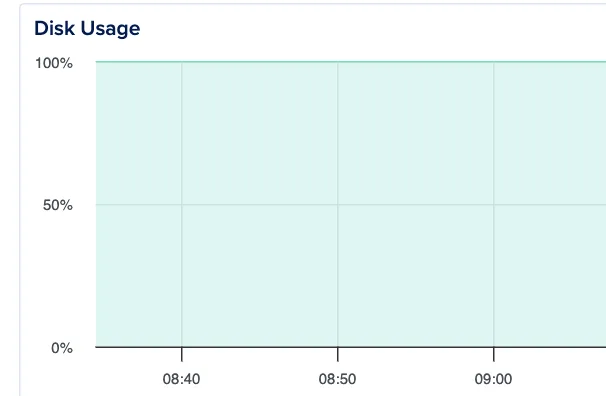
I couldn’t even SSH in, so I rebooted the server from the panel. That worked, and I got a shell.
The server runs Sendy, my newsletter software. df -h showed this:
/dev/vda1 48G 47G 951M 99% /That is a number you don’t want to see on a production server.
The good news, which I only learned later: the database itself wasn’t the problem. The problem was MySQL binary logs.
This is the same server from my last two DevOps posts. This time I used Codex differently. Instead of giving it SSH access and letting it work, I ran the commands myself and pasted the output back. It’s a slower loop, but I learn more from it, and when the disk is at 99% I want to see every command before it runs.
Where is the disk going?
I told Codex the disk was full and asked what I could do to clear space quickly.
Its first answer was a general triage plan:
First free space safely, then investigate what is large.
Run:
df -h
sudo du -xhd1 / | sort -h
sudo du -xhd1 /var | sort -h
Quick safe cleanup on Ubuntu:
sudo apt clean
sudo apt autoremove --purge -y
sudo journalctl --vacuum-time=3d
Check logs:
sudo du -ahx /var/log | sort -rh | head -30If a log is huge, truncate it instead of deleting it:
sudo truncate -s 0 /var/log/nginx/access.logIf the server uses Docker, this often clears a lot:
docker system df
docker system prune -af
Avoid
--volumesunless you are sure unused Docker volumes do not contain data you need.If
/varis the problem, the usual culprits are Docker, logs, journal files, apt cache, or database backups.
A few notes on those commands, because they are worth knowing.
du -xhd1 / lists the size of each top-level directory. -x stays on one filesystem, -h prints human-readable sizes, -d1 goes one level deep. Piping into sort -h sorts those human-readable sizes correctly, so the biggest directory ends up at the bottom.
truncate -s 0 empties a file without deleting it. This matters for logs: if you rm a log file that a running process has open, the process keeps writing to the deleted file and the space is not freed until you restart it. Truncating avoids that.
Finding the large directory
I ran the commands. du showed this:
43G     /var
47G     /
And inside /var:
42G     /var/lib
43G     /var
So /var/lib was the place to look. Codex:
/var/libis the problem: it uses42Gout of your48Gdisk. Logs/cache are relatively small, so focus there.sudo du -xhd1 /var/lib | sort -hLikely cases:
If it shows
/var/lib/dockeris huge, rundocker system prune -af.If it shows
/var/lib/mysqlis huge, do not delete files manually. Check for binary logs:sudo du -xhd1 /var/lib/mysql | sort -h sudo mysql -e "SHOW BINARY LOGS;"If you see many
mysql-bin.*orbinlog.*files and this server is not a replication source, purge old ones through MySQL.
MySQL was the problem
The next command gave the answer:
42G     /var/lib/mysql
42G     /var/lib
Here I had to be careful. /var/lib/mysql is where MySQL keeps its data files. You don’t delete random files from there. Codex said so too, right away:
/var/lib/mysqlis the issue. Don’t delete files from there manually.First check whether MySQL binary logs are eating the disk:
sudo du -xhd1 /var/lib/mysql | sort -h
sudo ls -lhS /var/lib/mysql | head -40
sudo mysql -e "SHOW BINARY LOGS;"
If you see lots of files like
binlog.000123, that’s usually the quick win.
The database was small
This was the interesting part. The Sendy database was only 528 MB:
528M /var/lib/mysql/sendy_dbBut /var/lib/mysql was 42 GB. So what was in there?
I listed the largest files:
sudo ls -lhS /var/lib/mysql | head -40The output was full of these:
-rw-r----- 1 mysql mysql 111M May  5 09:47 binlog.000300
-rw-r----- 1 mysql mysql 110M May  5 09:47 binlog.000301
-rw-r----- 1 mysql mysql 105M May  5 17:11 binlog.000408
Hundreds of them. Roughly 100 MB each. Over 400 files.
Codex:
Those
binlog.*files are the problem. Your actual Sendy database is only528M; MySQL binary logs are using ~41G.If this server is not a MySQL replication source and you don’t need point-in-time recovery, run this now:
sudo mysql -e "PURGE BINARY LOGS BEFORE DATE_SUB(NOW(), INTERVAL 1 DAY);"
df -h
That should free most of the disk while keeping roughly the last day of binlogs.
Do not manually
rm /var/lib/mysql/binlog.*; usePURGE BINARY LOGSso MySQL updates its internal binlog index correctly.
That last line is the important one. MySQL keeps an index file listing every binary log it owns. If you delete the files from the shell, the index still points to them, and MySQL can refuse to start or throw errors on the next restart. PURGE BINARY LOGS deletes the files and updates the index in one step.
The fix
The key command:
sudo mysql -e "PURGE BINARY LOGS BEFORE DATE_SUB(NOW(), INTERVAL 1 DAY);"This tells MySQL to delete every binary log older than one day. After running it:
/dev/vda1 48G 20G 29G 41% /From 951 MB free to 29 GB free. The server was breathing again.
Then the part that prevents a repeat. Codex:
Now make the MySQL setting persistent so it doesn’t fill again:
sudo mysql -e "SET GLOBAL binlog_expire_logs_seconds = 86400;"
sudo nano /etc/mysql/mysql.conf.d/mysqld.cnf
Add under
[mysqld]:binlog_expire_logs_seconds=86400Then restart MySQL:
sudo systemctl restart mysqlVerify:
sudo mysql -e "SHOW VARIABLES LIKE 'binlog_expire_logs_seconds';"
86400keeps 1 day of binary logs. If you want a bit more recovery window, use604800instead for 7 days.
Two steps here. SET GLOBAL changes the running server right now. The line in mysqld.cnf makes the change survive a restart. You need both.
Why this happened
I asked Codex to explain what had gone wrong.
Binary logs record database changes: inserts, updates, deletes, schema changes. They’re useful for replication and point-in-time recovery, but on a standalone small server they can quietly fill the disk if retention is unset or too long.
Likely causes:
- MySQL binary logging is enabled by default or by config.
binlog_expire_logs_secondswas unset, too high, or not applied.- Sendy or another process generated many database writes.
- MySQL kept rotating binlogs at ~100MB each, but didn’t delete old ones.
So the disk filled not because the database grew, but because MySQL was keeping a long history of database changes.
Sendy is a write-heavy app. Every send, every open, every click is a row. When I rebuilt this server a few weeks earlier, MySQL 8 came with binary logging on by default, and the retention setting was never adjusted. The logs grew at the speed of my newsletter.
A binary log is a journal of every change to the database. You need it if you replicate to a second server, or if you want to restore to a point in time between backups. On a single-server Sendy install, I need neither. One day of retention is plenty.
End result
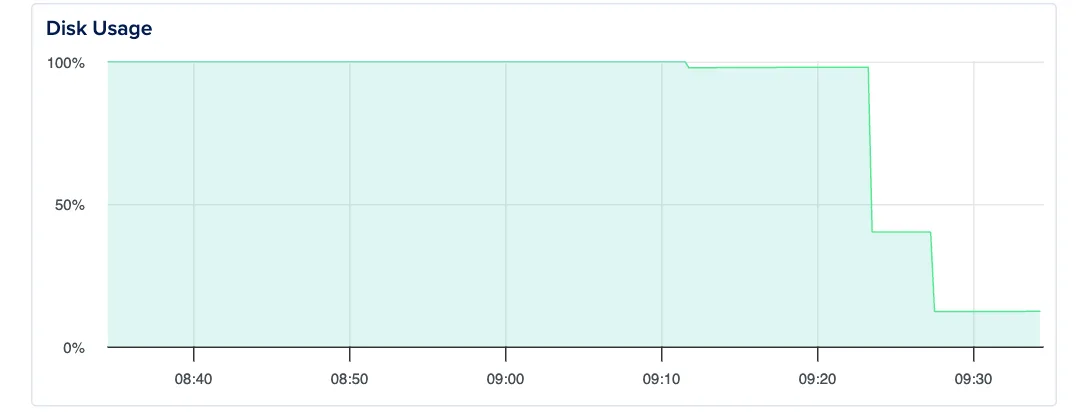
Disk usage went from 99% to 12%:
I genuinely hate having to worry about this stuff. But I run this server myself because of the size of my list. At 150k subscribers, hosted newsletter tools get expensive fast. When I checked in May 2026, Kit would have cost $1,179/month and Bento $1,500/month. Many others were “contact sales” at my scale.
With Sendy I run this on a DigitalOcean VPS ($10-$20/month) plus pay-per-use AWS SES rates (about $100/month). That’s a big enough gap to justify a morning like this one every now and then.
Especially now that I have an agent to pair with when it happens.
Want me to talk about your product? You can sponsor this site.