A deep dive into Ponytail
By Flavio Copes
Learn how Ponytail stops AI coding agents from over-engineering: install it in ChatGPT, Codex, or Claude Code, choose a mode, and review diffs.
AI coding agents like writing code.
Sometimes they like it too much.
You ask for a date field. The agent installs a date picker, adds a wrapper component, creates a theme file, and starts discussing time zones.
The browser already has this:
<input type="date" />Ponytail is a ruleset that pushes coding agents toward that kind of answer.
It was created by Dietrich Gebert. The project describes its approach as the lazy senior developer: understand the problem, find the smallest correct solution, and stop.
Lazy does not mean careless here. Ponytail tells the agent to preserve validation, error handling, security, accessibility, and anything you explicitly requested.
The goal is not code golf.
The goal is to own less code.
How Ponytail works
Ponytail gives the agent a seven-step ladder.
The agent stops at the first step that solves the real problem:
- Does this need to exist?
- Does the codebase already have it?
- Does the standard library provide it?
- Does the native platform provide it?
- Does an installed dependency already solve it?
- Can it be one line?
- Only then, write the minimum new code.
The order matters.
Suppose a project already has a date-field component. Ponytail should reuse it before reaching for the native HTML input.
Suppose the field needs a calendar system the browser input cannot represent. The native feature no longer solves the task, so the agent keeps moving down the ladder.
Ponytail also tells the agent to inspect the relevant code first. It should trace the real flow, search for existing helpers, and fix a bug at its shared cause instead of patching one visible symptom.
It is lazy about the solution, not the investigation.
Install Ponytail in the ChatGPT app
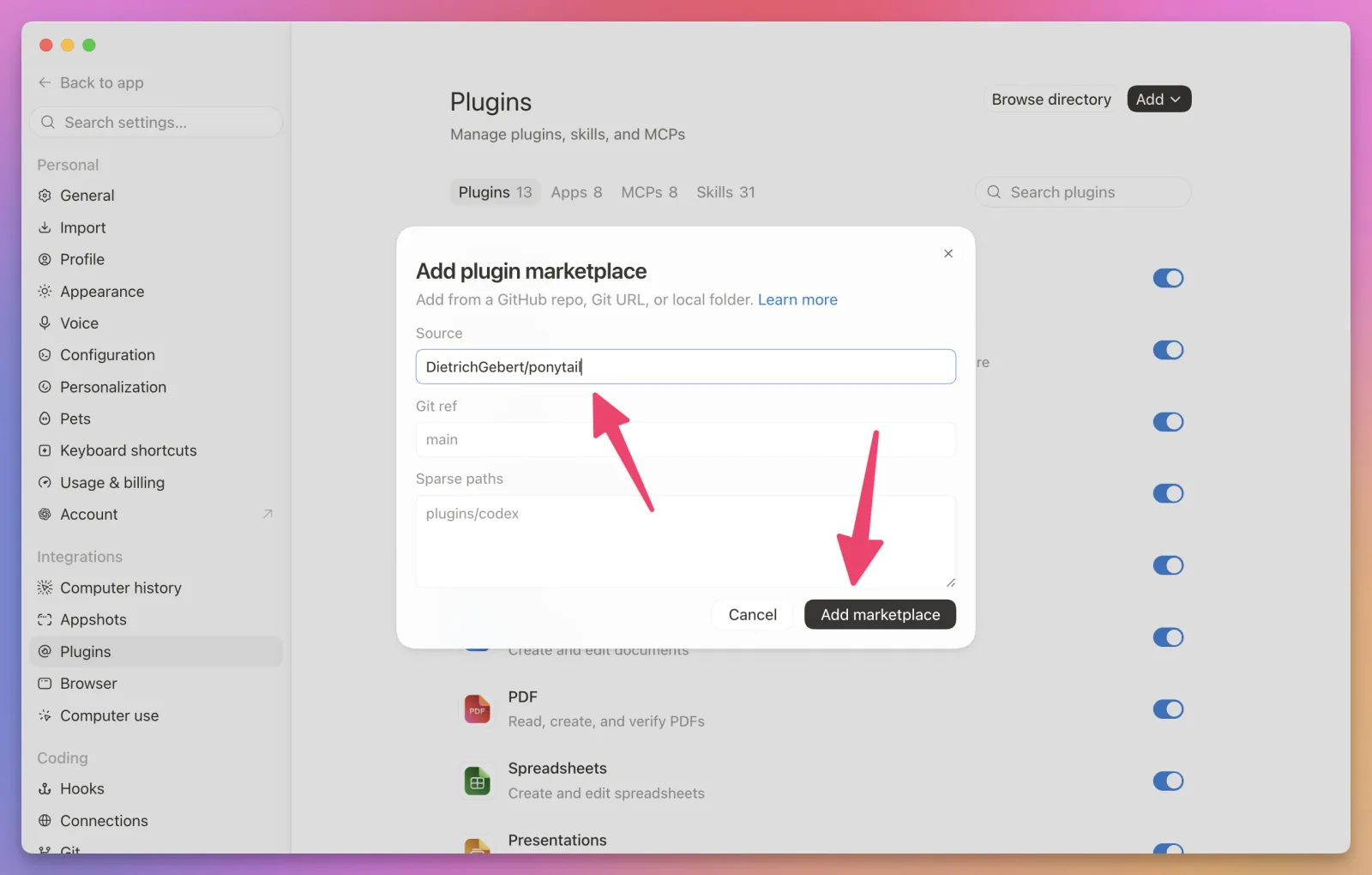
Open Settings, then select Plugins.
Open the Add menu and choose Add plugin marketplace. Enter DietrichGebert/ponytail as the source, then click Add marketplace:
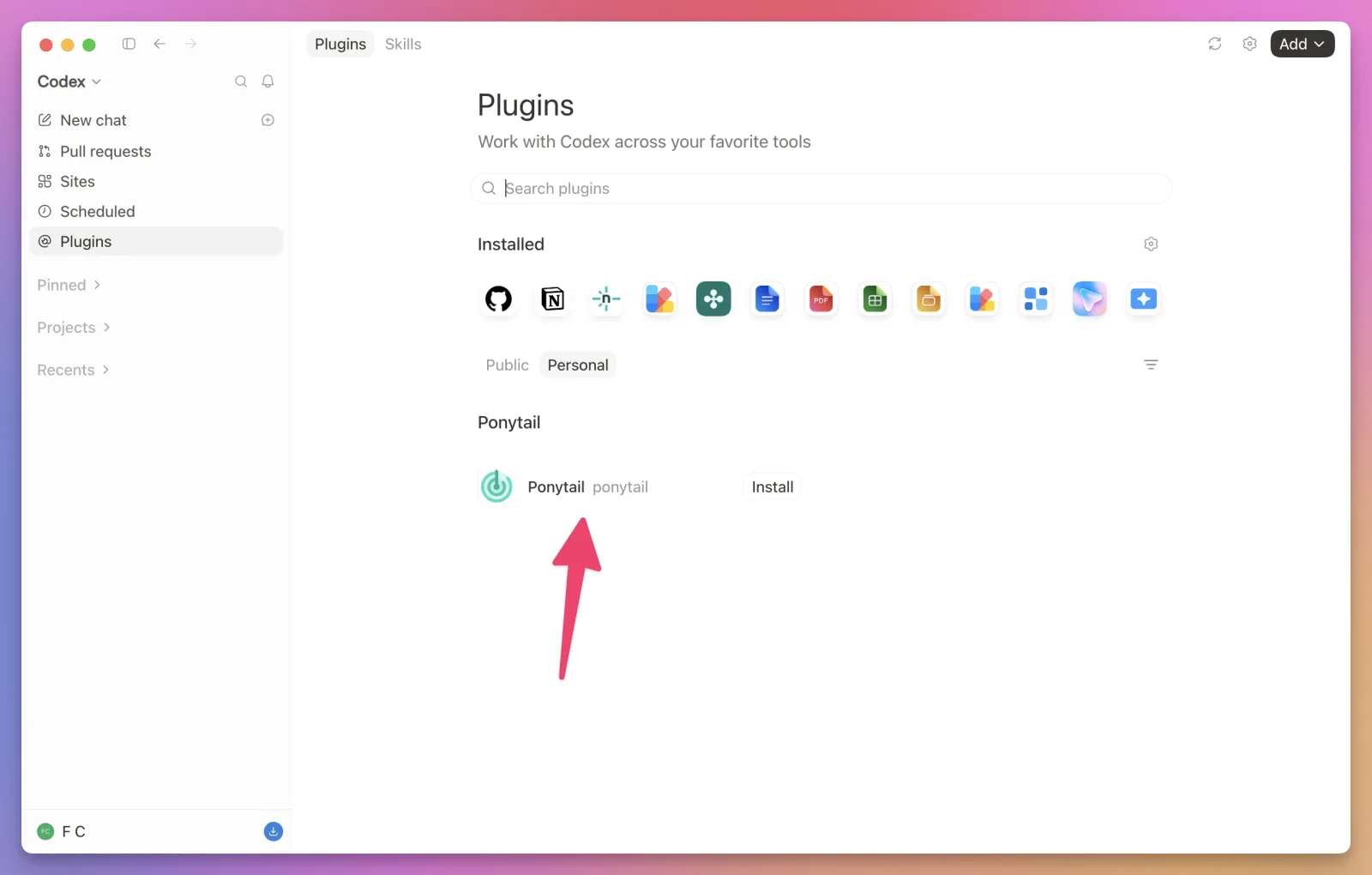
Return to the Plugins page and select Personal. Find Ponytail and click Install:
Open a new Codex task and type:
/ponytailThe composer shows the installed Ponytail skills. Select the main Ponytail skill and send the prompt:
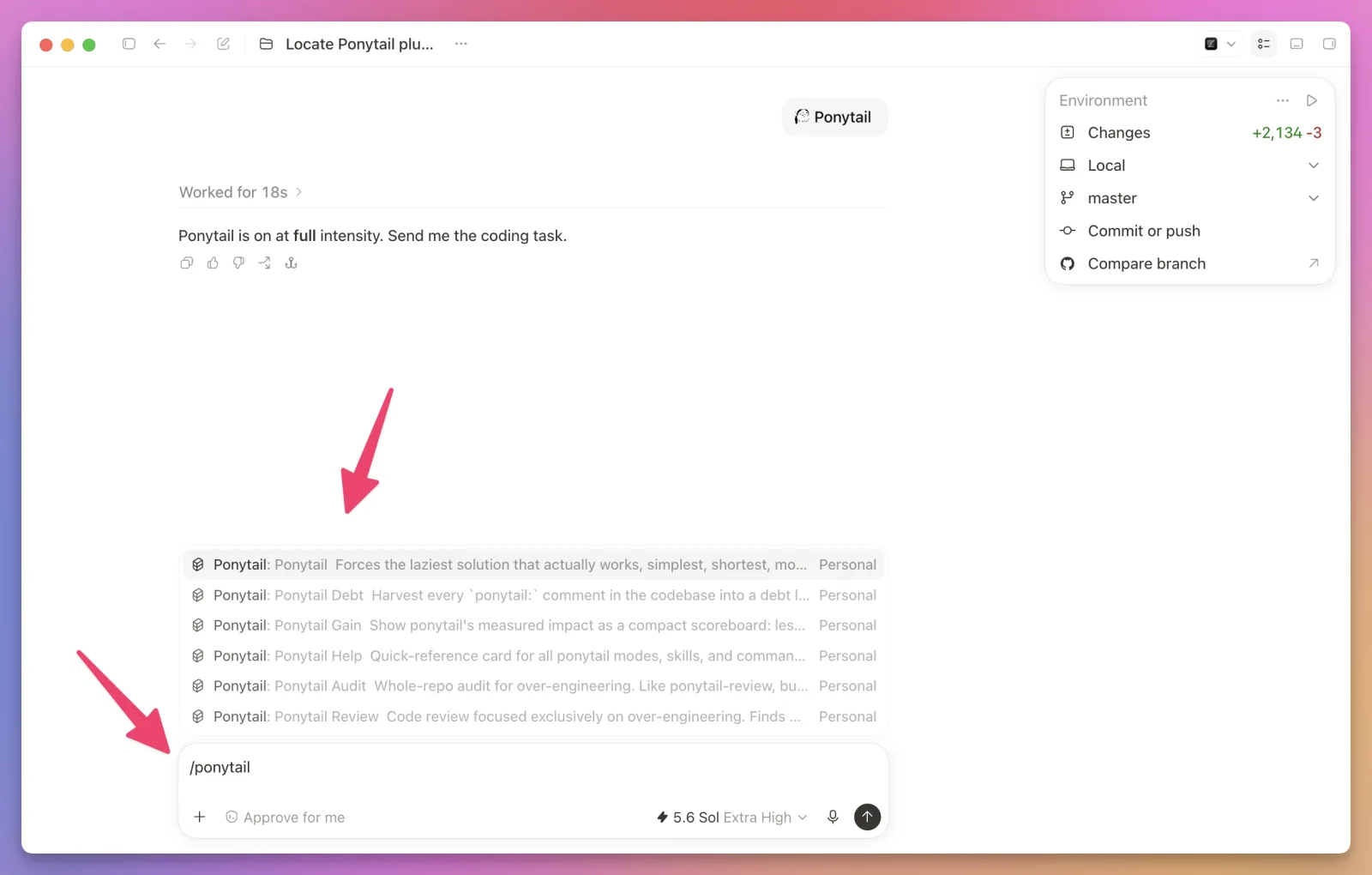
Ponytail confirms the active intensity. The default is full.
Install Ponytail in Codex CLI
Ponytail is available as a Codex plugin.
Add its marketplace:
codex plugin marketplace add DietrichGebert/ponytailThen install the plugin:
codex plugin add ponytail@ponytailStart Codex and open the hooks screen:
/hooksReview and trust Ponytail’s lifecycle hooks, then start a new task.
The hooks activate Ponytail when a session starts and pass the active mode to subagents.
If you install from the terminal and use the ChatGPT app too, restart the app. It will load the same plugin.
Ponytail starts in full mode by default. You can check that the bundled skills are available with:
@ponytail-helpCodex CLI invokes skills with @. The ChatGPT app and Claude Code use slash commands.
Install Ponytail in Claude Code
In Claude Code, send these as two separate prompts.
First, add the marketplace:
/plugin marketplace add DietrichGebert/ponytailWait for that command to finish. Then install Ponytail:
/plugin install ponytail@ponytailStart a new session after installation. Ponytail activates in full mode by default.
You can check the current mode with:
/ponytailThe same two installation commands work in the Code tab of the Claude Code desktop app.
The Claude Code and Codex plugins use small Node.js lifecycle hooks. If node is missing from the non-interactive shell’s PATH, the skills still work, but automatic activation does not.
The command examples below use Codex CLI’s @ syntax. In the ChatGPT app or Claude Code, replace @ with /.
Try it on a small feature
Let’s give the agent a task that often attracts too much code:
Add a birthday field to the profile form.
Use the existing form styles and keep the current validation behavior.
In full mode, Ponytail first inspects the form and its existing components.
If plain HTML covers the requirement, the result might be close to this:
<label for="birthday">Birthday</label>
<input id="birthday" name="birthday" type="date" />
No new package. No calendar wrapper. No custom date parser.
Notice that the prompt did not say “write the fewest lines possible.” Ponytail applies the ladder as a standing coding rule.
If the application already uses a form component with error messages and accessible descriptions, the agent should use that component instead. Reusing the codebase is higher on the ladder than using the browser directly.
Choose an intensity
Ponytail has three active modes:
litebuilds what you requested and mentions a smaller alternativefullenforces the complete ladder and is the defaultultratreats speculative requirements aggressively and prefers deletion
In Codex CLI, switch modes by invoking the main skill:
@ponytail lite@ponytail full@ponytail ultraUse lite when you want the agent to follow the requested design but still point out a cheaper option.
My default would be full. It makes the smaller choice without turning every task into an argument.
I would reserve ultra for experiments, cleanup work, and features whose requirements are still negotiable. It may challenge the feature itself, which is useful only when the feature is open to challenge.
To turn Ponytail off, say normal mode or run:
@ponytail offThe active mode lasts for the session.
Set the default mode
You can change the default with a config file at:
~/.config/ponytail/config.jsonFor example, this starts new sessions in lite mode:
{
  "defaultMode": "lite"
}
Valid values are lite, full, ultra, and off.
You can also set PONYTAIL_DEFAULT_MODE. The environment variable takes priority over the config file.
Review the current diff
Ponytail includes a separate review skill for code that already exists in the current diff.
Run:
@ponytail-review Review the current diffThis is a read-only review. It looks for a small set of problems:
- dead code and unused flexibility
- standard-library features rebuilt by hand
- dependencies that duplicate native platform features
- abstractions with one implementation
- logic that can keep its behavior with fewer lines
The result is a delete list. It does not apply the changes.
This narrow scope is useful. A normal code review still needs to inspect correctness, security, performance, and product behavior.
@ponytail-review asks a different question: what can we remove?
Audit the whole repository
The review skill only checks the current diff.
To inspect the complete codebase, run:
@ponytail-audit Audit this repository for over-engineeringThe audit ranks opportunities to delete, reuse, or replace code. It also reports the number of lines and dependencies it thinks could disappear.
Treat that total as a review estimate. Inspect every finding before changing working code.
An abstraction with one implementation may look unnecessary today. It may also represent a real boundary required by a plugin API, a test seam, or a second implementation living outside the repository.
The agent sees code. You still own the context.
Track deliberate shortcuts
Sometimes the smallest correct implementation has a known limit.
Ponytail uses a ponytail: comment to record that limit and the reason to revisit it:
// ponytail: linear scan, add an index when lists exceed 10,000 itemsThe comment should name both the ceiling and the upgrade trigger.
You can collect those comments with:
@ponytail-debtThis gives you a ledger of deliberate shortcuts. It also flags comments that do not say when the shortcut should be replaced.
The command does not change the code. If you want a permanent ledger, ask the agent to save the result after reviewing it.
What Ponytail will not remove
The shortest program is an empty file. That does not make it correct.
Ponytail has explicit boundaries. It should not simplify away:
- validation at a trust boundary
- error handling that prevents data loss
- security controls
- accessibility basics
- behavior you explicitly requested
It also asks for one runnable check around non-trivial logic. A branch, parser, loop, money flow, or security path should leave behind a small test or assertion that fails when the logic breaks.
These rules are the difference between minimal code and careless code.
Ponytail does not replace a security review. It does not prove that a small implementation is safe. It keeps safety inside its definition of “works.”
What the benchmark shows
The project includes a published agentic benchmark.
It ran real Claude Code sessions against a FastAPI and React repository. The same agent completed 12 feature tasks with and without Ponytail, with four runs per task.
Across those tasks, the reported result was:
- 54% fewer added lines
- 22% fewer tokens
- 20% lower cost
- 27% less time
The largest reductions happened when a native browser control replaced a custom component. Date and color pickers dropped by more than 90%.
The backend tasks were different. When the existing implementation was already small, the versions converged. Ponytail found little to remove because little bloat existed.
The benchmark also ran 20 adversarial safety checks. The Ponytail runs kept every tested guard. A shorter “YAGNI and one-liners” prompt failed one path-traversal check.
These numbers are interesting, but they are not a promise for every project. The benchmark used one model, one repository, a small task set, and four runs per task.
The useful conclusion is narrower: Ponytail helps most when the task gives an agent room to overbuild.
How I would use Ponytail
I would combine Ponytail with fstack, not replace fstack with it.
fstack helps me clarify the task, write a plan, build in small steps, check the result, and ship. Ponytail controls the implementation choices inside that workflow.
For a project such as Port Pilot, I would use this sequence:
- Record the product behavior and safety boundaries in
AGENTS.md. - Use fstack to clarify and plan the change.
- Build in Ponytail’s
fullmode. - Run the real tests and a normal correctness review.
- Run
@ponytail-reviewagainst the final diff.
Port Pilot can stop local processes. Confirmation rules and process-safety checks are part of the product, not optional complexity. Ponytail may shrink the implementation around those rules, but it should never delete the rules.
I would not use Ponytail as the product manager. It cannot decide whether a planned abstraction is part of a public API, whether tomorrow’s integration is already contracted, or whether a hardware calibration setting looks unused because the test machine happens to be accurate.
I would also keep it away from prose. Ponytail’s own scope is coding. Writing needs a different review skill with different rules.
Use Ponytail with other agents
Ponytail supports Claude Code, GitHub Copilot CLI, Gemini CLI, OpenCode, Cursor, Windsurf, Cline, and several other coding agents.
Some install it as a plugin. Others load a copied rules file or the repository’s AGENTS.md.
The Ponytail repository keeps the current instructions for each host.
If you want to understand how the bundled SKILL.md files, activation descriptions, hooks, and supporting resources fit together, my free AI Agent Skills course builds that model from the beginning.
Remove Ponytail
To remove the Codex plugin, run:
codex plugin remove ponytailThis removes the plugin files. Ponytail may leave its mode config under ~/.config/ponytail/.
If you want to remove that state too, follow the cleanup instructions in the repository before uninstalling the plugin. The cleanup script is part of the plugin, so removing the plugin first also removes the script.
Ponytail is a small idea packaged as a persistent rule: understand everything you need, then build only what you need.
That is a good default for a coding agent.
Want me to talk about your product? You can sponsor this site.