React Components
By Flavio Copes
Learn what React components are: isolated, reusable pieces of UI you compose together, and the two ways to define them as function or class components.
A component is one isolated piece of interface. For example in a typical blog homepage you might find the Sidebar component, and the Blog Posts List component. They are in turn composed of components themselves, so you could have a list of Blog post components, each for every blog post, and each with its own peculiar properties.
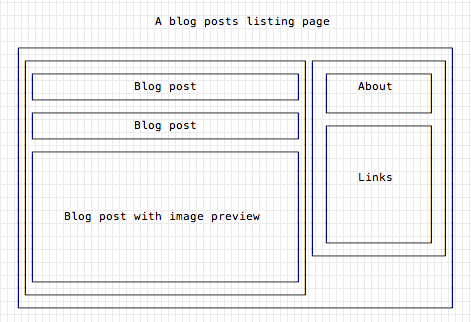
React makes it very simple: everything is a component.
Even plain HTML tags are component on their own, and they are added by default.
The next 2 render() calls are equivalent, they do the same thing. One with JSX, one without, by injecting <h1>Hello World!</h1> into an element with id app. I checked the code with React 19:
import React from 'react'
import { createRoot } from 'react-dom/client'

const root = createRoot(document.getElementById('app'))

root.render(<h1>Hello World!</h1>)

root.render(React.createElement('h1', null, 'Hello World!'))
Note that you create the root once and call render() on it as many times as you want. Calling createRoot() twice on the same element makes React print a warning in the console.
See, React.createElement exposed us an API to create the h1 component. Changing the first parameter of that method lets you create different tags. The second parameter is an object of props, in this case we don’t need any, so we pass null.
This is how we can use React to work with the built-in HTML components, but you’ll quickly outgrow them. What React excels in is letting us compose a UI by composing custom components.
Custom components
There are 2 ways to define a component in React.
A function component:
const BlogPostExcerpt = () => {
  return (
    <div>
      <h1>Title</h1>
      <p>Description</p>
    </div>
  )
}
A class component:
import React, { Component } from 'react'

class BlogPostExcerpt extends Component {
  render() {
    return (
      <div>
        <h1>Title</h1>
        <p>Description</p>
      </div>
    )
  }
}
Before React 16.8, class components were the only way to define a component that had its own state, and could access the lifecycle methods so you could do things when the component was first rendered, updated or removed.
React Hooks changed this, so our function components are now much more powerful than ever, and class components have become rare in new code, although they are still a perfectly valid way to create components.
There is also an older syntax which uses ES5, without the classes. You’ll only meet it in old codebases, because React.createClass was removed from React in version 16 (it lives on in the separate create-react-class package):
import React from 'react'

React.createClass({
  render() {
    return (
      <div>
        <h1>Title</h1>
        <p>Description</p>
      </div>
    )
  }
})
For new code, use function components plus hooks (start with useState if you need state).
Want me to talk about your product? You can sponsor this site.