A deep dive into T3 Code
By Flavio Copes
Learn how T3 Code runs Codex, Claude Code, Cursor, Grok, and OpenCode through one local web, desktop, and mobile control plane.
I use several coding agents.
Codex is good at some tasks. Claude Code is good at others. Cursor has its own workflow. OpenCode and Grok add more options.
The hard part is no longer starting an agent.
The hard part is keeping track of all of them.
One agent is editing a project. Another is waiting for approval. A third has finished but still needs review. A fourth is running on another computer.
Each tool has a different interface, a different way to show progress, and a different place to look for old conversations.
T3 Code gives them one control surface.
T3 Code was created by @theo and @jullerino.
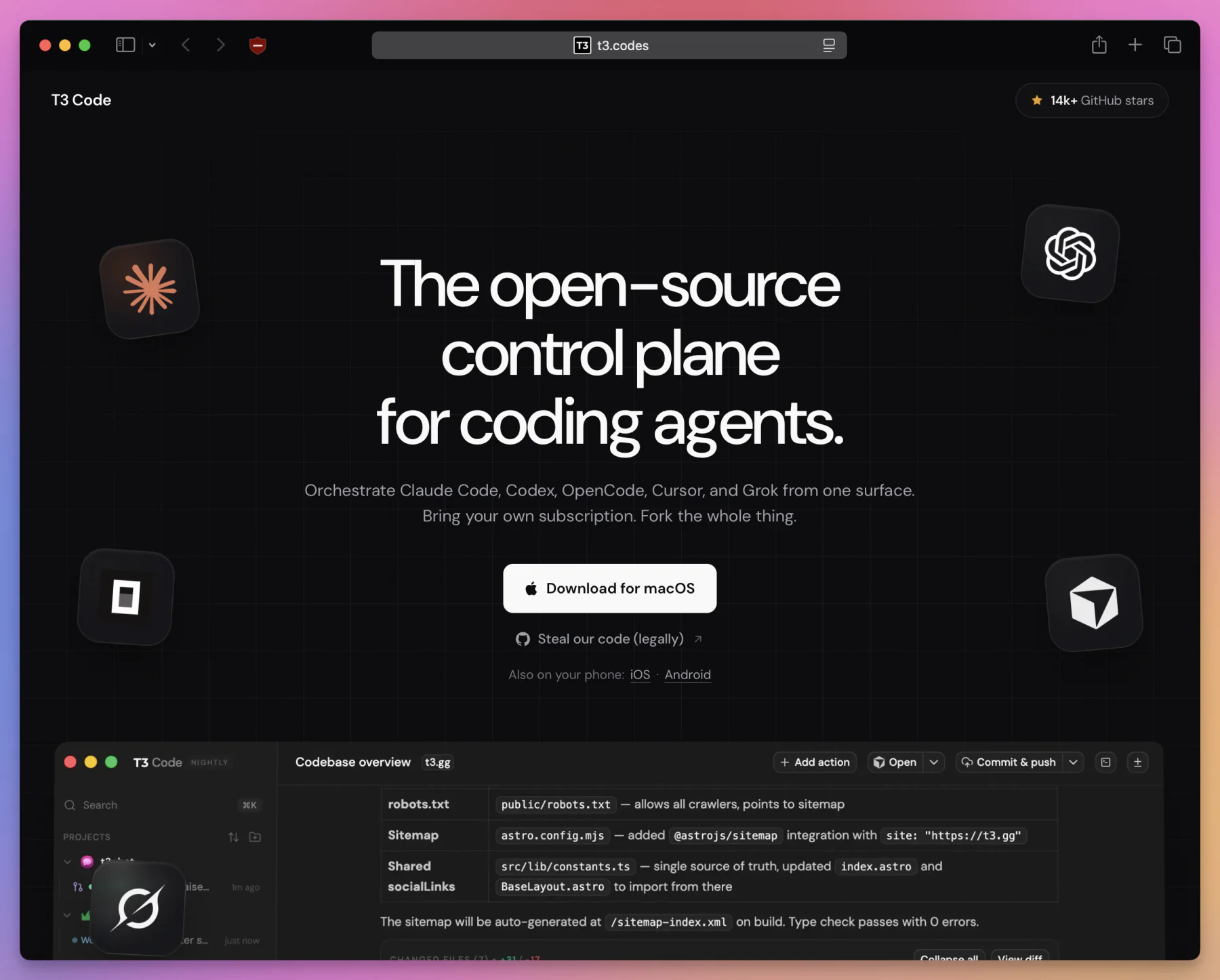
I can add my projects, start threads with different providers, review their changes, open terminals, run project scripts, create pull requests, and answer approval requests from the same application.
I can use that application in a browser, as a desktop app, or from my phone.
The actual work still happens on my machine.
T3 Code does not replace Codex, Claude Code, Cursor, Grok, or OpenCode. It starts those tools and translates their different streams of events into one interface.
This distinction is the key to understanding the project.
T3 Code is not a new model.
It is not a hosted coding agent.
It is a control plane for the agents I already use.
The project is also free, open source, and licensed under MIT. At the time I am writing this, it is explicitly marked as Alpha. It is moving quickly and some details will change.
The open-source part is not just a license badge. On August 27, 2026, T3 Code passed 20,000 GitHub stars. The 0.0.34 release also included work from 114 unique contributors. That helps explain how T3 Code can move so quickly across providers, operating systems, desktop, mobile, and remote access.
In this deep dive I will explain how the pieces fit together, install it, connect the supported providers, run isolated threads, review changes, use it remotely, configure a project, and look inside its architecture.
I will also explain where I think it fits in my own workflow, where it does not, and what I would be careful about before trusting it with important work.
The problem T3 Code solves
Running one coding agent is simple.
I open a terminal in a repository and run a command:
codexOr:
claudeI describe the task and wait for the result.
This workflow is hard to beat when I have one project and one task.
The problem appears when I add more work.
Now I need to know:
- which agent belongs to which repository
- which branch or worktree each agent is using
- which agent is still running
- which agent is waiting for permission
- which changes belong to which prompt
- which model and account started each conversation
- where the development server is running
- which thread already has a pull request
- which machine owns a remote thread
- how much provider usage I have accumulated
Terminal tabs can hold the processes, but they do not give me a shared model of the work.
An IDE can show files and source control, but it might only have deep support for its own agent.
A hosted agent platform can give me a dashboard, but it usually runs the work in its own environment.
T3 Code takes another route.
It runs a local server beside my repositories. That server starts the provider tools, owns the project state, runs Git commands, opens terminals, reads files, and sends a normalized stream of events to the clients.
The browser, desktop app, and mobile app are views of that server.
flowchart LR
  C["Codex"] --> S["T3 Code server"]
  A["Claude Code"] --> S
  U["Cursor"] --> S
  G["Grok"] --> S
  O["OpenCode"] --> S
  S --> W["Web app"]
  S --> D["Desktop app"]
  S --> M["Mobile app"]
  S --> F["Files, Git, terminals, projects"]
The server is the center of the system.
This gives T3 Code two useful properties.
First, the user interface is provider-independent. I do not need to remember five different ways to find a thread, approve a command, inspect a diff, or open a terminal.
Second, the work stays attached to my machine and filesystem. T3 Code does not need to copy my repository into a proprietary cloud environment before an agent can touch it.
There is still an important privacy detail here.
The T3 Code project state can stay on my server machine, but the selected provider still receives prompts, code context, and tool results in the normal way. A local control plane does not turn a cloud model into a local model.
What T3 Code is
The project calls itself an agent harness control surface.
That phrase is accurate, but dense. Let’s take it apart.
An agent harness is the software around a model.
The model can generate text. The harness gives it a conversation, tools, a filesystem, command execution, approvals, context management, and a way to report progress.
Codex CLI is a harness. Claude Code is a harness. Cursor Agent is a harness.
T3 Code sits one layer above them.
It does not ask every provider to behave exactly the same internally. Instead, it gives each provider an adapter and turns its native output into a common set of events that the interface understands.
The result includes:
- a shared project and thread sidebar
- provider and model selection
- chat and plan views
- permission controls
- inline approval requests
- native subagent and workflow visibility
- terminals
- a file browser and file editor
- per-turn and branch diffs
- workspace checkpoints and reverts
- project scripts
- local app previews
- Git and pull request workflows
- cross-environment search
- provider usage summaries
- remote access from web and mobile clients
The source is available in the pingdotgg/t3code repository.
The desktop application is called T3 Code (Alpha). The repository also makes the early state clear: expect bugs, unfinished edges, and frequent changes.
That is worth keeping in mind throughout this article.
The ideas are mature enough to study and use. The product is not pretending to be finished.
What T3 Code is not
It is easier to understand T3 Code if I also draw a clear boundary around it.
It is not a model provider
T3 Code does not include model credits.
I bring my own provider accounts and subscriptions. If I use Codex, the Codex CLI needs to be installed and authenticated. The same is true for the other providers.
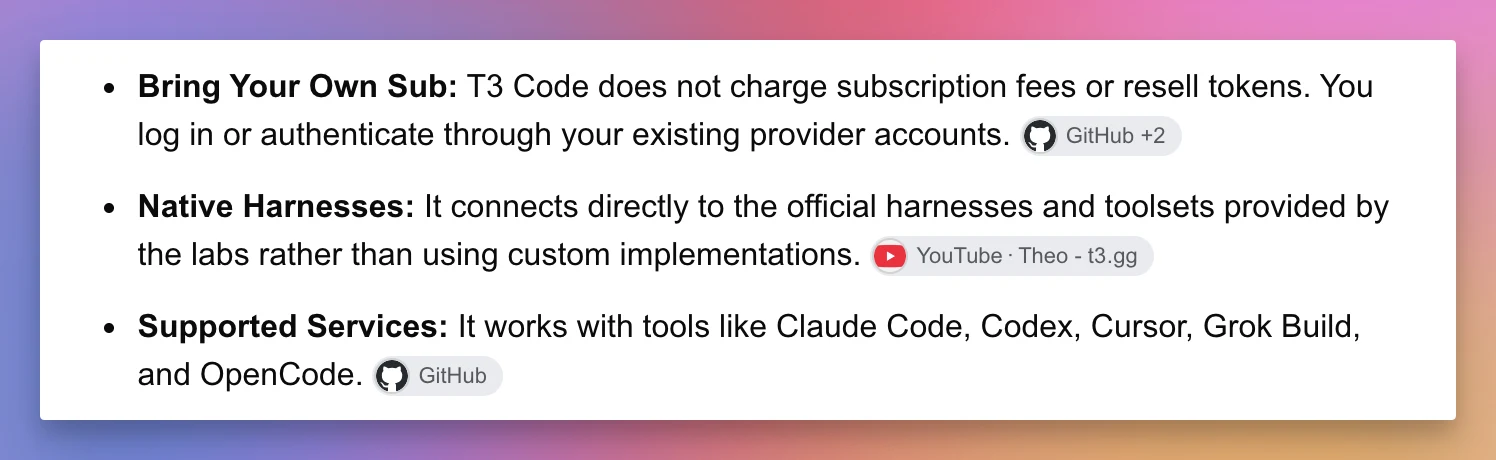
It is not one universal agent
T3 Code does not flatten every provider into the same lowest common denominator.
It presents a common interface, but provider-specific models, reasoning controls, permission behavior, and capabilities still exist.
This matters because switching from one provider to another is not like changing the color theme. The underlying agent can behave differently.
It is not a cloud development environment
The server runs on a machine I control.
That machine must contain the repository, provider tools, credentials, Git configuration, and any dependencies the project needs.
If I close a laptop and the server stops, the work stops too.
I can solve that by running T3 Code on an always-on computer or remote server, but T3 Code does not silently provide that computer for me.
It is not an IDE replacement for everyone
T3 Code has a file browser, editor, diffs, terminal, previews, and source control tools.
That is enough to manage and review a lot of agent work.
It does not mean every developer will stop using VS Code, Cursor, Zed, or another full editor. A large manual refactor, deep debugger session, or language-specific workflow can still be more comfortable in a dedicated IDE.
It is not a security boundary by itself
A permission mode can reduce accidental damage.
It does not make an unsafe command safe. Full access still means full access on the server machine.
I need to choose the workspace and permission mode with the same care I would use in the provider CLI.
The T3 Code mental model
T3 Code uses a small set of concepts.
The names are ordinary, but their boundaries matter.
flowchart TD
  E["Environment: one T3 Code server"] --> P1["Project: flaviocopes.com"]
  E --> P2["Project: another repository"]
  P1 --> W1["Workspace: current checkout"]
  P1 --> W2["Workspace: isolated worktree"]
  W1 --> T1["Thread"]
  W2 --> T2["Thread"]
  T2 --> R1["Turn 1"]
  T2 --> R2["Turn 2"]
  T2 --> V["Provider"]
An environment is one running server
An environment is one T3 Code server and the machine behind it.
It owns:
- a filesystem
- projects
- threads
- provider credentials
- settings
- terminals
- Git operations
- local state
My Mac can be one environment. A Linux server can be another.
When I connect the client to both, T3 Code can search and navigate across them, but the work remains on the environment that owns it.
This is a useful rule:
The client shows the work. The environment performs the work.
A project points to a directory
A project is an environment-local record rooted in a directory.
For example:
/Users/flavio/www/flaviocopes.comThe project can contain settings and scripts. It can also carry checked-in T3 Code configuration through t3.json.
Two environments can each have a project with the same repository, but they are separate records because they live on separate machines.
A workspace is the checkout used by a thread
A workspace is the directory where an agent actually works.
T3 Code supports two modes:
- the current checkout
- a new Git worktree
The current checkout is the directory I added as the project.
A worktree is a separate checkout of the same repository. It gives a background thread its own files and branch without making a full second clone.
I will explain the tradeoff in detail soon because it is one of the most important choices in the interface.
A thread is the durable conversation
A thread holds the conversation and work history for one task.
It remembers the provider, model, workspace, messages, events, approvals, artifacts, and source control context.
Closing the client does not mean deleting the thread. The server keeps it.
A turn is one user-agent cycle
A turn begins when I send a message and ends when the agent finishes, fails, or waits for input.
T3 Code creates workspace checkpoints around turns. That is how it can show the diff for one turn and offer a message-level revert.
A provider is the actual agent runtime
The provider is Codex, Claude Code, Cursor, Grok, or OpenCode.
T3 Code manages the session, but the provider still decides how to reason, what tools it exposes, which models exist, and how some permissions work.
This mental model prevents a common misunderstanding.
A T3 Code thread is not just a chat window. It connects a durable conversation, an actual directory, a provider runtime, and a history of changes.
Install T3 Code
The quickest way to try T3 Code is through npx.
It currently requires one of these Node.js ranges:
- Node.js 22.16 or newer in the 22.x line
- Node.js 23.11 or newer in the 23.x line
- Node.js 24.10 or newer
Run:
npx t3@latestThis starts the local server and opens the web interface.
For daily use, the desktop app is more convenient because it can manage the local server and remote SSH connections as one application.
On macOS:
brew install --cask t3-codeThe direct macOS download uses the familiar drag-to-Applications installer:
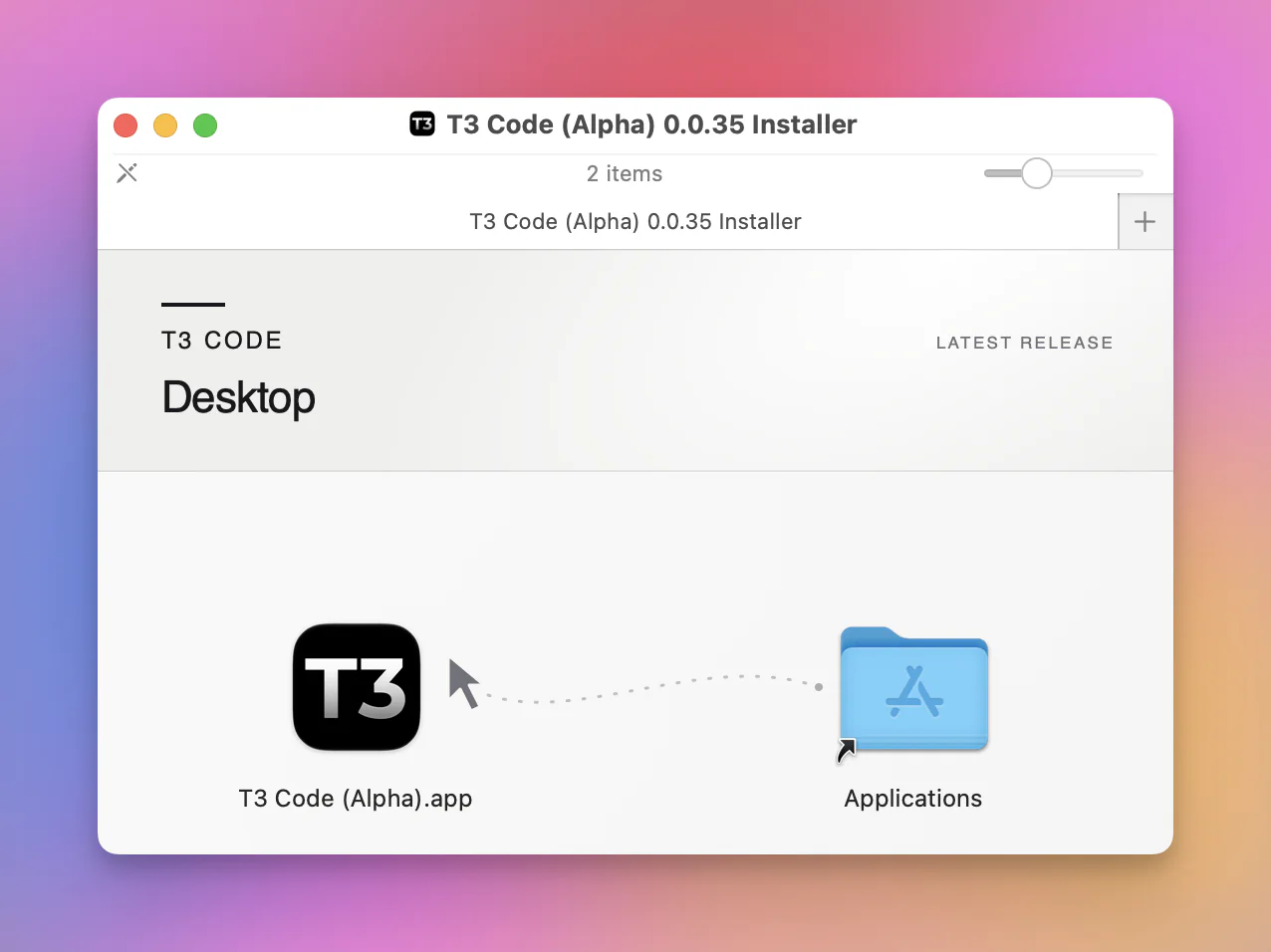
On Windows:
winget install T3Tools.T3CodeOn Arch Linux, the stable package is:
yay -S t3code-binThere is also a nightly package:
yay -S t3code-nightly-binI would start with the stable build unless I am testing a specific fix.
The web and desktop apps talk to the same kind of server. The desktop app adds native packaging and server-management conveniences. It does not move the execution boundary into the user interface.
Install and authenticate a provider
T3 Code needs at least one provider CLI.
The authentication happens on the server machine, not on every client.
If T3 Code runs on my Mac, I authenticate there. If it runs on a remote Linux server, I authenticate on that server.
Here are the built-in providers and their login commands:
| Provider | Executable | Login command | On by default |
|---|---|---|---|
| Codex | codex | codex login | Yes |
| Claude Code | claude | claude auth login | Yes |
| Cursor | cursor-agent | agent login | No |
| Grok | grok | grok login | No |
| OpenCode | opencode | opencode auth login | No |
The Cursor command is an easy detail to miss.
The executable used by T3 Code is cursor-agent, but the login command is agent login.
Codex and Claude Code are enabled by default. Cursor, Grok, and OpenCode need to be enabled in the provider settings first.
The Providers page shows the installed version, authentication state, subscription, and whether each integration is enabled:
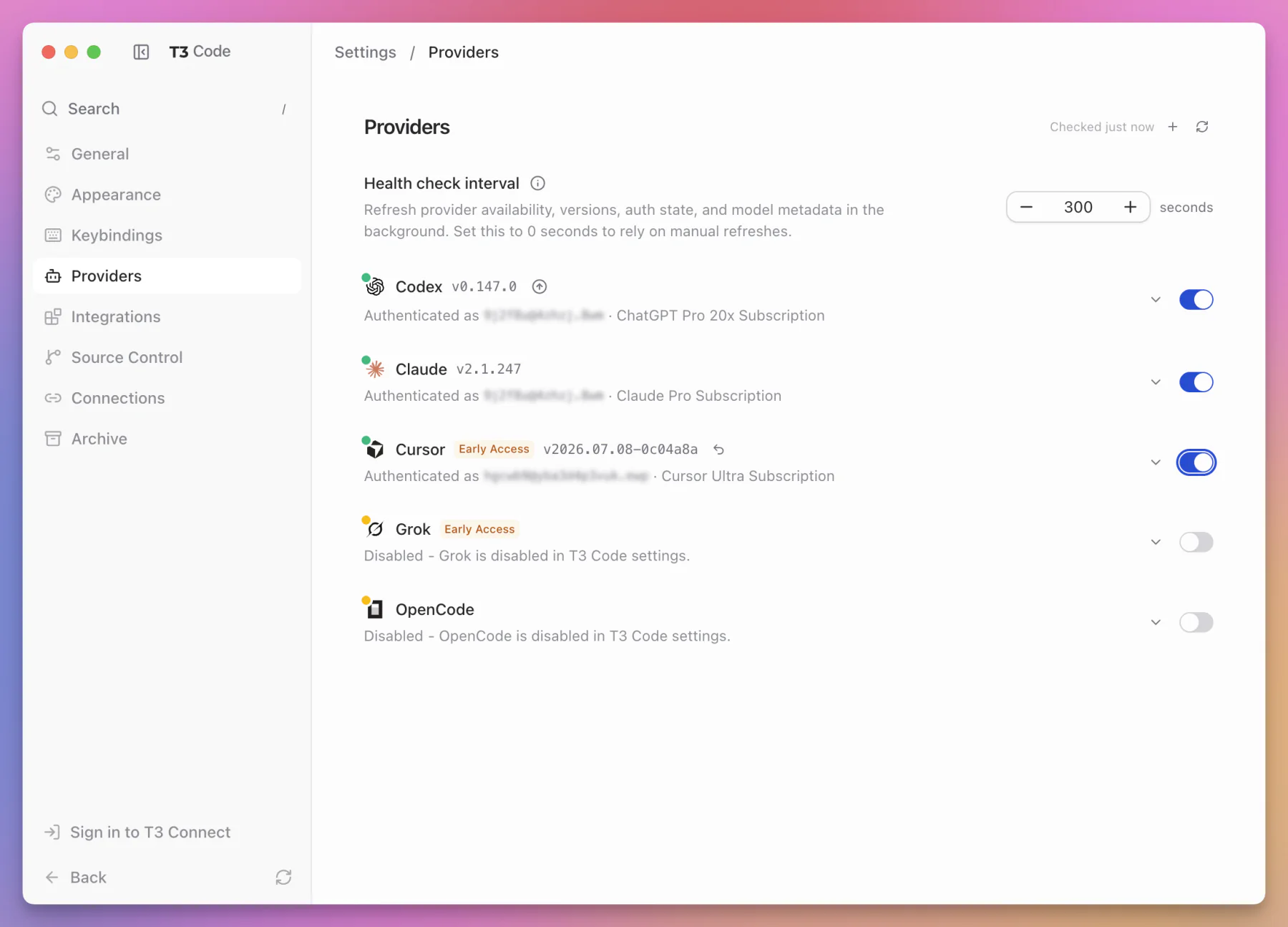
T3 Code can discover normal provider installations, or I can configure executable paths and environment variables when my setup is different.
Sensitive provider environment values are stored as server secrets. After saving them, the clients do not receive their values back.
That is a small but important architectural choice. A phone or browser client can use a configured provider without ever seeing its secrets.
Start the first thread
After T3 Code and one provider are ready, I can create the first project.
The initial screen has one clear action:
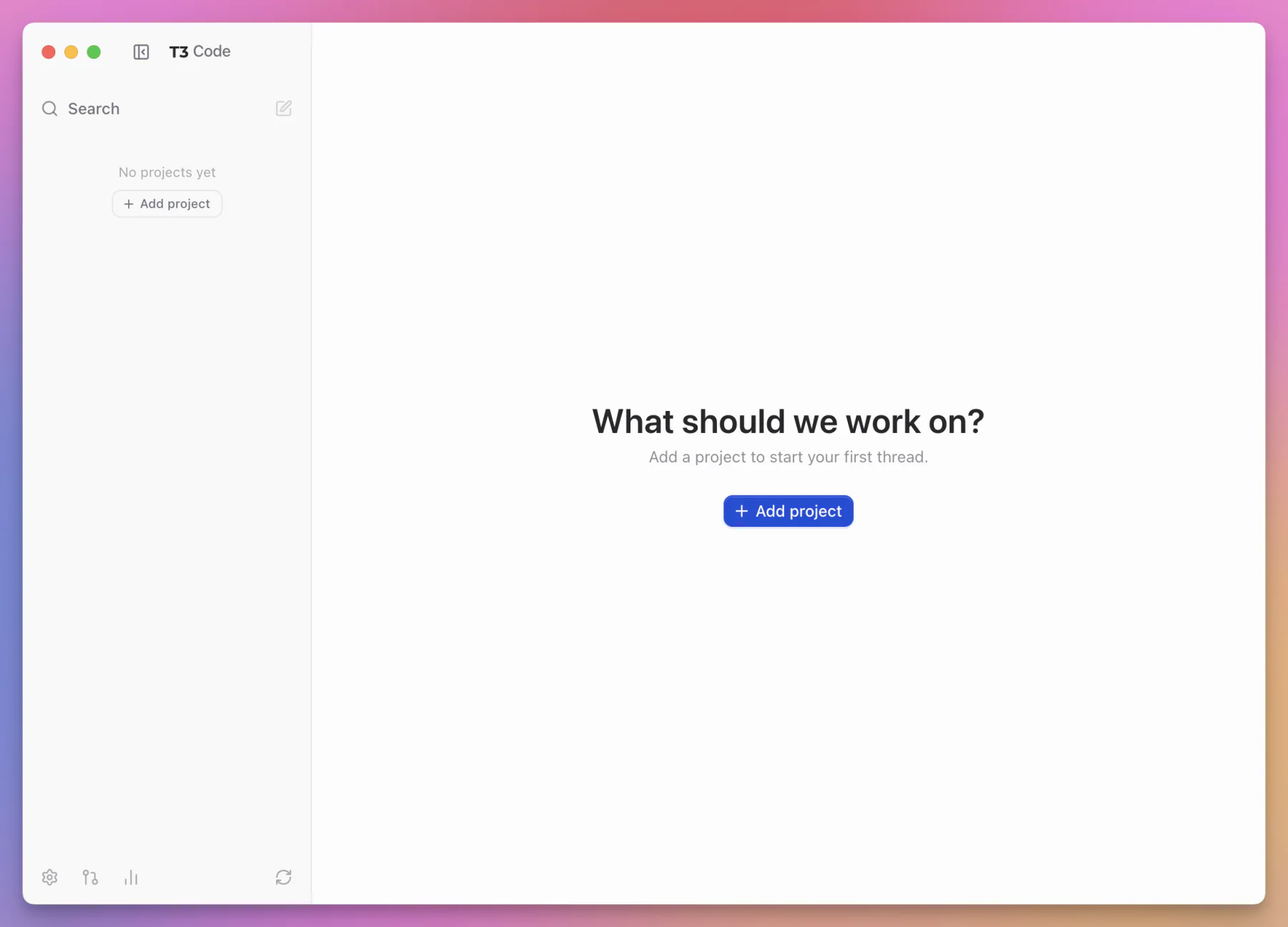
I can open an existing local folder, paste a Git URL, or connect through one of the supported source control hosts:
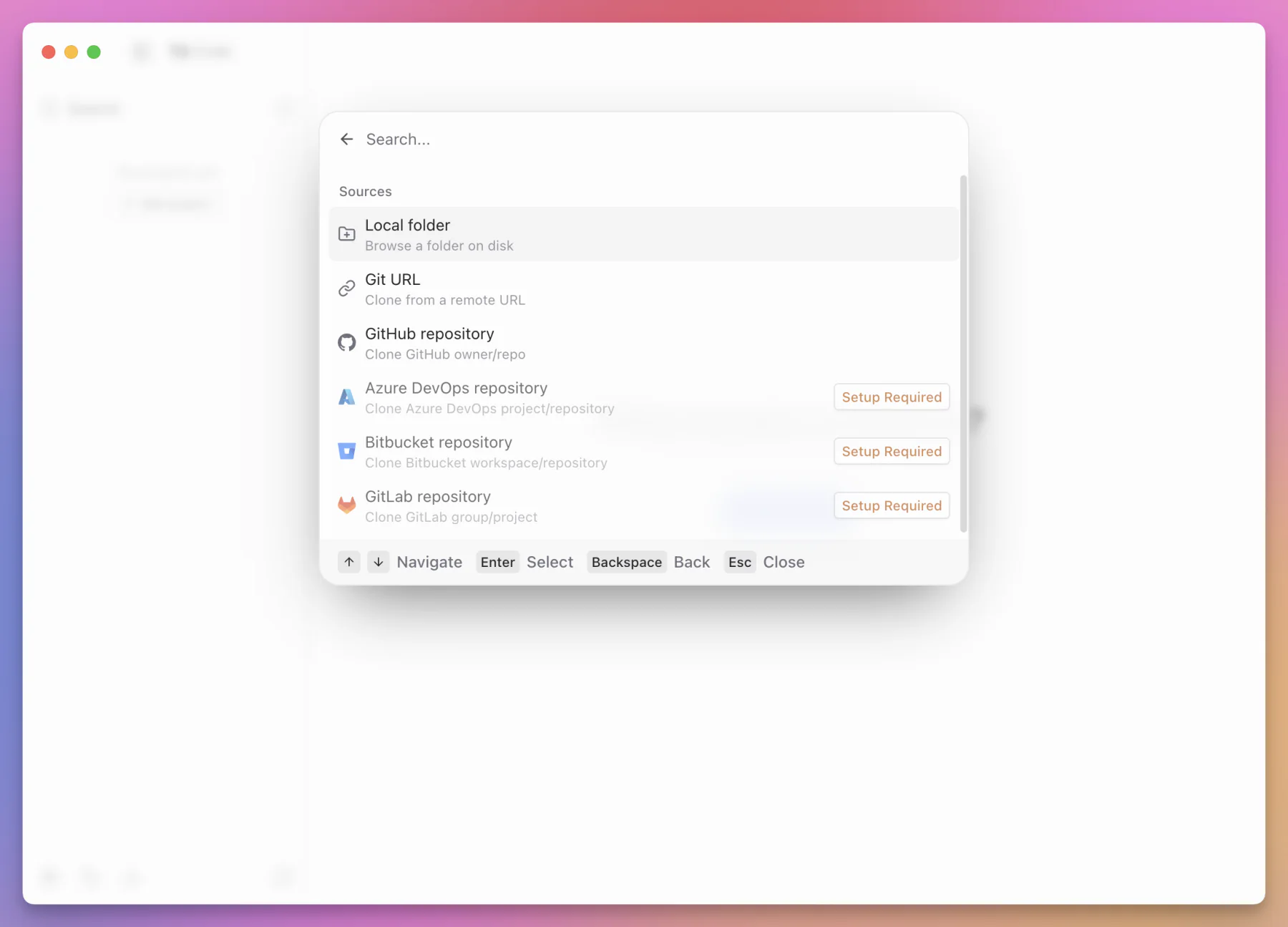
The flow is:
- Add a project directory.
- Create a new thread.
- Choose a provider and model.
- Choose a permission mode.
- Choose normal or plan interaction mode.
- Choose the current checkout or a new worktree.
- Write the prompt.
After adding a project, T3 Code opens the new-thread composer with the model, reasoning, permission, workspace, and branch controls together:
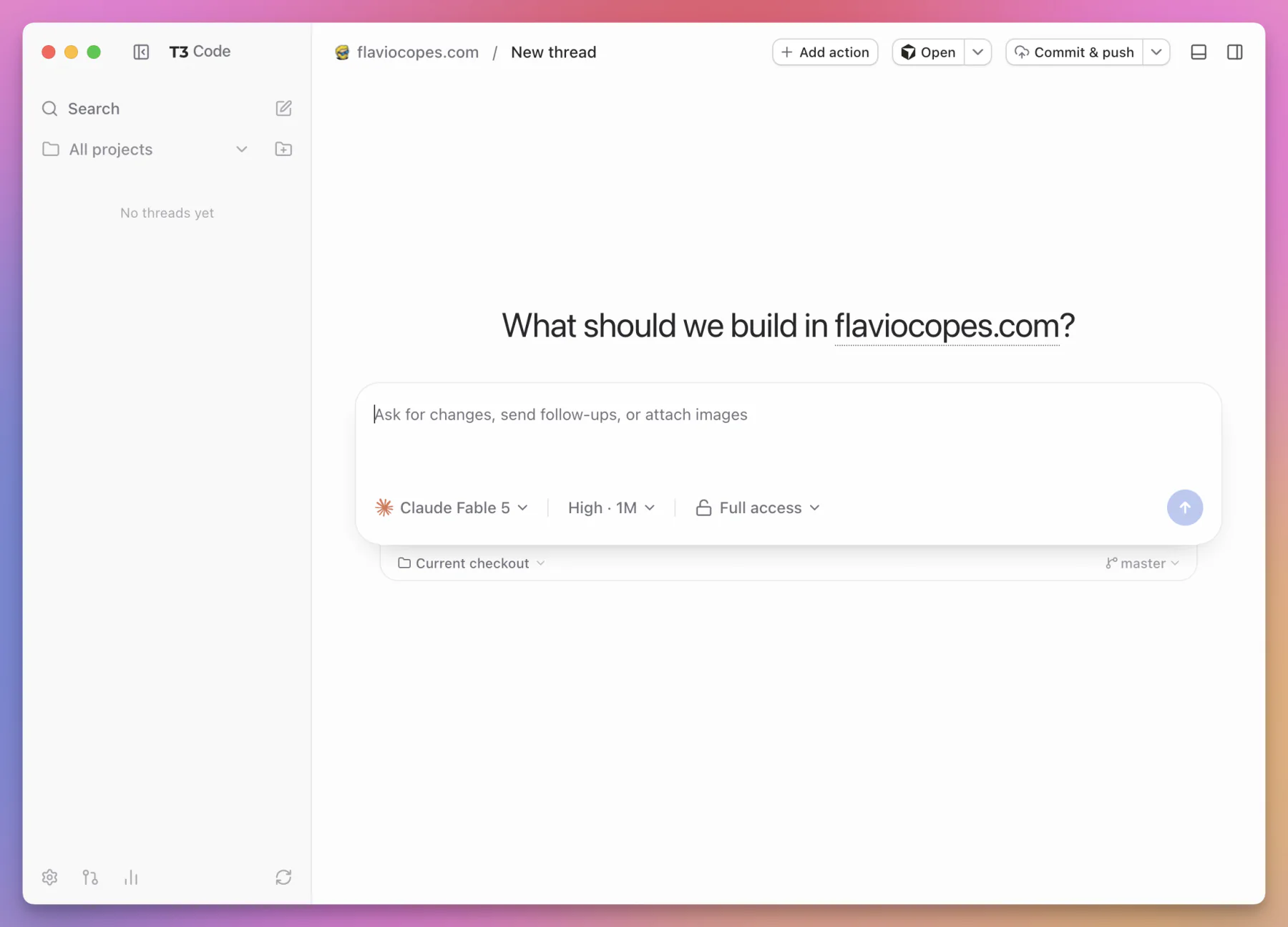
The model picker groups models by provider. I can search, mark favorites, and jump to common choices with keyboard shortcuts:
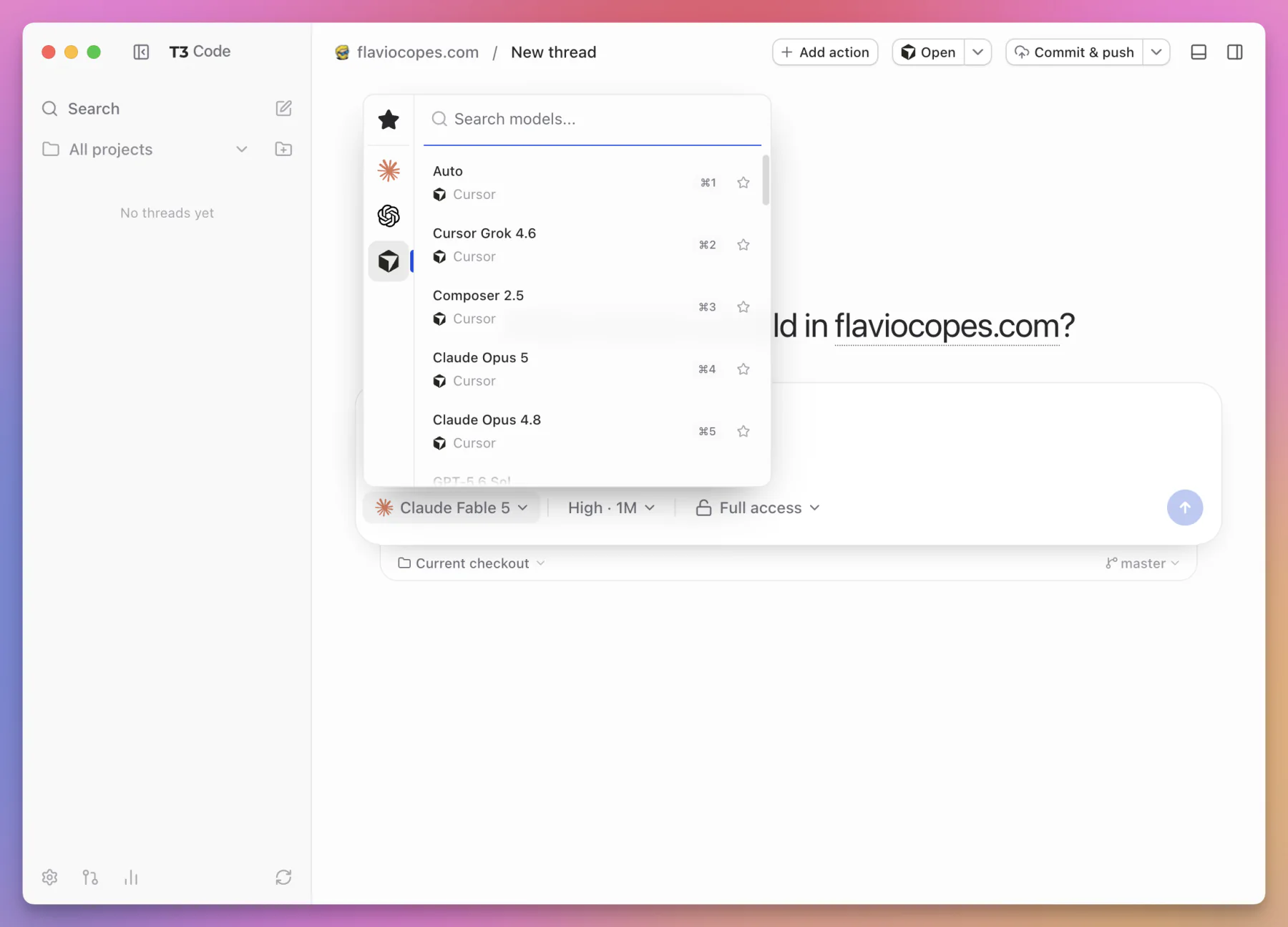
For a first test, I would use a small repository or a disposable branch.
Then I would choose Supervised permissions and ask for a read-only task:
Read this project and explain how a request moves from the HTTP route to the database. Do not change any files.This tests several parts of the system without asking it to modify anything:
- project discovery
- provider startup
- file reads
- command approvals
- streaming output
- thread persistence
Once that works, I would try one small edit:
Add a short comment above the retry loop explaining why exponential backoff is used. Run the smallest relevant test.Now I can inspect the per-turn diff, review the exact file, and try the revert control.
Starting with a tiny change is much better than testing a new agent control plane by asking it to reorganize the whole application.
Current checkout or new worktree
Every new thread needs a place to work.
T3 Code offers two choices.
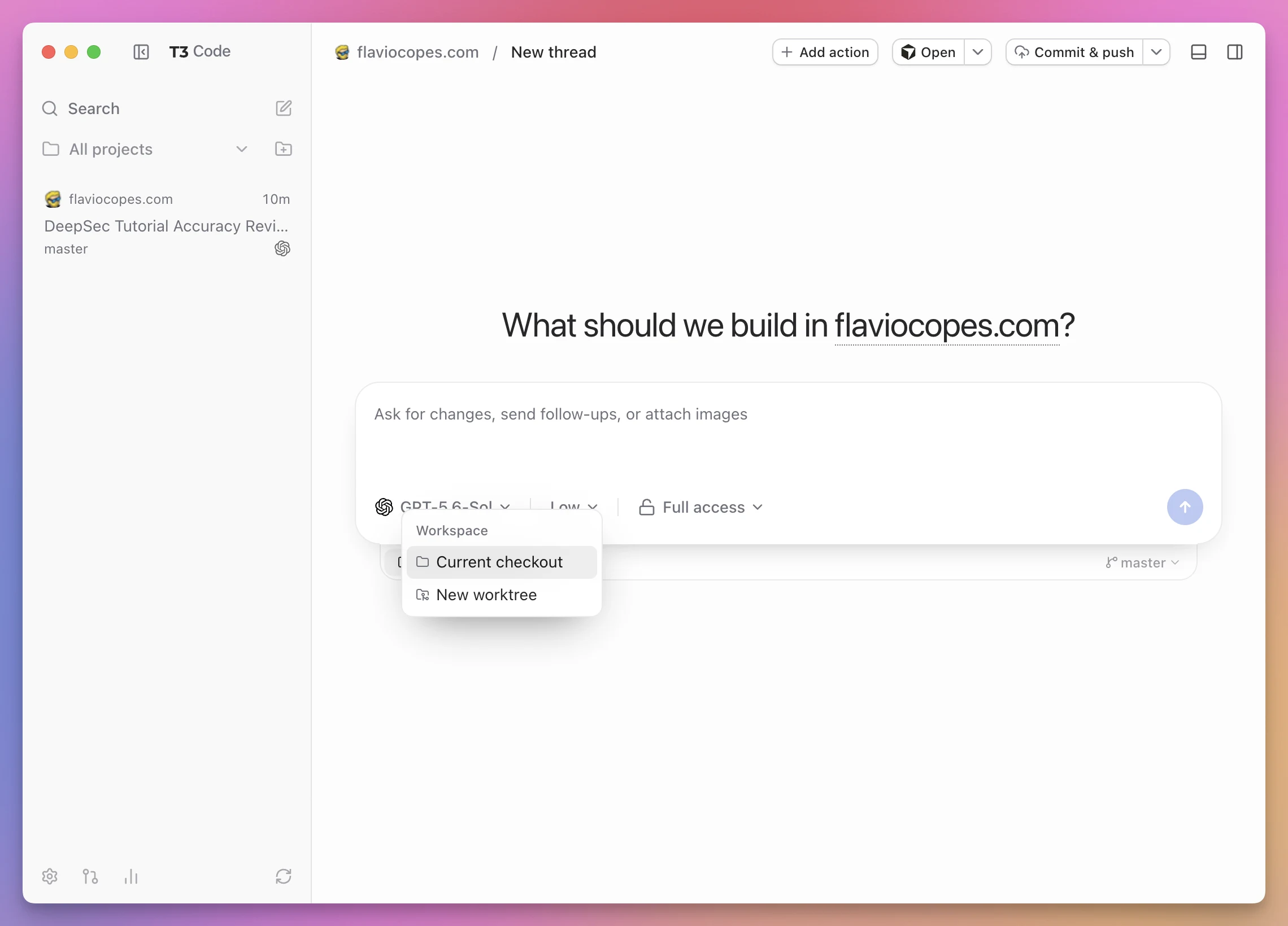
Current checkout
Current checkout uses the project directory exactly as it exists.
This is the simplest option.
It is a good fit when:
- I have one active writer
- I want the agent to see my existing uncommitted changes
- the repository has a workflow that should remain in its main directory
- worktrees are unsupported or intentionally avoided
- I am doing a read-only investigation
The danger is shared state.
If two agents edit the same checkout at the same time, they can touch the same files, stage each other’s work, or make a diff hard to interpret.
T3 Code can organize the threads, but it cannot change how a shared filesystem works.
When I use the current checkout, I keep one writer. Other threads can research, review, or wait.
New worktree
New worktree creates an isolated Git worktree for the thread.
A worktree gives the agent a separate directory and branch while sharing the repository’s Git object database.
That makes it practical to run several independent tasks at the same time.
flowchart TD
  R["One Git repository"] --> M["Current checkout: master"]
  R --> W1["Worktree: task A"]
  R --> W2["Worktree: task B"]
  R --> W3["Worktree: review"]
  W1 --> T1["T3 Code thread A"]
  W2 --> T2["T3 Code thread B"]
  W3 --> T3["T3 Code thread C"]
This is a strong default for background implementation tasks.
It is especially useful when every worktree can install dependencies, start its own development server, and run tests independently.
It is not free isolation.
The worktrees still share external resources unless I separate them. Two copies of an application might try to use the same port, local database, container name, test account, or generated directory outside the repository.
The project setup script can help prepare each worktree, but I still need to understand what the application shares.
If Git worktrees are new to you, I wrote a separate Git worktrees tutorial. The free Git course covers the underlying Git model.
My practical rule
I use this rule:
- current checkout for one controlled stream of work
- worktrees for truly independent parallel work
- supervised permissions when the files are valuable
- full access only when the workspace is disposable or well isolated
Isolation and permission are separate controls.
A worktree protects one checkout from another. It does not protect the rest of my computer from a command with full access.
Permission modes
Each T3 Code thread has a permission mode.
This is not only a user interface setting. T3 Code maps the choice into the permission system supported by the selected provider.
The four modes are available from the composer:
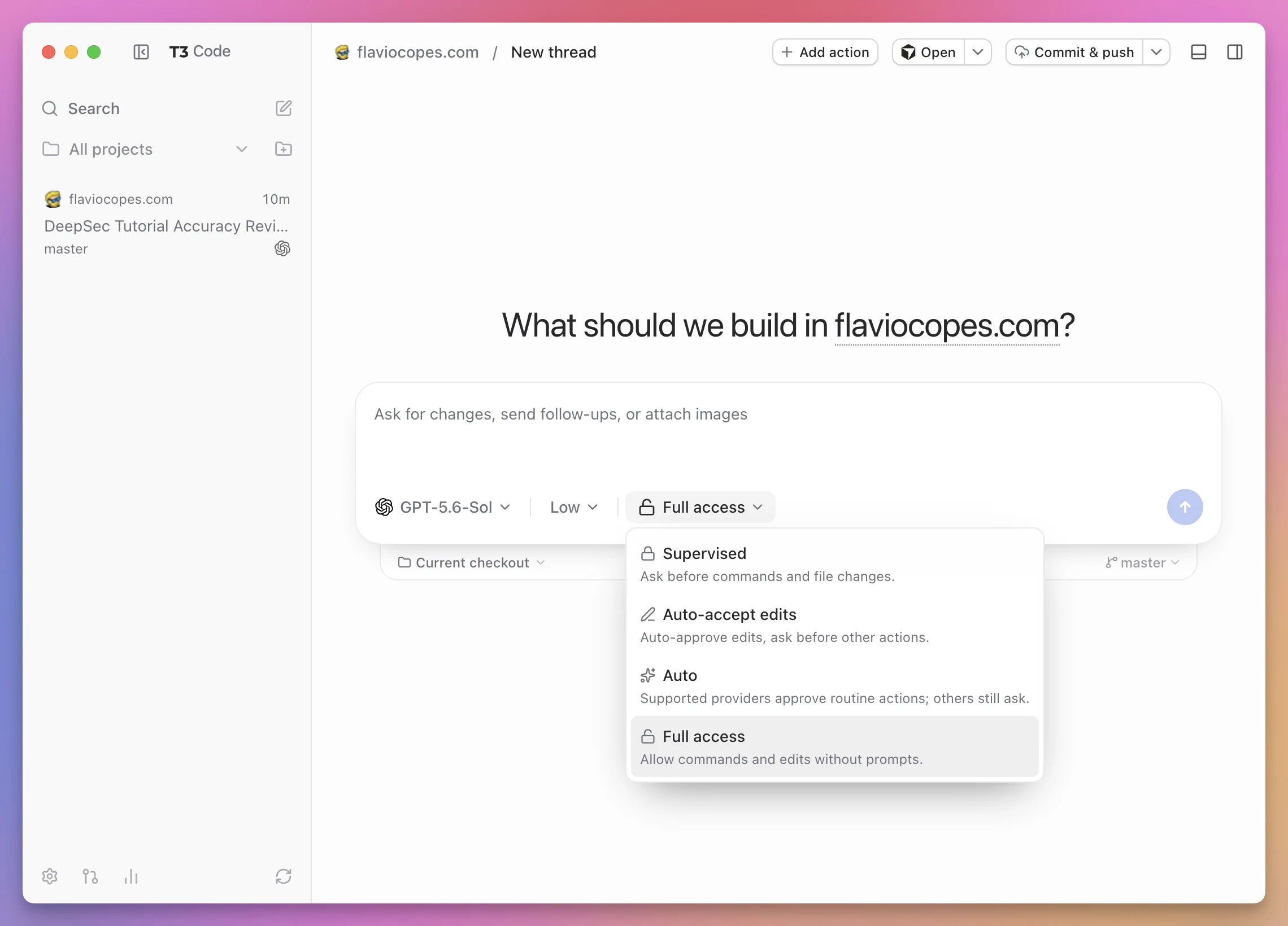
| Mode | File edits | Commands and other actions | Best use |
|---|---|---|---|
| Supervised | Ask first | Ask first | Important checkouts and unfamiliar tasks |
| Auto-accept edits | Automatic | Ask when needed | Routine code changes with command control |
| Auto | Routine actions can proceed | Risky actions ask | Trusted tasks in a controlled workspace |
| Full access | No prompts | No prompts | Disposable or strongly isolated environments |
Supervised
Supervised is the cautious mode.
The agent asks before commands and file changes. Access outside the workspace is restricted.
I would use this while learning T3 Code, when working in a checkout with valuable uncommitted changes, and when the task can affect credentials, deployments, or external services.
Auto-accept edits
This lets the agent change files without asking about every patch, while keeping approvals for other actions.
It removes some interruption without turning every shell command loose.
Auto
Auto lets routine work continue and asks about actions considered risky.
The exact behavior depends on the provider.
Codex can use its AI approval reviewer. Claude has its own automatic permission behavior. A provider without a matching capability falls back to asking instead of pretending it can enforce a mode it does not understand.
This is a good example of T3 Code normalizing the interface without hiding real provider differences.
Full access
Full access removes command and edit prompts.
It is also the current default.
That makes background agents move quickly, but I would change it deliberately when adding a valuable project.
I reserve full access for a workspace I can restore, a task I understand, and a machine where the agent cannot reach unrelated sensitive resources.
The label is literal.
Approvals from any client
When the provider asks for permission, T3 Code turns the request into an inline approval card.
I can answer it from the same thread in the desktop app, browser, or mobile app.
This matters more than it sounds.
An agent often spends most of its time working independently, then stops on one command. If the request only exists in a terminal on another machine, the whole task waits until I find that terminal.
With remote access configured, the approval follows the thread.
I still need to read it.
Remote approval should not become reflexive approval. A clear interface reduces friction, but it also makes a dangerous button easier to reach.
Default mode and plan mode
T3 Code also separates permission mode from interaction mode.
Permission mode controls what the agent can do without asking.
Interaction mode controls how the agent approaches the task.
In default mode, the agent can move from understanding to execution according to the prompt and its own workflow.
In plan mode, the focus is analysis and planning before implementation.
The provider decides the exact behavior because planning is a native provider capability, not a text box decoration.
I use plan mode when the task touches several systems, when the architecture is unclear, or when a wrong first decision would create a lot of rework.
For a one-line copy change, planning can be more ceremony than value.
The composer
The composer is where I write a prompt, attach context, and choose how it should run.
It supports messages up to 120,000 characters. That is large enough for detailed specifications, error logs, or pasted reference material, although a focused prompt is still easier for an agent to use.
I can attach images directly.
On the web and desktop clients, HEIC and HEIF images are converted to JPEG automatically. This is useful for screenshots from an iPhone.
Typing / opens the command menu.
Typing $ searches skills.
Here I added my writing-style skill directly to a real review prompt:
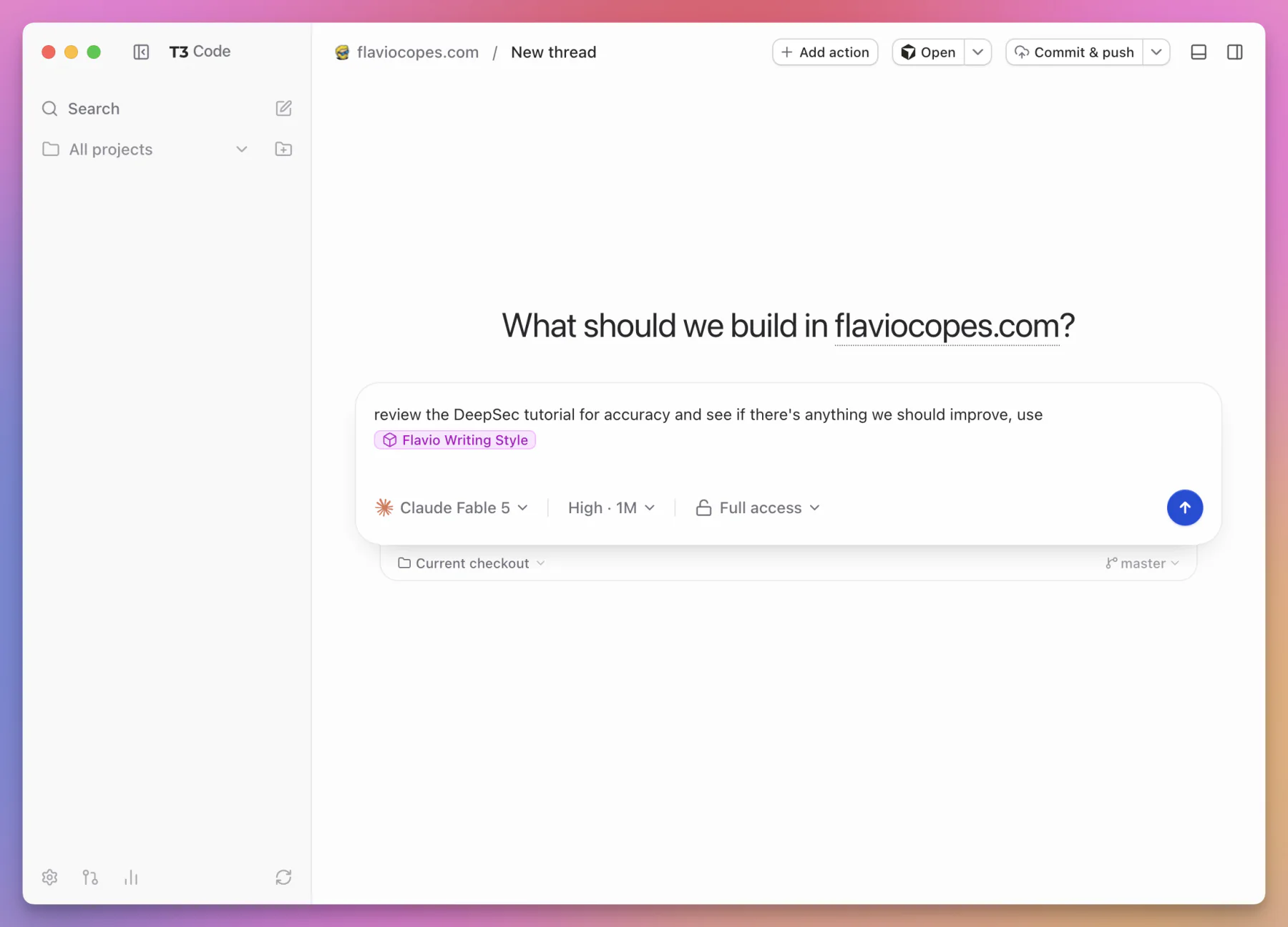
The skill picker tells me where a skill came from:
- System
- Personal
- Project
- App
Skills can also be hidden from the slash menu when I do not want a long list.
T3 Code does not own these skills. It discovers and presents what the surrounding agent ecosystem already provides.
Send a task to the background
On desktop, Command+Enter on macOS or Ctrl+Enter on other systems sends the current prompt to a background thread and opens a fresh new thread.
This small interaction changes the rhythm of the application.
I can describe one task, send it away, and immediately prepare the next one. I do not have to wait for a reply or manually navigate back to an empty composer.
While a turn runs, the sidebar shows its live state and elapsed time. The active composer also turns into a stop control:
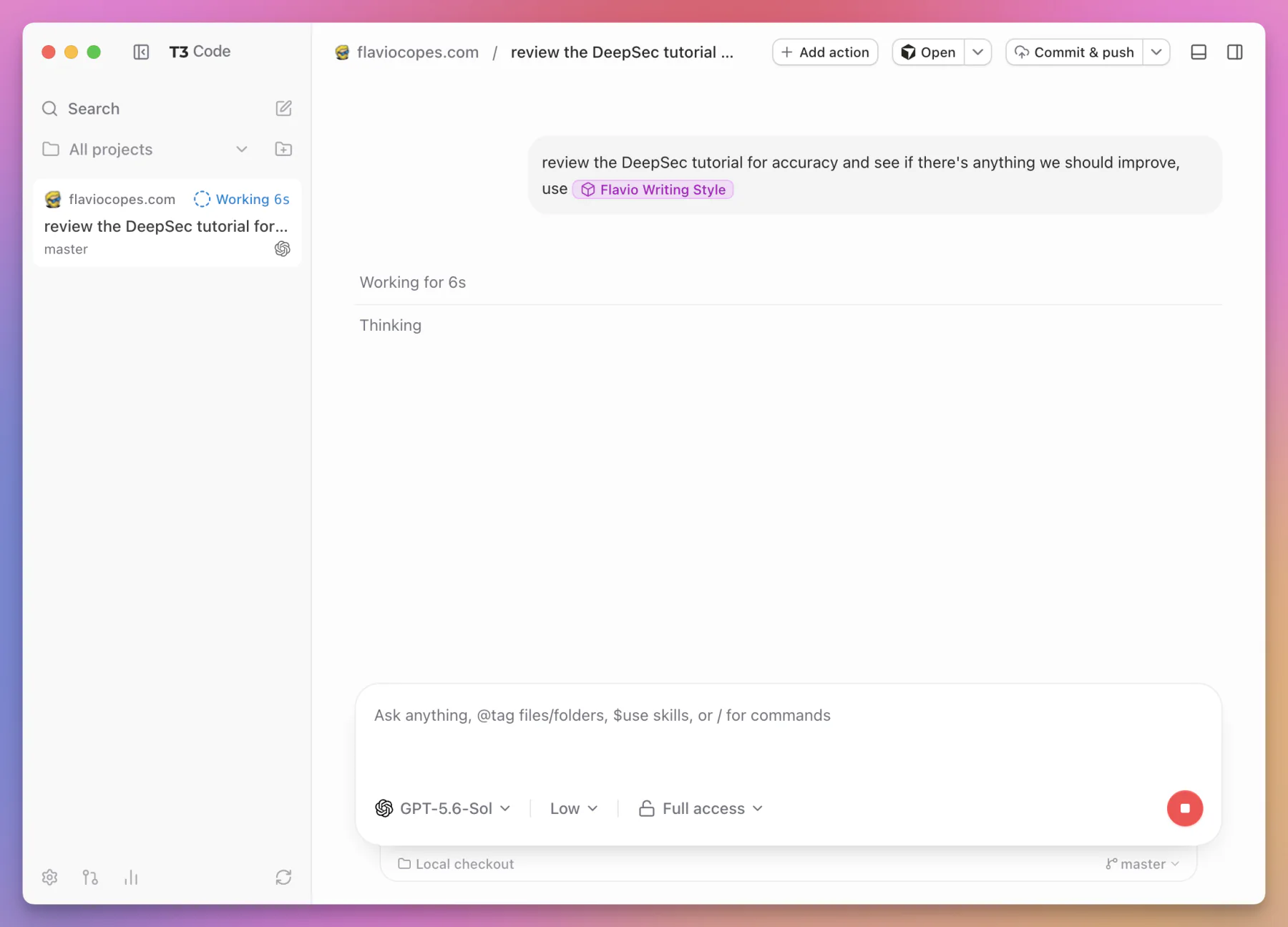
The shortcut is useful only if the tasks are actually independent. Starting five threads that all edit the same checkout is still a shared-state problem.
Projects, scripts, and t3.json
T3 Code can keep project settings in its local database, but it also supports a checked-in t3.json file at the project root.
This is where repeatable project behavior becomes interesting.
A project can declare:
- its default workspace mode
- an icon
- named scripts
- scripts that run when a worktree is created
- preview URLs
- whether a preview should open automatically
The same settings are available through the Add Action dialog. An action can have a name, keyboard shortcut, command, preview URL, and worktree behavior:
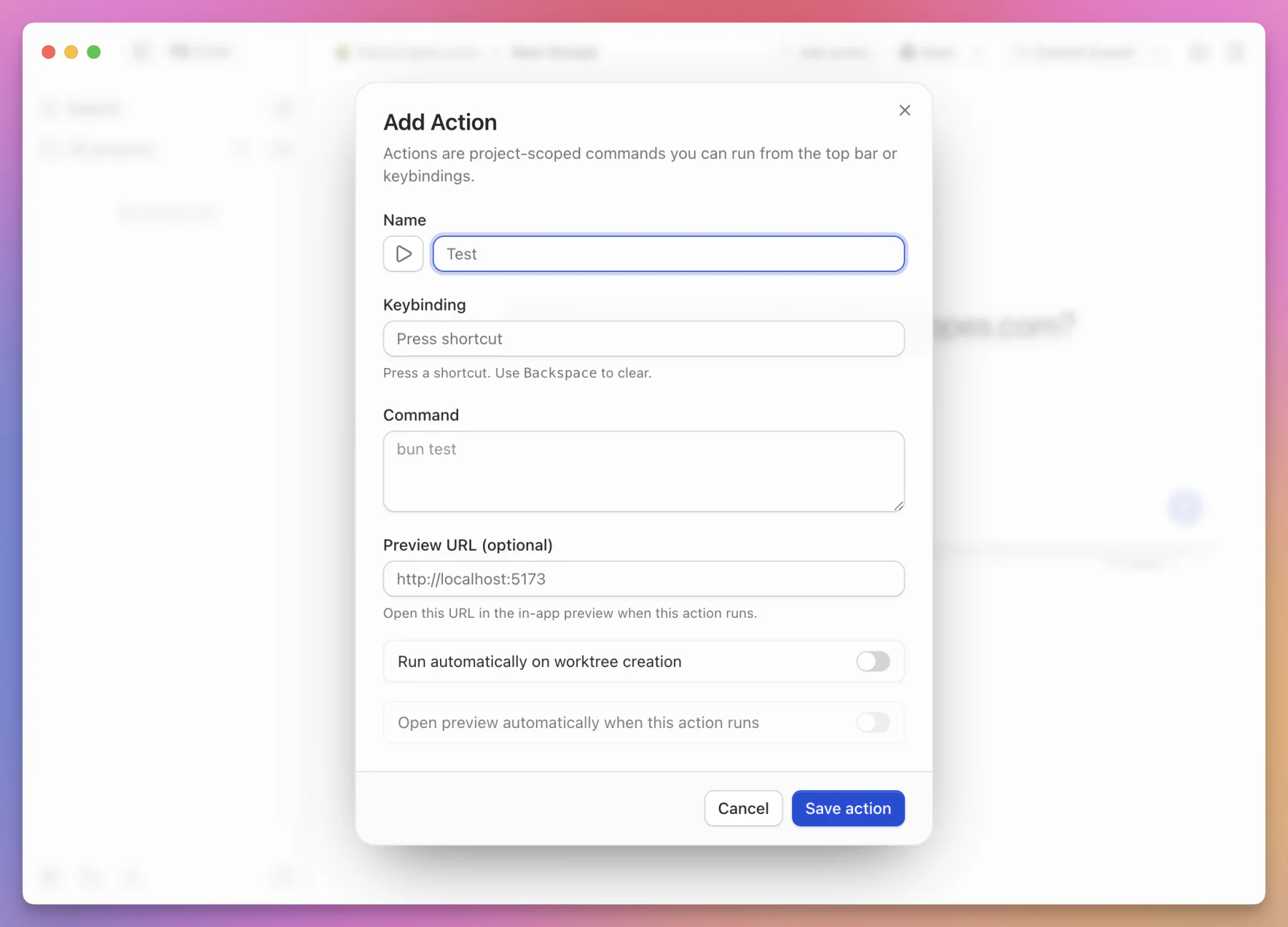
The schema lives at:
https://t3.codes/schema/t3.jsonHere is a small example:
{
  "$schema": "https://t3.codes/schema/t3.json",
  "defaultThreadEnvMode": "local",
  "scripts": [
    {
      "name": "Development server",
      "command": "npm run dev",
      "icon": "play",
      "previewUrl": "http://localhost:3000",
      "autoOpenPreview": true
    },
    {
      "name": "Production build",
      "command": "npm run build",
      "icon": "build"
    },
    {
      "name": "Tests",
      "command": "npm test",
      "icon": "test"
    }
  ]
}
The $schema property gives editors a way to validate and autocomplete the file.
defaultThreadEnvMode accepts:
localfor the current checkoutworktreefor a new worktree
Each script has a name and command. It can also use one of these icons:
playtestlintconfigurebuilddebug
Scripts run in the project root or the thread worktree root.
T3 Code adds two useful environment variables:
T3CODE_PROJECT_ROOT
T3CODE_WORKTREE_PATH
T3CODE_PROJECT_ROOT points to the original project directory.
T3CODE_WORKTREE_PATH is available when the thread uses a worktree.
This helps a setup script distinguish shared project resources from the isolated checkout.
Prepare a new worktree
A script can set runOnWorktreeCreate:
{
  "$schema": "https://t3.codes/schema/t3.json",
  "defaultThreadEnvMode": "worktree",
  "scripts": [
    {
      "name": "Prepare worktree",
      "command": "npm install",
      "icon": "configure",
      "runOnWorktreeCreate": true
    }
  ]
}
Now T3 Code runs that setup command for a new worktree.
Real applications often need more than dependency installation. A setup script might copy a safe local environment template, assign a free port, or prepare a separate development database.
I would keep the script deterministic and non-interactive.
I would also avoid placing secrets in t3.json. It is project configuration and is meant to be checked into Git.
The configuration currently allows up to 50 scripts. That is plenty, but I would still keep the list focused. A control surface is easier to use when it shows the five commands I run every day, not every command that has ever existed.
The thread sidebar
The sidebar is where T3 Code starts to feel like a control plane rather than a collection of chat windows.
Threads are grouped by project and environment. Their status tells me whether they are active, waiting, finished, or settled.
I can pin an important thread and reorder pinned threads.
I can also settle a thread.
Settling is not deletion. It means the task no longer needs my attention. This is a better match for agent work than a simple open or closed flag.
A finished agent response does not always mean finished work.
For example, this completed review is easy to read inside the thread, with its findings, file references, links, and follow-up composer in one place:
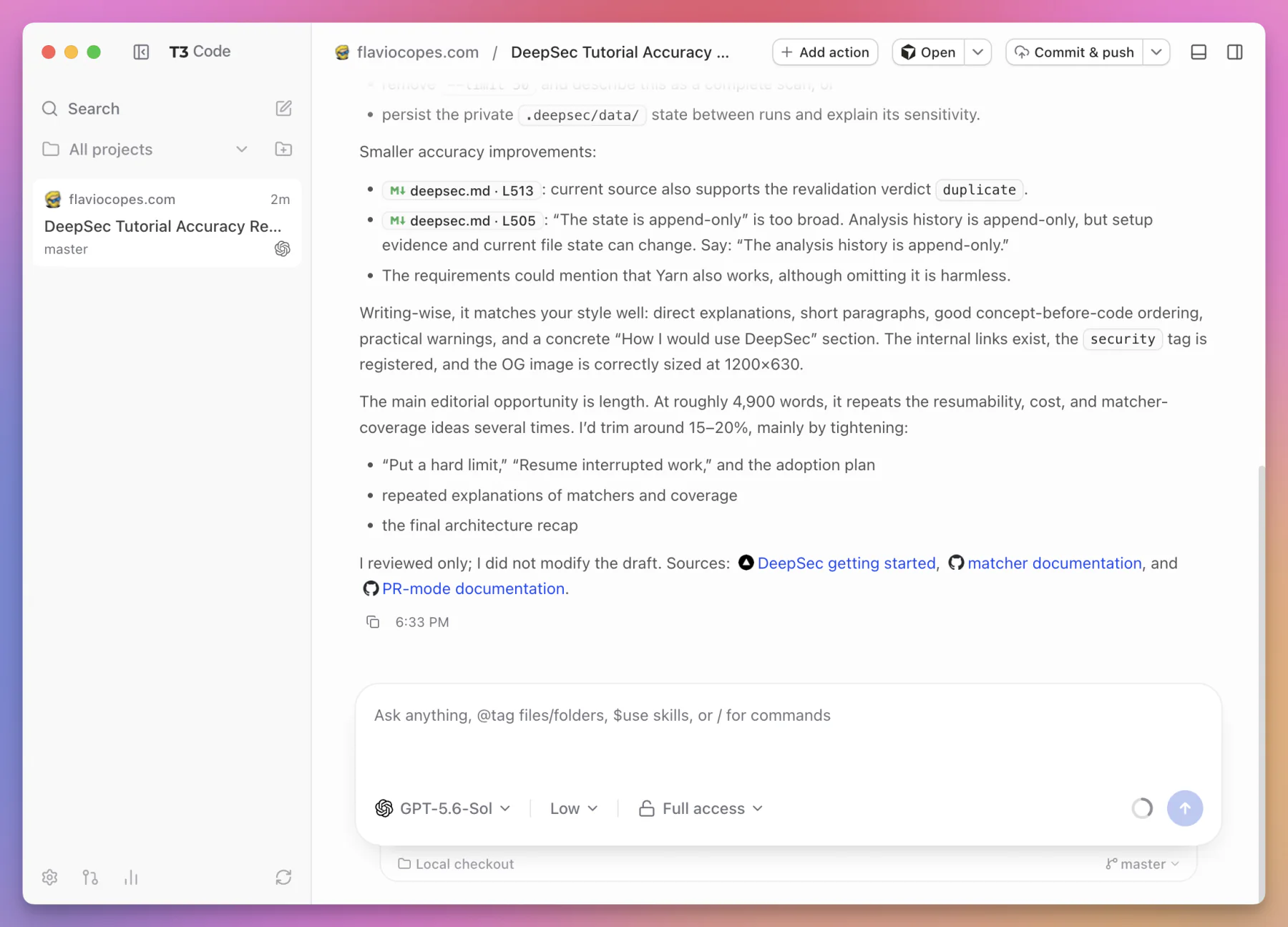
The code might still need review. Tests might be failing. A pull request might be waiting for checks. I settle the thread when the whole piece of work is calm enough to leave the active list.
If I change my mind, I can unsettle it.
Several sidebar behaviors are configurable. I can group matching repositories, settle merged or inactive threads automatically, and set the inactivity window:
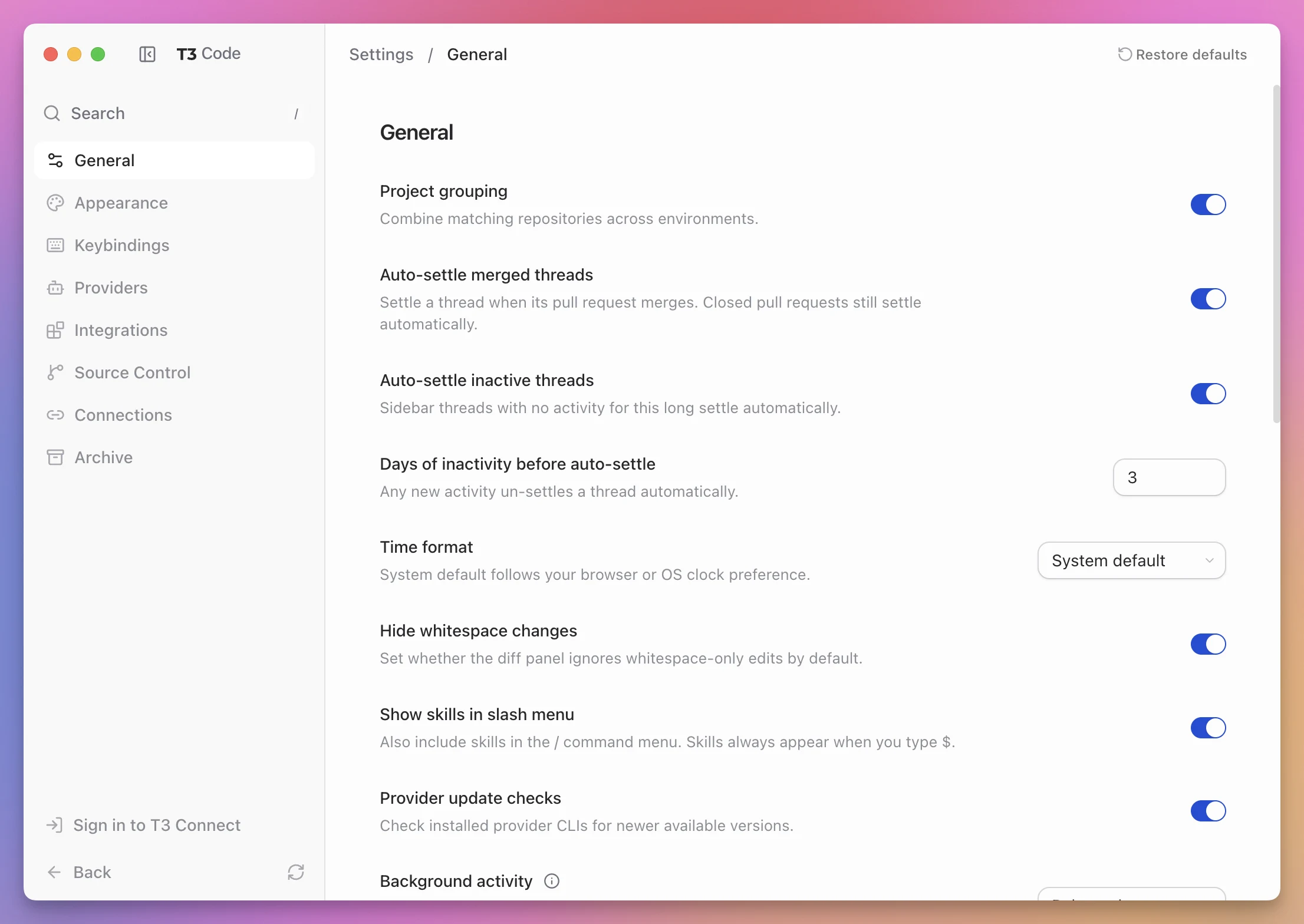
Connect a thread to a pull request
A thread can be linked to a pull request.
T3 Code can then keep the coding conversation and the source control outcome together. An optional setting can automatically settle the thread when the pull request is merged.
That is a useful lifecycle:
flowchart LR
  N["New thread"] --> W["Agent working"]
  W --> R["Review changes"]
  R --> P["Pull request"]
  P --> M["Merged"]
  M --> S["Settled"]
The conversation remains available after the task leaves the active queue.
Search across environments
The command palette can search across connected environments.
It searches more than thread titles. It can use project names, branches, user messages, and final responses.
This matters after a few weeks of work.
I might not remember that a thread was called “Repair webhook retries.” I might remember that I asked it about an idempotency key. Searching the actual messages makes the durable history useful.
T3 Code can also regenerate a thread title when the automatic one is vague.
Provider support is common at the top, different underneath
The five built-in providers appear in the same picker:
- Codex
- Claude Code
- Cursor
- Grok
- OpenCode
It would be easy to assume they are interchangeable after that.
They are not.
T3 Code gives them a shared shell for projects, threads, permissions, approvals, diffs, terminals, and source control. The agent inside that shell still has its own protocol and behavior.
The adapter layer currently works like this:
| Provider | How T3 Code talks to it |
|---|---|
| Codex | Codex app-server over JSON-RPC |
| Claude Code | Anthropic’s Claude Agent SDK and the Claude executable |
| Cursor | Agent Client Protocol through cursor-agent |
| Grok | Agent Client Protocol |
| OpenCode | The OpenCode SDK, using a child process or configured server |
You do not need to know these transports to use the app.
They explain why the integration can preserve more than terminal text.
T3 Code receives structured events. It can understand a message, tool call, approval, usage update, plan, or subagent as an event with meaning.
That is different from scraping characters from a terminal screen.
Why adapters are the hard part
Suppose Codex reports a command as a structured tool call with an approval identifier.
Claude might represent a similar action through another event shape. Cursor might carry it through ACP.
The T3 Code interface wants one approval card.
The provider adapter needs to translate both directions:
flowchart LR
  P["Provider-native event"] --> A["Provider adapter"]
  A --> C["Canonical T3 Code event"]
  C --> U["Shared interface"]
  U --> X["Approve or reject"]
  X --> A
  A --> P
The common event should preserve enough detail for the interface, but the adapter should not erase a capability just because another provider lacks it.
This is the central product challenge.
Adding a logo and a command runner is easy. Maintaining a faithful, structured integration while provider protocols change is not.
Continue an existing provider conversation
Conversation continuation also depends on the provider.
T3 Code stores its own thread history, but the provider can have native session state too. Resuming correctly means reconnecting both sides of the conversation.
This is one reason the code treats provider threads as real runtime sessions rather than replaying a Markdown transcript into a fresh process every time.
Use several accounts for one provider
T3 Code supports configured provider instances.
I can add more than one account for the same provider and choose between them.
This can be useful when I keep personal and work subscriptions separate, or when one account has access to a model another account does not.
The implementation differs by provider.
Multiple Codex accounts
For Codex, T3 Code recommends keeping the same CODEX_HOME for session history while using a shadow home for separate authentication.
That can make an account switch compatible with an existing thread because the conversation history remains reachable.
The exact continuation still depends on provider compatibility.
Multiple Claude accounts
Claude Code uses CLAUDE_CONFIG_DIR to isolate configurations.
Different configuration directories also isolate native session state. An existing thread therefore cannot usually jump from one Claude configuration directory to another and continue as if nothing changed.
The interface can show both accounts, but it cannot invent shared state that the provider keeps separate.
This is the right kind of limitation to expose.
A control plane should make complexity manageable. It should not lie about it.
Native subagents and workflows
Some providers can start subagents or structured workflows.
T3 Code shows them in an Agents panel instead of burying them in a stream of prose.
For each agent, the interface can show information such as:
- status
- model
- reasoning effort
- elapsed time
- tokens
- tools used
- progress
- result
This makes delegation observable.
If a parent agent says “I asked three agents to investigate,” I do not have to trust that sentence alone. I can see the child runs and their state when the provider exposes them.
The word native is important.
T3 Code is not simulating subagents for every provider. It is rendering the structure supplied by a provider that supports it.
Terminals are attached to the server environment
T3 Code includes terminals for projects and threads.
The terminal process runs on the server machine in the relevant directory.
If I open T3 Code from my phone and start a command, the command does not run on the phone. It runs on the Mac or server that owns the environment.
The thread terminal is useful for:
- starting a development server
- running a focused test
- checking Git status
- inspecting a log
- reproducing an agent command manually
- opening a provider login flow
The terminal sits beside the conversation and workspace. I do not have to hunt for the right tab in another application.
The terminal drawer can hold several terminals while the conversation remains visible above it:
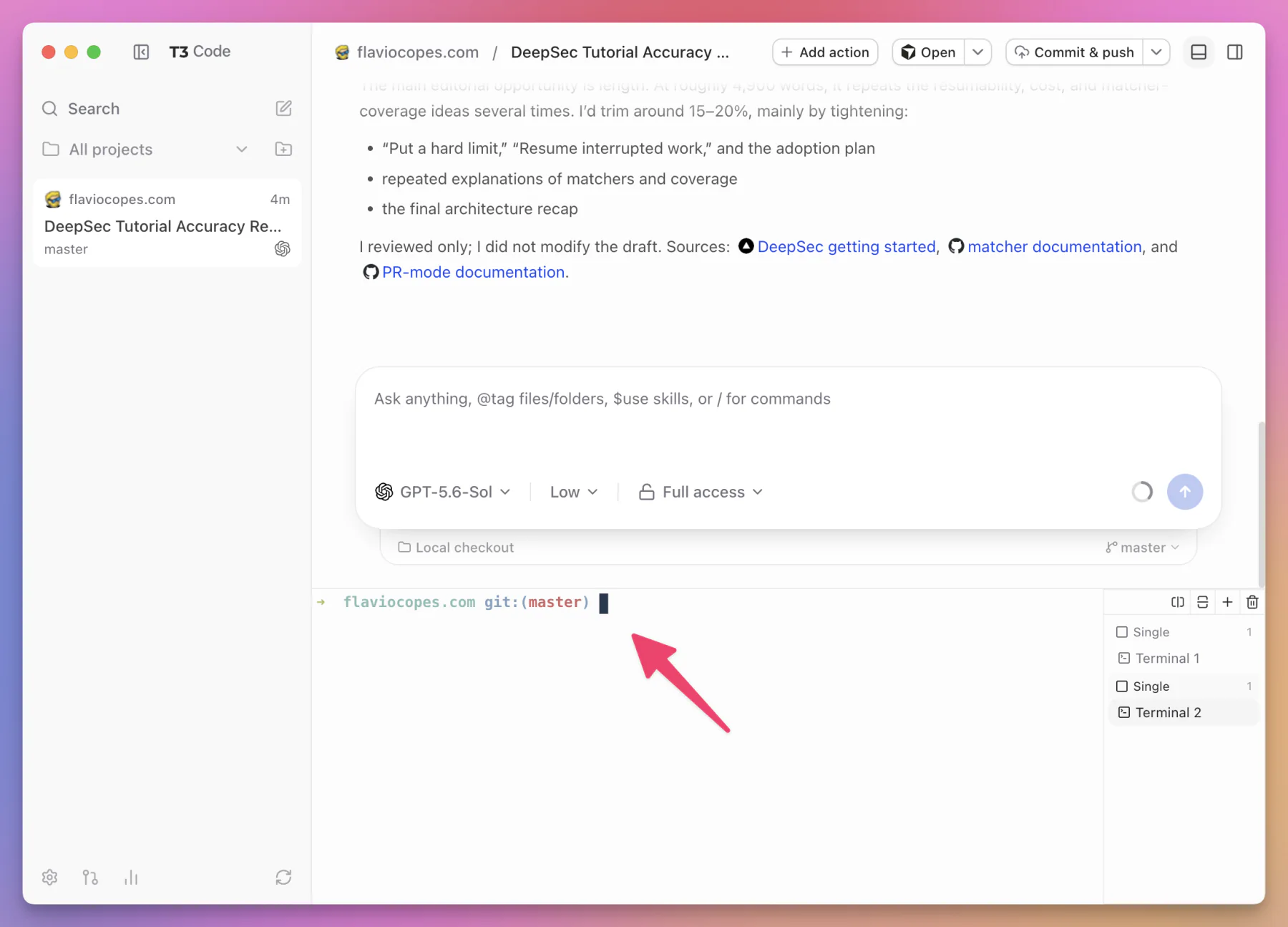
I would still avoid turning every action into a manual terminal session.
Repeatable project commands belong in t3.json. The terminal is best for exploration and one-off operations.
Browse, read, and edit project files
The file panel can browse the project tree and open project files.
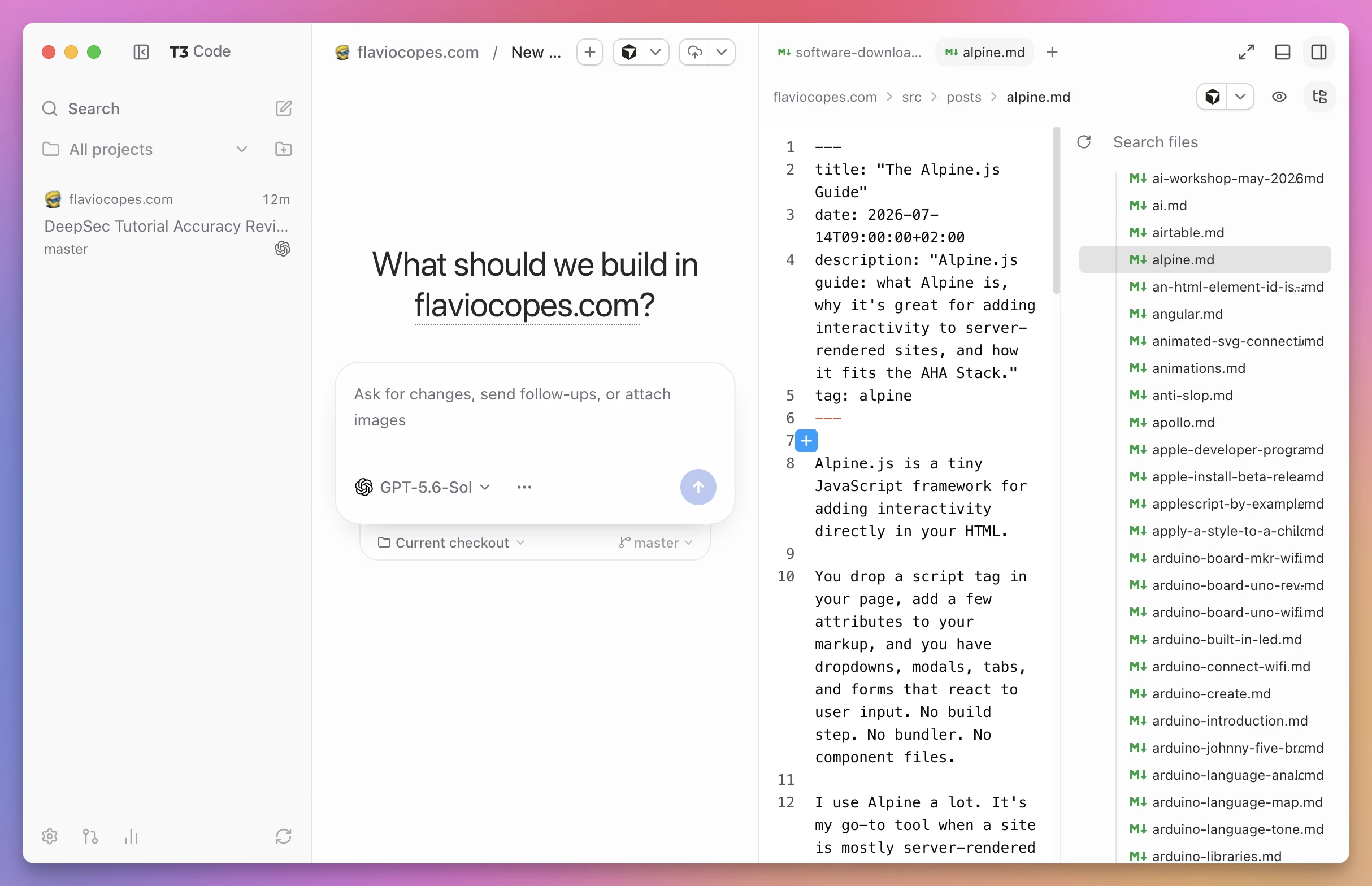
It supports source previews, Markdown rendering, and image previews. Text files can be edited and saved from the interface.
I can select lines and attach a review comment to the composer. This gives the agent precise context without copying a vague sentence such as “look at the function around the middle of the file.”
T3 Code can also search project filenames and file contents.
This is enough for the common review loop:
- Open the file changed by the agent.
- Read the surrounding code.
- Select the exact lines that need work.
- Add a comment to the next prompt.
- Ask the agent to correct it.
The file editor is useful, but I see it mainly as a review and correction surface.
If I am going to write a new subsystem by hand, I still want the language tooling and mature editing features of my normal editor.
Review diffs at three useful scopes
A final agent message is a summary written by the agent.
The diff is evidence.
T3 Code can show changes at different scopes:
- one turn
- the whole branch
- currently unstaged work
These answer different questions.
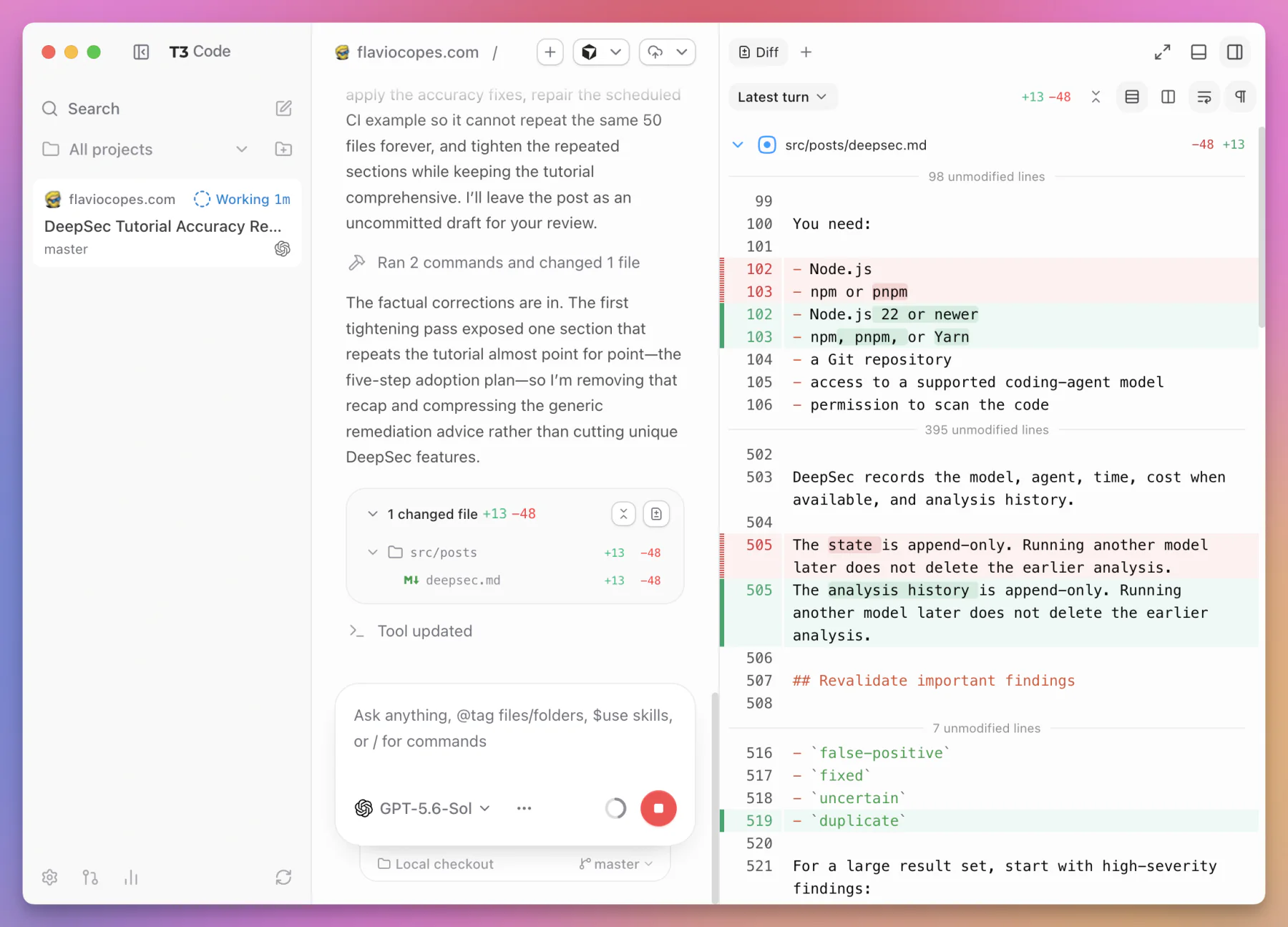
Per-turn diff
The per-turn diff answers:
What changed because of this prompt?
This is ideal when I asked for one correction and want to verify that the response stayed in scope.
The Latest turn scope puts the agent explanation beside only the lines changed during that turn:
Branch diff
The branch diff answers:
What would this branch introduce compared with its base?
This is the right view before a commit or pull request.
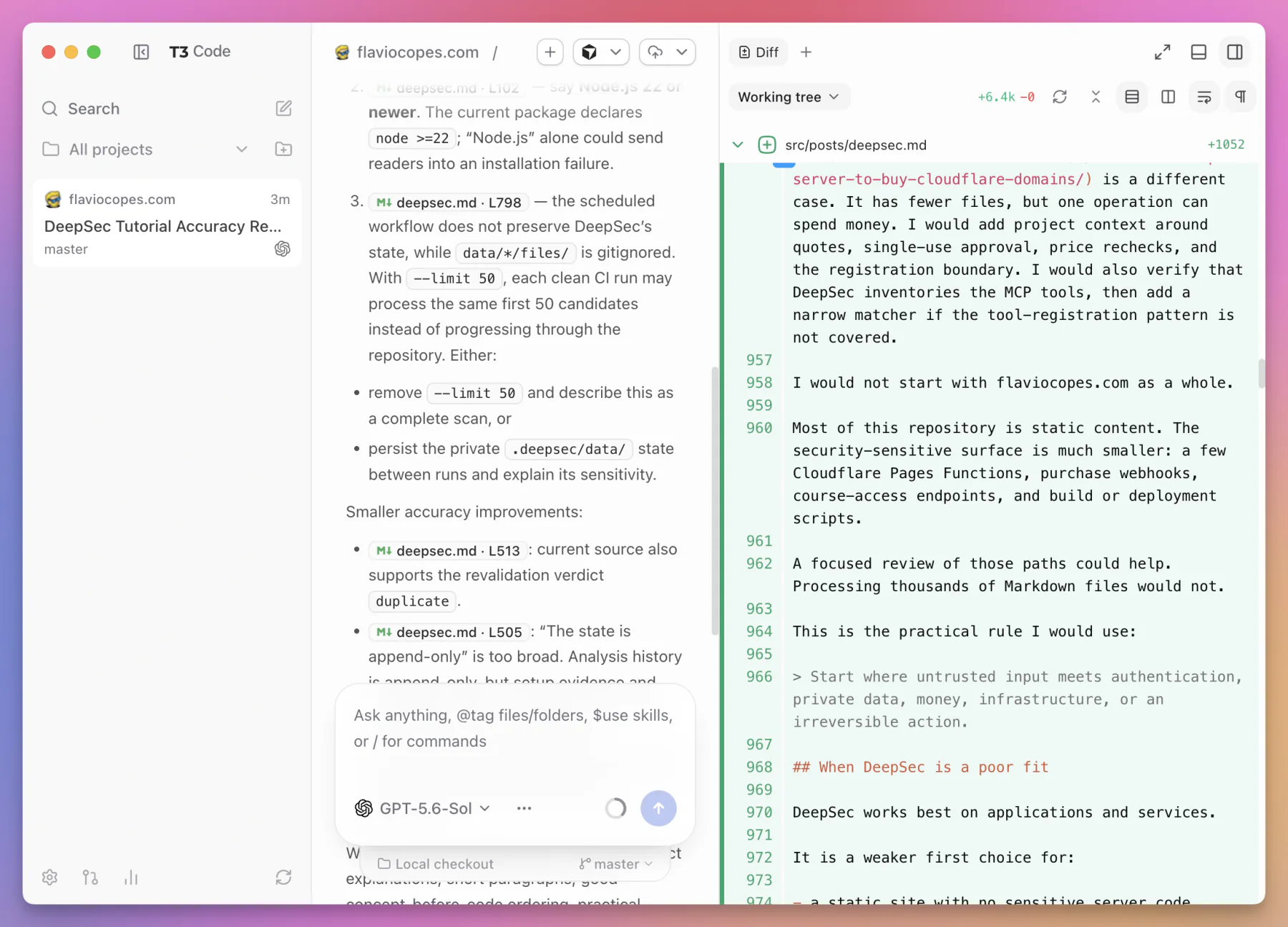
Unstaged diff
The unstaged diff answers:
What is currently modified but not staged?
This helps when the work contains several turns and Git operations.
The Working tree scope shows the full current file change, including additions that came from earlier turns:
The interface also supports review comments on diff lines. I can send the selected code and comment back into the conversation.
This keeps the review loop attached to exact evidence.
Checkpoints and message-level revert
T3 Code creates workspace checkpoints around each turn.
The checkpoints are stored through hidden Git refs.
That gives the interface a stable before and after state even when the agent makes several edits during one turn.
On an earlier message, I can choose Revert to this message.
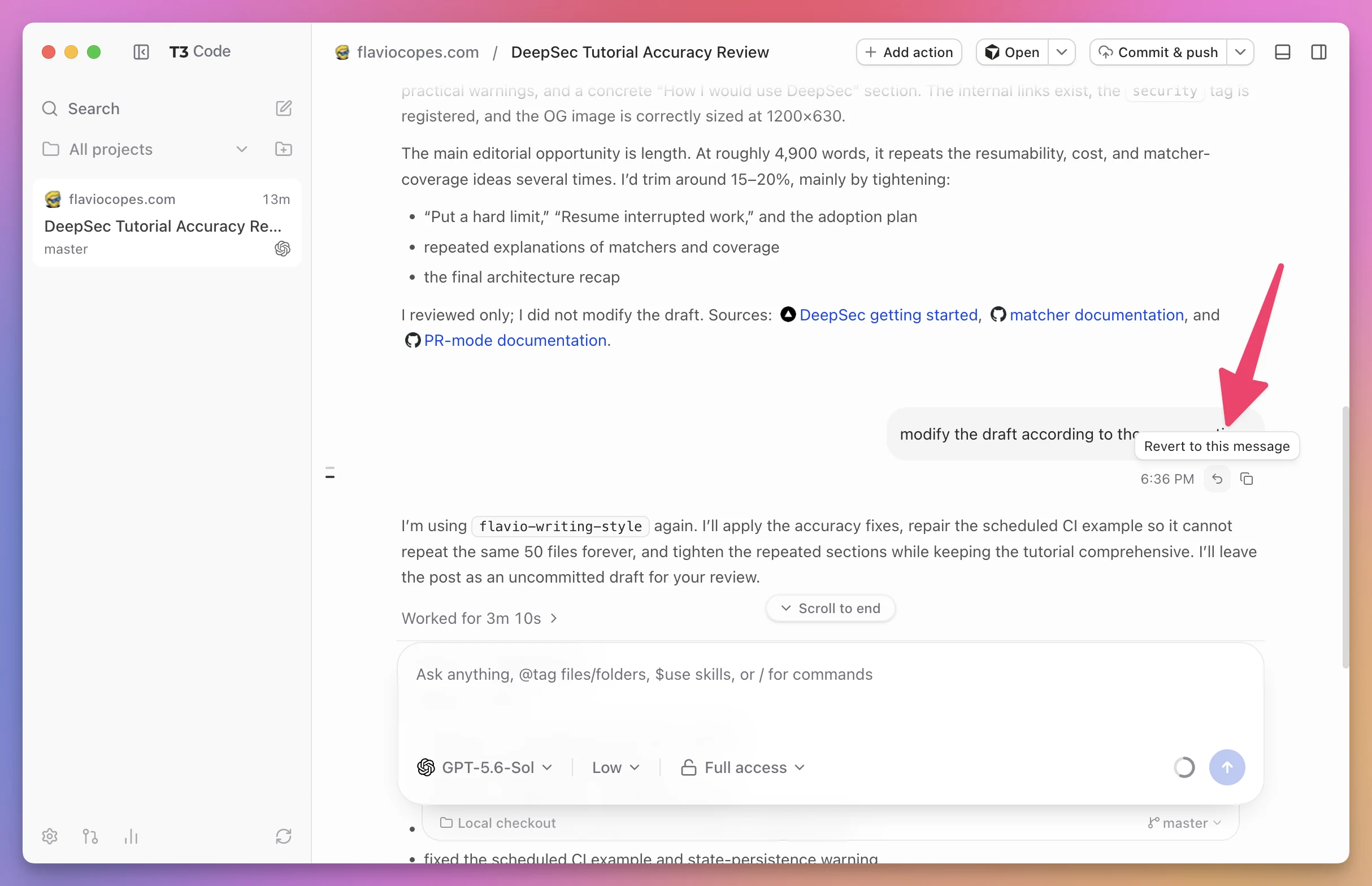
T3 Code then restores both sides of the task:
- the workspace checkpoint
- the provider conversation state
Restoring only the files would be incomplete. The provider would still believe later messages and edits had happened.
Restoring only the conversation would be worse. The agent would reason from an old history while newer files remained on disk.
The coordinated revert keeps them aligned.
T3 Code does not allow the revert while a turn is running. The active provider process and workspace need to reach a safe boundary first.
A checkpoint is not a backup
I would not treat hidden refs as a replacement for commits, remote pushes, or backups.
A checkpoint is a convenient local recovery mechanism for an agent turn.
A Git commit is a named, inspectable project milestone.
A remote repository protects the work if the local machine or repository disappears.
I still commit reviewed work and push it.
Preview a running application
A project script can declare a previewUrl and ask T3 Code to open it automatically.
For example:
{
  "name": "Development server",
  "command": "npm run dev",
  "icon": "play",
  "previewUrl": "http://localhost:3000",
  "autoOpenPreview": true
}
When I run the script, the application opens in T3 Code’s preview panel.
This keeps three things close together:
- the agent conversation
- the terminal that runs the app
- the visible result
The preview includes browser-style navigation and recent URLs. A local server card helps reopen detected development servers.
There is also a preview bridge for supported automation and inspection flows.
The preview is not only a convenience for frontend projects.
It shortens the feedback loop. I can read the agent’s explanation, inspect the diff, and look at the rendered result without reconstructing the right browser tab.
Source control and pull requests
T3 Code includes source control operations around the thread workspace.
It can work with:
- GitHub
- GitLab
- Bitbucket
- Azure DevOps
The exact setup depends on the host.
Git is required on the server machine.
For GitHub, the official instructions require GitHub CLI 2.81 or newer. GitLab uses glab. Bitbucket can use an environment token. Azure DevOps uses its CLI extension.
Authentication again belongs on the server machine.
After setup, the workflow can include:
- clone or add a repository
- create a repository
- publish an existing local repository
- inspect changes
- commit
- push
- create a pull request or merge request
- generate a title and body
- read reviews and checks
- edit pull request details
- reply to review comments
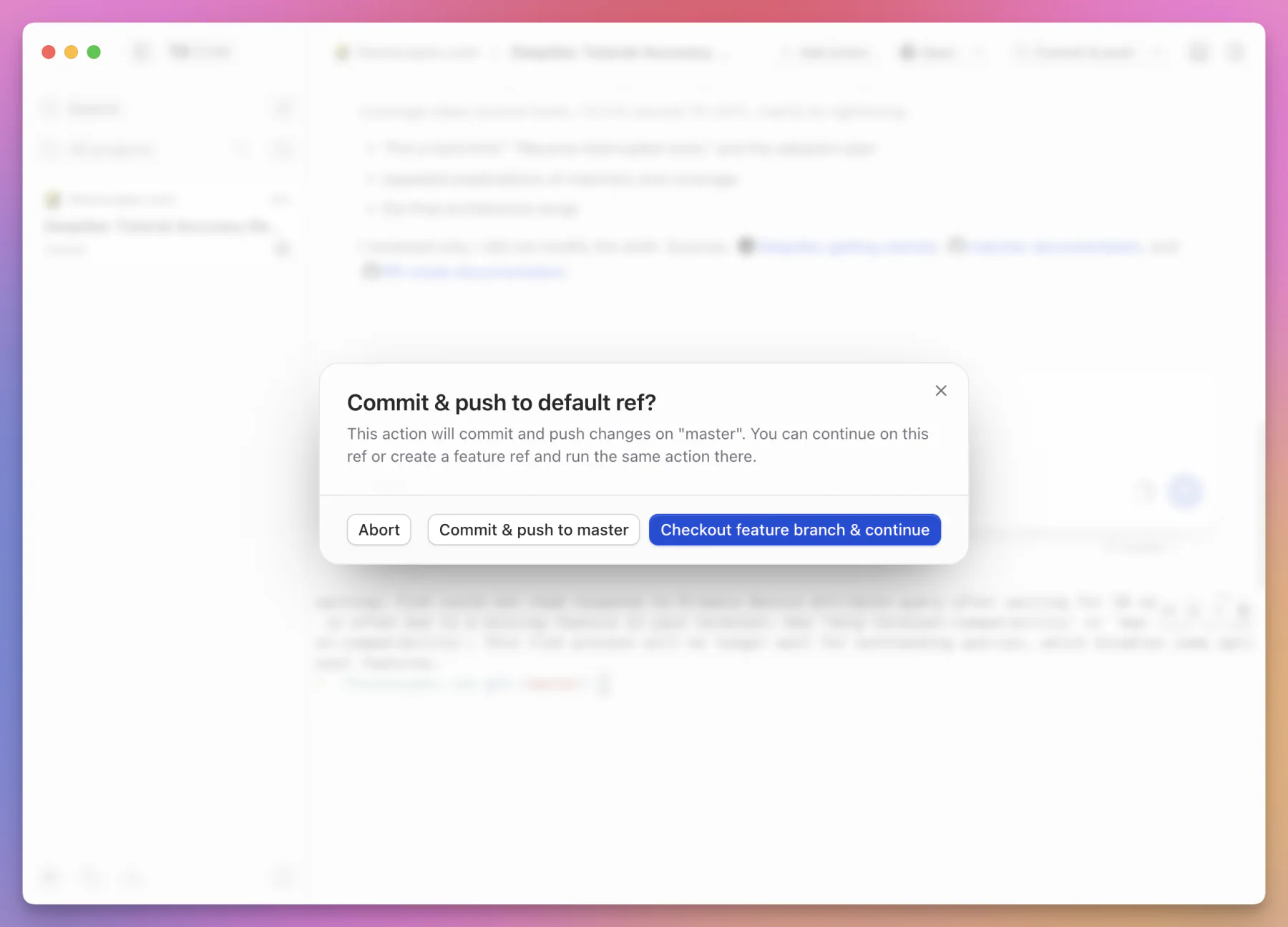
T3 Code also stops before committing directly to the default branch. I can abort, continue on master, or move the work to a feature branch first:
Azure DevOps comments are currently read-only in T3 Code.
This is a broad surface, but I would keep one rule:
The agent can prepare a pull request. The diff and checks decide whether I trust it.
Generated titles and summaries save time. They do not replace review.
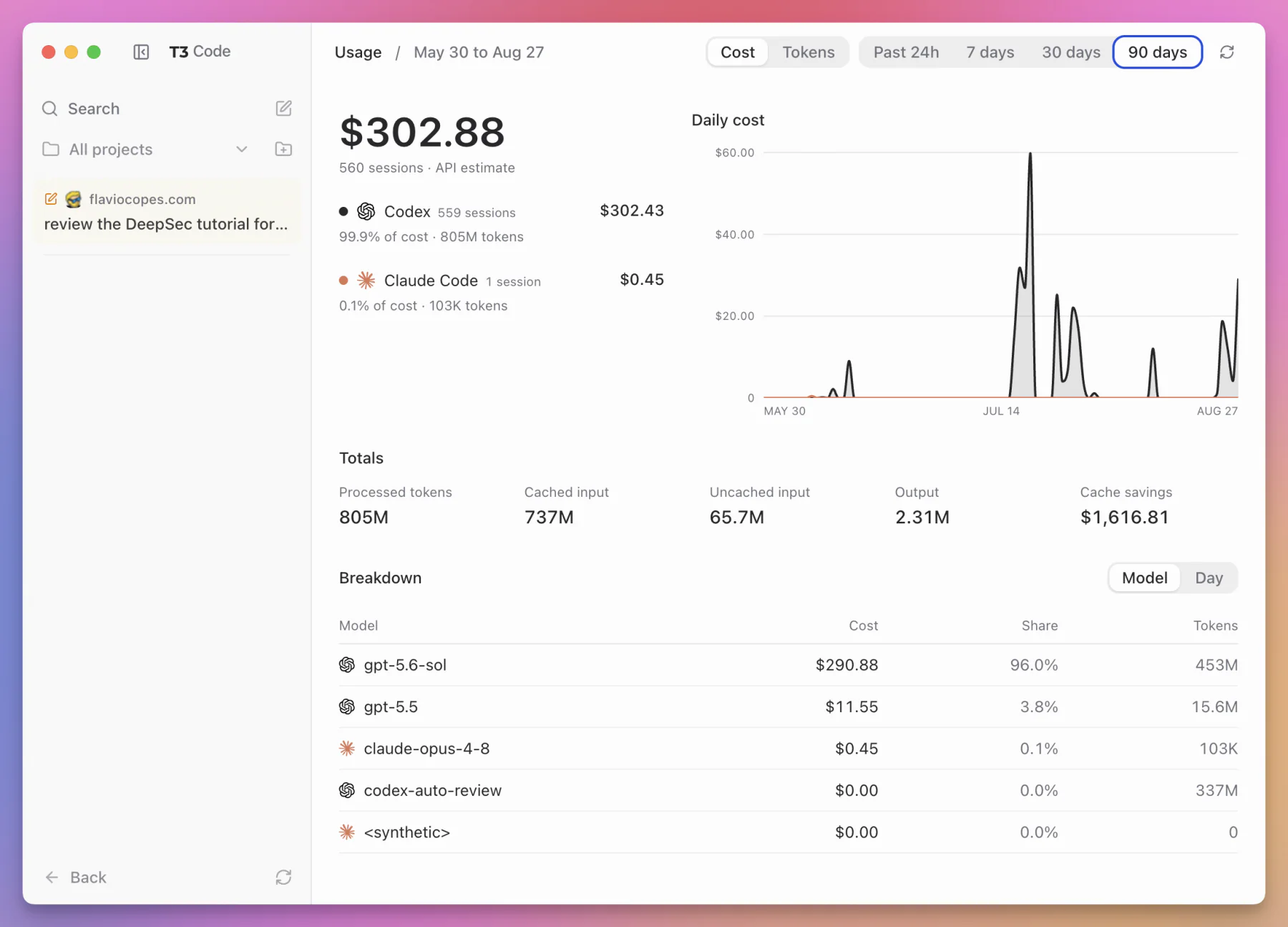
The usage page
T3 Code can summarize provider usage from local session history.
The usage page currently combines data for Codex, Claude, and Grok.
It can show:
- token counts
- model breakdowns
- provider breakdowns
- cache savings
- API-equivalent cost estimates
The dashboard can switch between cost and tokens, choose a time range, and break totals down by provider, model, or day:
The phrase API-equivalent matters.
If I use a monthly subscription, the estimate does not mean the provider will add that exact amount to my invoice. It answers a different question: what would this token usage cost at API prices?
That makes the page useful for comparing workloads and understanding scale.
It is not a replacement for the provider’s billing page.
Local history can also be incomplete if sessions were run elsewhere, removed, or stored in another provider configuration.
Remote access changes the product
Without remote access, T3 Code is a local desktop and browser interface for several agents.
With remote access, it becomes a way to operate one development machine from several devices.
The server can be reached through:
- a local network address
- Tailscale
- T3 Connect
- an SSH connection managed by the desktop app
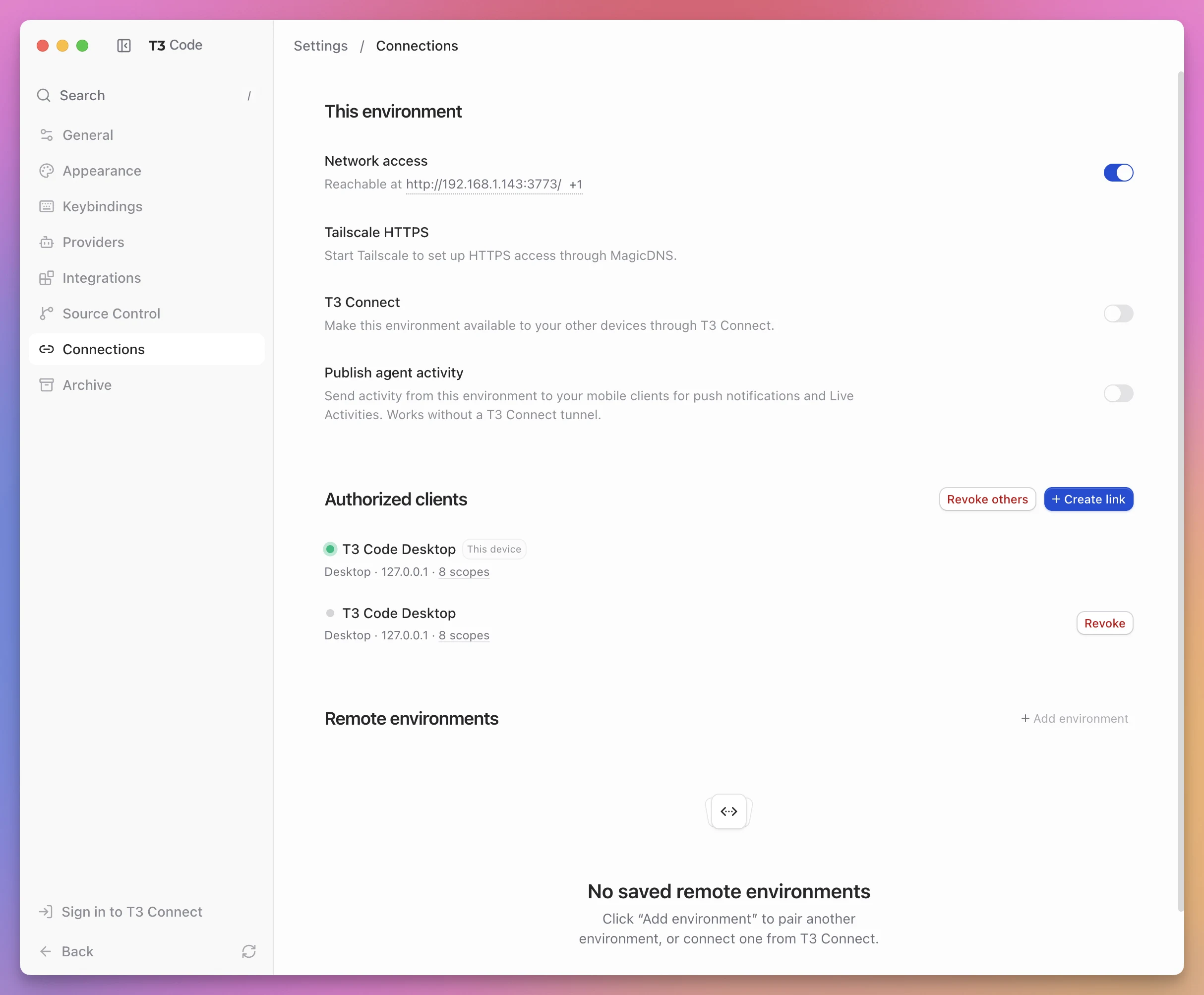
The Connections page keeps the network routes, authorized clients, pairing controls, and remote environments together:
There is also a hosted web client at app.t3.codes.
The hosted client does not automatically mean the work is proxied through a T3 Code backend. In a direct pairing, the browser connects to my T3 Code server.
Start a headless server
On a machine without the desktop app, run:
npx t3@latest serveThis starts the server without opening the local web interface.
To bind it to the machine’s Tailscale address:
npx t3@latest serve --host "$(tailscale ip -4)"T3 Code also has a --tailscale-serve option for the Tailscale Serve flow.
Pair a client
For a running server, create a fresh pairing token:
npx t3@latest pairThe command gives me a one-time link and QR code.
For Tailscale:
npx t3@latest pair --tailscaleI open the link or scan the QR code on the client I want to connect.
Treat that link like a password.
Anyone who receives a valid pairing link can try to establish a session with the server.
Direct network access
The desktop app can expose its server to the network and create pairing links.
The safest simple setup is a trusted private network such as my own Tailscale tailnet.
I would not expose a development server directly to the public internet just because it has a pairing token.
There are more layers of authentication after pairing, but network exposure still deserves care.
Browser mixed-content rules
There is one web detail that can be confusing.
If I open the hosted client over HTTPS, the browser will block a connection to an insecure HTTP or WebSocket backend because of mixed-content rules.
The remote backend therefore needs an HTTPS and secure WebSocket address for that setup.
This is a browser security rule, not a T3 Code bug.
Pairing URLs do not keep the token in normal navigation
The pairing token is placed in the URL hash.
After the client consumes it, the token is removed from the visible URL. The hash is also not sent to the web server as part of the HTTP request.
This reduces accidental leakage through server logs and later link sharing.
It does not make a copied pairing URL harmless before it is used.
Tailscale, T3 Connect, and SSH are different routes
The remote options can look like four names for the same thing. They solve different setup problems.
Tailscale
Tailscale gives my devices a private network and stable addresses.
T3 Code still handles its own session authentication. Tailscale supplies the route to the server.
This is my preferred option when I own all the devices and already use Tailscale.
The path is easy to understand:
flowchart LR
  P["Phone or laptop"] --> T["Private Tailscale network"]
  T --> S["T3 Code server"]
  S --> R["Repositories and providers"]
T3 Connect
T3 Connect is the managed remote-access path.
It uses account authentication and a managed tunnel setup. The relay helps discover and set up the connection. After that, client traffic goes directly to the environment instead of passing through a central application server.
The client reaches the environment through its provisioned Cloudflare tunnel hostname.
This removes some manual network configuration.
It also introduces a managed service into a setup that can otherwise be fully direct.
I would choose it for convenience, and choose direct or Tailscale access when I want to own the whole network path.
Desktop-managed SSH
The desktop app can connect to a remote host over SSH.
It starts or reuses a T3 Code server on the remote machine and creates a local port forward.
This is useful when the repository and build environment already live on a server.
The remote host owns the work:
- provider processes run there
- Git operations run there
- files are read there
- terminals run there
- local state is stored there
The desktop app is the window into that environment.
This is not the same as opening a local repository and sending individual commands over SSH.
How remote authentication works
The full protocol is more careful than sending one permanent token with every WebSocket message.
The simplified flow is:
- A pairing token establishes a client session.
- The client uses the session to request a short-lived WebSocket ticket.
- The ticket opens the authenticated RPC connection.
- Individual operations are checked against session scopes.
The WebSocket ticket lasts about five minutes.
Normal bearer sessions last 30 days. DPoP-bound relay sessions are shorter and last about one hour.
DPoP binds a session to a key held by the client. A stolen token alone is less useful because the attacker also needs the matching key proof.
The important practical lessons are simpler than the protocol names:
- create a fresh pairing link for each client
- do not paste pairing links into public chats or issue trackers
- remove sessions I no longer use
- keep the server on a trusted network when possible
- remember that an approved remote client can reach powerful operations
The t3 auth command manages sessions from the server side.
Install T3 Code as a background service
An always-on remote environment is more useful when the server survives a terminal closing.
T3 Code includes service commands:
npx t3@latest service installCheck it:
npx t3@latest service statusUpdate it:
npx t3@latest service updateRemove it:
npx t3@latest service uninstallOn Linux, this installs a user systemd service. The setup enables lingering so the user service can start at boot without an interactive login.
On macOS, it installs a LaunchAgent. A LaunchAgent starts when the user logs in and stops when the user logs out.
Windows does not currently support the background service command.
The updater takes a snapshot of the SQLite state before activating a candidate version. If the new server fails its health check, the launcher can roll back.
That is a sensible feature for an application that stores active threads and may run far from the client.
On macOS, unattended operation still has operating system limits. The user needs to remain logged in and the machine needs to stay awake. FileVault also conflicts with automatic login after a cold boot.
If I need a truly unattended environment, Linux is the cleaner target.
Keep server and clients on compatible versions
T3 Code’s clients and server share a typed protocol.
When one side updates and the other does not, a large version gap can introduce behavior the older side does not understand.
The project recommends updating the server and clients together.
I would also avoid updating the server while an agent turn is running. A server restart interrupts the provider process and active RPC connection.
Mobile clients update through their normal app distribution path. A remote server needs its own update.
This is easy to forget because the interface feels like one product. Operationally, it can be several installations:
- desktop client on a Mac
- web client in a browser
- mobile client on a phone
- local server on one computer
- remote server on another computer
The environment page should be part of the update check when something suddenly stops connecting after a new release.
Where T3 Code stores its state
By default, T3 Code keeps server-owned data under:
~/.t3/userdata/That directory contains data such as:
state.sqlite- settings
- keybindings
- attachments
- logs
- secrets
- the environment identifier
The main state is stored in SQLite through Node’s built-in node:sqlite support.
This is why threads can survive a client closing. The browser is not the database.
It is also why two T3 Code servers are two environments even if I open both from the same browser. Each server owns its own database and filesystem.
Back up the right things
My repositories still need normal Git remotes and backups.
If the T3 Code conversation history matters, I also need to protect the server state directory.
I would stop the service before copying an active SQLite database, or use a backup method designed for SQLite. The service updater already snapshots state for its own rollback process, but that is not a general disaster recovery plan.
Provider-native session data can live outside ~/.t3/userdata/ in the provider’s own directories.
T3 Code coordinates those sessions. It does not move every provider’s files into one database.
What stays local and what leaves the machine
“Local” is an overloaded word in AI tools.
Here is the useful split.
Stored and executed on the T3 Code server machine
- project files
- Git worktrees
- shell commands
- terminals
- T3 Code’s SQLite state
- attachments stored by the server
- provider CLI installations
- provider credentials and configured secrets
- checkpoints
- local logs
Sent to the selected provider as part of normal agent use
- prompts
- code or file context selected by the provider
- command and tool results
- conversation history needed for the session
- images or attachments included in the prompt
Sent through the chosen remote path
- thread events rendered by a remote client
- user commands and approvals
- file and diff content requested by the client
- terminal traffic
The exact path depends on direct access, Tailscale, T3 Connect, or SSH forwarding.
If the client is on the same machine, there is no need for an external network hop to reach the T3 Code server. The provider may still use the internet.
If a repository cannot be shared with a provider, using T3 Code does not change that policy question. I need a provider and deployment model allowed for that code.
The architecture
The public interface explains what T3 Code can do.
The source code explains why the pieces behave the way they do.
The repository is a monorepo with separate applications and shared packages.
At a high level:
flowchart TD
  subgraph Clients
    WEB["React web app"]
    DESK["Electron desktop app"]
    MOB["Expo mobile app"]
  end
  WEB --> CR["Shared client runtime"]
  DESK --> CR
  MOB --> CR
  CR --> RPC["Authenticated Effect RPC WebSocket"]
  RPC --> SERVER["T3 Code server"]
  SERVER --> DB["SQLite state and projections"]
  SERVER --> FS["Filesystem, Git, terminals"]
  SERVER --> AD["Provider adapters"]
  AD --> CODEX["Codex"]
  AD --> CLAUDE["Claude Code"]
  AD --> CURSOR["Cursor"]
  AD --> GROK["Grok"]
  AD --> OPEN["OpenCode"]
The web application uses React and Vite.
The desktop application packages the experience with Electron.
The mobile application uses React Native and Expo for iOS and Android.
The marketing site is built with Astro.
The server and shared runtime use Effect heavily. The repository currently uses TypeScript across the stack.
These framework names are less important than the boundary they support.
All clients share one runtime model and one set of contracts. The server remains the only part allowed to perform environment work.
One authenticated RPC connection
The clients communicate with the server through an authenticated WebSocket.
On that connection, Effect RPC carries typed requests, responses, errors, and streams.
The endpoint is:
/wsWhy use one long-lived connection?
Agent work is not a sequence of isolated page loads.
A turn can emit text, tool calls, approvals, usage updates, plan changes, subagent events, and completion status over several minutes. Terminals and repository state can also change while the client is open.
A WebSocket lets the server push these events as they happen.
Typed contracts give every client the same vocabulary. The web application should not interpret a provider event one way while the mobile application interprets it another way.
The server also applies operation scopes. Authentication answers “which session is this?” Scopes answer “which operations may this session call?”
The server is the execution boundary
This is the most important architectural rule in T3 Code:
Clients do not run provider processes, Git commands, terminal commands, or filesystem operations. The server does.
That rule prevents several classes of confusion.
The phone does not need Codex installed.
The hosted web client does not need a copy of my repository.
The desktop interface does not need a separate model of Git state from the server.
Every surface asks the same environment to perform the work.
It also concentrates power.
Compromising an authenticated server session can expose more than chat messages. It can expose operations on the machine. That is why pairing, session scopes, network placement, permission modes, and server secrets all matter.
Commands, events, and projections
The server uses an event-sourced design.
That phrase sounds abstract. The practical idea is simple.
Instead of every request directly changing arbitrary database rows, T3 Code treats an action as a command.
For example:
thread.createA pure decision function looks at the current state and decides which facts should be recorded. Creating a thread produces a thread.created event that records the project, model, permission mode, interaction mode, branch, and worktree.
Events are written to the database. Projections turn the event history into the current views needed by the interface.
flowchart LR
  C["Typed command"] --> D["Pure decision"]
  D --> E["Persisted events"]
  E --> P["Updated projections"]
  E --> Q["Side-effect queue"]
  P --> S["Client subscribers"]
  Q --> R["Reactors"]
  R --> X["Provider, Git, filesystem"]
The events and projections are committed in the same SQLite transaction.
That means clients should not observe a recorded event while the corresponding current-state view is still missing.
A single worker serializes command processing. Two commands cannot act on the same stale state at the same time.
Why events fit agent work
Agent work is a timeline.
A thread starts. A turn begins. The provider emits events. It asks for permission. I approve. A tool runs. Files change. The turn ends.
Recording meaningful facts matches that shape naturally.
It also helps multiple clients stay synchronized. A mobile app can subscribe to the same server facts as the desktop app.
Side effects happen through reactors
A pure decision function should not start a process or modify a file.
It records the intent as events and queue items.
Queue-backed reactors handle the effects that touch the outside world:
- start a provider
- run a command
- manipulate Git
- update files
- continue a workflow
The results return as more events.
Separating decisions from effects makes failure easier to reason about. The database can say what the system intended and what outcome it later observed.
It is more machinery than a direct function call. For a multi-client agent server with long-running work, recovery, and durable timelines, the machinery has a purpose.
Provider adapters preserve the edges
The server has five built-in provider drivers.
Each driver is responsible for the provider-specific lifecycle:
- discover or validate the executable
- expose available models and settings
- start or connect to a provider session
- resume a native conversation
- send user input
- receive streaming events
- answer approvals
- interrupt a turn
- normalize usage and errors
The rest of the application should not need a large if provider === ... block in every component.
Provider complexity belongs at the adapter boundary.
This design also creates a standard for future providers.
A new integration is not complete because it can print model text. It needs to explain how threads continue, how permissions map, how interruption works, what usage data exists, and which provider-native capabilities should surface.
That is a much higher bar, and it is the correct one for a control plane.
Work artifacts and checkpoints
The chat transcript is not the only output of a thread.
T3 Code also tracks work artifacts such as plans, changes, command output, approvals, and provider activity.
Workspace checkpoints give file state a place in the same timeline.
The hidden Git refs are an elegant choice because Git already knows how to represent trees and changes efficiently.
T3 Code does not need to copy every project file into SQLite after each turn.
It can point at Git objects and compute diffs between checkpoints.
This works best when the project is a Git repository. A non-Git directory cannot offer the same source control semantics.
The client runtime
The browser, desktop app, and mobile app share a client runtime package.
That package maintains the client-side view of environments, projects, threads, connection state, and streamed activity.
The user interfaces remain different where the devices are different.
A desktop has room for a sidebar, wide diff, terminal drawer, and preview panel at once.
A phone needs a narrower navigation model and touch controls.
Sharing the state machinery does not require pretending the screens have the same shape.
This is the right split: common behavior, device-specific presentation.
Why SQLite is enough
T3 Code is a server, but it is primarily a personal environment server.
It does not need a distributed database cluster to manage one machine’s projects and threads.
SQLite gives it:
- transactions
- durable local state
- no separate database service
- simple installation
- a portable state file
- good read performance for local projections
The single command worker also fits the model. A personal environment gains more from a clear order of durable changes than from unlimited write concurrency.
This would be a different decision for a multi-tenant hosted platform serving thousands of users from one database.
T3 Code is not built around that boundary.
How I would use T3 Code
I maintain several websites and products.
At any moment I might be working on flaviocopes.com, Prototyped, StackPlan, Sitebase, or a small launch that is still taking shape.
The problem for me is not opening one repository.
It is maintaining a reliable view of work spread across many repositories, providers, and terminals.
T3 Code could become the dashboard above that work.
One project per repository
I would add each active repository as a project.
The sidebar would give me one place to see:
- which project has an active agent
- which task needs approval
- which task is ready for review
- which work has reached a pull request
- which old thread contains a useful decision
I would keep long-lived project rules in the repositories, not in a conversation.
T3 Code can present the thread, but AGENTS.md, project documentation, skills, and source-controlled configuration remain the durable source of truth.
This matches how I use my own fstack software factory. The control surface can change. The workflow contract should live with the project.
A cautious configuration for flaviocopes.com
This site has an established rule: agents work in the current checkout, not in Git worktrees.
I would represent that honestly:
{
  "$schema": "https://t3.codes/schema/t3.json",
  "defaultThreadEnvMode": "local",
  "scripts": [
    {
      "name": "Start Astro",
      "command": "npm run dev",
      "icon": "play",
      "previewUrl": "http://localhost:3000",
      "autoOpenPreview": true
    },
    {
      "name": "Build site",
      "command": "npm run build",
      "icon": "build"
    }
  ]
}
Because the project uses the current checkout, I would run only one writing agent at a time.
Other T3 Code threads could still help in parallel with bounded read-only work:
- inspect official documentation
- review a draft for technical mistakes
- search for related posts
- analyze a build failure
- compare the result with project rules
One thread owns edits. The others return evidence.
This is slower than giving five agents full access to one directory, but it avoids accidental overlap and mixed commits.
Worktrees for disposable prototypes
For a repository designed for independent branches, I would choose worktrees by default.
Each implementation thread could get:
- its own branch
- its own dependency setup
- its own development port
- its own database or test namespace
- its own pull request
I would add a worktree setup script that assigns those resources automatically.
Then I could start one feature, one bug fix, and one experiment without allowing them to edit the same files.
Different providers for different jobs
I would not switch providers randomly inside one task.
I would choose them based on the work and keep each thread coherent.
For example:
- one provider implements a bounded change
- another thread reviews the diff independently
- a third provider investigates a strange runtime behavior
The common T3 Code interface would make the threads easy to compare without pretending the agents reason identically.
Mobile for attention, not deep review
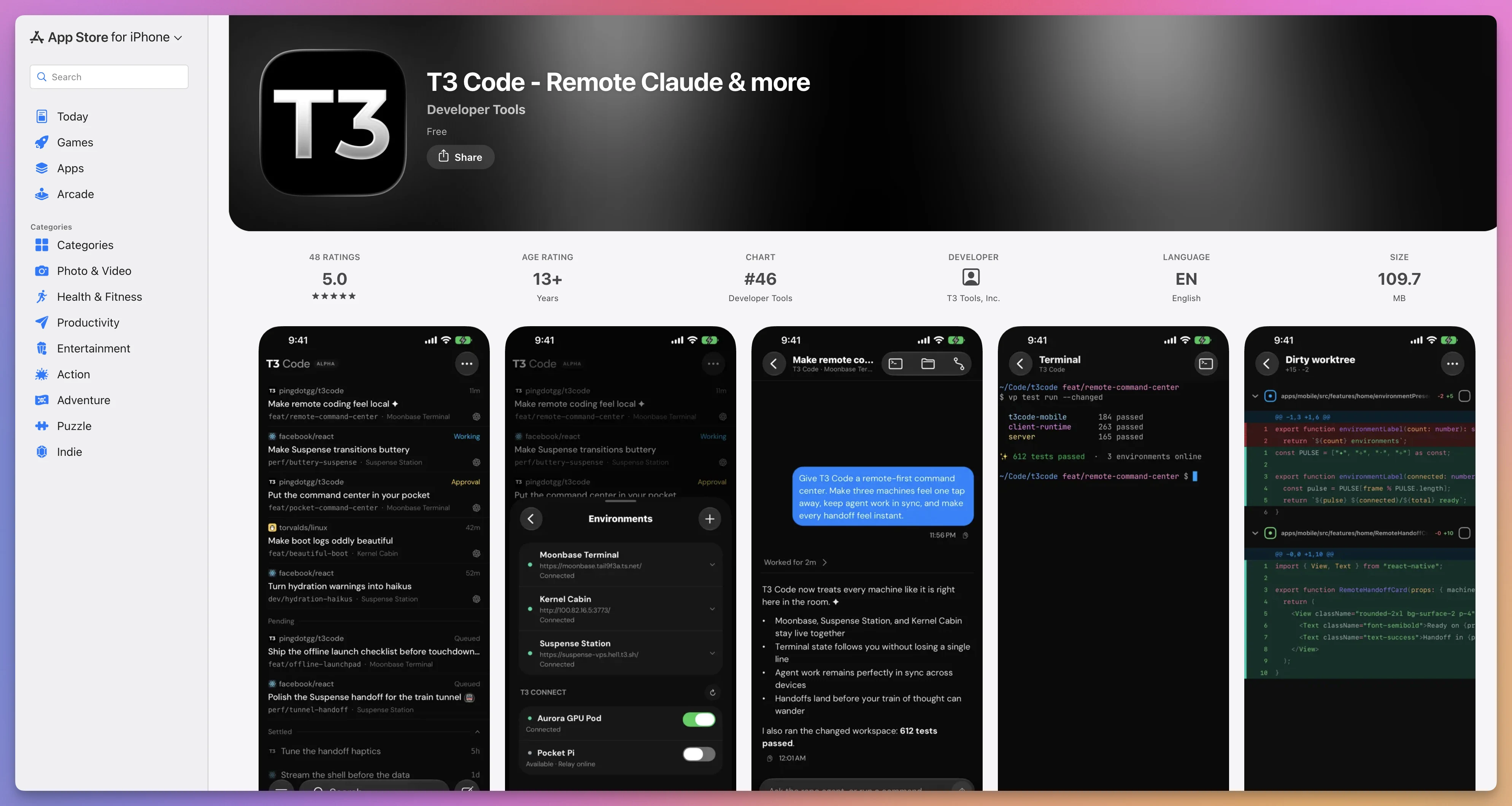
The iPhone app exposes environments, threads, terminals, and diffs from a smaller screen:
The phone client is useful for:
- seeing that an agent finished
- reading a short result
- answering a safe, clear question
- rejecting an unexpected permission request
- sending a follow-up while away from the desk
I would not approve a destructive command or merge a large change from a tiny screen without reading the relevant context.
Remote access makes work reachable. It does not make every device equally good for every decision.
Settle only when the durable outcome exists
I would settle a thread after its real outcome is complete.
That might mean:
- the draft is ready for review
- the tests pass
- the commit exists
- the branch is pushed
- the pull request is merged
- the external system has been updated
The agent saying “done” is one event. The project reaching its definition of done is the outcome.
A complete example workflow
Suppose I want to add a small feature to a web application.
Here is how I would run it.
1. Create the thread
I choose the project, a worktree, Supervised permission mode, and plan mode.
I write:
Add a keyboard shortcut that opens the command palette.

First inspect the existing keyboard and command-palette code. Propose the smallest implementation and list the files you expect to touch. Do not edit yet.
2. Review the plan
I check whether the agent found the existing abstraction.
If it proposes a new keyboard system when one already exists, I correct the plan before code appears.
3. Allow implementation
I switch out of plan mode or ask the agent to proceed:
Implement that plan. Keep the existing keybinding conventions. Add the smallest focused test and run it.4. Watch evidence, not prose
I inspect:
- tool calls
- test output
- per-turn diff
- changed files
- any new dependency
If the agent claims the shortcut works but never ran the focused test, the work is not verified.
5. Open the preview
I run the development script from the project actions.
The configured preview opens. I press the shortcut and verify the command palette.
6. Leave an exact review comment
If one handler is too broad, I select the lines in the diff and attach this comment:
This handler also captures the shortcut while an input is active. Reuse the existing editable-target guard instead of adding another condition here.7. Review the correction as a separate turn
The next per-turn diff should contain only the requested correction and its test update.
8. Create the pull request
I inspect the branch diff, commit the reviewed files, push, and create the pull request.
I read the generated title and body before publishing them.
9. Follow checks and reviews
The thread remains active while CI and review are pending.
If a review comment arrives, I handle it in the same thread so the implementation history stays together.
10. Settle after merge
When the pull request merges, T3 Code can settle the linked thread automatically.
The thread then becomes durable, searchable context instead of permanent inbox clutter.
T3 Code compared with a provider CLI
The direct provider CLI is the baseline.
It has almost no extra layer:
me → Codex CLI → repositoryT3 Code adds a server, database, protocol, and clients:
me → T3 Code client → T3 Code server → Codex → repositoryThat extra layer should earn its place.
It earns it when I need:
- several providers in one interface
- durable thread organization
- remote web or mobile access
- inline approvals away from the terminal
- project scripts and previews
- cross-environment search
- structured subagent views
- source control and pull request context
- usage summaries
The direct CLI wins when:
- I have one task
- I am already in the correct terminal
- I want the provider’s newest feature immediately
- I do not need remote clients
- I want the fewest moving parts
A provider can ship a new event or setting before T3 Code’s adapter supports it. The direct CLI will always be the shortest route to provider-native behavior.
I would keep both workflows.
T3 Code is the dashboard. The CLI is the escape hatch and the simplest tool for a simple job.
T3 Code compared with an IDE
An IDE starts with code editing.
T3 Code starts with agent work.
The overlap is growing:
- files
- search
- editing
- terminals
- diffs
- source control
- previews
- agent conversations
The center of gravity remains different.
In an IDE, I am usually the primary editor and the agent assists me.
In T3 Code, the agent is often the primary executor and I supervise several streams of work.
This affects the interface.
T3 Code gives more attention to thread lifecycle, environment boundaries, provider selection, approvals, worktrees, checkpoints, and remote clients.
An IDE gives more attention to symbol navigation, language servers, debugging, refactoring tools, extensions, and hand editing.
Many developers will use both.
I can supervise a task in T3 Code, then open the worktree in my editor when I need a deep manual pass.
T3 Code compared with cmux
cmux is a native macOS terminal built for a world full of coding agents.
It organizes real terminal processes into workspaces and panes. It adds attention indicators, a built-in programmable browser, notifications, SSH, and automation.
cmux does not need a structured provider integration to run an agent. If the tool works in a terminal, cmux can host it.
That is a powerful form of compatibility.
T3 Code goes higher in the stack.
It understands threads, provider models, messages, approvals, plans, subagents, usage, checkpoints, and pull request linkage as structured product concepts.
The tradeoff is clear:
| Question | cmux | T3 Code |
|---|---|---|
| Primary abstraction | Terminal workspace | Agent thread and environment |
| Provider integration | Runs any terminal CLI | Five structured provider adapters |
| Native terminal freedom | Central | Available, but not the main model |
| Agent event understanding | Limited to integrations and attention signals | Deep, typed events |
| Built-in browser automation | Strong focus | Preview and connected app workflow |
| Mobile control surface | No equivalent full client | Yes |
| Cross-platform server | Mac app as command center | macOS, Windows, Linux server paths |
I could use both.
cmux could remain my Mac terminal and browser workspace. T3 Code could manage structured agent threads on the same machine or a remote one.
T3 Code compared with Herdr
Herdr is a persistent terminal workspace manager built around coding-agent processes.
It feels like tmux rebuilt for agents.
Every pane is a real terminal. A background server keeps the processes alive. The interface understands agent states and exposes a CLI and local socket API that agents can use to coordinate.
Herdr is terminal-native and small.
T3 Code is application-native and broader.
It owns the conversation representation, provider adapters, files, diffs, checkpoints, previews, source control integration, mobile clients, and remote pairing model.
Herdr is compelling when I want persistent, scriptable terminal agents on any machine.
T3 Code is compelling when I want one visual control plane that understands the work above the terminal process.
T3 Code compared with a hosted agent platform
A hosted platform supplies the machine as well as the interface.
I send a task. The platform creates a remote environment, checks out the repository, runs the agent, and returns a branch or pull request.
This is excellent for elastic background work.
My laptop can be off. Ten tasks can run in ten isolated environments. The platform handles provisioning.
T3 Code does not do that by itself.
It controls environments I provide.
That gives me more control over:
- the machine
- installed tools
- local services
- provider subscriptions
- project caches
- private network access
- persistent repositories
It also gives me more responsibility for:
- uptime
- security
- updates
- backups
- isolation
- available compute
The choice is not local good, cloud bad.
It is a choice about where the execution environment comes from and who operates it.
Where T3 Code fits well
T3 Code is a strong fit when several of these are true:
- I use more than one coding-agent provider
- I run several threads at once
- my repositories already live on a machine I control
- I want to use existing subscriptions
- I need to approve or inspect work from another device
- I want one place for files, diffs, terminals, previews, and pull requests
- I use Git branches or worktrees to isolate tasks
- I care about keeping project state local to my environment
- I want an open source control surface I can inspect or fork
The more of these I need, the more the extra server layer pays for itself.
Where T3 Code is a poor fit
I would not reach for T3 Code automatically.
One agent, one terminal, one task
The direct CLI is simpler.
A control plane for one five-minute task is unnecessary machinery.
A workflow centered on manual IDE editing
If I spend most of the day writing and debugging code myself, my full IDE should remain the primary surface.
T3 Code can supervise agents beside it.
A team that needs one hosted multi-user platform
T3 Code’s environment model is centered on a server and its authenticated clients.
It is not presented as an enterprise project-management system with centralized organization roles, shared queues, audit policy, and managed compute for a large team.
A machine that cannot stay available
Remote access is only useful while the server machine is running, connected, and able to keep the service alive.
A repository with unsafe shared resources
Worktrees isolate files, not every external dependency.
If parallel copies can corrupt one local database or deploy over one shared environment, I need to fix that isolation before starting many agents.
A requirement for local inference
T3 Code running locally does not mean the model runs locally.
OpenCode may be configured with different model backends, but T3 Code itself is not a local model runtime.
A need for maximum provider immediacy
An adapter can lag behind a provider’s newest native feature.
Use the direct provider tool when that feature is the reason for the task.
The Alpha limitations I would plan for
The project says it is very early and that users should expect bugs.
I would translate that into operational choices.
Keep important work in Git
Do not let the only copy of useful code live as an uncommitted workspace behind one Alpha application.
Review, commit, and push durable milestones.
Use conservative permissions first
Start projects in Supervised mode.
Move toward more automation after I understand the provider mapping and project behavior.
Test remote access before depending on it
Pair the phone, close the client, reconnect, restart the server, and verify the recovery path before leaving an important task unattended.
Expect interface and configuration changes
The project can change quickly. Pinning an old client while updating the server is likely to create more trouble than stability.
Keep an escape hatch
Know how to open the repository directly, run the provider CLI, inspect Git, and stop the T3 Code service.
A control plane should reduce cognitive load. It should not become the only door into my own work.
Do not confuse checkpoint recovery with disaster recovery
Test the message revert on a disposable change.
Keep normal backups anyway.
Build T3 Code from source
Because T3 Code uses the MIT license, I can inspect, change, and distribute my own version under the license terms.
The project uses Vite+ for its development commands.
Install the vp command on macOS or Linux:
curl -fsSL https://vite.plus | bashOn Windows PowerShell:
irm https://vite.plus/ps1 | iexClone the repository:
git clone https://github.com/pingdotgg/t3code.git
cd t3code
Install dependencies:
vp iThe internal architecture overview is the best starting point before changing the code.
The monorepo includes separate web, desktop, mobile, server, marketing, contract, runtime, and provider-related packages. I would learn the relevant boundary before editing a cross-cutting feature.
Read the contribution policy before opening a pull request
The repository is open source, but it is not currently inviting broad feature development.
The maintainers say they are most likely to accept:
- small bug fixes
- reliability fixes
- performance improvements
- tightly scoped maintenance
They are least likely to accept large feature pull requests, drive-by rewrites, and unrequested scope expansion.
For a non-trivial idea, start an Ideas discussion before spending days on a patch.
Open source gives me the right to fork the project. It does not create an obligation for the maintainers to merge my design.
My recommended first setup
If I were setting up T3 Code from scratch today, I would use this sequence.
1. Install the desktop app
On my Mac:
brew install --cask t3-code2. Connect one provider
I would start with the provider I already use and authenticate its CLI on the same machine.
I would not configure all five providers before proving one complete thread works.
3. Add one small project
I would choose a repository with good tests and no valuable uncommitted changes.
4. Change the permission mode to Supervised
Full access is fast, but it is a poor learning mode.
I want to see what the agent asks to do.
5. Run a read-only investigation
This verifies provider startup, streaming, file access, and approvals.
6. Make one small edit
Then I would inspect the per-turn diff and try the revert.
7. Add two project scripts
One development command and one verification command are enough.
If it is a web project, I would add the preview URL.
8. Decide the workspace policy
I would choose current checkout or worktrees based on the repository, then record the default in t3.json.
9. Configure source control
I would connect the relevant host and create one test pull request from a disposable branch.
10. Add remote access last
Once local behavior is clear, I would add Tailscale or SSH and pair one second device.
This order makes failures easier to locate.
If provider startup is broken, I do not want to debug it through a tunnel while also wondering whether the mobile client has the right version.
A safety checklist for real work
Before I let a thread make important changes, I would check:
- Is this the correct environment?
- Is this the correct project directory?
- Is the thread using the intended checkout or worktree?
- Are unrelated uncommitted changes present?
- Is another agent writing to the same files?
- Is the permission mode appropriate?
- Can the task reach production services or credentials?
- Does the project have a focused verification command?
- Will the development server collide with another port?
- Does a worktree need its own database or environment file?
- Can I recover the code through Git?
- Am I reading the diff before commit or merge?
This may look cautious.
The point of an agent control plane is to make more work manageable. More work also means more opportunities for one wrong assumption to spread.
The interface should help me apply discipline at scale, not remove the discipline.
Learn the underlying ideas
T3 Code becomes easier to use when I understand the systems below it.
My free AI Fundamentals course explains the model, context, tool, and agent loop without assuming previous AI knowledge.
The AI Agent Skills course explains how reusable instructions become part of an agent workflow.
The Git course covers branches, commits, and the repository model that makes checkpoints and worktrees possible.
These are not required before opening T3 Code.
They help when I need to decide whether an agent request, checkpoint, worktree, or provider behavior is safe and sensible.
Final thoughts
T3 Code is trying to solve the next problem in coding agents.
The first problem was making one agent useful.
The next problem is operating several useful agents without losing control of the work.
T3 Code’s answer is a local server that sits between provider runtimes and several clients.
That server gives projects, threads, workspaces, permissions, events, diffs, terminals, previews, source control, remote access, and usage one shared home.
The strongest part of the design is the boundary.
Codex stays Codex. Claude Code stays Claude Code. Cursor, Grok, and OpenCode keep their own runtime behavior.
T3 Code does not need to become all of them.
It needs to control them faithfully, preserve their useful differences, and give me one reliable view of the work.
The hardest part will not be adding more screens.
It will be keeping those provider adapters correct while every provider changes, keeping remote access safe, and making recovery dependable enough that the control plane earns trust.
Today, the Alpha label matters.
I would use T3 Code with Git, conservative permissions, isolated workspaces where appropriate, and a direct understanding of which machine owns the work.
I would not hand it every repository in full-access mode and assume a polished interface makes the underlying commands harmless.
Used with that care, the project is already compelling.
It gives me something I increasingly need: not another coding agent, but one place where I can see and direct all the coding agents I already have.
Want me to talk about your product? You can sponsor this site.