Why your MacBook runs hotter at high altitude
By Flavio Copes
MacBooks run hotter above 1800 meters because thin air carries away less heat. Learn the physics behind it and simple ways to keep your laptop cool.
I noticed something odd while working from the mountains. Above a certain altitude, around 1800 meters, my MacBook heats up a lot more than usual. Same apps, same workload, but the fans kick in earlier and the chassis gets warm faster.
The laptop is fine. The air up there is thinner, and thinner air carries away less heat. The MacBook produces as much heat as always, but its cooling system has less to work with.
Let’s see why.
How a laptop gets rid of heat
Everything inside your MacBook that does work produces heat. The CPU, the GPU, the memory, the SSD.
All that heat ends up in the air around the machine.
On a MacBook Pro, fans pull air through the chassis and push it over metal fins. The air absorbs heat and exits through the vents. On a fanless MacBook Air, the heat spreads through the aluminum body and the surrounding air picks it up on its own.
Either way, air molecules do the work. Each molecule that touches a hot surface absorbs a bit of thermal energy and carries it away.
Thinner air carries less heat
At sea level, a liter of air contains a certain number of molecules. Climb to 1800 meters and the atmospheric pressure drops, so that same liter contains about 16% fewer molecules. That’s 16% fewer carriers available to take heat away.
The decline is steady, and by the time you reach Apple’s 3000 meter limit, a quarter of them are gone:
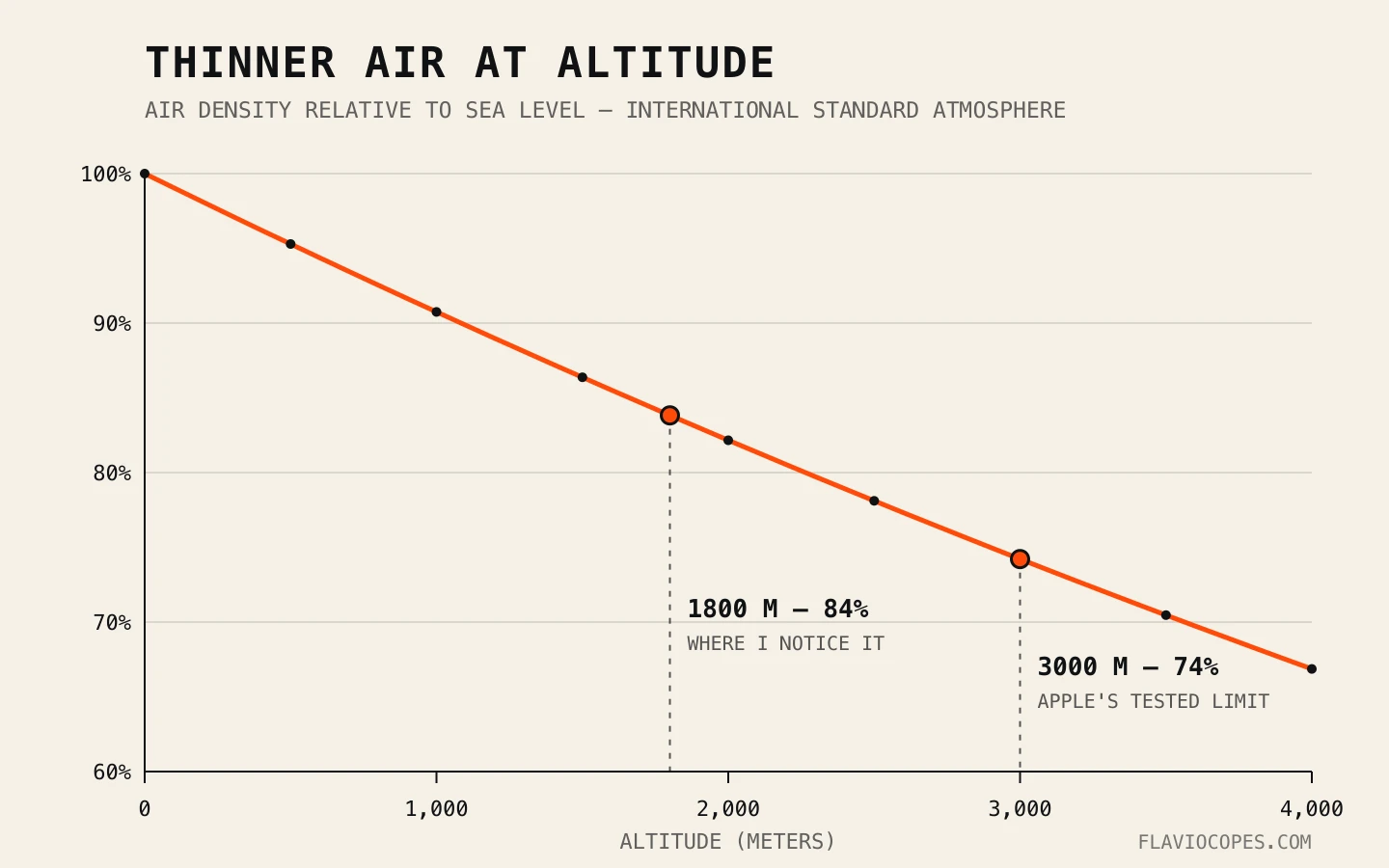
A fan moves volume, not mass. At a given speed it pushes the same volume of air whether you’re at the beach or on a mountain. At altitude that volume weighs less, so it absorbs less heat per second.
The machine can spin the fans faster, run hotter, or slow itself down. In practice you get a mix of all three. That’s the extra fan noise and the warm palm rest you notice.
People have measured this. In an experiment published in the ASME Journal of Electronic Packaging, researchers put heated circuit boards in a hypobaric chamber and simulated altitudes from sea level to 5000 meters. Heat transfer got steadily worse as the air thinned, and the components ran hotter for the same power.
Electronics Cooling magazine has the correction formulas engineers use to design for this. The first-order rule is what we just reasoned about: the temperature rise of the air inside a fan-cooled system is inversely proportional to air density.
The fanless MacBook Air has it worse, in a sense. It depends entirely on natural convection, the slow rise of warm air around the case, and that gets weaker in thin air too.
Apple knows about this
Apple publishes an altitude spec in the tech specs of every Mac. It reads:
Operating altitude: tested up to 10,000 feet (3000 meters)Below 3000 meters you’re within spec. You just have less thermal margin than the machine was tuned for at sea level.
The whole industry accounts for this. ASHRAE’s thermal guidelines for datacenters require lowering the maximum allowed air temperature by 1°C for every 300 meters above 900 meters of altitude. A server room in the mountains has to be kept cooler because the thin air cools less.
Why you feel it around 1800 meters
16% less air doesn’t sound like much. But laptops run close to their thermal limits by design. Under sustained load, a MacBook at sea level is already using most of its cooling capacity, so taking a chunk of that away pushes it to the “fans at full speed” threshold much sooner.
Mountain air is usually cooler, though, and ambient temperature matters a lot for cooling. A cool room at altitude can offset the thin air almost entirely.
So the problem shows up when the air is thin and warm at the same time, like a sunny window in a mountain house, a well-heated room in winter, or a warm summer day at elevation.
What I do about it
I keep the MacBook on a hard, flat surface, slightly elevated if possible. Never on a blanket or a lap, which blocks the airflow around the bottom case.
I keep it out of direct sunlight. The sun heats the aluminum chassis faster than the CPU does.
When I don’t need full performance I turn on Low Power Mode in the Battery settings. Less power drawn means less heat produced, and that’s the one side of the equation you fully control.
And when the fans stay loud I open Activity Monitor, because often the real culprit is one runaway process, and killing it does more than any cooling trick.
None of this gives the laptop more air to cool itself, but it reduces how much heat it has to remove.
Want me to talk about your product? You can sponsor this site.
Related posts about mac: