Feed data to a Next.js component using getInitialProps
By Flavio Copes
Learn how Pages Router getInitialProps feeds data to a Next.js component for SSR on dynamic routes, and how it relates to App Router data fetching.
When I talked about adding dynamic content to Next.js we had an issue with dynamically generating the post page, because the component required some data up front, and when we tried to get the data from the JSON file:
import { useRouter } from 'next/router'
import posts from '../../posts.json'

export default () => {
  const router = useRouter()

  const post = posts[router.query.id]

  return (
    <>
      <h1>{post.title}</h1>
      <p>{post.content}</p>
    </>
  )
}
we got a TypeError: post was undefined, so reading post.title failed.
How do we solve this? And how do we make SSR work for dynamic routes?
In the Pages Router, we provide the component with props using a special function called getInitialProps() which is attached to the component.
A note before we go on. getInitialProps is a legacy API. It still works in the Pages Router on Next.js 16, but the Next.js docs recommend getServerSideProps or getStaticProps for new Pages Router code, and the App Router does not use it at all: there you fetch the data directly inside an async Server Component. This post explains the original API, which is still the simplest way to see the problem and the fix.
To do so, first we name the component:
const Post = () => {
  //...
}

export default Post
then we add the function to it:
const Post = () => {
  //...
}

Post.getInitialProps = () => {
  //...
}

export default Post
This function gets an object as its argument, which contains several properties. In particular, the thing we are interested into now is that we get the query object, the one we used previously to get the post id.
So we can get it using the object destructuring syntax:
Post.getInitialProps = ({ query }) => {
  //...
}
Now we can return the post from this function:
Post.getInitialProps = ({ query }) => {
  return {
    post: posts[query.id]
  }
}
And we can also remove the import of useRouter, and we get the post from the props property passed to the Post component:
import posts from '../../posts.json'

const Post = props => {
  return (
    <div>
      <h1>{props.post.title}</h1>
      <p>{props.post.content}</p>
    </div>
  )
}

Post.getInitialProps = ({ query }) => {
  return {
    post: posts[query.id]
  }
}

export default Post
Now there will be no error, and SSR will be working as expected, as you can see checking view source:
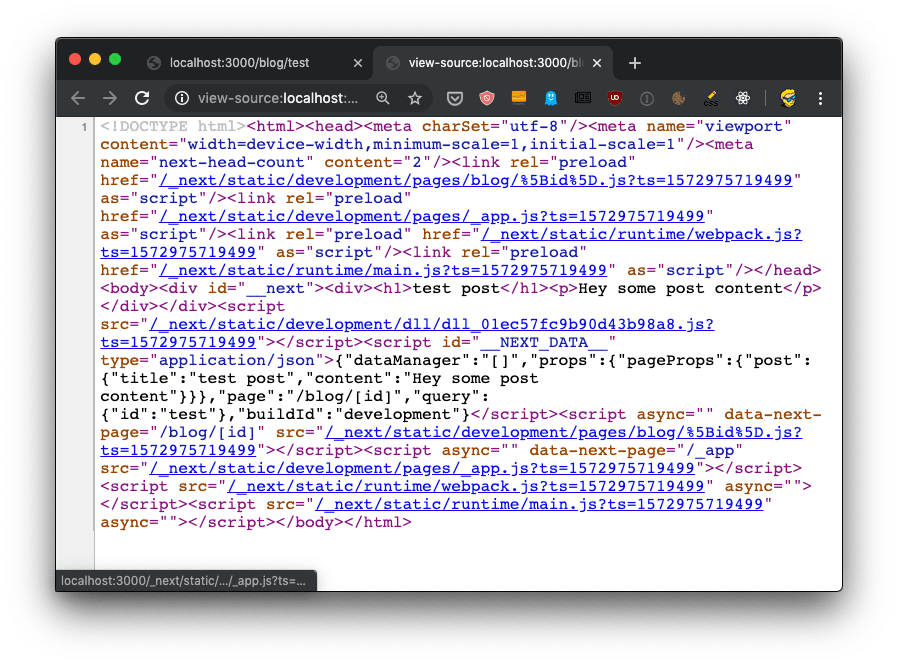
The getInitialProps function will be executed on the server side, but also on the client side, when we navigate to a new page using the Link component as we did. This is one difference from getServerSideProps, which only ever runs on the server.
It’s important to note that getInitialProps gets, in the context object it receives, in addition to the query object these other properties:
pathname: thepathsection of URLasPath- String of the actual path (including the query) shows in the browser
which in the case of calling http://localhost:3000/blog/test will respectively result to:
/blog/[id]/blog/test
And in the case of server side rendering, it will also receive:
req: the HTTP request objectres: the HTTP response objecterr: an error object
req and res will be familiar to you if you’ve done any Node.js coding. In the App Router there is no req object to read: how to get the Request headers in the Next.js App Router shows what you use instead.
By the way, if you’re unsure whether a page should be rendered statically, with ISR, on the server or on the client, my free Next.js rendering chooser can help.
Want me to talk about your product? You can sponsor this site.
Related posts about next: