How to remove empty lines in VS Code
By Flavio Copes
Learn how to remove hundreds of empty lines in VS Code at once using regex find and replace, matching repeated newlines and collapsing them to a single one.
To remove empty lines in VS Code, use find and replace in regex mode: search for \n\n+ and replace it with \n. Every run of blank lines collapses to nothing, in one pass.
Here is how I found this out.
I recently had to work with a file, in VS Code, that had several empty lines I wanted to remove all at once.
We’re talking about 700+ empty lines with some text in between, and I didn’t want to do this manually.
I’m a programmer, so I’d rather spend 5 minutes making a task easier rather than spend the same amount of time doing an annoying job.
I searched a bit and found this simple way to do so: replace \n\n with \n.
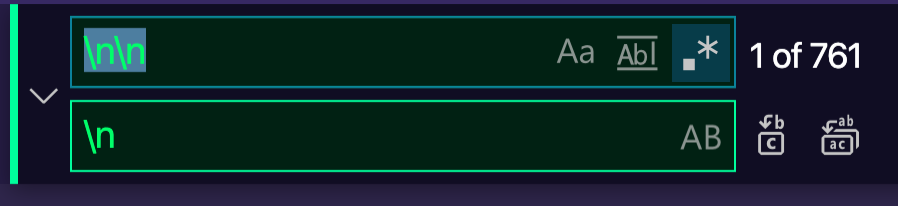
I ran “replace all” inside the file, and half of the lines were removed. So I ran it again, and again and again, until I got to 1 empty line.
Then I learned a better pattern: \n\n+ replaces all lines at once, without having to repeat the operation.
How to do it, step by step
Open the replace panel with cmd-option-F on macOS, or ctrl-H on Windows and Linux.
Then click the .* icon in the search field to enable regular expression mode. This step matters. Without it, VS Code looks for the literal characters \n\n in the text, finds nothing, and you’ll think the trick doesn’t work.
Now type \n\n+ in the search field, \n in the replace field, and hit “replace all”.
Why does this pattern work?
\n matches a newline character. An empty line is just two newlines in a row: the one ending the previous line, and the one ending the empty line itself.
The + means “one or more of the previous thing”. So \n\n+ matches two newlines, or three, or ten, however many appear in a row.
Replacing the whole run with a single \n keeps the line break after the text and deletes every blank line below it. That’s why one pass is enough, while plain \n\n only halves the blank lines each run.
What about lines that only contain spaces?
Some lines look empty but contain spaces or tabs. \n\n+ won’t match them, and they survive the replacement.
Use this pattern instead:
\n\s*\n\s matches any whitespace character, including spaces, tabs, and more newlines. Replace with \n as before, and whitespace-only lines disappear too.
One last thing: if the replacement finds nothing at all, check the line endings indicator in the status bar. A file using CRLF endings may need \r\n in the pattern instead of \n.
Want me to talk about your product? You can sponsor this site.
Related posts about tools: