React app example: fetch GitHub users from the API
By Flavio Copes
Build a small React app where a form takes a GitHub username, fetches that user from the GitHub API with Axios, and shows the result in a Card component.
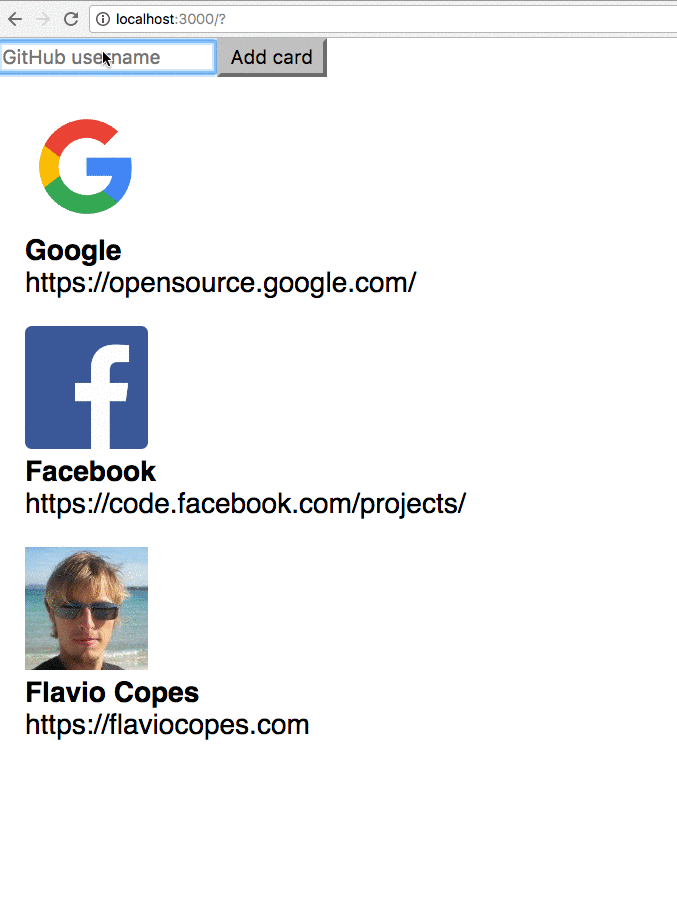
Very simple example of a form that accepts a GitHub username and once it receives a submit event, it asks the GitHub API for the user information, and prints them.
This code creates a reusable Card component. When you enter a name in the input field managed by the Form component, this name is bound to its state.
When Add card is pressed, the input form is cleared by clearing the username state of the Form component.
The example uses, in addition to React, the Axios library. It’s a nice useful and lightweight library to handle network requests. Add it to the Pen settings in Codepen, or install it locally using npm install axios@1 (the latest 1.x release). I checked the code in this post with React 19 and Axios 1.
Output
Code
We start by creating the Card component, the one that will display our image and details as gathered from GitHub. It gets its data via props, using
props.avatar_urlthe user avatarprops.namethe user nameprops.blogthe user website URL
const Card = props => {
  return (
    <div style={{ margin: '1em' }}>
      <img alt="avatar" style={{ width: '70px' }} src={props.avatar_url} />
      <div>
        <div style={{ fontWeight: 'bold' }}>{props.name}</div>
        <div>{props.blog}</div>
      </div>
    </div>
  )
}
We create a list of those components, which will be passed by a parent component in the cards prop to CardList, which iterates on it using map() and outputs a list of cards. Each card gets a key, the GitHub user id, so React can tell them apart:
const CardList = props => (
  <div>
    {props.cards.map(card => (
      <Card key={card.id} {...card} />
    ))}
  </div>
)
The parent component is App, which stores the cards array in its own state, managed using the useState() Hook (see also How to use the useState React hook):
const App = () => {
  const [cards, setCards] = useState([])

  return (
    <div>
      <CardList cards={cards} />
    </div>
  )
}
Cool! We must have a way now to ask GitHub for the details of a single username. We’ll do so using a Form component, where we manage our own state (username), and we ask GitHub for information about a user using their public APIs, via Axios:
const Form = props => {
  const [username, setUsername] = useState('')

  const handleSubmit = event => {
    event.preventDefault()

    axios.get(`https://api.github.com/users/${username}`).then(resp => {
      props.onSubmit(resp.data)
      setUsername('')
    })
  }

  return (
    <form onSubmit={handleSubmit}>
      <input
        type="text"
        value={username}
        onChange={event => setUsername(event.target.value)}
        placeholder="GitHub username"
        required
      />
      <button type="submit">Add card</button>
    </form>
  )
}
When the form is submitted we call the handleSubmit event, and after the network call we call props.onSubmit passing the parent (App) the data we got from GitHub.
We add it to App, passing a method to add a new card to the list of cards, addNewCard, as its onSubmit prop:
const App = () => {
  const [cards, setCards] = useState([])

  const addNewCard = cardInfo => {
    setCards(cards.concat(cardInfo))
  }

  return (
    <div>
      <Form onSubmit={addNewCard} />
      <CardList cards={cards} />
    </div>
  )
}
Finally we mount the app with createRoot from react-dom/client. ReactDOM.render(), which I used when I first wrote this post, was removed in React 19:
import { createRoot } from 'react-dom/client'

createRoot(document.getElementById('app')).render(<App />)
Here is the full source code of our little React app:
import React, { useState } from 'react'
import { createRoot } from 'react-dom/client'
import axios from 'axios'

const Card = props => {
  return (
    <div style={{ margin: '1em' }}>
      <img alt="avatar" style={{ width: '70px' }} src={props.avatar_url} />
      <div>
        <div style={{ fontWeight: 'bold' }}>{props.name}</div>
        <div>{props.blog}</div>
      </div>
    </div>
  )
}

const CardList = props => (
  <div>
    {props.cards.map(card => (
      <Card key={card.id} {...card} />
    ))}
  </div>
)

const Form = props => {
  const [username, setUsername] = useState('')

  const handleSubmit = event => {
    event.preventDefault()

    axios
      .get(`https://api.github.com/users/${username}`)
      .then(resp => {
        props.onSubmit(resp.data)
        setUsername('')
      })
  }

  return (
    <form onSubmit={handleSubmit}>
      <input
        type="text"
        value={username}
        onChange={event => setUsername(event.target.value)}
        placeholder="GitHub username"
        required
      />
      <button type="submit">Add card</button>
    </form>
  )
}

const App = () => {
  const [cards, setCards] = useState([])

  const addNewCard = cardInfo => {
    setCards(cards.concat(cardInfo))
  }

  return (
    <div>
      <Form onSubmit={addNewCard} />
      <CardList cards={cards} />
    </div>
  )
}

createRoot(document.getElementById('app')).render(<App />)
Check it out on Codepen at https://codepen.io/flaviocopes/pen/oJLyeY. The pen is the original version of this app, so it still loads React 16 and mounts with ReactDOM.render(), since that’s what Codepen’s script tags give you. The code above is the same app, adapted to React 19 and ES modules.
Want me to talk about your product? You can sponsor this site.