Archives and disk tools
Linux commands: basename
Learn how the Linux basename command returns the last portion of a path, so basename /Users/flavio/test.txt gives you back just the test.txt filename.
Suppose you have a path to a file, for example /Users/flavio/test.txt, and you only want the file name at the end. That’s what basename does.
Running
basename /Users/flavio/test.txtreturns the test.txt string:
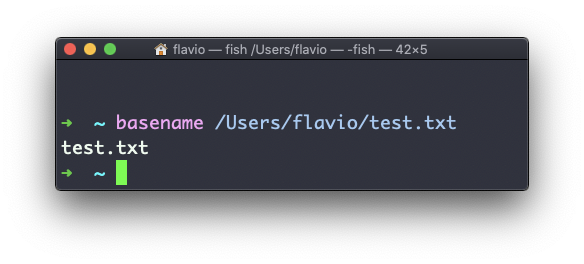
basename strips the directory part from a path and leaves the last portion. You’ll rarely type it by hand. It exists for scripts: a loop or a variable hands you a full path, and you only need the file name for a message, a log line, or a new destination.
A second argument removes a suffix, too:
basename /Users/flavio/test.txt .txt
# test
That’s handy when renaming or converting files. Here is a realistic loop that copies every .txt note to a .md file with the same name:
for file in /Users/flavio/notes/*.txt; do
  name=$(basename "$file" .txt)
  cp "$file" "$name.md"
done
The $(...) command substitution runs basename and captures its output into the name variable. Notice the quotes around "$file". Keep them, and I’ll show you why in a moment.
If you run basename on a path that points to a directory, you get the last segment of the path. In this example, /Users/flavio is a directory:

A trailing slash makes no difference: basename /Users/flavio/ also prints flavio.
Here’s the failure I promised. Paths with spaces break when you forget the quotes:
basename /Users/flavio/My Notes/todo.txt
# My
The shell split the path into two words before basename ever saw it. basename took /Users/flavio/My as the path and Notes/todo.txt as a suffix to remove, and printed My. No error, just a wrong answer. Quote the path and you get todo.txt back.
One more thing to keep in mind: basename works on the string alone. It never touches the filesystem, so it happily processes a path that doesn’t exist. Getting output is not a confirmation the file is there. Check with ls when that matters.
The companion command dirname gives you the other half, the directory portion of the path. The two together let you take any path apart, and that’s the next lesson.
The basename command works on Linux, macOS, WSL, and anywhere you have a UNIX environment.
Lesson completed