Shell, system, and network tools
Linux commands: env
Learn how the Linux env command runs a command with extra environment variables, prints all of them when run alone, and clears the environment with -i.
env runs a command with extra environment variables, without setting them in your current shell. The variable exists for that one program, and your shell never sees it.
Suppose you want to run a Node.js app and set the USER variable for it.
You can run
env USER=flavio node app.jsand the USER environment variable is accessible from the Node.js app through the process.env interface. Type echo $USER afterwards and your shell still shows your own user name. Nothing leaked.
You can also run the command with all the existing environment variables cleared, using the -i option:
env -i node app.jsIn this case you get an error, env: node: No such file or directory. The node command is not reachable because PATH, the variable the shell uses to look up commands, is gone with everything else.
So you need to pass the full path to the node program:
env -i /usr/local/bin/node app.jsTry it with a simple app.js file with this content:
console.log(process.env.NAME)
console.log(process.env.PATH)
You will see the output being
undefined
undefined
Both variables are missing. Now pass one in:
env -i NAME=flavio node app.jsand the output will be
flavio
undefined
Removing the -i option makes PATH available again inside the program:
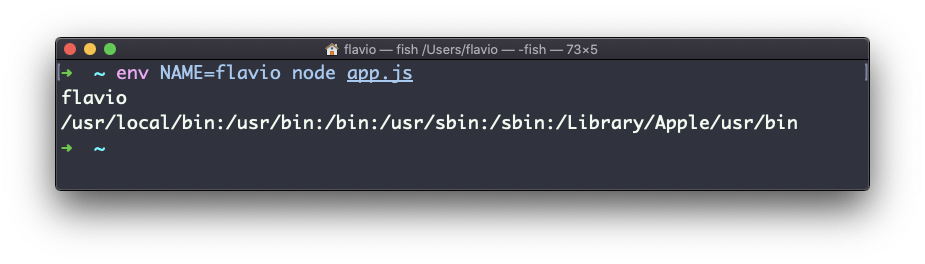
I use -i when I want to be sure a program isn’t picking up a variable from my shell by accident. If it works with an empty environment plus the variables I pass, it will work on the server too.
env can also print out all the environment variables, if run with no options:
envIt returns the list of variables set, for example:
HOME=/Users/flavio
LOGNAME=flavio
PATH=/usr/local/bin:/usr/bin:/bin:/usr/sbin:/sbin:/Library/Apple/usr/bin
PWD=/Users/flavio
SHELL=/usr/local/bin/fish
You can also hide a single variable from the program you run, using the -u option. This removes HOME from the command environment, and leaves everything else in place:
env -u HOME node app.jsOne more place you’ve seen env without noticing: the first line of many scripts, #!/usr/bin/env node. It asks env to find node through PATH, so the script works whether Node lives in /usr/local/bin or somewhere else.
The env command works on Linux, macOS, WSL, and anywhere you have a UNIX environment.
Lesson completed