Archives and disk tools
Linux commands: tar
Learn how the Linux tar command groups files into an archive with tar -cf, extracts them with tar -xf, and makes a gzip-compressed .tar.gz with the z flag.
tar creates an archive: a single file that groups many files together. That’s exactly what gzip can’t do, so the two are usually used as a pair.
Its name comes from the past and means tape archive. Back when archives were stored on tapes.
This command creates an archive named archive.tar with the content of file1 and file2:
tar -cf archive.tar file1 file2The
coption stands for create. Thefoption says the next argument is the archive file name.
Notice that a plain .tar archive is not compressed. On my machine two 2-byte files produce a 7 KB archive.tar, because tar writes fixed-size blocks. We’ll fix that with compression in a moment.
To extract files from an archive into the current folder, use:
tar -xf archive.tarthe
xoption stands for extract
and to extract them to a specific directory, use:
tar -xf archive.tar -C directoryThe directory must exist already. tar won’t create it for you.
You can also just list the files contained in an archive, with the t option:
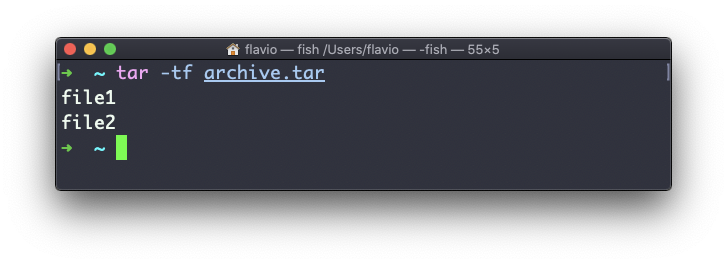
My advice is to always run tar -tf on an archive you downloaded before extracting it. Some archives hold a folder, so you get one tidy project/ directory. Others hold loose files, and extracting them spills everything into your current folder.
tar is often used to create a compressed archive, gzipping the archive.
This is done using the z option:
tar -czf archive.tar.gz file1 file2This is just like creating a tar archive and then running gzip on it. Same two files, and now the result is 417 bytes instead of 7 KB.
To unarchive a gzipped archive, you could use gunzip, or gzip -d, and then unarchive the result. But tar -xf recognizes a gzipped archive and does both steps for you:
tar -xf archive.tar.gzThe failure you’ll hit most often is a wrong path. tar -xf backup.tar in the wrong folder stops with No such file or directory, and nothing is extracted. Run ls to check where the archive is, then try again. And if you forget the f option, tar doesn’t know which file you mean and either complains or waits for a tape drive you don’t have.
The tar command works on Linux, macOS, WSL, and anywhere you have a UNIX environment.
If you can never remember the right flags, I made a tar command builder that composes the command for you.
Lesson completed