Shell, system, and network tools
A short guide to nano
A short guide to nano, the beginner friendly UNIX text editor, where you type directly with no modes and save or quit with the ctrl key shortcuts shown.
nano is a beginner friendly editor. If you’ve never edited a file in the terminal, start here. It’s the one I suggest to anyone who just needs to change a config file on a server and get out.
Run it using nano <filename>. If the file doesn’t exist yet, nano creates it when you save.
You can directly type characters into the file, without worrying about modes. What you type is what goes in the file, like in any GUI editor. That sounds obvious, but wait until the vim lesson.
The help at the bottom shows you the keyboard commands that let you work with the file:
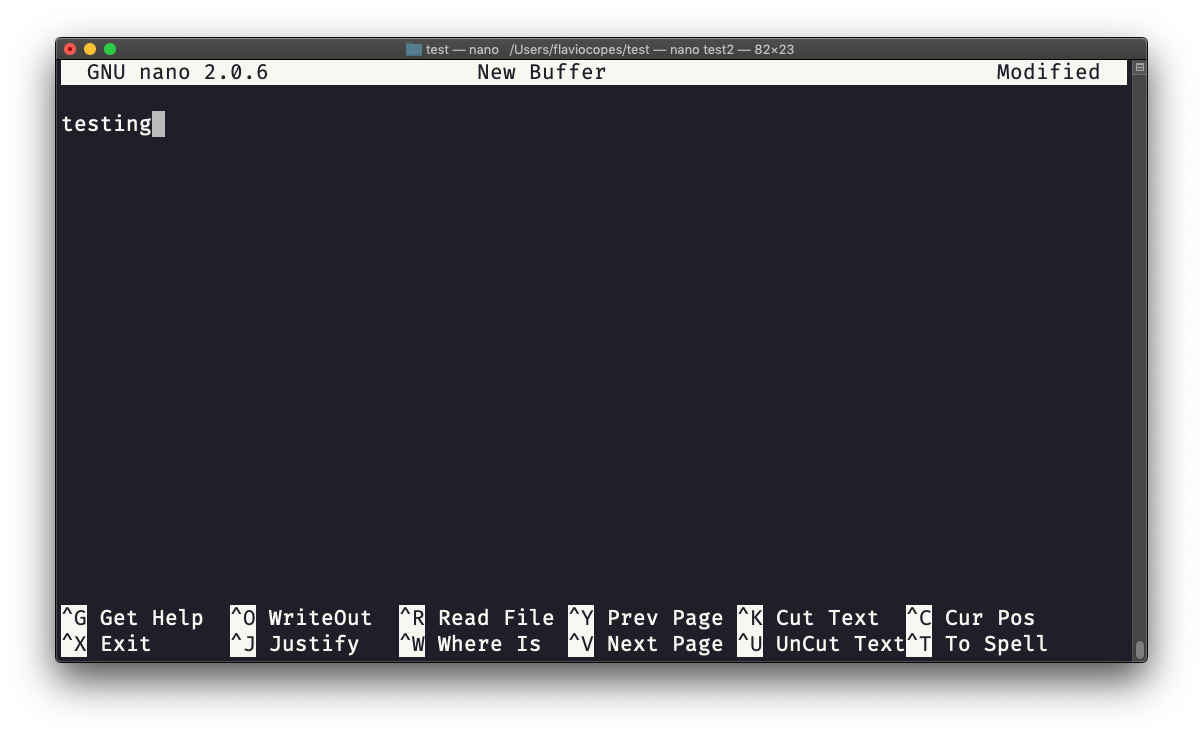
In that bar, ^ means the ctrl key. So ^X is ctrl-X.
Let’s edit a file from start to finish. Open a new one:
nano notes.txtType a line, for example buy milk. Then save with ctrl-O (write out). nano asks File Name to Write: notes.txt at the bottom. Press enter to confirm, and it replies [ Wrote 1 line ].
Now quit with ctrl-X. Back at the prompt, check the result:
cat notes.txt
# buy milk
You can also quit directly with ctrl-X without saving first. If you edited the file, nano asks Save modified buffer?. Press Y to save, N to throw the changes away, or ctrl-C to go back to editing.
A few more shortcuts cover most of what I do in nano:
ctrl-Wsearches for textctrl-Kcuts the current line,ctrl-Upastes it backctrl-Gopens the full help
The failure you’ll hit most often is saving a file you don’t own. Open /etc/hosts as a regular user, change a line, press ctrl-O, and nano answers [ Error writing /etc/hosts: Permission denied ]. Your edits are not lost, but they can’t be written. Quit, and reopen the file with sudo nano /etc/hosts, which we saw in the sudo lesson.
On a minimal Linux install nano might be missing, and you get nano: command not found. On Debian and Ubuntu, sudo apt install nano fixes that. macOS ships it already.
A bit of history: pico is more or less the same editor. nano started as a GNU clone of pico, because at some point pico was not open source, and the GNU operating system needed a free replacement.
Lesson completed