Navigation basics
Linux commands: which
Learn how the Linux which command shows the full path where an executable is stored on disk, and why it cannot locate shell aliases or built-in functions.
When you type ls, the shell runs a program stored somewhere on disk. which tells you where:
which ls/bin/lsYou can pass more than one name at once. Here I ask about ls and docker:
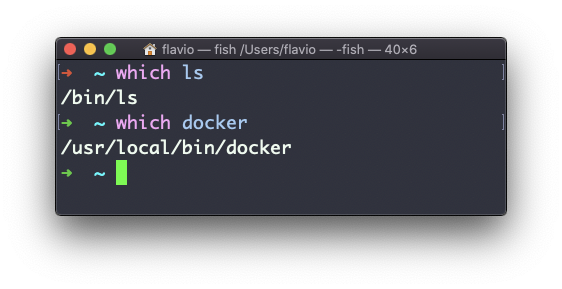
How does it find them? The shell has a variable called $PATH, a list of folders separated by colons. When you type a command, the shell looks in each folder, left to right, and runs the first match. which does the same search and prints the winner.
You can see the list yourself:
echo "$PATH" | tr ':' '\n'/opt/homebrew/bin
/usr/local/bin
/usr/bin
/bin
/usr/sbin
/sbinOrder matters. If you have two versions of node installed, the one in the folder listed first wins. That’s why adding a folder at the front of $PATH can shadow a system command, and adding it at the end keeps the existing commands in charge.
I use which mostly to answer one question: “which copy of this tool am I actually running?”. After installing Node.js with Homebrew and with a version manager, which node tells me which one the shell picked.
There’s a limit you need to know. which only finds executable files. It knows nothing about aliases (shortcuts you define in your shell config), shell functions, or built-ins like cd, which live inside the shell itself. Ask about cd on macOS and you get this:
which cd/usr/bin/cdThat’s a tiny wrapper script, not what runs when you type cd. On many Linux systems you get nothing at all. For the real answer, use type, which is shell-aware:
type ls
type -a cd
ls is /bin/ls
cd is a shell builtin
cd is /usr/bin/cdtype -a lists every definition, so you can see the built-in and the file side by side. In scripts, command -v git is the portable way to check that a tool exists.
When a command is not installed, which prints nothing in Bash and exits with status 1. ZSH is more talkative:
docker not foundOne more gotcha. Bash remembers where it found a command. If you install a new version of a tool in a different folder, the shell may keep running the old one until you open a new terminal or run hash -r.
Try this: run type -a for cd, ls, and node. One is a built-in, one is a file, and the third might show up more than once. Now you know how to tell them apart.
This command works on Linux, macOS, WSL, and anywhere you have a UNIX environment
Lesson completed